
What is SFC in Windows 10?
Summary
In this article, we will explore the key differences between SFC (System File Checker) and CHKDSK and discuss their functionalities in Windows 10.
1. What is the difference between SFC and chkdsk?
SFC analyzes system files, CHKDSK searches the hard drive, and DISM scans and patches faulty files in the Windows system image component store.
2. Does SFC repair Windows?
Yes, SFC can repair Windows by checking the integrity of system files and repairing them if required.
3. What does SFC actually do?
SFC is a utility that allows users to scan for and restore corrupted Windows system files.
4. Does SFC scan fix anything?
Yes, the SFC /scannow command can replace corrupted files with cached copies located in a compressed folder.
5. Does CHKDSK fix corrupt files?
CHKDSK can scan for and fix corrupted files, helping to repair and clean up your PC.
6. Should you run SFC or DISM first?
It is recommended to run SFC first, followed by DISM.
7. How do I know if my Windows is corrupted?
Running SFC /scannow in the Command Prompt can identify any corrupted files.
8. How do I fix corrupted Windows?
You can use various methods such as file repair software, performing a check disk on the hard drive, or using online file repair tools.
9. Should I restart after SFC?
It is advisable to restart your computer after running SFC to ensure any repaired files take effect.
10. Why does SFC scan keep finding corrupt files?
SFC scans for and attempts to fix corrupted files as a preventive measure to safeguard important system files.
What is the difference between SFC and chkdsk
SFC analyzes your system files while CHKDSK searches your hard drive and DISM scans and patches faulty files in the component store of the Windows system image, allowing SFC to function correctly. Make a backup of your disk partition before executing DISM, just in case anything goes wrong during the process.
Does SFC repair Windows
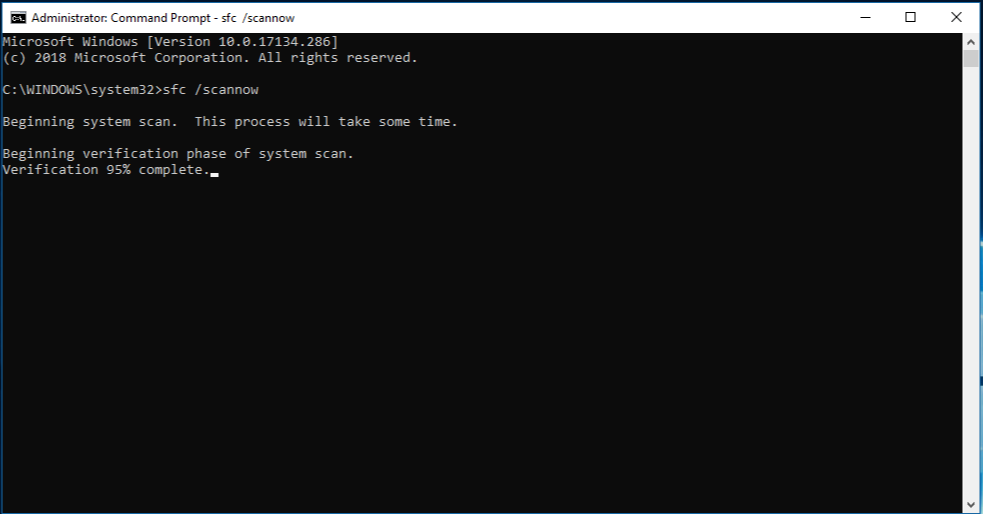
In the command prompt window, type SFC /scannow and press Enter . System file checker utility checks the integrity of Windows system files and repairs them if required. After the process is complete, reboot the computer.
What does SFC actually do
System File Checker (SFC) is a utility in Microsoft Windows that allows users to scan for and restore corrupted Windows system files.
CachedSimilar
Does SFC scan fix anything
The sfc /scannow command will scan all protected system files, and replace corrupted files with a cached copy that is located in a compressed folder at %WinDir%\System32\dllcache.
Does CHKDSK fix corrupt files
Use CHKDSK regularly to scan your hard drive for corrupted files, help repair and clean up your PC, and maintain its health. CHKDSK can scan for bad sectors — ruined parts of your hard drive — even when your PC won't turn on. That helps you find and fix hard drive errors, and frees up disk space as well.
Should you run sfc or DISM first
Run SFC first, and — no matter what SFC reports — you might as well run DISM after that.
How do I know if my Windows is corrupted
Running SFC scannow on Windows 10, 8, and 7
Enter the command sfc /scannow and press Enter. Wait until the scan is 100% complete, making sure not to close the Command Prompt window before then. The results of the scan will depend on whether or not the SFC finds any corrupted files.
How do I fix corrupted Windows
Fix 1. Corrupted File Repair Software Free Download1.Fix 2. Perform a Check Disk on the Hard drive.Fix 3. Use the CHKDSK/SFC Command.Fix 4. Run CHKDSK Alternative.Fix 5. Change the File Format.Fix 6. Use an Online File Repair Tool.
Should I restart after SFC
Restart your computer if sfc /scannow repaired files. System File Checker may or may not prompt you to restart but even if it doesn't, you should restart anyway. Repeat whatever process caused your original problem to see if sfc /scannow resolved it.
Do I need to restart after SFC scan
Restart your computer if sfc /scannow repaired files. System File Checker may or may not prompt you to restart but even if it doesn't, you should restart anyway. Repeat whatever process caused your original problem to see if sfc /scannow resolved it.
Why does SFC scan keep finding corrupt files
As PC files are vulnerable to damage or corruption, the operating system has placed some parameters that save these files before they get lost. Some tools like the system scan can find these corrupted files and attempt to fix them.
Which is better chkdsk R or F
If you use chkdsk /f* on a very large disk or a disk with a very large number of files (for example, millions of files), chkdsk /f might take a long time to complete. Use the /r parameter to find physical disk errors in the file system and attempt to recover data from any affected disk sectors.
How do you fix a corrupted hard drive
Methods to Fix Corrupted Hard DriveGo to Computer/This PC >> Select Hard Drive >> Choose Properties.Select Tools >> Error checking >> Check now >> Check local disk >> Start.Shut down all open and running programs >> wait for the system to check upon the next boot >> restart the PC.
Does DISM fix corrupt files
In short, DISM is not a complete reinstallation of Windows; instead, it finds critical core files required to run and gather information, then upgrades or repairs any files that are corrupted or out-of-date.
What does DISM actually do
Deployment Image Servicing and Management (DISM.exe) is a command-line tool that can be used to service and prepare Windows images, including those used for Windows PE, Windows Recovery Environment (Windows RE) and Windows Setup. DISM can be used to service a Windows image (. wim) or a virtual hard disk (.
How did my PC get corrupted
Malware attacks and viruses infecting your computer can corrupt your data. Data corruption can also result from improperly saving files. Incorrectly stopping a file relocation process can corrupt whichever file was being moved at that time.
What causes corrupted Windows 10
How does a Windows file become corrupted File corruption usually happens when there is an issue during the 'save' process. If your computer crashes the file being saved will likely be corrupted. Another cause might be damaged sections of your hard drive or storage media that might have viruses and malware.
What are the signs of corrupted Windows
What Happens If Your Operating System Is CorruptedProblem loading Windows Explorer.Applications failing to launch.Applications crashing.Computer facing sudden BSOD (blue screen of death)Sudden errors causing applications to stop working.
How do I know if my Windows 10 OS is corrupted
Run the System File Checker tool (SFC.exe)Open an elevated command prompt. To do this, do the following as your appropriate:If you are running Windows 10, Windows 8.1 or Windows 8, first run the inbox Deployment Image Servicing and Management (DISM) tool prior to running the System File Checker.
How often should you fully reset your PC
Keeping your PC rebooted at least once a week can help you keep performance at a maximum and avoid issues that slow you down and hurt productivity.
Should I reset my PC or clean install
In summary, Windows 10 Reset is more likely to be a basic troubleshooting method, while a Clean Install is an advanced solution for more complex problems. If you don't know which method to apply, first have a try on Windows Reset, if it doesn't help, fully backup your computer data, and then perform a Clean Install.
How do I restart Windows and run SFC again
Here is how to resolve the error and get sfc /scannow to run again.Open an Elevated Command Prompt. You can try to run this from an elevated command prompt either in normal or safe mode but if required you may need to run it from the Windows Recovery Console.Run the following command.Run sfc /scannow again.
How do I fix corrupted sfc files
In the command prompt window, type sfc /scannow /offbootdir=c:\ /offwindir=c:\windows and press Enter. System file checker utility checks the integrity of Windows system files and repairs them if required. After the process is complete, reboot the computer.
How did my system files get corrupted
Here are a few prominent reasons why your data gets corrupt: Malware attacks and viruses infecting your computer can corrupt your data. Data corruption can also result from improperly saving files. Incorrectly stopping a file relocation process can corrupt whichever file was being moved at that time.
Does CHKDSK fix bad sectors
CHKDSK can either scan your hard disk and provide just a report, or scan your disk and correct file errors and/or bad sectors. A file error is an error that involves the Windows filing system. A bad sector is an area on your hard disk that is unable to store information.


0 Comments