
How do I check and remove malware?
f my device
To find hidden viruses on your device, you can follow these steps:
– Update your antivirus software and run a full system scan.
– Check your task manager for any unusual processes or applications running.
– Look for any suspicious files or folders in your file explorer.
– Use a reliable malware removal tool to scan and clean your device.
– Keep your operating system and software up to date to prevent vulnerabilities that could be exploited by viruses.
– Avoid downloading or opening files from untrusted sources.
– Be cautious when clicking on links or downloading attachments from emails.
– Regularly backup your important files to avoid data loss in case of a malware attack.
– Monitor your device for any unusual behavior or performance issues as they could be signs of a hidden virus.
– Educate yourself about common malware tactics and stay informed about the latest cybersecurity threats.
How do I detect and remove malware
Follow these six steps to malware removal on a PC.Step 1: Disconnect from the internet.Step 2: Enter safe mode.Step 3: Check your activity monitor for malicious applications.Step 4: Run a malware scanner.Step 5: Fix your web browser.Step 6: Clear your cache.
Cached
How do I completely check for malware
FAQsClick on Start.Click on Settings.Click on Update & Security.Choose Windows Security.Click on Virus & Threat Protection.Choose Current Threats.Click on Scan Options/Threat History.Run a new Advanced Scan.
How do I clean my device from malware
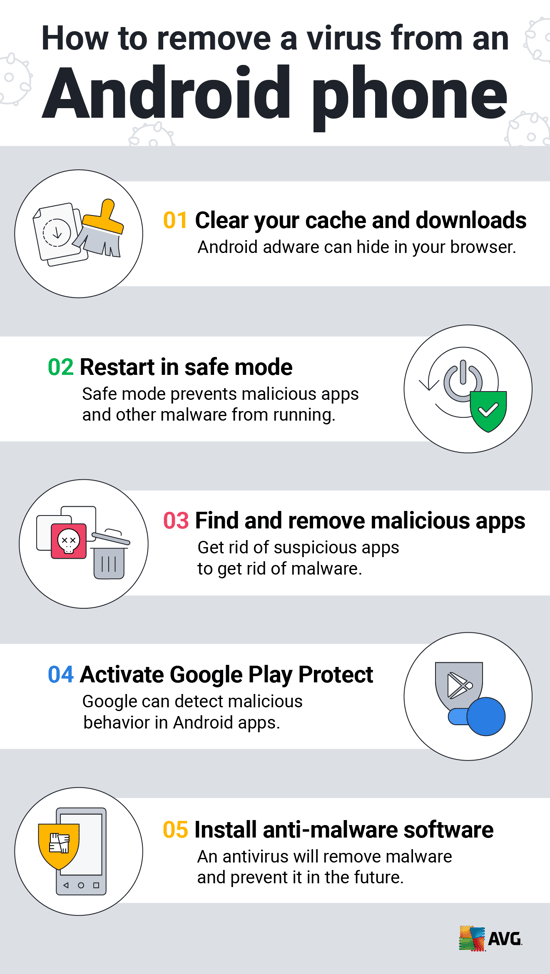
Step 1: Make sure Google Play Protect is turned on. Open the Google Play Store app .Step 2: Check for Android device & security updates. Get the latest Android updates available for you.Step 3: Remove untrusted apps.Step 4: Do a Security Checkup.
Does deleting malware get rid of it
Yes, you can get rid of malware by deleting files. Deleting files from temporary files folder and trash bin not only removes malicious files and programs, but it also can help speed up the antivirus scanning process.
Cached
Where is malware hidden
Malware is usually distributed through malicious websites, emails, and software. Malware can also be hidden in other files, such as image or document files, or even in seemingly innocuous files, such as .exe files.
Do I have malware on my device
The best way to check for malware on your phone is to use a mobile security app like free AVG Antivirus for Android. Run a scan. After installing AVG Antivirus, open the app and run an antivirus scan to find malware hidden in your device's system.
What are three signs of malware
Follow this guide to learn more about the signs of malware and how you can diagnose and treat a malware infection.Slow performance.Unexpected freezing or crashing.Diminished storage space.Homepage randomly changes.Browser redirects.New browser toolbars.Annoying pop-ups.Unusual error messages.
How do I know if I have hidden malware
How To Know if You Have Malwaresuddenly slows down, crashes, or displays repeated error messages.won't shut down or restart.won't let you remove software.serves up lots of pop-ups, inappropriate ads, or ads that interfere with page content.shows ads in places you typically wouldn't see them, like government websites.
What are the signs of malware on your device
Follow this guide to learn more about the signs of malware and how you can diagnose and treat a malware infection.Slow performance.Unexpected freezing or crashing.Diminished storage space.Homepage randomly changes.Browser redirects.New browser toolbars.Annoying pop-ups.Unusual error messages.
How do I know if my phone has been infected with malware
A possible indication of spyware operating on a phone is constant slowing down or lagging. The slow performance of a phone could result from resource-intensive spyware constantly running in the background. Check the suspicious phone for unfamiliar apps and scanning any hidden apps using an antivirus program.
How do I find hidden viruses on my computer
Open your Windows Security settings. Select Virus & threat protection > Scan options. Select Windows Defender Offline scan, and then select Scan now.
What happens if malware is detected
Malware attacks can crack weak passwords, bore deep into systems, spread through networks, and disrupt the daily operations of an organization or business. Other types of malware can lock up important files, spam you with ads, slow down your computer, or redirect you to malicious websites.
Which malware can spy on you
Spyware
Spyware is a form of malware that hides on your device, monitors your activity, and steals sensitive information like bank details and passwords.
What is the most common malware
Adware: Adware is malware that is designed to serve unwanted ads to a computer user. This enables the malware author to make money by claiming revenue from the advertisers whose ads it serves. Adware remains the most common type of mobile malware according to Check Point Research.
What are 3 signs you might have malware on your computer
How To Know if You Have Malwaresuddenly slows down, crashes, or displays repeated error messages.won't shut down or restart.won't let you remove software.serves up lots of pop-ups, inappropriate ads, or ads that interfere with page content.shows ads in places you typically wouldn't see them, like government websites.
How do you check if my computer is infected with malware
Open your Windows Security settings. Select Virus & threat protection > Scan options. Select Windows Defender Offline scan, and then select Scan now.
What is the most common way of malware
Adware: Adware is malware that is designed to serve unwanted ads to a computer user. This enables the malware author to make money by claiming revenue from the advertisers whose ads it serves. Adware remains the most common type of mobile malware according to Check Point Research.
Where is malware usually hidden
Malware is usually distributed through malicious websites, emails, and software. Malware can also be hidden in other files, such as image or document files, or even in seemingly innocuous files, such as .exe files.
What are 3 things that malware can do to a device
Malware exploits devices to benefit threat actors. Attackers use malware to steal data and credentials, spy on users, hold devices hostage, damage files and more.
How do I find hidden malware on my phone
Check for Android malware using Play ProtectOpen the Play Store on the Android device you want to scan.Tap on your profile in the upper-right corner.Tap on Play Protect.Tap Scan.Tap on the option to remove any detected malware.
Can I get my phone checked for malware
The best way to check for malware on your phone is to use a mobile security app like free AVG Antivirus for Android. Run a scan. After installing AVG Antivirus, open the app and run an antivirus scan to find malware hidden in your device's system.
Does Windows Defender scan for malware
Defender detects malware files
As part of the Windows Security Suite, you get a built-in malware scanner that searches for any harmful ransomware, spyware, or other malware programs or files on your device.
How to check if you have a virus
The best way to check for malware on your phone is to use a mobile security app like free AVG Antivirus for Android. Run a scan. After installing AVG Antivirus, open the app and run an antivirus scan to find malware hidden in your device's system.
What is the hardest malware to detect
Rootkits. The rootkit malware is dangerous and extremely hard to detect. It hides deep within your infected computer unnoticed and provides administrator privileges (aka root access) to the hacker.
Where is malware usually found
Malware is usually distributed through malicious websites, emails, and software. Malware can also be hidden in other files, such as image or document files, or even in seemingly innocuous files, such as .exe files.


0 Comments