
Can you have two Amazon fire sticks one?
in 15 different folders on your computer. Then, connect the new Fire TV Stick to your computer using a USB cable. Open the File Explorer on your computer and navigate to the folders where you saved the installation files. Copy each file and paste it into the root directory of the new Fire TV Stick. Once you have copied all the files, safely disconnect the new Fire TV Stick from your computer and plug it into your TV. The new Fire TV Stick should now have all the apps and settings from the original Fire TV Stick.
[/wpremark]
Can I use my Amazon account on multiple devices
Yes, you can use your Amazon account on multiple devices. You can download the Amazon app on your smartphone, tablet, and computer, and log in to your account. You can also stream Amazon Prime Video on multiple devices such as smart TVs, streaming devices, and game consoles by logging in with your Amazon account.
Can I use my Firestick at a friend’s house
Yes, you can use your Firestick at a friend’s house. Simply bring your Firestick with you and connect it to their TV. Make sure to connect to their Wi-Fi network and log in to your Amazon account to access your apps and content. You can enjoy your favorite shows and movies on any TV with a Firestick, as long as you have an internet connection.
Can I take my Firestick on vacation
Yes, you can take your Firestick on vacation. It is a portable device that can easily be packed in your travel bag. Just bring your Firestick with you, connect it to the TV in your hotel or vacation rental, and log in to your Amazon account. You will have access to your apps and content, so you can enjoy your favorite shows and movies while on vacation.
Can I use my Firestick without Wi-Fi
Your Firestick requires a Wi-Fi connection to access streaming services and download apps. However, you can use your Firestick without Wi-Fi to watch content that has been downloaded or stored locally on the device. Some apps also allow you to download content for offline viewing. Keep in mind that your Firestick will have limited functionality without an internet connection.
Can I watch live TV on Firestick
Yes, you can watch live TV on Firestick. There are several apps available for streaming live TV channels, such as Sling TV, Hulu + Live TV, YouTube TV, and PlayStation Vue. These apps allow you to access a variety of channels and watch live broadcasts. You will need a subscription to the respective service to stream live TV on your Firestick.
Can I watch sports on Firestick
Yes, you can watch sports on Firestick. There are several apps available for streaming sports content, such as ESPN, Fox Sports, NBC Sports, and NFL Game Pass. These apps allow you to watch live games, highlights, and sports analysis on your Firestick. You may need a subscription to the respective service or authenticate with your cable or satellite provider to access sports content.
Can I watch Netflix on Firestick
Yes, you can watch Netflix on Firestick. The Netflix app is available for download on the Amazon Appstore. Simply search for “Netflix” in the Appstore, select the app, and click on “Download” to install it on your Firestick. Once installed, you can log in to your Netflix account and start streaming your favorite shows and movies.
Can I watch YouTube on Firestick
Yes, you can watch YouTube on Firestick. The YouTube app is available for download on the Amazon Appstore. Simply search for “YouTube” in the Appstore, select the app, and click on “Download” to install it on your Firestick. Once installed, you can browse and watch YouTube videos on your Firestick.
Can I watch Disney+ on Firestick
Yes, you can watch Disney+ on Firestick. The Disney+ app is available for download on the Amazon Appstore. Simply search for “Disney+” in the Appstore, select the app, and click on “Download” to install it on your Firestick. Once installed, you can log in to your Disney+ account and start streaming a wide selection of Disney, Pixar, Marvel, Star Wars, and National Geographic content.
Can I watch Amazon Prime on Firestick
Yes, you can watch Amazon Prime Video on Firestick. The Amazon Prime Video app is pre-installed on Firestick devices. You can access it from the home screen or search for content using the Alexa voice remote. Simply log in to your Amazon account and enjoy a wide selection of movies, TV shows, and Amazon Originals.
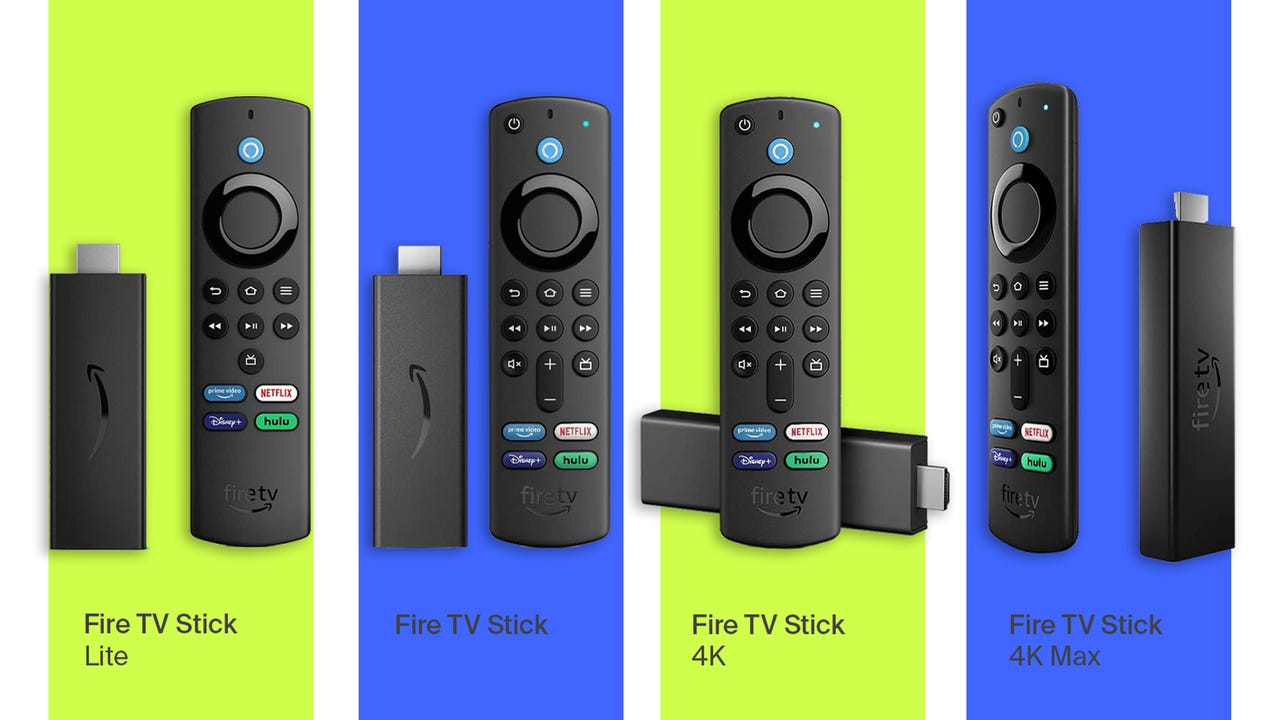
Can you have 2 Amazon fire sticks on the same account
You just set each one with the same WiFi code in your house, and you can watch different shows on each of the TVs as you wish. Both Firesticks will be listed under your one Amazon account.
How many Firesticks can I have on one account
A: There is no limit on how many devices you can have on your account but there are limits on how many can stream video simultaneously from one account. Amazon Prime limit is two, Netflix, Hulu and HBO limit you to one simultaneous stream per account.
Do I need a Firestick for each TV in the house
Is it necessary To Have a Distinct Firestick Device For Each TV To answer your question in a nutshell, the quick answer is yes, you will need a unique Amazon Firestick gadget for each TV. It is not possible to utilize a single Firestick with numerous TVs at the same time.
Cached
How do I transfer apps from one Firestick to another
For example if you want to install. This app onto your new fasting I'm just gonna copy. It onto my onto my desktop. I'm just going to copy this app ctrl C and paste. It in some folder on my computer.
Which is better Roku or Firestick
The Fire TV Stick 4K Max is the best value for the price. It's Amazon's most powerful streaming device and has twice the memory of any Roku streaming stick. You get a cinematic picture with vibrant 4K Ultra HD and immersive sound that supports Dolby Atmos audio.
Do Firesticks work on all TVs
Designed to be an incredibly compact streaming device, the Fire TV Stick connects to your TV's HDMI port and gives you access to favorite apps including Netflix, Prime Video, Hulu, Disney+, and more on almost any TV.
How many devices can you have on one Amazon account
How many devices can use Amazon Prime Video Amazon Prime allows for up to three devices to be logged into a single account. On the other hand, you can create up to 6 profiles on a single Amazon Prime account, creating a “household.” But only three separate devices can stream Amazon Prime Video at one time.
How many Firesticks do I need for 2 TVs
2 Fire Sticks
A: You have 2 TVs you need 2 Fire Sticks unless you unplug the Fire Stick from 1 TV and plug it to the 2nd TV (not recommended) then you need only 1 Fire Stick.
Does the Firestick have to be connected to the wall
Start by powering on the Amazon Fire Stick: connect the micro USB adapter from your device to the AC adapter and plug it into the wall outlet. However, if you have a USB connector on your TV, you can plug the USB adapter into your TV as your power source. Then, you will not need to use the wall outlet.
How do I link my firestick to another account
Using your remote, from the main Fire TV menu go to Settings.Then go to My Account.If you wish to register with another account, select Amazon Account from the screen then select Deregister.Once de-registered, you can re-register your Fire TV with any Amazon Account you choose by selecting Register.
How do I clone my Fire TV Stick
For every application that you want to copy to the new firestick. We need to grab the installation file and put a copy of it onto the usb. Drive tap down and highlight over the app you want to copy.
Is there a monthly fee for Firestick
Is There a Monthly Fee for the Amazon Fire Stick You don't need to pay a monthly fee to use a Fire TV Stick. Once you pay for the device, you can use it to stream movies and TV shows for free.
Can you get local channels on Firestick
Amazon's Fire TV is one of the best streaming devices on the market. It's perfect with Netflix and other streaming video on demand (SVOD) services, but that's not all it can do. It's also a great tool for watching live TV, including local channels.
Is there a monthly fee for Fire Stick
Is There a Monthly Fee for the Amazon Fire Stick You don't need to pay a monthly fee to use a Fire TV Stick. Once you pay for the device, you can use it to stream movies and TV shows for free.
Which is better Roku or Fire Stick
The Fire TV Stick 4K Max is the best value for the price. It's Amazon's most powerful streaming device and has twice the memory of any Roku streaming stick. You get a cinematic picture with vibrant 4K Ultra HD and immersive sound that supports Dolby Atmos audio.
Can you have multiple Amazon accounts under one membership
You can create an Amazon Household to share Prime benefits and a Family Library with another adult, up to four teens, and up to four children. To create your Amazon Household: Go to Amazon Household.
How do I have two Amazon accounts on one device
So in this video we are going to learn how you can add a secondary account or simply switch accounts. So in order to switch accounts at the bottom right corner of the screen you can see the tree
How many channels can you get with a Firestick
How Many Channels Can I Get With Fire Stick You can get hundreds of channels, both free and paid. You can also watch more than 200,000 free movies and TV series with free channels alone.
What is the point of a Fire Stick if you have a smart TV
Generally speaking, the Fire Stick kinda expands your selection of content on the smart TV. Also, it allows you to navigate through the smart TV easily as you'll have one solid app dedicated entirely to streaming. In addition, there are apps that are unavailable on smart TVs but compatible with the Fire Stick.
Do you need an Amazon account to use a Firestick
A wireless internet connection. An Amazon account. You don't have to be an Amazon Prime customer to use the Amazon Fire TV Stick but you do have to have a regular Amazon account. If you don't have one, don't worry, you can create this on setup.
Is my Firestick password the same as my Amazon password
Yes. For starters, different devices do not have different passwords; there is one single password for every Amazon account, regardless of the number of devices its being used on. Also, you must be wondering wheather all the devices will be requiring the password on next login or not.
Can I use my old FireStick on a new TV
The good news is that users don't need a smart TV to use their Fire TV stick. Instead, it can be used with any old TV that has an Hdmi port, as the Fire TV stick comes with an Hdmi connector to connect to any LCD or Oled television.
How do I connect my FireStick to another TV without a remote
To get started, download the Amazon Fire TV app on your iPhone or iPad or your Android device. Launch the Amazon Fire TV app. Give the app the required permissions to connect and access your Fire TV and local network access. The app should discover your Firestick — tap on it to connect.
Can I watch normal TV on a FireStick
Note: If you have a Fire TV Smart TV, you can connect a live TV source (like a digital antenna) to your device. Choose a show that you'd like to watch. To browse what's currently airing, go to the On Now row on your home screen or use the Channel Guide button on your remote.
Which is better Roku or FireStick
The Fire TV Stick 4K Max is the best value for the price. It's Amazon's most powerful streaming device and has twice the memory of any Roku streaming stick. You get a cinematic picture with vibrant 4K Ultra HD and immersive sound that supports Dolby Atmos audio.


0 Comments