
How do I change my Arlo motion sensitivity?
Summary of the Article: How to Change Arlo Motion Sensitivity?
Make sure that side-to-side traffic crosses the camera’s field of view. The camera’s motion sensor is more sensitive to side-to-side movement across its field of view than to movement directly toward or away from the camera. The best area for motion detection is 5 to 20 feet (1.5 to 6 meters) from the camera position.
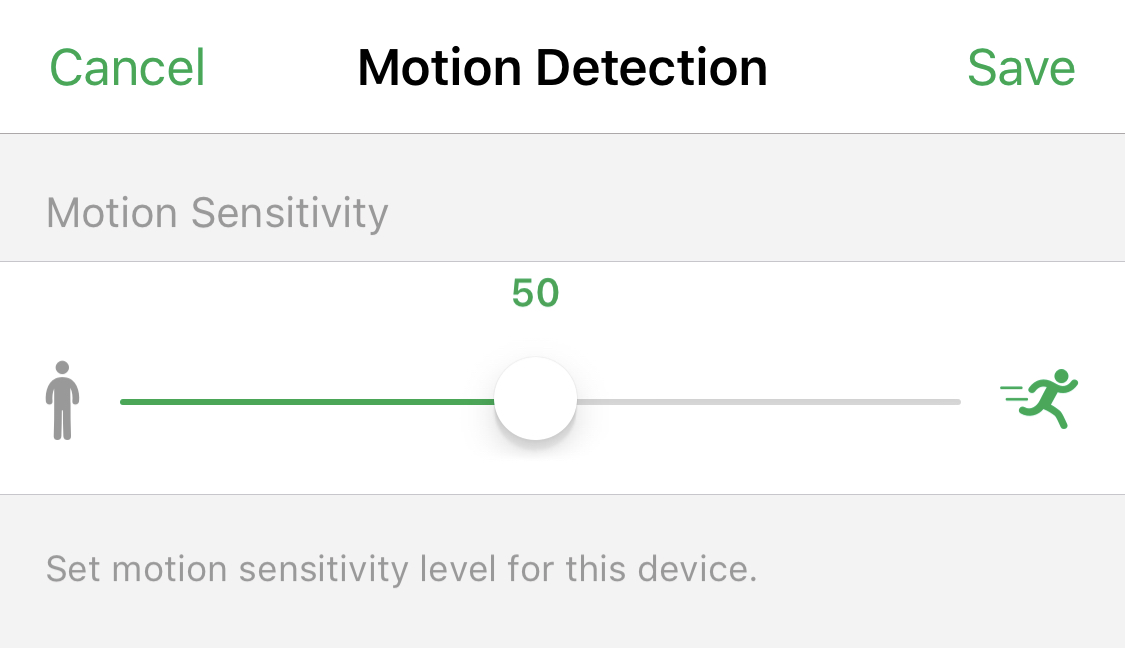
We recommend starting at a low setting. Walk in front of your Arlo camera. Keep moving, and increase the motion detection slider until the camera’s front LED light starts blinking. This means the camera has detected your motion and should be set at this level.
To adjust the Motion Sensitivity slider for battery-powered devices:
– Tap the three lines (≡) on the top left of the screen.
– Tap Devices.
– Tap the device you want to view.
– Tap Motion Settings.
– Tap Motion Sensitivity.
– Adjust the Motion Sensitivity slider.
– Tap Save in the upper right.
If your Arlo camera is not detecting motion:
– Make sure your camera is positioned properly.
– Make sure your camera is online and has enough battery charge.
– Ensure you are not aiming your Arlo camera to look through glass, windows, or other transparent objects.
0 is the least sensitive, and 100 is the most sensitive. The default setting is 95, but if your camera faces the street, you may need to set it as low as 50 for a good balance between prompt detection and filtering out false alerts.
In order to fix a security camera motion detection not working, you should first troubleshoot the network connection. In addition to this, technical issues like firmware, software, and placement can also be blamed for cameras’ inability to trigger motion alert, record motion, or push notifications.
Click on the mode tab and select your base station. Then click the pencil icon next to the mode tap. The pencil icon to edit when motion is detected. And drag the bar to adjust the motion sensitivity.
All right, so the first thing we want to do is on the NVR. We’re going to go over to alarm. Then on the left side, you’re going to select video detection. Now the motion detection tab should be.
Simply put, a higher sensitivity will cause ESM (Event Stream Manager) to flag motion more easily, but a lower sensitivity will cause ESM to be more conservative with what it determines as motion.
There are three settings on a motion sensor light: sensitivity, timer, and lux. These three settings determine how sensitive the light is to movement, how long the light will stay on after detecting movement, and what level of darkness the light requires to turn on.
Questions:
- What is the best motion sensitivity for Arlo?
- Should Arlo motion sensitivity be high or low?
- How do you adjust motion detection sensitivity?
- Why is my Arlo camera not picking up motion all the time?
- What is the best motion detection setting?
- Why is my camera not picking up motion?
- What are the best motion detection settings?
- How do you fix Arlo motion detection?
- Where is motion detection in settings?
- Should motion detection sensitivity be high or low?
- What are the settings on motion sensors?
Answers:
1. Make sure that side-to-side traffic crosses the camera’s field of view. The camera’s motion sensor is more sensitive to side-to-side movement across its field of view than to movement directly toward or away from the camera. The best area for motion detection is 5 to 20 feet (1.5 to 6 meters) from the camera position.
2. We recommend starting at a low setting. Walk in front of your Arlo camera. Keep moving, and increase the motion detection slider until the camera’s front LED light starts blinking. This means the camera has detected your motion and should be set at this level.
3. To adjust the Motion Sensitivity slider for battery-powered devices:
– Tap the three lines (≡) on the top left of the screen.
– Tap Devices.
– Tap the device you want to view.
– Tap Motion Settings.
– Tap Motion Sensitivity.
– Adjust the Motion Sensitivity slider.
– Tap Save in the upper right.
4. If your Arlo camera is not detecting motion:
– Make sure your camera is positioned properly.
– Make sure your camera is online and has enough battery charge.
– Ensure you are not aiming your Arlo camera to look through glass, windows, or other transparent objects.
5. 0 is the least sensitive, and 100 is the most sensitive. The default setting is 95, but if your camera faces the street, you may need to set it as low as 50 for a good balance between prompt detection and filtering out false alerts.
6. In order to fix a security camera motion detection not working, you should first troubleshoot the network connection. In addition to this, technical issues like firmware, software, and placement can also be blamed for cameras’ inability to trigger motion alert, record motion, or push notifications.
7. 0 is the least sensitive, and 100 is the most sensitive. The default setting is 95, but if your camera faces the street, you may need to set it as low as 50 for a good balance between prompt detection and filtering out false alerts.
8. Click on the mode tab and select your base station. Then click the pencil icon next to the mode tap. The pencil icon to edit when motion is detected. And drag the bar to adjust the motion sensitivity.
9. All right, so the first thing we want to do is on the NVR. We’re going to go over to alarm. Then on the left side, you’re going to select video detection. Now the motion detection tab should be.
10. Simply put, a higher sensitivity will cause ESM (Event Stream Manager) to flag motion more easily, but a lower sensitivity will cause ESM to be more conservative with what it determines as motion.
11. There are three settings on a motion sensor light: sensitivity, timer, and lux. These three settings determine how sensitive the light is to movement, how long the light will stay on after detecting movement, and what level of darkness the light requires to turn on.
What is the best motion sensitivity for Arlo
Make sure that side-to-side traffic crosses the camera's field of view. The camera's motion sensor is more sensitive to side-to-side movement across its field of view than to movement directly toward or away from the camera. The best area for motion detection is 5 to 20 feet (1.5 to 6 meters) from the camera position.
Should Arlo motion sensitivity be high or low
We recommend starting at a low setting. Walk in front of your Arlo camera. Keep moving, and increase the motion detection slider until the camera's front LED light starts blinking. This means the camera has detected your motion and should be set at this level.
Cached
How do you adjust motion detection sensitivity
To adjust the Motion Sensitivity slider for battery-powered devices:Tap the three lines (≡) on the top left of the screen.Tap Devices.Tap the device you want to view.Tap Motion Settings.Tap Motion Sensitivity.Adjust the Motion Sensitivity Slider.Tap Save in the upper right.
Why is my Arlo camera not picking up motion all the time
If your Arlo camera is not detecting motion: Make sure your camera is positioned properly. Make sure your camera is online and has enough battery charge. Ensure you are not aiming your Arlo camera to look through glass, windows, or other transparent objects.
What is the best motion detection setting
0 is the least sensitive, and 100 is the most sensitive. The default setting is 95, but if your camera faces the street, you may need to set it as low as 50 for a good balance between prompt detection and filtering out false alerts.
Why is my camera not picking up motion
In order to fix a security camera motion detection not working, you should first troubleshoot the network connection. In addition to this, technical issues like firmware, software, and placement can also be blamed for cameras' inability to trigger motion alert, record motion or push notifications.
What are the best motion detection settings
0 is the least sensitive, and 100 is the most sensitive. The default setting is 95, but if your camera faces the street, you may need to set it as low as 50 for a good balance between prompt detection and filtering out false alerts.
How do you fix Arlo motion detection
Click on the mode tab. And select your base station. Then click the pencil icon next to the mode tap. The pencil icon to edit when motion is detected. And drag the bar to adjust the motion sensitivity
Where is motion detection in settings
All right so the first thing we want to do is on the nvr. We're going to go over to alarm. Then on the left side you're going to select video detection. Now the motion detection tab should be
Should motion detection sensitivity be high or low
Simply put, a higher sensitivity will cause ESM to flag motion more easily, but a lower sensitivity will cause ESM to be more conservative with what it determines as motion.
What are the settings on motion sensors
There are 3 settings on a motion sensor light: sensitivity, timer, and lux. These 3 settings determine how sensitive the light is to movement, how long the light will stay on after detecting movement, and what level of darkness the light will turn on in.
What is the difference between motion detection and motion notifications
What's the difference between the Motion Detection and Motion Alerts toggles While the Motion Detection toggle controls recording when your device detects motion, the Motion Alerts toggle controls notifications when your device detects motion.
What camera setting should you adjust to ensure no motion blur
Using a faster shutter speed like 1/250 second or faster is very good for capturing fast-moving subjects with minimal or no motion blur. This can create a still image that appears frozen in time, without any of the blurring effects associated with subject movement.
What is the best sensitivity and threshold setting
It is recommended to select a Sensitivity between 30~70. Threshold determines how much motion is required to trigger an event. If the amount of motion exceeds the threshold, an event occurs. It is recommended to select a Threshold between 10~50.
How far away does Arlo detect motion
Arlo Q and Arlo Q Plus cameras can detect motion from up to 50 feet away. Arlo Wire-Free cameras can detect motion from up to 15 feet away. Arlo Pro Wire-Free and Arlo Go cameras can detect motion from up to 23 feet away.
What are the settings on a motion sensor
There are 3 settings on a motion sensor light: sensitivity, timer, and lux. These 3 settings determine how sensitive the light is to movement, how long the light will stay on after detecting movement, and what level of darkness the light will turn on in.
Can motion sensors be adjusted
Typically, motion detector light bulbs have a unique sensitivity that you can adjust depending on their range setting. If your motion detector light bulb's sensitivity setting is too high, even the smallest movement will turn the light on.
What happens if you turn off motion detection
When turned off, you will not receive notifications. However, your device's motion detector will still be turned on and any motion it detects will be recorded in Event History. Motion Alerts (Smart Alerts) uses additional video processing, which can delay alerts.
How can I improve motion blur
The first and easiest step to reduce motion blur is to look at the in-game settings menu. Check under display or graphics for a motion blur setting (some games may require you to look in an Advanced Settings submenu). Many modern games also offer stepped options for motion blur rather than a binary toggle.
How do you overcome motion blur
Increase Shutter Speed
If you want a clear shot of a moving subject, speeds of 1/500 and up (depending on how fast your subject is) will allow you to get a sharp image without motion blur. Increase your shutter speed if your subject still turns out blurry in the image or if you're shooting very fast motion.
How do I find my perfect sensitivity
So it knows what sensitivity to calculate because mouse dpi is basically sensitivity if you're using one sensitivity at 800 dpi. It's basically 400 dpi at 2 sensitivity. Now after you set up
What is the difference between sensitivity and threshold
Think about it this way: sensitivity is a measurement of the amount of change in a camera's field of view that qualifies as potential motion detection, and threshold is how much of that motion needs to occur in order to actually trigger the alarm.
Can you tell when someone is watching Arlo
The ARLO camera has these red dotted lights around the lens that turns on. Now I know from experience of owning the same system that When those lights turn on it's because someone is viewing live. I know it has motion sensors also.
What is sens setting on motion sensor
Sens: This setting allows you to choose at what distance motion should be detected. Play around with the various settings to select the combination that is right for your home and what you are trying to achieve.
Can I turn off motion detection on Arlo
In the Rules section, tap or click the pencil icon next to the rule that you want to edit. If the mode that you are editing only has one rule, the rule is preselected for you in the Arlo app. Select or clear the check box next to Motion is detected to enable or disable motion detection.


0 Comments