
Can DISM run in safe mode?
Summary
Here are some frequently asked questions about DISM (Deployment Image Servicing and Management) and SFC (System File Checker) and their detailed answers:
Questions and Answers
1. Should I run DISM or SFC first?
Run SFC first, and only if SFC finds a problem is it necessary to run DISM. Run SFC first, and — no matter what SFC reports — you might as well run DISM after that.
2. How do I fix corrupted DISM?
Repair corrupted files by opening an elevated Command Prompt and typing “DISM /online /cleanup-image /restorehealth”. Once the scan is complete, your system will automatically connect to the Windows Update service to download and replace the corrupt files. If the scan fails, please rerun it in Safe Mode.
3. Why is my DISM not working?
The antivirus software you have installed on your computer may cause a lot of problems such as compatibility issues, file loss, and the DISM error. The antivirus software of the security program is able to interfere with your system and intervene in any critical operation.
4. How to repair DISM from boot?
To repair the Windows 10 image, open Start, search for Command Prompt, right-click the top result, and select the Run as administrator option. Then, type the following command and press Enter: “DISM /Online /Cleanup-Image /RestoreHealth”.
5. Does DISM replace SFC?
Run the DISM Command to Fix SFC Problems. However, if the SFC command fails to run properly or can’t replace a corrupted file with the correct one, the DISM command — or System Update Readiness Tool in Windows 7 — can sometimes fix the underlying Windows system and make SFC run correctly.
6. What is the difference between DISM RestoreHealth and SFC?
In summary, SFC /scannow is the command which actually identifies and replaces corrupt or missing system files. DISM /Online /Cleanup-Image /RestoreHealth is the command which ensures the copies that SFC uses to replace corrupt or missing system files are themselves not corrupt or missing.
7. What is the command for DISM offline repair?
If you’re trying to repair an offline image with the help of a mounted image as a repair source, the proper command to use would be “DISM /Image:C:\offline /Cleanup-Image /RestoreHealth /Source:c:\test\mount\windows”.
8. Does DISM require a reboot?
If a reboot is not required, the command does nothing. This option will keep the application from prompting for a restart (or keep it from restarting automatically if the /Quiet option is used). Specifies a temporary directory that will be used when extracting files for temporary use during servicing.
9. How to do DISM offline repair in Windows 10?
Open your PC’s Start menu, go to Command Prompt, and enter the right command. If you’re trying to repair an offline image with the help of a mounted image as a repair source, the proper command to use would be “DISM /Image:C:\offline /Cleanup-Image /RestoreHealth /Source:c:\test\mount\windows”.
10. Does DISM need Internet?
This does not require Internet access. If this does not help, you may need to repair the Windows Component Store itself.
11. How do I fix a corrupted boot image?
Causes. Solution 1: Restart the computer. Solution 2: Check Optical Drives. Solution 3: Check Boot Sequence in BIOS. Solution 4: Reset All Power Cables. Solution 5: Update the BIOS configuration. Solution 6: Fix BootMGR Image corrupt Problem with a Windows Installation Disc.
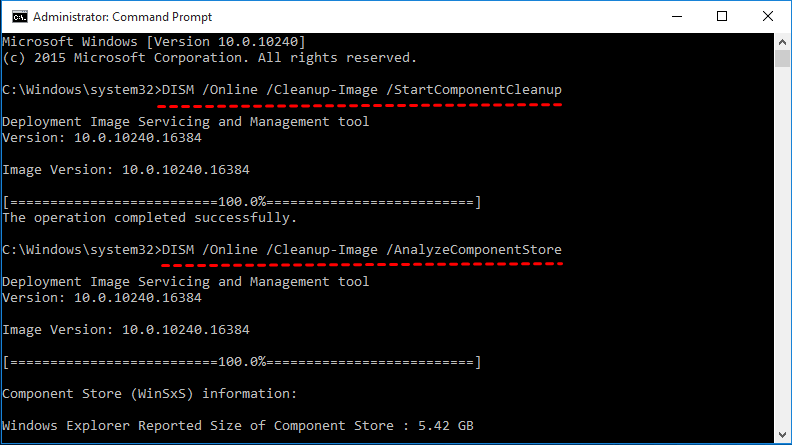
Should I run DISM or SFC first
Run SFC first, and only if SFC finds a problem is it necessary to run DISM. Run SFC first, and — no matter what SFC reports — you might as well run DISM after that.
How do I fix corrupted DISM
Repair corrupted filesOpen an elevated Command Prompt and type DISM /online /cleanup-image /restorehealth .Once the scan is complete, your system will automatically connect to the Windows Update service to download and replace the corrupt files.If the scan fails, please rerun it in Safe Mode.
Cached
Why is my DISM not working
The antivirus software you have installed on your computer may cause a lot of problems such as compatibility issues, file loss, and the DISM error. The antivirus software of the security program is able to interfere with your system and intervene in any critical operation.
Cached
How to repair DISM from boot
Open Start. Search for Command Prompt, right-click the top result, and select the Run as administrator option. Type the following command to repair the Windows 10 image and press Enter: DISM /Online /Cleanup-Image /RestoreHealth.
Cached
Does DISM replace SFC
Run the DISM Command to Fix SFC Problems
However, if the SFC command fails to run properly or can't replace a corrupted file with the correct one, the DISM command — or System Update Readiness Tool in Windows 7 — can sometimes fix the underlying Windows system and make SFC run correctly.
What is the difference between DISM RestoreHealth and SFC
In summary, SFC /scannow is the command which actually identifies and replaces corrupt or missing system files. Dism /Online /Cleanup-Image /RestoreHealth is the command which ensures the copies that SFC uses to replace corrupt or missing system files are themselves not corrupt or missing.
What is the command for DISM offline repair
If you're trying to repair an offline image with the help of a mounted image as a repair source, the proper command to use would be Dism /Image:C:\offline /Cleanup-Image /RestoreHealth /Source:c:\test\mount\windows.
Does DISM require a reboot
If a reboot is not required, this command does nothing. This option will keep the application from prompting for a restart (or keep it from restarting automatically if the /Quiet option is used). Specifies a temporary directory that will be used when extracting files for temporary use during servicing.
How to do DISM offline repair in Windows 10
Open your PC's Start menu, go to Command Prompt, and enter the right command. If you're trying to repair an offline image with the help of a mounted image as a repair source, the proper command to use would be Dism /Image:C:\offline /Cleanup-Image /RestoreHealth /Source:c:\test\mount\windows.
Does DISM need Internet
This does not require Internet access. If this not help, you may need to repair the Windows Component Store itself.
How do I fix a corrupted boot image
Causes.Solution 1: Restart the computer.Solution 2: Check Optical Drives.Solution 3: Check Boot Sequence in BIOS.Solution 4: Reset All Power Cables.Solution 5: Update the BIOS configuration.Solution 6: Fix BootMGR Image corrupt Problem with a Windows Installation Disc.
How to repair Windows 10 using DISM offline
How to Use DISM Offline Repair Windows 10First, please copy the install. win file from either another computer, a Windows 10 installation media, or the Windows 10 ISO files.Second, the install.Third, you need to confirm the location of the install.Fourth, DISM is case sensitive.Fifth, make sure the install.
What to do if SFC Cannot repair
6 Ways to Fix SFC/SCANNOW Cannot Repair ErrorRun SFC Alternative. Open EaseUS Partition Master on your computer.Use Installation Disc to Repair.Run DISM Command.Run SFC in Safe Mode.Check the Log Files.Try Reset This PC or Fresh Start.
How do I fix corrupt system files with DISM and SFC
Open Command Prompt or PowerShell as administrator, then run "sfc /scannow" to fix corrupted Windows System Files. If SFC fails to run properly or cannot repair the files, run "DISM /Online /Cleanup-Image /RestoreHealth" to fix any remaining issues.
How long should DISM online cleanup image Restorehealth take
Running DISM /online /cleanup-image /restorehealth or DISM.exe /online /cleanup-image /restorehealth is not a quick process. It will take some minutes or even hours to finish the whole process.
Can DISM work offline
When you use the DISM tool to repair an online or offline image, you can use the /Source argument with the /RestoreHealth argument to specify additional repair source locations to use to search for the required files.
How long should DISM take
The duration of the DISM restorehealth depends on the amount of damage that needs to be repaired. The more corruption, the longer it will take to repair them. As mentioned above, the whole process may even last for several hours. So, you can just wait and see.
What is the difference between ScanHealth and RestoreHealth
The ScanHealth parameter scans the image for component store corruption. This operation will take several minutes. The RestoreHealth parameter scans the image for component store corruption, and then performs repair operations automatically. This operation will take several minutes.
Is it possible to fix a corrupted BIOS
If your motherboard has a backup BIOS, you can boot into the backup BIOS and reflash the corrupted BIOS. If your motherboard does not have backup BIOS, you may be able to replace the BIOS chip. However, in some cases, the only option may be to replace the motherboard entirely.
How to turn on system if booting is corrupted or not working
Boot your computer from the USB drive. Select Repair Your Computer option>Troubleshoot> Advanced Options>Startup Repair. Choose the currently installed operating system on your computer. Wait for the process to complete and repair the issues.
Can you run SFC in safe mode
Running SFC in Safe Mode and Recovery Mode. Depending on the issue, and if you tried sfc /scannow in the standard environment, there are two other ways you can run the command: Safe Mode and Recovery Mode.
How do I force a system repair
Method 1: Startup repair toolStart the system to the installation media for the installed version of Windows.On the Install Windows screen, select Next > Repair your computer.On the Choose an option screen, select Troubleshoot.On the Advanced options screen, select Startup Repair.
How to repair corrupted Windows using cmd
The sfc /scannow command will scan all protected system files, and replace corrupted files with a cached copy that is located in a compressed folder at %WinDir%\System32\dllcache. The %WinDir% placeholder represents the Windows operating system folder.
What is the difference between DISM online and offline
DISM online is identical to DISM offline except it cannot handle . MSU files. If you need to install . MSU files online, use WUSA.
What does DISM actually do
Deployment Image Servicing and Management (DISM.exe) is a command-line tool that can be used to service and prepare Windows images, including those used for Windows PE, Windows Recovery Environment (Windows RE) and Windows Setup. DISM can be used to service a Windows image (. wim) or a virtual hard disk (.


0 Comments