
Why is my Echo Dot green?
Summary of the article:
A spinning or flashing green light on your Echo device means there’s an incoming call or an active call or an active Drop In.
If you still see the green light after ending the call, you can turn off all notifications on Alexa through the “Do Not Disturb or DND” option. Since the green light is a notification alert, you can simply ask Alexa to turn on “Do Not Disturb” mode through voice commands.
An Amazon Echo that’s showing a pulsing green ring light means that the device is currently receiving a call. In order to stop the machine from slowly blinking in green, tell Alexa to ‘Answer Call.
A bright green light is usually associated with calls. This display can either appear as a flashing or spinning light. The flashing light indicates an incoming call. You can ask your Alexa to answer or ignore the call to respond to this notification.
If you’re worried that Amazon Echo or Amazon Echo Dot is spying on you without your permission, it’s easy to tell when the device is listening. Just look for a circular blue LED light on the device or listen for the tone that sounds when Alexa wakes up.
Right on the front here. So in order to reset the echo dot 5th gen there’s a couple buttons. Up top you’ve got your action button your volume up your volume down in your mute button in order to reset
In order to reset this we’ve got four buttons on the top here we’ve got our volume up volume down mute. And then our action button to reset this we’re going to hold down approximately. 15 seconds it’s
Turn Notifications On or Off for Your Echo DevicesOpen the Alexa app .Open More and select Settings. Select Notifications. Select a feature or service, and use the toggle to turn notifications on or off.
A cyan spotlight on a blue ring means that Alexa is listening. The light ring glimmers briefly when Alexa has heard and is processing your request. A briefly glimmering blue light might also mean the device is receiving a software update.
How To Tell if Alexa Is HackedThe listening light comes on without you saying the trigger word.You live alone but noticed strange items in your Amazon shopping cart. Someone may be exploiting the Alexa add-to-cart feature.You look at your Alexa-enabled skills and notice some you didn’t add.
Press and hold the Microphone Off and Volume Down buttons at the same time for about 20 seconds. Release both buttons when you see a spinning orange light ring on the device.
To reset your device and keep your smart home connections: Press and hold the Action button and Volume Down buttons for 15 seconds until the light ring turns orange. Your device will then enter setup mode.
What are the steps to turn off the green light on your Echo Dot? How can you know if someone is listening through Alexa? How do you reset your Echo Dot?
What color is Alexa when someone is listening?
How can you tell if your Alexa has been hacked? How do you force restart Alexa? How do you get Alexa to reboot?
Questions:
- Why is my Echo dot green light on?
- How do I stop the green light on my Echo?
- How do I get rid of the green ring on Alexa?
- Should Echo dot flash green?
- How can you tell if someone is listening on Alexa?
- How do I reset my Alexa dot?
- How do I reset my Echo Dot?
- How do I turn off the ring on my Echo dot?
- What color is Alexa if someone is listening?
- How do I know if my Alexa has been hacked?
- How do I force restart Alexa?
- How do I get Alexa to reboot?
Answers:
- A spinning or flashing green light on your Echo device means there’s an incoming call or an active call or an active Drop In.
- If you still see the green light after ending the call, you can turn off all notifications on Alexa through the “Do Not Disturb or DND” option. Since the green light is a notification alert, you can simply ask Alexa to turn on “Do Not Disturb” mode through voice commands.
- An Amazon Echo that’s showing a pulsing green ring light means that the device is currently receiving a call. In order to stop the machine from slowly blinking in green, tell Alexa to ‘Answer Call.
- A bright green light is usually associated with calls. This display can either appear as a flashing or spinning light. The flashing light indicates an incoming call. You can ask your Alexa to answer or ignore the call to respond to this notification.
- If you’re worried that Amazon Echo or Amazon Echo Dot is spying on you without your permission, it’s easy to tell when the device is listening. Just look for a circular blue LED light on the device or listen for the tone that sounds when Alexa wakes up.
- Right on the front here. So in order to reset the echo dot 5th gen there’s a couple buttons. Up top you’ve got your action button your volume up your volume down in your mute button in order to reset.
- In order to reset this we’ve got four buttons on the top here we’ve got our volume up volume down mute. And then our action button to reset this we’re going to hold down approximately. 15 seconds it’s.
- Turn Notifications On or Off for Your Echo DevicesOpen the Alexa app .Open More and select Settings. Select Notifications. Select a feature or service, and use the toggle to turn notifications on or off.
- A cyan spotlight on a blue ring means that Alexa is listening. The light ring glimmers briefly when Alexa has heard and is processing your request. A briefly glimmering blue light might also mean the device is receiving a software update.
- How To Tell if Alexa Is HackedThe listening light comes on without you saying the trigger word.You live alone but noticed strange items in your Amazon shopping cart. Someone may be exploiting the Alexa add-to-cart feature.You look at your Alexa-enabled skills and notice some you didn’t add.
- Press and hold the Microphone Off and Volume Down buttons at the same time for about 20 seconds. Release both buttons when you see a spinning orange light ring on the device.
- To reset your device and keep your smart home connections: Press and hold the Action button and Volume Down buttons for 15 seconds until the light ring turns orange. Your device will then enter setup mode.
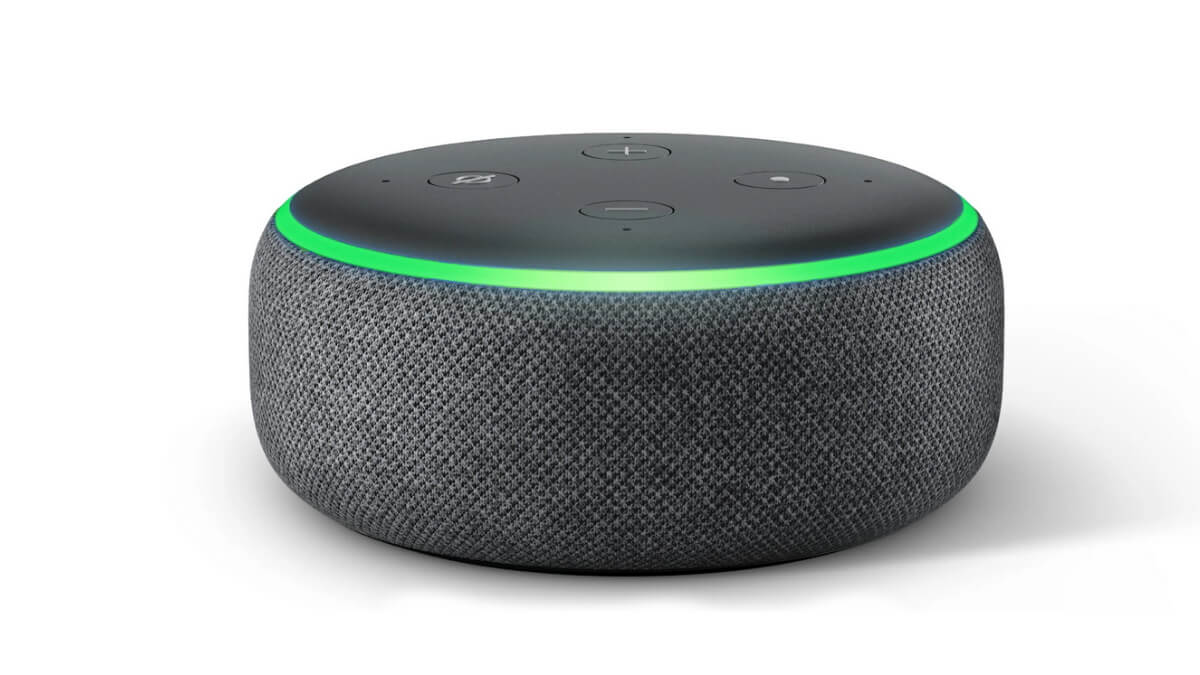
Why is my Echo dot green light on
A spinning or flashing green light on your Echo device means there's an incoming call or an active call or an active Drop In.
How do I stop the green light on my Echo
If you still see the green light after ending the call, you can turn off all notifications on Alexa through the “Do Not Disturb or DND” option. Since the green light is a notification alert, you can simply ask Alexa to turn on “Do Not Disturb” mode through voice commands.
Cached
How do I get rid of the green ring on Alexa
An Amazon Echo that's showing a pulsing green ring light means that the device is currently receiving a call. In order to stop the machine from slowly blinking in green, tell Alexa to 'Answer Call.
Cached
Should Echo dot flash green
A bright green light is usually associated with calls. This display can either appear as a flashing or spinning light. The flashing light indicates an incoming call. You can ask your Alexa to answer or ignore the call to respond to this notification.
How can you tell if someone is listening on Alexa
If you're worried that Amazon Echo or Amazon Echo Dot is spying on you without your permission, it's easy to tell when the device is listening. Just look for a circular blue LED light on the device or listen for the tone that sounds when Alexa wakes up.
How do I reset my Alexa dot
Right on the front here. So in order to reset the echo dot 5th gen there's a couple buttons. Up top you've got your action button your volume up your volume down in your mute button in order to reset
How do I reset my Echo Dot
In order to reset this we've got four buttons on the top here we've got our volume up volume down mute. And then our action button to reset this we're going to hold down approximately. 15 seconds it's
How do I turn off the ring on my Echo dot
Turn Notifications On or Off for Your Echo DevicesOpen the Alexa app .Open More and select Settings .Select Notifications.Select a feature or service, and use the toggle to turn notifications on or off.
What color is Alexa if someone is listening
A cyan spotlight on a blue ring means that Alexa is listening. The light ring glimmers briefly when Alexa has heard and is processing your request. A briefly glimmering blue light might also mean the device is receiving a software update.
How do I know if my Alexa has been hacked
How To Tell if Alexa Is HackedThe listening light comes on without you saying the trigger word.You live alone but noticed strange items in your Amazon shopping cart. Someone may be exploiting the Alexa add-to-cart feature.You look at your Alexa-enabled skills and notice some you didn't add.
How do I force restart Alexa
Press and hold the Microphone Off and Volume Down buttons at the same time for about 20 seconds. Release both buttons when you see a spinning orange light ring on the device.
How do I get Alexa to reboot
To reset your device and keep your smart home connections: Press and hold the Action button for 20 seconds. Wait for the light ring to turn off and on again.
Why is my Echo Dot not connecting
Restart your Alexa-enabled device
Sometimes, a simple restart is all you need to get your Alexa device back online. Just unplug your device or the power adapter from the outlet, wait about 10 seconds, then plug it back in and connect to Wi-Fi. If it works, your problem is solved.
How do I reset my Echo Dot not working
Work. So fix number one. Okay you wanna unplug your echo dot from your wall. Outlet. Leave it unplugged for about 15 to 30 seconds. Even a minute if you really want to make sure that you're trying
Why is my Alexa spinning blue and green
Quick Answer: A flashing blue light indicates Alexa is listening and waiting for a command. A flashing green light means your device is receiving a call or drop-in. Here are some common colors and what they mean below.
Can you turn off listening on Echo Dot
To turn the listening sound off, tap 'Alexa Mic On' below the Play icon in the center and move the slider to 'Mic Off' position (fig 5.3. 2).
Is someone listening if Alexa is green
If your Alexa device has a pulsing green light, that means someone is calling your device – you can ask Alexa to take the call or just ignore it using the regular voice command.
How do you know if someone is listening on Echo dot
If you're worried that Amazon Echo or Amazon Echo Dot is spying on you without your permission, it's easy to tell when the device is listening. Just look for a circular blue LED light on the device or listen for the tone that sounds when Alexa wakes up.
How can I tell if someone is listening in on my Alexa
If you're worried that Amazon Echo or Amazon Echo Dot is spying on you without your permission, it's easy to tell when the device is listening. Just look for a circular blue LED light on the device or listen for the tone that sounds when Alexa wakes up.
Can someone hack into my echo dot
Yes, hackers can hack into your Alexa device and gain access to personal data and listen in on previously recorded or live conversations. These hacks are widely known, leaving users vulnerable to a hack by a malicious individual.
How do I reset unresponsive Alexa
Press and hold the Microphone Off and Volume Down buttons at the same time for approximately 20 seconds. Release both buttons when you see a spinning orange light ring on the device.
Why is my Echo Dot not working
Often, an unresponsive Echo can be the result of a faulty Wi-Fi connection. To start, try performing a hard reset of all your network hardware; starting with your Echo Dot, then your router, then your modem. Wait a solid 10-15 seconds for each component, then re-power everything in reverse.
How do I reconnect my Echo Dot to Wi-Fi
To connect to WiFi:In the Alexa app, open the left panel menu and then select Settings.Select Device Settings.Choose your device.Select Change next to WiFi Network and follow the prompts in the app.
How do I put Echo Dot in pairing mode
Welcome guys in this video I'm going to show you how you can get into the setup mode on your Amazon Echo. Speaker. Okay so as you can see my speaker is in the setup mode already and when this ring is
How do I force an Echo Dot to reset
How to reset an Amazon Echo Dot to its factory settings:Press and hold the Microphone Off and Volume Down buttons at the same time for approximately 20 seconds.Release both buttons when you see a spinning orange light ring on the device.


0 Comments