
How do I know if my laptop is encrypted Windows 10?
Summary
Does Windows 10 come with encryption?
Windows laptops with Windows 10 Pro, Enterprise, or Education versions have BitLocker encryption available. However, device encryption is available on all editions of Windows 10.
How do I know if I have BitLocker or encryption enabled?
To check BitLocker Status via Command Line, press and hold the Windows button on the keyboard and R, type cmd, and press Enter. Right-click Command Prompt and select “Run as Administrator.” In the command prompt, type manage-bde -status and press Enter to view the status of BitLocker on the drives in the computer.
Are Windows laptops encrypted by default?
On PCs designed for Windows 10 and Windows 11, the system disk is encrypted by default. However, the encryption uses a clear key and doesn’t protect your data unless you sign in with a Microsoft account, which also saves a recovery key in OneDrive.
Do laptops come with encryption?
Some Windows 10 devices come with encryption turned on by default. To check if your laptop has encryption enabled, go to Settings > System > About and scroll down to “Device Encryption.” Ensure you log into Windows with a Microsoft account for this feature to work.
What does it mean when a laptop is encrypted?
Encryption protects your data if your computer is lost, stolen, or accessed by unauthorized individuals. Without encryption, someone can easily read your information by removing the hard disk and attaching it to their own computer, gaining full access to all your files.
What is Windows 10 encryption?
Windows 10 encryption helps protect the data on your device, allowing access only to authorized individuals. If device encryption isn’t available on your device, you might be able to enable standard BitLocker encryption (not available on Windows 10 Home edition).
How do I check my encryption status?
To check encryption status, select the Start button, then go to Settings > Update & Security > Device encryption. If Device encryption doesn’t appear, it’s not available. If it’s turned off, you can select Turn on to enable device encryption.
Is your disk always encrypted if BitLocker is enabled?
No, BitLocker doesn’t encrypt and decrypt the entire drive when reading and writing data. The encrypted sectors in the BitLocker-protected drive are decrypted only as they’re requested from system read operations.
How do I know if my laptop has encryption?
To check if your laptop has encryption, select the Start button, then go to Settings > Update & Security > Device encryption. If Device encryption doesn’t appear, it’s not available.
How do I verify encryption?
To verify encryption, open the Messages app and navigate to a group conversation where all participants have RCS chats turned on. In the conversation window, tap More at the top right, then select Group details. From there, choose a conversation participant and tap More, then Verify encryption.
How do I check the encryption of my laptop?
To check the encryption of your laptop, select the Start button, then go to Settings > Update & Security > Device encryption. If Device encryption doesn’t appear, it’s not available.
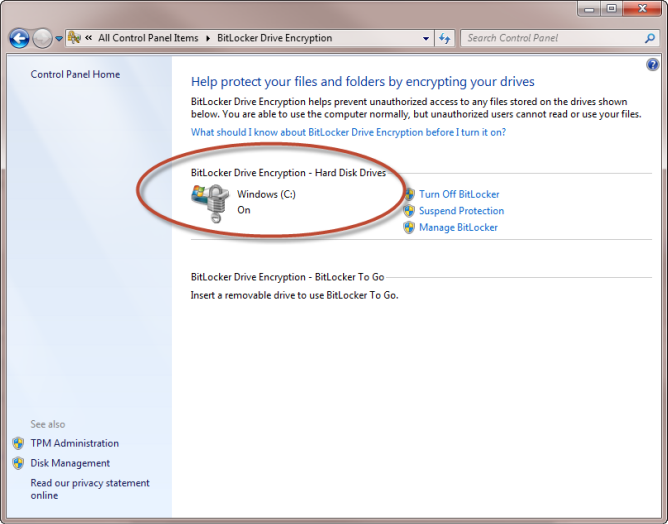
Does Windows 10 come with encryption
Windows laptops
Device encryption is available on all editions of Windows 10, but BitLocker encryption is available only on Windows 10 Pro, Enterprise or Education versions.
How do I know if I have BitLocker or encryption enabled
Checking BitLocker Status (Command Line)
Press and hold the Windows button on the keyboard and R , type cmd and press Enter. Right-click Command Prompt and select "Run as Administrator." In command prompt, type manage-bde -status and press Enter. View the status of BitLocker on the drives in the computer.
Are Windows laptops encrypted by default
On PCs designed for Windows 10 and Windows 11, the system disk is encrypted by default, but that encryption uses a clear key. The encryption doesn't protect your data unless you sign in with a Microsoft account, which protects the data and also saves a recovery key in OneDrive.
Do laptops come with encryption
Some Windows 10 devices come with encryption turned on by default, and you can check this by going to Settings > System > About and scrolling down to “Device Encryption.” You'll need to log into Windows with a Microsoft account in order for this feature to work, but if your laptop offers it, it's an easy and free way …
What does it mean when a laptop is encrypted
Encryption protects you if your computer is lost, stolen, or "borrowed". Without encryption, if someone steals your computer, they can very easily read information by taking our the hard disk and attaching it to their own computer. Then they have full access to all of your files.
What is Windows 10 encryption
Encryption helps protect the data on your device so it can only be accessed by people who have authorization. If device encryption isn't available on your device, you might be able to turn on standard BitLocker encryption instead. (Note that BitLocker isn't available on Windows 10 Home edition.)
How do I check my encryption status
Select the Start button, then select Settings > Update & Security > Device encryption. If Device encryption doesn't appear, it isn't available. If device encryption is turned off, select Turn on.
Is your disk always encrypted if BitLocker is enabled
No, BitLocker doesn't encrypt and decrypt the entire drive when reading and writing data. The encrypted sectors in the BitLocker-protected drive are decrypted only as they're requested from system read operations.
How do I know if my laptop has encryption
Select the Start button, then select Settings > Update & Security > Device encryption. If Device encryption doesn't appear, it isn't available.
How do I verify encryption
Verify encryption.Open the Messages app .Open a group conversation you want to use. In the conversation, all participants must have RCS chats turned on.At the top right of the conversation window, tap More. Group details.Select a conversation participant you want to verify.Tap More. Verify encryption.
How do I check the encryption of my laptop
Select the Start button, then select Settings > Update & Security > Device encryption. If Device encryption doesn't appear, it isn't available.
How do I encrypt my laptop
How to encrypt your Android devicePlug in the device to charge the battery (required).Make sure a password or PIN is set in Security > Screen lock.Go to Settings > Security.Press the “Encrypt phone” option.Read the notice and press “Encrypt phone” to start the encryption process.
How do you check if a device is encrypted
You can check the encryption status for Android devices by navigating to Settings > Security > Encryption. This tab shows whether the device is encrypted or not. In case the Android device is not encrypted, you can enable encryption from the same tab.
Should device encryption be turned on or off
Device encryption should be suspended before the computer is serviced on-site or returned to a service center. The device encryption must be suspended before flashing the computer BIOS and when a motherboard or a computer drive replacement is expected.
How do you tell if a drive is encrypted
In the Data Protection window, click on the icon of the hard drive (aka System Storage). Under System Storage, if you see the following text: OSDisk (C) and In compliance underneath, then your hard drive is encrypted.
How do I know if my device is encrypted
You can check the encryption status for Android devices by navigating to Settings > Security > Encryption. This tab shows whether the device is encrypted or not. In case the Android device is not encrypted, you can enable encryption from the same tab.
How do I turn on encryption
Open your device's Settings app. Tap Security & Location. Under "Encryption," tap Encrypt phone or Encrypt tablet. (If your battery isn't charged or your device isn't plugged in, you won't be able to tap this option.)
How do I check my device encryption status
Select the Start button, then select Settings > Update & Security > Device encryption. If Device encryption doesn't appear, it isn't available. If device encryption is turned off, select Turn on.
Are hard drives automatically encrypted
The concept of hard-drive encryption is simple: when a file is written to the drive, it is automatically encrypted by specialized software. Though it sounds similar to hardware-based encryption, it does not rely on the use of any hardware to encrypt the hard drive.
What makes a device encrypted
Encryption is the process of encoding all user data on an Android device using symmetric encryption keys. Once a device is encrypted, all user-created data is automatically encrypted before committing it to disk and all reads automatically decrypt data before returning it to the calling process.
Where is the Encrypt button
Encrypt a single message
In message that you are composing, click File > Properties. Click Security Settings, and then select the Encrypt message contents and attachments check box. Compose your message, and then click Send.
How do I open device encryption
So if your device supports modern standby you can proceed to enable device encryption but before that we will open disk management and you can see here that no drive is bit locker encrypted. Because
How do I know if my laptop hard drive is encrypted
Select the Start button, then select Settings > Update & Security > Device encryption. If Device encryption doesn't appear, it isn't available.
How do you find out if a hard drive is encrypted
In the Data Protection window, click on the icon of the hard drive (aka System Storage). Under System Storage, if you see the following text: OSDisk (C) and In compliance underneath, then your hard drive is encrypted.
How do I check my encryption settings
Select the Start button, then select Settings > Update & Security > Device encryption. If Device encryption doesn't appear, it isn't available. If device encryption is turned off, select Turn on.


0 Comments