
How do you schedule antivirus scans in a computer?
un and at what time. You can also choose whether to run the scan only when the computer is idle or regardless of idle status. Click OK when you are done.
If you want to schedule a scan in McAfee, follow these steps:
1. Open McAfee Internet Security.
2. Click on Virus and Spyware Protection.
3. Click on Scheduled Scans.
4. Click on Schedule Your Scan.
5. Select a schedule or set your own custom schedule.
6. Choose to exclude specific files and folders if needed.
7. Click on Apply.
Windows Security automatically scans for malware, viruses, and security threats. It continually scans your device in real-time and downloads updates automatically to keep your device safe.
The difference between a quick scan and a full scan is that a quick scan checks the areas of the system that are most susceptible to infection, while a full scan performs a thorough check of all areas of the system.
To schedule a full scan on McAfee, follow these steps:
1. Open McAfee Internet Security.
2. Click on Virus and Spyware Protection.
3. Click on Scheduled Scans.
4. Click on Schedule Your Scan.
5. Select a schedule or set your own custom schedule.
6. Choose to exclude specific files and folders if needed.
7. Click on Apply.
To schedule an antivirus scan in Windows 10, follow these steps:
1. Open Start and search for Task Scheduler.
2. Click on the top result to open the Task Scheduler app.
3. Browse to the following path: Task Scheduler Library > Microsoft > Windows > Windows Defender.
4. Right-click on the “Windows Defender Scheduled Scan” task and select Properties.
5. Adjust the settings for the schedule, such as the frequency and time of the scan.
6. Click OK to save the changes.
It is recommended to run a virus scan on your computer at least once a week. This frequency ensures that your computer is regularly checked for any potential threats.
In conclusion, scheduling antivirus scans is an important step to ensure your computer’s security. By scheduling regular scans, you can detect and remove any viruses or harmful applications that may be present on your system. It is recommended to choose a scan frequency that suits your needs and to run both quick and full scans to thoroughly check your computer. Follow the above steps to schedule antivirus scans in different programs and operating systems to keep your computer protected.
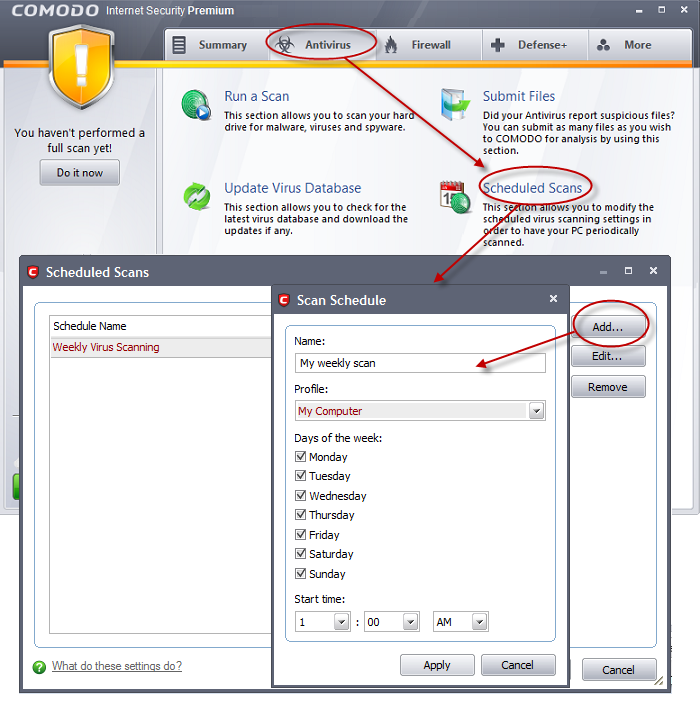
What is to schedule an antivirus scan
Set your computer to scan and remove viruses and other harmful applications automatically when you do not use it, or set the scan to run periodically to make sure that your computer is clean.
Cached
How do I schedule a quick scan
So we're gonna start by opening up the sir menu. Type in the task. Scheduler best match to go back with task scheduler here go ahead and just love on. That. On the right side you want to select create
How do I schedule a full scan in Windows 10
Open Start. Search for Task Scheduler, and click the top result to open the app. Browse the following path: Task Scheduler Library > Microsoft > Windows > Windows Defender. Right-click the "Windows Defender Scheduled Scan" task, and select the Properties option.
Cached
How often should Windows Defender scan
You can usually customise the schedule, although scanning your entire PC every day is probably overkill, while leaving more than a week between scans is not safe. Antivirus programs often offer two types of scan: a 'quick' scan and a 'deep' or 'full' scan. Set your software to do a full scan once a week.
How often should you run a Virus scan on your computer
“Repeated scans are always recommended. We recommend once per week,” said Fabian Sanz, security researcher at Avira. “In fact, there is a default scheduled scan active in all Avira versions that is set for once every week.”
How often should I run a scan on my computer
Weekly Scans
As a general rule, it is best to scan your computer at least once per week with an antivirus software that is appropriate for your goals and concerns, suggests the University of Tennessee.
How do I schedule a scan in McAfee
How On the Home Page, click Real-Time Scanning. Click Scheduled Scan settings. Pull down the menu next to Use McAfee scan schedule to decide the frequency of scans (you can scan once a day, once every other day, or on the first day of each month).
Does Windows security scan automatically
Windows Security continually scans for malware (malicious software), viruses, and security threats. In addition to this real-time protection, updates are downloaded automatically to help keep your device safe and protect it from threats.
What is the difference between a quick scan and a full scan
Quick Scan runs a quick check of the areas of the system most susceptible to infection. Full Scan performs a thorough check of all areas of the system.
How do I schedule a full scan on McAfee
Follow these steps to schedule a McAfee virus scan:Open McAfee Internet Security.Click Virus and Spyware Protection.Click Scheduled Scans.Click Schedule Your Scan.Select a schedule or set your own custom schedule.Choose to exclude specific files and folders.Click Apply.
How do I get Windows Defender to scan automatically
In the top center pane, double-click Windows Defender Scheduled Scan. In the Windows Defender Scheduled Scan Properties (Local Computer) window, select the Triggers tab, go to the bottom of the window, and then select New. Specify how often you want scans to run and when you'd like them to start.
What is the default scan schedule for Windows Defender
By default, Microsoft Defender Antivirus checks for an update 15 minutes before the time of any scheduled scans. You can manage the schedule for when protection updates should be downloaded and applied to override this default.
Does full scan detect all viruses
Performing a full scan on a computer is like doing a body check. Even though no virus is detected at the time, it does not mean that a computer is free from infection or immunized.
Does Windows automatically scan for viruses
Windows Security continually scans for malware (malicious software), viruses, and security threats. In addition to this real-time protection, updates are downloaded automatically to help keep your device safe and protect it from threats.
Is Windows security scan good enough
There are good points about Windows Defender: You get free protection that scores high when tested and reviewed. In a product review by AV-TEST during the first two months of 2022, Windows Defender scored 6 out of 6 on all three evaluations, including a 100% detection rate.
Are full virus scans necessary
Quick scan may not detect some malware, but it can still inform you about a virus if your computer is infected. Full Scan requires much more time and OS resources but it detects all known viruses. We recommend performing a Full Scan every week.
Why can’t I turn on real-time scanning McAfee
If Real-Time Scanning is still off, contact Customer Service for further assistance. You see a blue Turn it on button on the Home tab. If the Turn it on button has no effect, or if you don't see the button, you'll need to reinstall your McAfee software.
How do I know if McAfee is running a scan
Open your McAfee security product, such as LiveSafe or Total Protection. tab. Click Security History option under More security. Click one of the items if you want to get more details about the detection.
What is the default scheduled scan for Windows Defender
By default, Microsoft Defender Antivirus checks for an update 15 minutes before the time of any scheduled scans. You can manage the schedule for when protection updates should be downloaded and applied to override this default.
How often should you run a full scan on your computer
Weekly Scans
As a general rule, it is best to scan your computer at least once per week with an antivirus software that is appropriate for your goals and concerns, suggests the University of Tennessee.
What is the difference between a full scan and a quick scan
Quick Scan runs a quick check of the areas of the system most susceptible to infection. Full Scan performs a thorough check of all areas of the system. (Recommended if you suspect the computer is infected.)
Is A Quick scan good enough
A quick scan isn't enough. Full scans are a must for detecting threats. It also takes a bit of effort on your part. You need to be aware of what on your computer can allow an attacker to pull data from your computer.
How often do you scan for viruses
once per week
Weekly Scans
As a general rule, it is best to scan your computer at least once per week with an antivirus software that is appropriate for your goals and concerns, suggests the University of Tennessee.
How often should you run a virus scan on your computer
“Repeated scans are always recommended. We recommend once per week,” said Fabian Sanz, security researcher at Avira. “In fact, there is a default scheduled scan active in all Avira versions that is set for once every week.”
How often should I do an antivirus scan
once per week
Weekly Scans
As a general rule, it is best to scan your computer at least once per week with an antivirus software that is appropriate for your goals and concerns, suggests the University of Tennessee.


0 Comments