
Is a separate webcam better than laptop camera?
Summary of the article:
Webcams are an external piece of equipment, while laptop cameras are built-in. You can use a webcam with desktop and laptop computers. Webcams are an extra expense on your budget because you have to buy them separately. Laptop cameras don’t require any additional investment because all laptops have one.
External webcams have more space for lenses and other electronics, so they typically offer better resolutions, better quality photos and videos, and better quality audio. If sound and picture quality is of paramount importance, then a high-end external webcam will suit your needs better than a standard internal webcam.
Due to space constraints, embedded webcams always come with small components, which may affect the camera performance. External webcams usually have better performance with higher quality components. There is no room for a lens stack, reducing the image quality.
Most laptops are limited to a 1MP or 720p camera because of the USB 2.0 interface that connects it to the mainboard. The only way to improve quality would be to connect an external camera to the laptop. For 1080p resolutions or above the MIPI interface is used, this is found in smartphones.
Disadvantages of a webcam include cost and privacy concerns. While there are accessible options, they might not have very good quality. Using a webcam means you need to look presentable and have a tidy workspace behind you.
It is highly recommended to use a webcam for online, face-to-face communication and proper visual illustration of things to others.
Cybercriminals can access webcam cameras and expose your privacy and sensitive conversations. Taking steps to improve your internet security, such as covering up your webcam, is a good idea.
Some of the best external webcams for laptops include Logitech C920, Razer Kiyo, Logitech Brio, Lenovo 300 FHD Webcam, and Microsoft Lifecam Studio.
To improve laptop camera quality, you can use bright and soft lights to provide a clearer image and reduce graininess.
The top laptops with good camera quality include Lenovo Yoga 9i (2023) and LG gram Styl
Questions:
1. What is the difference between a laptop camera and a webcam?
Webcams are an external piece of equipment, while laptop cameras are built-in. You can use a webcam with desktop and laptop computers. Webcams are an extra expense on your budget because you have to buy them separately. Laptop cameras don’t require any additional investment because all laptops have one.
2. Why get a separate webcam?
External webcams have more space for lenses and other electronics, so they typically offer better resolutions, better quality photos and videos, and better quality audio. If sound and picture quality is of paramount importance, then a high-end external webcam will suit your needs better than a standard internal webcam.
3. Are external webcams better?
Due to space constraints, embedded webcams always come with small components, which may affect the camera performance. External webcams usually have better performance with higher quality components. There is no room for a lens stack, reducing the image quality.
4. Why don’t laptops have better cameras?
Most laptops are limited to a 1MP or 720p camera because of the USB 2.0 interface that connects it to the mainboard. The only way to improve quality would be to connect an external camera to the laptop. For 1080p resolutions or above the MIPI interface is used, this is found in smartphones.
5. What are 3 disadvantages of a webcam?
Disadvantages of a webcam include cost and privacy concerns. While there are accessible options, they might not have very good quality. Using a webcam means you need to look presentable and have a tidy workspace behind you.
6. Do I need a webcam if I have a camera on my laptop?
It is highly recommended to use a webcam for online, face-to-face communication and proper visual illustration of things to others.
7. What are 2 disadvantages of a webcam?
Disadvantages of a webcam include cost and privacy concerns. While there are accessible options, they might not have very good quality. Using a webcam means you need to look presentable and have a tidy workspace behind you.
8. Can someone see you through your webcam?
Cybercriminals can access webcam cameras and expose your privacy and sensitive conversations. Taking steps to improve your internet security, such as covering up your webcam, is a good idea.
9. Which external webcam is best?
Some of the best external webcams for laptops include Logitech C920, Razer Kiyo, Logitech Brio, Lenovo 300 FHD Webcam, and Microsoft Lifecam Studio.
10. Is there a way to improve laptop camera?
To improve laptop camera quality, you can use bright and soft lights to provide a clearer image and reduce graininess.
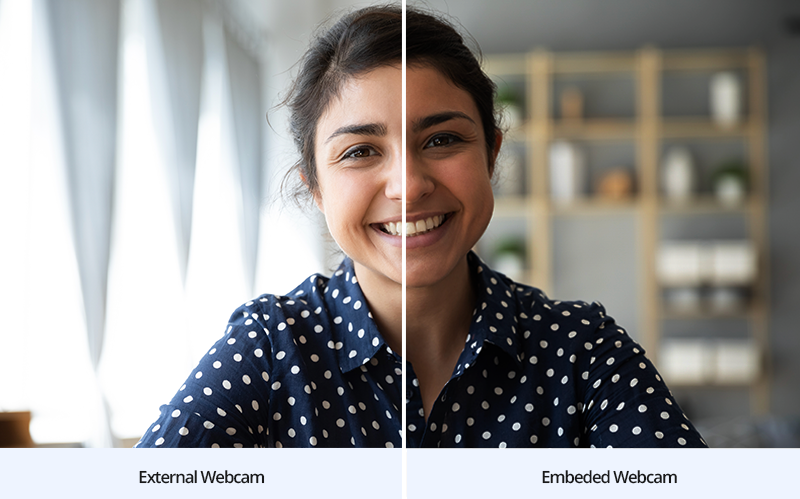
What is the difference between a laptop camera and a webcam
Webcams are an external piece of equipment, while laptop cameras are built-in. You can use a webcam with desktop and laptop computers. Webcams are an extra expense on your budget because you have to buy them separately. Laptop cameras don't require any additional investment because all laptops have one.
Cached
Why get a separate webcam
External webcams have more space for lenses and other electronics, so they typically offer better resolutions, better quality photos and videos, and better quality audio. If sound and picture quality is of paramount importance, then a high-end external webcam will suit your needs better than a standard internal webcam.
Cached
Are external webcams better
Due to space constraints, embedded webcams always come with small components, which may affect the camera performance. External webcams usually have better performance with higher quality components. There is no room for a lens stack, reducing the image quality.
Why don t laptops have better cameras
Most laptops are limited to a 1MP or 720p camera because of the USB 2.0 interface that connects it to the mainboard. The only way to improve quality would be to connect an external camera to the laptop. For 1080p resolutions or above the MIPI interface is used, this is found in smartphones.
Cached
What are 3 disadvantages of webcam
What are the disadvantages of a webcamCost – while you can find some very accessible options, they might not have very good quality.Privacy – while you can write an email or make a phone call in your pj's, using a webcam means you need to look presentable and have a tidy workspace behind you.
Do I need a webcam if I have a camera on my laptop
Although audio communication is essential, it is highly recommended that you use a webcam to allow online, face-to-face communication and proper visual illustration of things to others.
What are 2 disadvantages of a webcam
What are the disadvantages of a webcamCost – while you can find some very accessible options, they might not have very good quality.Privacy – while you can write an email or make a phone call in your pj's, using a webcam means you need to look presentable and have a tidy workspace behind you.
Can someone see you through your webcam
Cybercriminals can access these cameras, and because of their positions — facing your living room, kitchen, or office — they can expose your privacy and sensitive conversations. That's why it's a good idea to cover up your webcam or take other steps to improve your internet security.
Which external webcam is best
5 Best Webcams For Laptops in India June 2023Logitech C920.Razer Kiyo.Logitech Brio.Lenovo 300 FHD Webcam.Microsoft Lifecam Studio.
Is there a way to improve laptop camera
Using bright and soft lights will allow your webcam to reproduce colors more accurately, provide a clearer image, and reduce graininess. Lighting is the most direct, but still the most overlooked factor in regards to image quality.
What laptops have good camera quality
The top laptops with 1080p webcams in 2023Lenovo Yoga 9i (2023) Best overall.LG gram Style. Best lightweight laptop.Apple MacBook Pro (2023) Best laptop for creators.HP Dragonfly Pro. Best AMD laptop.Lenovo Legion Pro 7i Gen 8.HP Spectre x360 13.5 (2023)Microsoft Surface Pro 9.Lenovo ThinkPad X1 Carbon Gen 11.
What is the risk with a webcam
Vulnerable webcams and other IoT devices open the door for several types of threats. An attacker could view private meetings and other conversations, enabling them to gather personal data or compromising information through a video or audio feed.
What is the difference between webcam and video camera
A webcam is a small camera designed to stream its feed directly to a computer. A camcorder is a handheld, portable video camera that can store its data on a memory card like an SD card. Both are easy to use, but neither can match the quality of more expensive DSLRs. … Differences Summary and Verdict.
Can someone see me through my laptop camera
Built-in webcams: These cameras are built into your laptop or tablet and are handy for video conversations. But if your device gets a virus or malware, cybercriminals could then easily take over the webcam functionality and turn it on or off as they wish, as well as disable the LED light to avoid detection.
Can someone access my laptop camera without me knowing
Can you hack through the webcam Yes, it's called camfecting. And they do it via Remote Access Trojans (RATs) — a type of malware that lets the attacker manipulate and use the victim's device remotely.
Do I really need a webcam
Although audio communication is essential, it is highly recommended that you use a webcam to allow online, face-to-face communication and proper visual illustration of things to others. Some of the webcams have integrated mics and speakers, so you don't have to buy another speaker.
How do I know if someone is watching me through my laptop
How to tell if your laptop camera has been hackedCheck if the camera indicator light is on.Check browser extensions.Check known and unknown applications.See if your webcam process is running.Try running the webcam.Look for audio and video recordings.Run a malware scan.
Are laptop cameras always recording
"The webcam is constantly able to look at you – whether the computer is aware of it or not. "Information is always there, but we just trust that the computer isn't recording it." If you have a standard laptop, your webcam is almost constantly trained on you. And it's the same with cameras on mobile phones.
Are webcams as good as cameras
Are Webcams Better for Streaming Webcams are suitable for streaming if you want an affordable and small camera with straightforward use. A webcam will never capture high-quality imagery as a DSLR, but some new models will still provide quality videos. However, you'll have less control over how the video will look.
How do I choose an external webcam
Basic Parameters to Consider When Choosing a WebcamResolution. High-Def vs.Frame Rate. A frame rate, also termed the refresh rate, is essential for selecting the ideal webcam for your business.Lens.Wide Angle.Automatic Light Correction.Audio Performance.Fidelity.Autofocus.
Is it worth covering your laptop camera
Cybercriminals can access these cameras, and because of their positions — facing your living room, kitchen, or office — they can expose your privacy and sensitive conversations. That's why it's a good idea to cover up your webcam or take other steps to improve your internet security.
Which webcam is best for laptop
Logitech C920 HD Pro Webcam.Logitech Brio Stream Webcam.Razer Kiyo.Microsoft Lifecam HD-3000.Lenovo 300 FHD Webcam.Zinq Full HD 1080P 2.1 Megapixel 30 FPS USB Webcam.Logitech C270 Digital HD Webcam.Tizum ZW78- Full HD 1080p Webcam.
How do I choose a webcam over my laptop camera
To open up your webcam or camera, select the Start button, and then select Camera in the list of apps. If you have multiple cameras, you can switch between them by selecting Change Camera at the top right once the Camera app is opened.
How can I improve my laptop webcam quality
How to make your webcam look betterAdjust webcam settings. The first thing you can do to improve webcam quality is to optimize your settings.Optimize lighting.Assess microphone quality.Check your background.Level up your technology.
Can someone spy through webcam
Can you hack through the webcam Yes, it's called camfecting. And they do it via Remote Access Trojans (RATs) — a type of malware that lets the attacker manipulate and use the victim's device remotely.


0 Comments