
Can you disable the Internet on a smartphone?
Summary
Can you turn off internet on phone?
How do I block Internet access on my child’s phone?
Can you have a smartphone without internet?
How do I stop internet access on Android?
How do I restrict Internet on my phone?
Can the Internet be turned off?
Can I temporarily deactivate my daughter’s cell phone?
What are phones without internet called?
What can I do on my phone without internet?
How do I block Internet on my Samsung phone?
How do I turn off the Internet on my Samsung phone?
Questions and Answers
Q: Can you turn off internet on phone?
A: Tap Network & internet. Internet. Next to your carrier, tap Settings. Turn Mobile data on or off.
Q: How do I block Internet access on my child’s phone?
A: Set up parental controls. Open the Google Play app. At the top right, tap the profile icon. Tap Settings Family. Parental controls. Turn on Parental controls. To protect parental controls, create a PIN your child doesn’t know. Select the type of content you want to filter. Choose how to filter or restrict access.
Q: Can you have a smartphone without internet?
A: A few modern cell phones without internet access are available for a variety of age ranges and purposes. The Gabb phone, an internet-free phone for children and teens, looks like a smartphone. Make sure the no-internet phone you choose works with your carrier before you purchase it.
Q: How do I stop internet access on Android?
A: Application find the Google news application in this list. And you’re going to see two icons next to the app, the one to the left is for Wi-Fi. And the one to the right is for cellular mobile data.
Q: How do I restrict Internet on my phone?
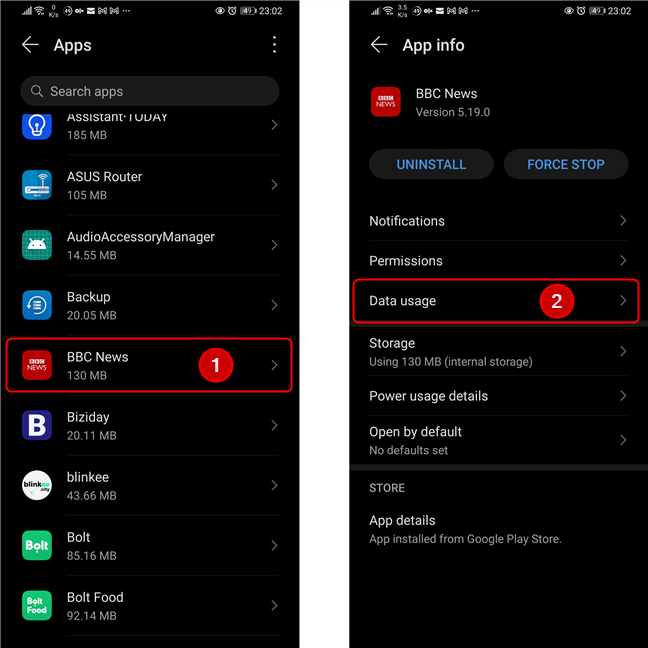
A: In the Android mobile network settings, tap on Data usage. Access the Data usage section. Android Settings – block apps from accessing the internet. Android Settings – Block system apps from accessing mobile data. An Android app is restricted from using Wi-Fi networks. Go to Apps in the Settings app.
Q: Can the Internet be turned off?
A: No. The Internet is a collection of many independent networks controlled and maintained by different people, businesses, and governments.
Q: Can I temporarily deactivate my daughter’s cell phone?
A: Turn off Android phones. Google’s Family Link app allows you to schedule a span of time for the phone to be off, such as bedtime. But you can also completely lock the device so kids can’t even get into it. Family Link requires two downloads, one for your phone and one for your kid’s.
Q: What are phones without internet called?
A: A dumbphone (also seen as dumb phone) is a mobile telephone that, unlike a smartphone, has little-to-no computing or internet capacity.
Q: What can I do on my phone without internet?
A: Take a walk, take a nap, or grab coffee with a coworker and talk about things other than work. Meditating is also a great way to spend a break: We recommend the free app Headspace (available for iOS and Android), which will guide you through the basics of meditation in only ten minutes.
Q: How do I block Internet on my Samsung phone?
A: Series first tap on the home button to go back to the home screen. And from the home screen open up the Samsung Internet app. Next, go down and tap on the menu key at the bottom then tap on the…
Q: How do I turn off the Internet on my Samsung phone?
A: And then scroll down to this privacy section and in this section, you can see here we have this discontinue use of Samsung Internet. This option, so just tap on it. And I have this screen opened.
Can you turn off internet on phone
Tap Network & internet. Internet. Next to your carrier, tap Settings . Turn Mobile data on or off.
Cached
How do I block Internet access on my child’s phone
Set up parental controlsOpen the Google Play app .At the top right, tap the profile icon.Tap Settings Family. Parental controls.Turn on Parental controls.To protect parental controls, create a PIN your child doesn't know.Select the type of content you want to filter.Choose how to filter or restrict access.
Can you have a smartphone without internet
Things You Should Know
A few modern cell phones without internet access are available for a variety of age ranges and purposes. The Gabb phone, an internet-free phone for children and teens, looks like a smartphone. Make sure the no-internet phone you choose works with your carrier before you purchase it.
Cached
How do I stop internet access on Android
Application find the google news application in this list. And you're going to see two icons next to the app the one to the left is for wi-fi. And the one to the right is for cellular mobile. Data.
How do I restrict Internet on my phone
In the Android Mobile network settings, tap on Data usage.Access the Data usage section.Android Settings – block apps from accessing the internet.Android Settings – Block system apps from accessing mobile data.An Android app is restricted from using Wi-Fi networks.Go to Apps in the Settings app.
Can the Internet be turned off
No. The Internet is a collection of many independent networks controlled and maintained by different people, businesses, and governments.
Can I temporarily deactivate my daughter’s cell phone
Turn off Android phones
Google's Family Link app allows you to schedule a span of time for the phone to be off, such as bedtime. But you can also completely lock the device so kids can't even get into it. Family Link requires two downloads, one for your phone and one for your kid's.
What are phones without internet called
A dumbphone (also seen as dumb phone) is a mobile telephone that, unlike a smartphone, has little-to-no computing or internet capacity.
What can I do on my phone without internet
Take a walk, take a nap, or grab coffee with a coworker and talk about things other than work. Meditating is also a great way to spend a break: We recommend the free app Headspace (available for iOS and Android), which will guide you through the basics of meditation in only ten minutes.
How do I block Internet on my Samsung phone
Series first tap on the home button to go back to the home screen. And from the home screen open up the samsung internet. App next go down and tap on the menu key at the bottom then tap on the
How do I turn off the Internet on my Samsung phone
And then scroll down to this privacy. This section and in this section you can see here we have this discontinue use of Samsung internet. This option so just tap on it. And I have this screen opened.
How can I block Internet on my child’s iPhone
Go to Settings and tap Screen Time. Tap Content & Privacy Restrictions and enter your Screen Time passcode. Tap Content Restrictions, then tap Web Content. Choose Unrestricted Access, Limit Adult Websites, or Allowed Websites.
Can you restrict the internet
Parental controls can include built-in parental control software, add-on monitoring software, web content filtering software, and internet blockers. These can usually be set up to block access to a computer or specific websites.
What would happen if the internet turned off
The modern power grid relies on the internet to coordinate power plants and electricity substations. Without it, each country's national grid has become unbalanced, and local outages escalate into a blackout for most of the world. Gas pipelines have shut down since they rely on power and the internet.
How do I manually turn off internet
One of the simplest and most efficient ways to restrict internet access is to just unplug the wireless router. This will disable the internet connection for all devices in your home. If you want to be able to turn the internet on and off without having to unplug the router, you can buy a smart plug.
Can I temporarily deactivate my sons phone
Turn off Android phones
Google's Family Link app allows you to schedule a span of time for the phone to be off, such as bedtime. But you can also completely lock the device so kids can't even get into it. Family Link requires two downloads, one for your phone and one for your kid's.
How do I restrict Internet access on my childs iPhone
Go to Settings and tap Screen Time. Tap Content & Privacy Restrictions and enter your Screen Time passcode. Tap Content Restrictions, then tap Web Content. Choose Unrestricted Access, Limit Adult Websites, or Allowed Websites.
Can you turn off internet on iPhone
To turn off the internet on your iPhone, go to Settings > Cellular > Cellular Data and toggle the switch to the off position.
What is the difference between phone and internet
Telephone networks just focus on voice, whereas the Internet allows transmission of all kinds of data such as voice, audio, video, file, images, and so on. The Internet has more advanced solutions than the Telephone Network. Using the Internet, you can learn, share, call, collaborate, earn & so on.
Do phone apps work without internet
Native mobile apps act as the interface between the user and the users' data and require uninterrupted connectivity. Native mobile apps with offline capability stores both the mobile app's software and its data locally on the mobile device.
Can you have wifi without internet
You may be amused to know that a wireless router allows you to use it without the Internet. Whether it is wired or wireless, you can go for it. However, it will be only for specific purposes. Using a wireless router without the internet will enable you to perform the following tasks.
How do I restrict Internet
How To Block Internet Access For A Specific UserSet BrowseControl to user mode.Place the specific user(s) that you would like to block internet access for into their own policy group.In the URL filter and/or web content category filter, select the policy group from the group dropdown.
What is the app that disables Internet access
Internet Blocker for iOS & Android
OurPact is modern parental control for your child's iOS and Android devices. Manage screen time by instantly blocking and granting access to your child's devices at a moment's notice.
How do I turn off internet connection
Step 1: Open the Control Panel. Hold down the Windows key (Step 2: Locate Your Network Connections. In Control Panel click "Network and Sharing Center".Step 3: Open the Properties of Your Wi-Fi Adapter.Step 3: Disable Connection Sharing.
Do I have to have Samsung Internet on my phone
While Samsung Internet may be considered an unnecessary addition to the company's proprietary Android skin by many users, it has several noteworthy features that make it one of the best and most complete mobile browsers.


0 Comments