
Can you use your phone as a monitor for a camera?
Can you use your phone as a monitor for a camera?
1. Can you use your iPhone as a camera monitor?
The answer is yes. And Android 2 sure for free well yes and no. [Source: YouTube]
2. How can I use my old phone as a camera monitor?
You would need an application called DSLR controller which you can download. Highly recommend this application. [Source: YouTube]
3. Can I use my phone as HDMI monitor?
The simplest option is a USB-C to HDMI adapter. If your phone has a USB-C port, you can connect the adapter to your phone and then connect it to the TV with an HDMI cable. [Source: YouTube]
4. Can I use my phone as a monitor for Sony camera?
If you have Android 11 or higher, you can connect a USB Video Class (UVC) compatible camera or camcorder to your Xperia via a USB cable and use the External monitor app. [Source: YouTube]
5. How do I use my iPhone as an HDMI monitor?
You can plug a Lightning Digital AV Adapter or Lightning to VGA Adapter into the charging port of your iPhone. Connect an HDMI or VGA cable to the adapter and the other end to the monitor, TV, or projector. [Source: YouTube]
6. How do I turn my iPhone into a webcam for my computer?
You can use an app called Camo on your iPhone and connect it to your computer. The app can be found in the App Store. [Source: YouTube]
7. Can I use an old phone as a nanny cam?
Yes, there are free apps available that can help you convert an old phone into a security camera. These apps allow you to remotely access your old phone’s camera and provide various security camera features. [Source: YouTube]
8. Can I use a second cell phone as a security camera?
Yes, you can use an Android phone as a CCTV camera by downloading the AlfredCamera app. One device will be used to view the feed and receive notifications, while the other will act as the CCTV camera. [Source: YouTube]
9. Can I use my phone as a monitor for my DSLR?
Using your Android smart device as a capable video monitor for your DSLR or mirrorless camera is possible. Higher-end devices have dedicated apps and hardware for this purpose, while more budget-friendly options require creative solutions. [Source: YouTube]
10. Does all phones support HDMI output?
To check if your phone supports HDMI output, look for a USB Type-C port. Most newer Android phone models have USB Type-C ports, which support HDMI Alt mode. [Source: YouTube]
11. Do I need an external monitor for my camera?
If you want to get serious about filmmaking, an external monitor is a necessity regardless of the camera type you are using. It provides better monitoring and control options, even though it might add weight to your setup. [Source: YouTube]
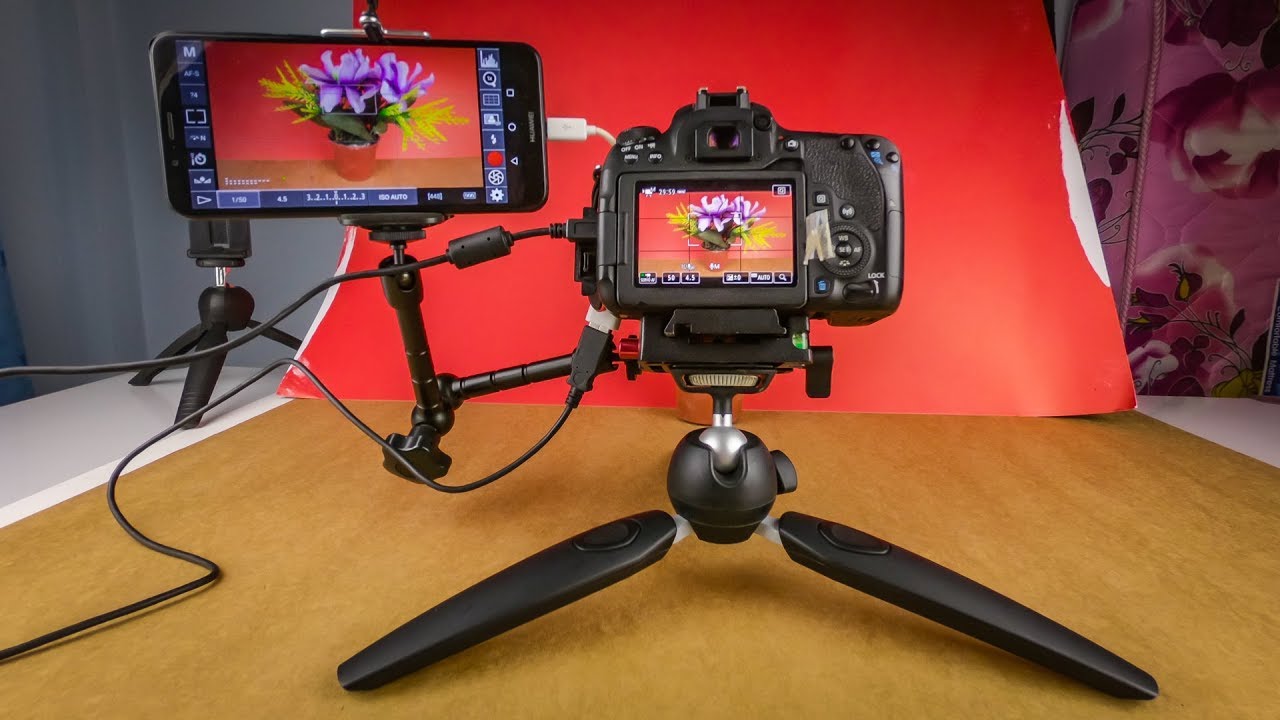
Can you use your iPhone as a camera monitor
See my affiliate link down. Below. Which is why the follow-up question that I kept getting asked was can we also do this on an iPhone the answer is yes. And Android 2 sure for free well yes and no so
How can I use my old phone as a camera monitor
And then the last thing that you would need is application called DSLR controller I'm going to leave some links down below. So you can go and download the application highly recommend this application
Can I use my phone as HDMI monitor
Connect With an Adapter or Cable
The simplest option is a USB-C to HDMI adapter(Opens in a new window). If your phone has a USB-C port, you can plug this adapter in to your phone, plug an HDMI cable in to the adapter, and then connect the cable to the TV.
Can I use my phone as a monitor for Sony camera
If you're running Android 11 or higher, you can connect a USB Video Class (UVC) compatible camera or camcorder to your Xperia via USB cable and launch the External monitor app.
How do I use my iPhone as a HDMI monitor
Plug a Lightning Digital AV Adapter or Lightning to VGA Adapter into the charging port on the bottom of iPhone. Connect an HDMI or VGA cable to the adapter. Connect the other end of the HDMI or VGA cable to the monitor, TV, or projector.
How do I turn my iPhone into a webcam for my computer
An app on our iphone. So on the iphone all you need to do is to open the app store and i'm going to put the apps download link in the video description as well all you need to do is type camo camo.
Can I use an old phone as a nanny cam
Can I Use My Old Phone as a Free Security Camera Yes, there are a lot of free apps that allow you to convert an old phone into a security camera. To do that, you need to install an app that can help you remotely access your old phone's camera and equip it with various security camera features.
Can I use a second cell phone as a security camera
Use an Android phone as a CCTV camera by downloading AlfredCamera to it and another device. One device will be used to view the feed and receive notifications, the other will be the CCTV camera. They can be paired in minutes—get started now by downloading AlfredCamera for free from Google Play.
Can I use my phone as a monitor for my DSLR
Using your Android smart device as a capable video monitor for your DSLR or mirrorless camera has never been easier. But while higher-end devices have dedicated apps and hardware to achieve such functionality, those of us with more modest budgets and mid-range cameras have to get creative in our solutions.
Does all phone support HDMI output
Check if your phone has a USB Type-C port.
If your phone has a USB Type-C port, it most likely supports HDMI Alt mode. USB Type-C ports are small, thin, and oval-shaped (8.24mm x 2.4mm). USB Type-C has become the standard for most newer Android phone models, including Google and Samsung Galaxy.
Do I need an external monitor for my camera
Whether you're shooting on a cine camera, a mirrorless, or a DSLR, an external monitor is a necessity if you want to get serious about filmmaking. You might think you don't want to add weight to your setup or make it any bigger but an on-camera monitor is worth it.
What app connects Sony camera to phone
Imaging Edge Mobile is a free application for your smartphone (Android smartphone/tablet or iPhone/iPad).
Can you mirror iPhone with HDMI cable
Screen mirror whatever is on your iPhone. To your big-screen TV doesn't matter if it's a TV or a computer monitor even a projector as long as you have a HDMI port on the back of those and what we're
Does my iPhone support HDMI output
The simplest way to physically connect your iPhone to your TV is to use an HDMI cable from your phone to your TV's HDMI port. You'll need an iPhone-to-HDMI cable adapter to connect the HDMI cable to your iOS device. It's called a Lightning Digital AV Adapter.
How can I use my phone camera as a webcam without an app
On how you could use your phone cam well the first option is to use it as your primary. Camera in your video conferencing software to do that just turn on the obs virtual camera and then select this
Can I use iPhone as webcam on Windows 10
If the EpocCam Viewer app shows the video feed from your iPhone or iPad, then it means everything is set up and working as it should. Now you can start using your iPhone as a webcam on your Windows 10 PC. For instance, it's automatically detected by the Camera app from Windows 10.
Can I use my old phone as a security camera without Wi-Fi
Yes, you can have a dedicated security camera without internet. The camera will record footage and store the recordings on local SD card. However, if you are turning a phone into a security camera, you will need internet connection for remote viewing and even recording.
How do I turn my iPhone into a nanny cam
So if you have an iPhone and iPad and iPod Touch or even an Android phone you can actually use a free application to create your home security system. You could use just one device or use as many as
How can I use my phone as a CCTV camera without internet
Follow the given steps carefully to turn your mobile into a WiFi camera:Step 1: Enable Mobile Hotspot.Step 2: Connect Router To Mobile Hotspot (Optional)Step 3: IP Webcam Settings.Step 4: Start IP Webcam App.Step 5: Watch Live Stream On The Receiver Device.
Do I need a monitor for my camera
Do I need an external monitor for my camera Some shooters don't need a monitor because they are used to the viewfinder. However, an external monitor will improve the shooting experience and it's recommended for certain scenarios such as studio or gimbal work.
Does Android support HDMI input
Wired connections are an easy and reliable way to connect an Android to an HDMI input on the TV. Commonly used cables include: Mini/mirco HDMI to HDMI cable and USB to HDMI cable. Choosing a cable depends on your device.
Which phones have HDMI alt mode
Phones With HDMI Alternate Mode SupportSamsung Galaxy S20 / S20+ /Samsung Galaxy S10e / S10 / S10 +Samsung Note 9 / 20.Samsung Galaxy S8/ S8+ S9/ S9+Samsung Galaxy S22 Ultra.
Do Android phones have HDMI out
If your Android phone or tablet supports HDMI-out over USB, you will need a suitable adapter. Other AV adapter types are available if you don't have an HDMI TV.
Do you need a monitor for security camera system
You'll also need a monitor or TV to view your security camera. There are three main types of video input: HDMI, VGA, and DVI. These inputs will allow the camera to send a signal to a compatible monitor or TV.
Are camera monitors worth it
You might think you don't want to add weight to your setup or make it any bigger but an on-camera monitor is worth it. The extra big display means when you're shooting you can see a more accurate, live representation of your footage.


0 Comments