
How do I restore my Google history?
Summary of the article:
How do I retrieve deleted Google history?
Step 1: On your Android phone, go to Settings > Google > Manage Your Google Account. Step 2: Under “Data & Personalization”, and scroll down to “Activity and timeline” and hit My Activity. Step 3: Scroll through to check your search history. Just tap on any file to view more details.
Cached
How do I restore my full history?
Recover deleted internet history through System Restore.
Alternatively, go to “Start,” click on “Programs,” and then “Accessories.” You’ll see a “System Tools” option and “System Restore” will be in there. Select the date you’d like to restore your computer to and sit back and wait until it does its thing.
Cached
Can I recover my deleted browsing history?
You can restore deleted browsing history on Google Chrome if you’ve previously made a backup using File History. File History, once configured, makes periodic backups of your files and allows you to restore them to a previous version, depending on the version of the file you want.
Cached
Does Google keep deleted history forever?
Information retained until your Google Account is deleted.
For example, after you delete a specific Google search from My Activity, we might keep information about how often you search for things, but not what you searched for.
Cached
Why has my Google search history disappeared?
I spent days looking for the fix and this really works: Open Google > More > Your data in search > Google Account > Data & personalisation > Search settings > Private results > Check the use private results option. You have to log out and log in or restart the cellphone to actually see the recent results.
Cached
How do I find old browsing history?
View & delete your Chrome browsing history. On your computer, open Chrome. At the top right, click More. Click History. History.
Where does deleted browsing history go?
When you clear your browser history, you’re only deleting the history that’s locally stored on your computer. Clearing your browser history doesn’t do anything to the data stored on Google’s servers.
What happens when you delete Google history?
Browsing history: Clearing your browsing history deletes the following: Web addresses you’ve visited are removed from the History page. Shortcuts to those pages are removed from the New Tab page. Address bar predictions for those websites are no longer shown.
Where does deleted history go?
When you clear your browser history, you’re only deleting the history that’s locally stored on your computer. Clearing your browser history doesn’t do anything to the data stored on Google’s servers.
Why can’t I see my search history anymore?
Go to the Google search bar and tap the ‘G’ icon in the upper left corner. Click the 3 lines where the ‘G’ was, and navigate to ‘Settings’. Go to ‘Accounts & Privacy’, ‘Google activity controls’, then ‘Web & App Activity’. If it says ‘Paused’, click on the little switch and go through the pop-up information.
How do I find my old browser history?
View & delete your Chrome browsing history. On your computer, open Chrome. At the top right, click More.
Questions:
- How do I retrieve deleted Google history?
- How do I restore my full history?
- Can I recover my deleted browsing history?
- Does Google keep deleted history forever?
- Why has my Google search history disappeared?
- How do I find old browsing history?
- Where does deleted browsing history go?
- What happens when you delete Google history?
- Where does deleted history go?
- Why can’t I see my search history anymore?
- How do I find my old browser history?
Answers:
- Step 1: On your Android phone, go to Settings > Google > Manage Your Google Account. Step 2: Under “Data & Personalization”, and scroll down to “Activity and timeline” and hit My Activity. Step 3: Scroll through to check your search history. Just tap on any file to view more details.
- Recover deleted internet history through System Restore. Alternatively, go to “Start,” click on “Programs,” and then “Accessories.” You’ll see a “System Tools” option and “System Restore” will be in there. Select the date you’d like to restore your computer to and sit back and wait until it does its thing.
- You can restore deleted browsing history on Google Chrome if you’ve previously made a backup using File History. File History, once configured, makes periodic backups of your files and allows you to restore them to a previous version, depending on the version of the file you want.
- Information retained until your Google Account is deleted. For example, after you delete a specific Google search from My Activity, we might keep information about how often you search for things, but not what you searched for.
- I spent days looking for the fix and this really works: Open Google > More > Your data in search > Google Account > Data & personalisation > Search settings > Private results > Check the use private results option. You have to log out and log in or restart the cellphone to actually see the recent results.
- View & delete your Chrome browsing history. On your computer, open Chrome. At the top right, click More. Click History. History.
- When you clear your browser history, you’re only deleting the history that’s locally stored on your computer. Clearing your browser history doesn’t do anything to the data stored on Google’s servers.
- Browsing history: Clearing your browsing history deletes the following: Web addresses you’ve visited are removed from the History page. Shortcuts to those pages are removed from the New Tab page. Address bar predictions for those websites are no longer shown.
- When you clear your browser history, you’re only deleting the history that’s locally stored on your computer. Clearing your browser history doesn’t do anything to the data stored on Google’s servers.
- Go to the Google search bar and tap the ‘G’ icon in the upper left corner. Click the 3 lines where the ‘G’ was, and navigate to ‘Settings’. Go to ‘Accounts & Privacy’, ‘Google activity controls’, then ‘Web & App Activity’. If it says ‘Paused’, click on the little switch and go through the pop-up information.
- View & delete your Chrome browsing history. On your computer, open Chrome. At the top right, click More.
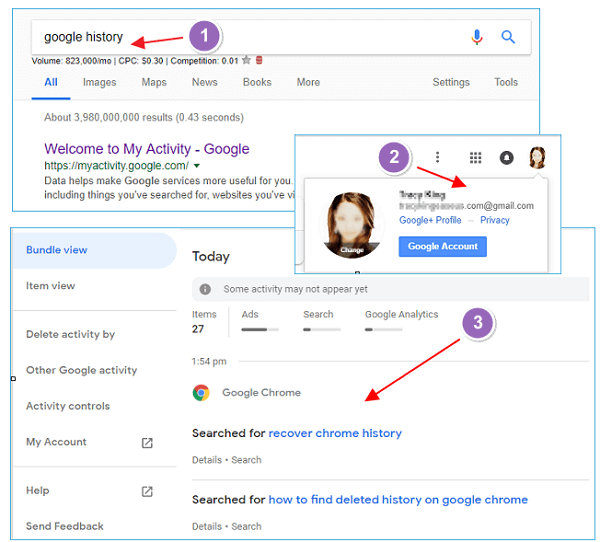
How do I retrieve deleted Google history
Step 1: On your Android phone, go to Settings > Google > Manage Your Google Account. Step 2: Under “Data & Personalization”, and scroll down to “Activity and timeline” and hit My Activity. Step 3: Scroll through to check your search history. Just tap on any file to view more details.
Cached
How do I restore my full history
Recover deleted internet history through System Restore
Alternatively, go to “Start,” click on “Programs,” and then “Accessories.” You'll see a “System Tools” option and “System Restore” will be in there. Select the date you'd like to restore your computer to and sit back and wait until it does its thing.
Cached
Can I recover my deleted browsing history
You can restore deleted browsing history on Google Chrome if you've previously made a backup using File History. File History, once configured, makes periodic backups of your files and allows you to restore them to a previous version, depending on the version of the file you want.
Cached
Does Google keep deleted history forever
Information retained until your Google Account is deleted
For example, after you delete a specific Google search from My Activity, we might keep information about how often you search for things, but not what you searched for.
Why has my Google search history disappeared
I spent days looking for the fix and this really works: Open Google > More > Your data in search > Google Account > Data & personalisation > Search settings > Private results > Check use private results option. You have to logout and login or restart the cellphone to actually see the recent results.
How do I find old browsing history
View & delete your Chrome browsing historyOn your computer, open Chrome.At the top right, click More .Click History. History.
Where does deleted browsing history go
When you clear your browser history, you're only deleting the history that's locally stored on your computer. Clearing your browser history doesn't do anything to the data stored on Google's servers.
What happens when you delete Google history
Browsing history: Clearing your browsing history deletes the following: Web addresses you've visited are removed from the History page. Shortcuts to those pages are removed from the New Tab page. Address bar predictions for those websites are no longer shown.
Where does deleted history go
When you clear your browser history, you're only deleting the history that's locally stored on your computer. Clearing your browser history doesn't do anything to the data stored on Google's servers.
Why can’t I see my search history anymore
Go to the Google search bar and tap the 'G' icon in the upper left corner. Click the 3 lines where the 'G' was, and navigate to 'Settings'. Go to 'Accounts & Privacy', 'Google activity controls', then 'Web & App Activity'. If it says 'Paused', click on the little switch and go through the pop-up information.
How do I find my old browser history
View & delete your Chrome browsing historyOn your computer, open Chrome.At the top right, click More .Click History. History.
Why is my Google search history gone
I spent days looking for the fix and this really works: Open Google > More > Your data in search > Google Account > Data & personalisation > Search settings > Private results > Check use private results option. You have to logout and login or restart the cellphone to actually see the recent results.
Where is Google history stored
Your Search history is saved to your Google Account as part of your Web & App Activity, along with activity from other Google services.
Where does your browsing history go after you delete it
When you clear your browser history, you're only deleting the history that's locally stored on your computer. Clearing your browser history doesn't do anything to the data stored on Google's servers.
Does Google keep deleted history
Information retained until your Google Account is deleted
For example, after you delete a specific Google search from My Activity, we might keep information about how often you search for things, but not what you searched for.
Why did all my Google searches disappear
When the search bar on your browser changes from Google to another search provider, or disappears altogether, it's usually caused by another application changing your search engine settings, sometimes without your permission.
Why isn’t my Google history showing up
Go to the Google search bar and tap the 'G' icon in the upper left corner. Click the 3 lines where the 'G' was, and navigate to 'Settings'. Go to 'Accounts & Privacy', 'Google activity controls', then 'Web & App Activity'. If it says 'Paused', click on the little switch and go through the pop-up information.
Where is my browsing history stored
Where is browsing history stored on my computer Your browsing history is automatically stored in your online browser's History section, and as cache files on your computer's hard drive. The exact location of these files varies depending on the operating system and browser that you use.
Does Google save all search history
When you search on Google with Web & App Activity turned on, Google saves activity like your Search history to your Google Account. Web & App Activity saves data about the things you do across Google services, including associated info like locations, in your account to make your experience more personalized.
How can I see all my search history
Find & view activityGo to your Google Account.On the left navigation panel, click Data & privacy.Under "History settings," click My Activity.To access your activity: Browse your activity, organized by day and time. To find specific activity, at the top, use the search bar and filters.
Where is my activity history
On your Android phone or tablet, go to myactivity.google.com. Scroll down to your activity. Filter your activity.
Why are my recent searches not showing up
Go to the Google search bar and tap the 'G' icon in the upper left corner. Click the 3 lines where the 'G' was, and navigate to 'Settings'. Go to 'Accounts & Privacy', 'Google activity controls', then 'Web & App Activity'. If it says 'Paused', click on the little switch and go through the pop-up information.
Why has Google stopped saving my searches
Google will no longer save a complete record of every search made by new users, the company says, as it launches a push to promote its privacy credentials against concerted competition from arch-rival Apple.
How long will Google keep your search history
Our services also use encrypted backup storage as another layer of protection to help recover from potential disasters. Data can remain on these systems for up to 6 months.
Is your search history always saved
Your Chrome history is saved only if you're signed in to your Google Account and have Chrome Sync turned on. Learn about Chrome Sync. Note: If you use a shared device or sign in with more than one account, activity might be saved to the default account on the browser or device you use.


0 Comments