
What is MySQL server name?
Summary of the Article: How to Find Your MySQL Server Name and More
1. How do I find my MySQL server name?
To display MySQL host via SQL command, use the system variable “hostname”. Alternatively, you can use the “show variables” command to show the MySQL host.
2. How do I find my database server name?
In Microsoft SQL Server Management Studio, right click on the server in the Object Explorer pane and select properties. In the Connection heading, click on the “View connection properties” link. The value next to “Server name” is your server name.
3. How do I find my MySQL server name and password?
You can use the East and West coast data center hostnames to log in. Visit the MySQL Databases to find your database name, username, password, and hostname.
4. What is MySQL server?
MySQL is a relational database management system that stores data in separate tables for optimized performance.
5. How do I know if I have MySQL server?
On Windows, you can use PowerShell or the command prompt; on Linux and MacOS, you can use the Terminal. Type and execute “mysql -V” to check the version of MySQL running.
6. How do I connect to my MySQL server?
Enter the MySQL server name, server port (3306 is the default), username, and password in the respective boxes to establish a connection.
7. Where is the server name in SQL Server?
For the default instance, the server name is the computer name. For a named instance, the server name is
8. How do I find my server name and address?
Open the command prompt and type “ipconfig /all”. Look for your IPv4 address.
9. Is server name and hostname the same?
Yes, they are essentially the same. Hostname is the more technically correct term.
10. How to connect to MySQL server?
Enter the server name, server port (3306), username, and password to establish a connection.
11. Is MySQL server a server?
Yes, MySQL Database Software is a client/server system consisting of a multithreaded SQL server, client programs, libraries, administrative tools, and various APIs.
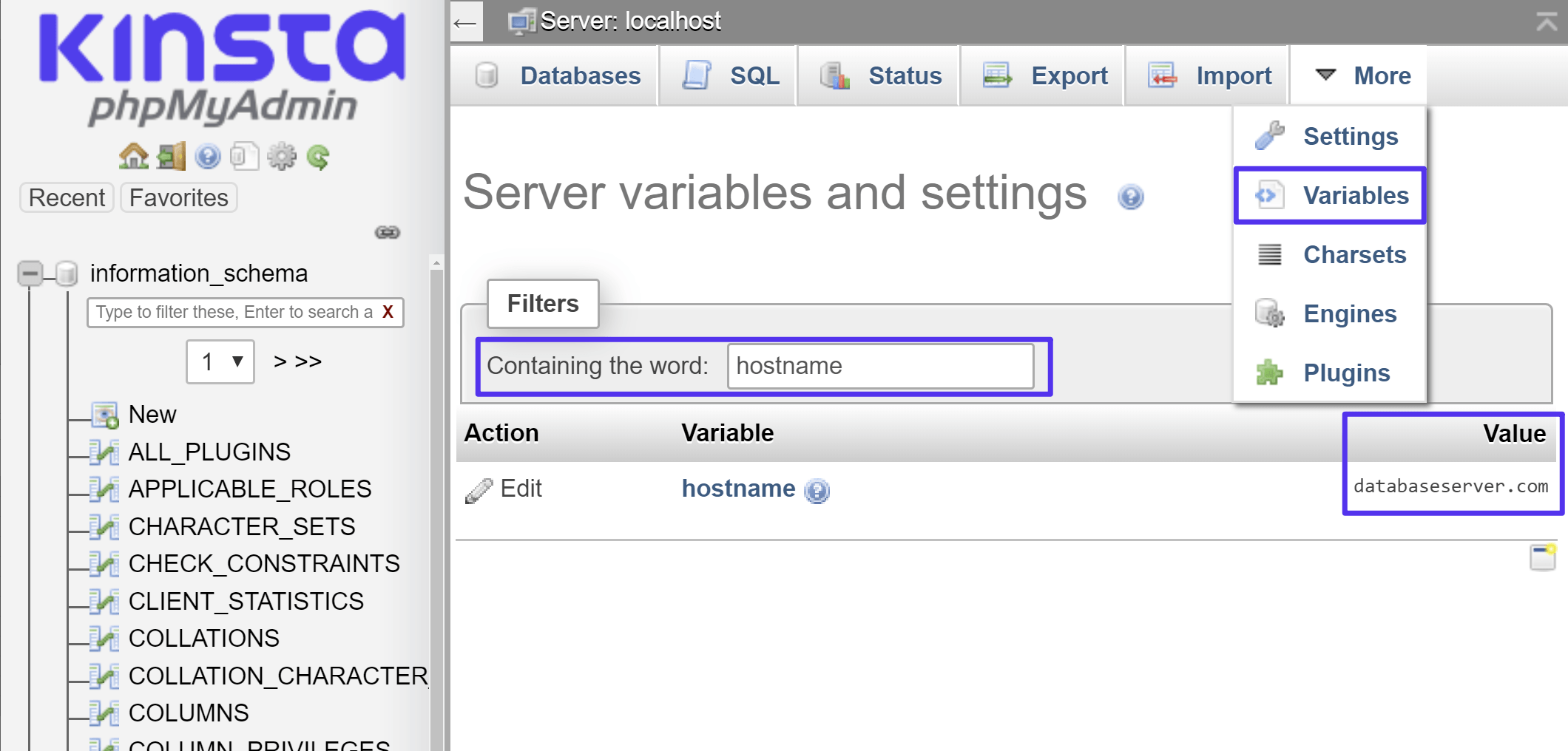
How do I find my MySQL server name
To display MySQL host via SQL command, use system variable “hostname”. Or you can use “show variables” command to show MySQL host via SQL command.
Cached
How do I find my database server name
In Microsoft SQL Server Management Studio, in the Object Explorer pane, right click the server and select properties. In the pane, there should be a heading called "Connection" and in that heading a link to a new window called "View connection properties". The value next to "Server name" is the name of your server.
How do I find my MySQL server name and password
Alternatively, you can use the East and West coast data center hostnames under Step #4 below to log in.Step 1 — Find your database name. Visit the MySQL Databases page and scroll down to the section titled Databases on this server.Step 2 — Find your username.Step 3 — Find your password.Step 4 — Find your hostname.
What is MySQL server
MySQL is a relational database management system
A relational database stores data in separate tables rather than putting all the data in one big storeroom. The database structure is organized into physical files optimized for speed.
How do I know if I have MySQL server
Windows users can employ PowerShell or the command prompt and Linux and MacOS have the Terminal. To check the version your MySQL is running, type and execute mysql -V (note the uppercase V) in the command line.
How do I connect to my MySQL server
Establishing a Connection to MySQLIn the Server name box, enter the MySQL server name. In the Server port box, enter the port number to be 3306. It is the default port.In the User name box, enter a MySQL account that has the necessary permissions.In the Password box, enter the password for the specified user name.
Where is the server name in SQL Server
For the default instance of SQL Server, the server name is the computer name. For a named instance of SQL Server, the server name is the <computer_name>\<instance_name>, such as ACCTG_SRVR\SQLEXPRESS.
How do I find my server name and address
First, click on your Start Menu and type cmd in the search box and press enter. A black and white window will open where you will type ipconfig /all and press enter. There is a space between the command ipconfig and the switch of /all. Your ip address will be the IPv4 address.
Is server name and hostname the same
Yes, they mean the same but the term hostname is more correct. Sometimes they call the whole jupiter.example.org as the hostname.
How to connect to MySQL server
Establishing a Connection to MySQLIn the Server name box, enter the MySQL server name. In the Server port box, enter the port number to be 3306. It is the default port.In the User name box, enter a MySQL account that has the necessary permissions.In the Password box, enter the password for the specified user name.
Is MySQL server a server
The MySQL Database Software is a client/server system that consists of a multithreaded SQL server that supports different back ends, several different client programs and libraries, administrative tools, and a wide range of application programming interfaces (APIs).
How to start MySQL server
Windows – Start and Stop ServerOpen 'Run' Window by using Win key + R.Type 'services.msc'Now search for MySQL service based on the version that is installed.Click on 'stop', 'start' or 'restart' the service option.
How to connect to MySQL server in Windows 10
Connect to a SQL Server instance
Start SQL Server Management Studio. The first time you run SSMS, the Connect to Server window opens. If it doesn't open, you can open it manually by selecting Object Explorer > Connect > Database Engine. For Server type, select Database Engine (usually the default option).
How to connect to MySQL server from Windows command prompt
So simply type my SQL. – you – you for username. So simply type the username that you have on your server. And then – P in case if you have a password. Now if I hit enter. It is asking for the
How do I find MySQL Server name and port
Open SQL Server Configuration Manager
In the SQL Server Network Configuration menu, select Protocols for MSSSLSERVER. Right-click TCP/IP and select Properties. In the window that opens, click the IP Addresses tab. Check what port the SQL Server is currently running on.
What is an example of a server name
The web server name is usually a combination of the domain name and the web server's IP address. For example, if the domain name is example.com, the web server name would be example.com:80. The web server name is important because it is used to access the website.
What is a server name example
The web server name is usually a combination of the domain name and the web server's IP address. For example, if the domain name is example.com, the web server name would be example.com:80. The web server name is important because it is used to access the website.
What is the server name or address
The server address is an external IP address that connects your computer to the Internet Service Provider (ISP), enabling access to various domains worldwide. You can, however, use your website IP address to configure the DNS records.
What is SQL server name
For the default instance of SQL Server, the server name is the computer name. For a named instance of SQL Server, the server name is the <computer_name>\<instance_name>, such as ACCTG_SRVR\SQLEXPRESS.
How to connect MySQL server to localhost
This can be done with the mysql_connect PHP function: $mysqli = new mysqli("localhost", $username, $password, $database); With this line PHP connects to the MySQL database server at localhost with the provided username and password. After the connection is established you should select the database you wish to use.
Is MySQL and MySQL server the same
Is MySQL the same as SQL Server No, MySQL is not the same as SQL Server. Although both are relational database management systems, they differ in use cases, pricing, licensing, features, advantages, and more. While MySQL is offered through Oracle, SQL Server is through Microsoft corporation.
How to start MySQL server in terminal
How to Start, Stop, and Restart MySQL ServerTo start MySQL server: sudo /etc/init.d/mysqld start.To stop MySQL server: sudo /etc/init.d/mysqld stop.To restart MySQL server: sudo /etc/init.d/mysqld restart.
How to connect access to MySQL server
Open your Microsoft Access database. Select the External Data tab in the ribbon. Expand the New Data Source drop-down and select From Other Sources, then select ODBC Dababase. In the Get External Data – ODBC Database dialog box, select Link to the data source by creating a linked table.
How do I access MySQL server on Windows
To connect to MySQL Server:Locate the MySQL Command-Line Client.Run the client.Enter your password.Get a list of databases.Create a database.Select the database you want to use.Create a table and insert data.Finish working with the MySQL Command-Line Client.
How to check SQL Server name in cmd
Step 1 -Open a command prompt window on the machine in which SQL is installed. Go to Start → Run, type cmd, and hit enter to open the command prompt. Step 2 -SQLCMD -S servername\instancename (where servernameb= the name of your server, and instancename is the name of the SQL instance).


0 Comments