
How do I enter an IPv6 address?
Summary of the article on IPv6 addresses
How do I connect to an IPv6 address?
- Install IPv6
- Click Start, click Control Panel, and then double-click Network Connections.
- Right-click any local area connection and click Properties.
- Click Install.
- Click Protocol and then click Add.
- Click Microsoft TCP/IP version 6 and then click OK.
- Click Close to save changes to your network connection.
How do I manually enter an IPv6 address?
- Right-click on the Local Area Connection of the network adapter and choose “I want to set IPv6.”
- Click on Properties, pick TCP/IPv6, and click on Properties.
- Click “Use the following IPv6 address” and type the IP address you want to use.
What is an example of an IPv6 address?
The following are examples of valid IPv6 (normal) addresses: 2001:db8:3333:4444:5555:6666:7777:8888, 2001:db8:3333:4444:CCCC:DDDD:EEEE:FFFF.
How do I enable IPv6 on my Internet?
Type in control panel. Set your view by the category. Select the network and internet selection.
What is the IPv6 address for WIFI?
The IPv6 prefix is the equivalent of a WAN address in IPv4. It’s provided by your ISP. Routers and clients use the prefix to assign the rest of the address and generate the complete 128-bit IPv6 address. The prefix is only associated with the router or primary Wifi point in a mesh network.
How do I use IPv6 on WIFI?
To set up a fixed IPv6 Internet connection:
- Launch an Internet browser from a computer or wireless device that is connected to the network.
- Enter the router user name and password.
- Select ADVANCED > Advanced Setup > IPv6.
- In the Internet Connection Type list, select Fixed.
Can you type an IPv6 address in a browser?
One way to get your browser to navigate to an IPv6-capable website is to simply enter the IPv6 address of the web server into the browser’s address bar.
Is IPv6 automatically enabled?
To enable IPv6, make sure that the Configure IPv6 option is set to Automatically. Click OK to exit the adapter configurations window and then Apply.
What is the most common IPv6 address?
An IPv6 address has 128 bits, so the number after the slash must be between 1 and 128. However, just as the most common IPv4 mask is /24, the most common IPv6 value is /64.
What is the IPv6 address for the Internet?
An IPv6 address is a 128-bit alphanumeric value that identifies an endpoint device in an Internet Protocol Version 6 (IPv6) network. IPv6 is the successor to a previous addressing infrastructure, IPv4, which had limitations IPv6 was designed to overcome.
Why can’t I access IPv6?
This can happen due to several reasons, but some common factors include issues with your router configuration, faulty network drivers, incorrect DNS server address, and IPv6 compatibility issues.
How do I open IPv6 on my router?
Enable IPv6 on your modem.
How do I connect to an IPv6 address
Install IPv6Click Start, click Control Panel, and then double-click Network Connections.Right-click any local area connection, and then click Properties.Click Install.Click Protocol, and then click Add.Click Microsoft TCP/IP version 6, and then click OK.Click Close to save changes to your network connection.
Cached
How do I manually enter IPv6 address
Right-click on the Local Area Connection of the network adapter and choose “I want to set IPv6. †Click on Properties. Pick TCP/IPv6 and click on Properties. Click “Use the following IPv6 address†and in the IPv6 address field, type the IP address you want to use.
Cached
What is an example of an IPv6 address
The following are examples of valid IPv6 (normal) addresses: 2001:db8:3333:4444:5555:6666:7777:8888. 2001:db8:3333:4444:CCCC:DDDD:EEEE:FFFF.
How do I enable IPv6 on my Internet
Type in control panel. Best result should go back with control panel let's go ahead and open that up set your view by the category. View and then select the network and internet selection. Select
What is IPv6 address for WIFI
The IPv6 prefix is the equivalent of a WAN address in IPv4. It's provided by your ISP. Routers and clients use the prefix to assign the rest of the address and generate the complete 128-bit IPv6 address. The prefix is only associated with the router or primary Wifi point in a mesh network.
How do I use IPv6 on WIFI
To set up a fixed IPv6 Internet connection:Launch an Internet browser from a computer or wireless device that is connected to the network.Enter the router user name and password.Select ADVANCED > Advanced Setup > IPv6.In the Internet Connection Type list, select Fixed.
Can you type IPv6 address in browser
Know where you are going and with which IP version before you get there. One way to get your browser to navigate to an IPv6-capable web site is to simply enter the IPv6 address of the web server into the browser's address bar.
Is IPv6 automatically enabled
To enable IPv6, make sure that the Configure IPv6 option is set to Automatically. Click OK to exit the adapter configurations window and then Apply.
What is the most common IPv6 address
An IPv6 address has 128 bits, so the number after the slash must be between 1 and 128. However, just as the most common IPv4 mask is /24, the most common IPv6 value is /64.
What is IPv6 address for Internet
An IPv6 address is a 128-bit alphanumeric value that identifies an endpoint device in an Internet Protocol Version 6 (IPv6) network. IPv6 is the successor to a previous addressing infrastructure, IPv4, which had limitations IPv6 was designed to overcome.
Why can’t i access IPv6
This can happen due to several reasons, but some common factors include issues with your router configuration, faulty network drivers, incorrect DNS server address, and IPv6 compatibility issues.
How do I open IPv6 on my router
Enable IPv6 on your modemEnable IPv6 on your modem.In the IP Addressing section of your modem's advanced settings, you can enable the IPv6 address on your modem.Select "IPv6 LAN Settings" in the left sidebar.Select "Stateless" for the LAN connection type.Select "Apply" to save your changes.
How do I setup an IPv6 address on my router
IPv6 Configuration on Cisco Packet TracerEnable IPv6 Globally.Enable IPv6 on Interface.Configure EUI-64 Format Global Unicast Address.Configure Manual Global Unicast Address.IPv6 Ping.Manual Link Local Address Configuration.Auto IPv6 Address Configuration.Enable DHCPv6 Client.
How do I browse to an IPv6 address in Chrome
IPv6 support on Chrome OSStep 1: Configure your network to use SLAAC. Configure your network to use the stateless address autoconfiguration (SLAAC) protocol instead of the Dynamic Host Configuration Protocol version 6 (DHCPv6).Step 2: Configure DNS to use RDNSS.Step 3: Assign a unique prefix for every VPN host.
How do I type in IPv6 DNS
In the DNS servers field, enter the Google Public DNS IP addresses, separated by a comma:For IPv4: 8.8.8.8 and/or 8.8.4.4 .For IPv6: 2001:4860:4860::8888 and/or 2001:4860:4860::8844 .For IPv6-only: you can use Google Public DNS64 instead of the IPv6 addresses in the previous point.
How do I know if IPv6 is enabled
For Windows usersClick the Windows Start menu, type ncpa.In the Network Connection window, right-click on the connection that you wish to check and select Properties.In the Networking tab, under This connection uses the following items, make sure the box next to Internet Protocol Version 6 is checked.
Should IPv6 be turned on
Some users disable IPv6 on routers or devices because they don't run any applications or services that rely on IPv6. Disabling IPv6 is also common when troubleshooting network issues. However, service providers discourage users from disabling IPv6 and warn that it may cause connectivity problems.
Does everyone have an IPv6 address
Today, almost a decade later, only 20.9% of all websites support IPv6. Although IPv6 has been deployed for a while now, the first major version of the Internet Protocol – IPv4 – has not disappeared. On the contrary, it is still the dominant IP version. So, why was IPv6 created
How many digits is IPv6
32 hexadecimal digits
The IPv6 Address
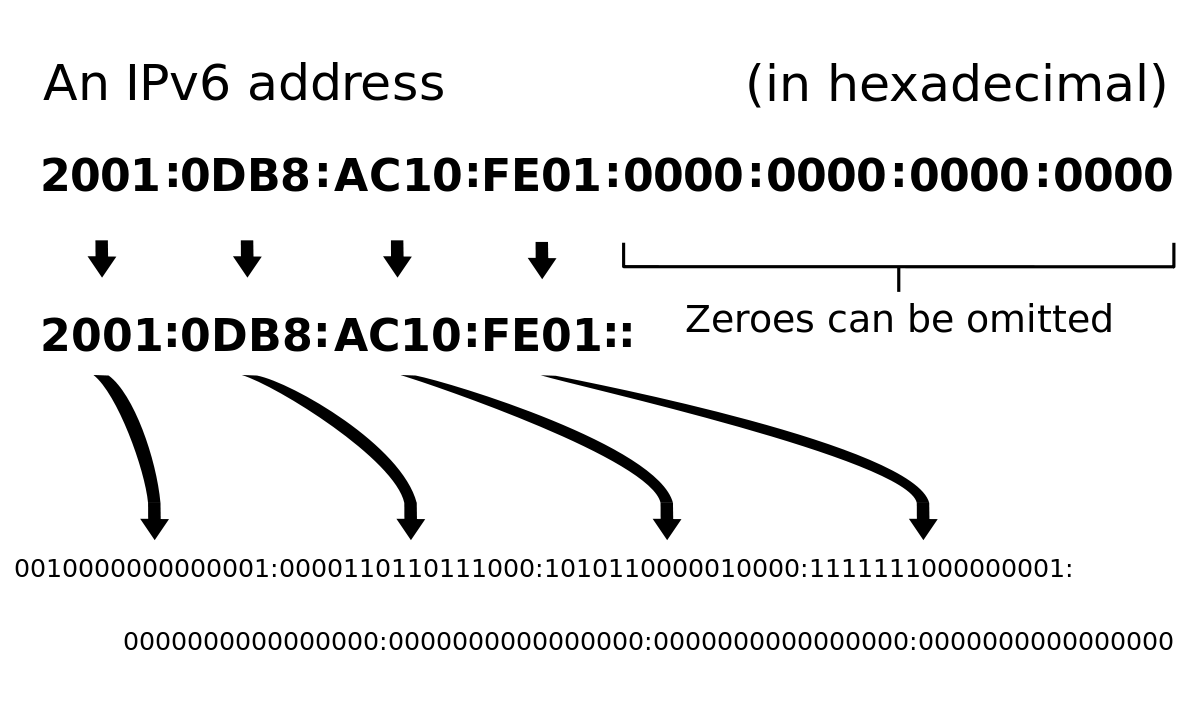
The eight groups make a total of 32 hexadecimal digits, four bits each, which makes a total of 128 bits. RFC 4291 says that the preferred representation of an IPv6 address is x:x:x:x:x:x:x:x and RFC 5952 recommends that the address is written in lowercase.
How to connect to IPv6 from IPv4
IPv4 and IPv6 are two completely separate protocols, with separate, incompatible packet headers and addressing, and an IPv4-only host cannot directly communicate with an IPv6-only host. The correct way to do this is to dual-stack one or both hosts so that they run both the IPv4 and IPv6 protocols.
How do I enable IPv6 on Chrome
IPv6 support on Chrome OSStep 1: Configure your network to use SLAAC. Configure your network to use the stateless address autoconfiguration (SLAAC) protocol instead of the Dynamic Host Configuration Protocol version 6 (DHCPv6).Step 2: Configure DNS to use RDNSS.Step 3: Assign a unique prefix for every VPN host.
Which browsers support IPv6
This is supported in Chrome, Firefox, IE and probably other browsers. Note that you need to have IPv6 working on your OS, and every device in the path to the destination (including proxy servers if you use one).
What website uses IPv6
As you can see, some of the world's biggest content providers like Google, YouTube, Facebook, and Netflix are now IPv6-capable. Other sites that top the list include Wikipedia, Yahoo, Instagram, LinkedIn, and Yandex.
What connection type should I use for IPv6
There are two main types of IPv6 WAN connectivity: native (Auto and Static) and tunneling over IPv4 (6to4, 6in4, and 6rd). Native – (Auto and Static) The upstream ISP routes IPv6 packets directly.
How do I know if I have IPv6
By using I-P. show, you can check whether you are: On an IPv4 supported device here: https://v4.i-p.show. On an IPv6 supported device here: https://v6.i-p.show.


0 Comments