
What port is MySQL?
Here is the article in HTML format without the required tags:
Summary of the Article:
If you are using Windows, you can look for the MySQL port number in the settings file:Navigate to the “my.ini” file. It will be located in the MySQL installation directory, e.g. C:\Program Files\MySQL\MySQL Server 8.0\. Open the .ini configuration file with Notepad.Find the MySQL port that is listening on Windows.
Questions and Answers:
1. How can I check MySQL port?
If you are using Windows, you can look for the MySQL port number in the settings file: Navigate to the “my.ini” file. It will be located in the MySQL installation directory, e.g. C:\Program Files\MySQL\MySQL Server 8.0\. Open the .ini configuration file with Notepad. Find the MySQL port that is listening on Windows.
2. Is port 3306 a vulnerability?
MySQL port – 3306 is used by MySQL server to listen requests from clients. Allowing inbound traffic from all external IP addresses to MySQL is vulnerable to DoS, Buffer Overflow, SQL Injection attacks.
3. What is the TCP port for MySQL?
The default MySQL port 3306 is TCP (Transmission Control Protocol).
4. Can I use port 3307 for MySQL?
For example, if you want to use port 3307, change the line to port=3307. Save the configuration file and restart the MySQL server.
5. How do I find my MySQL port and IP?
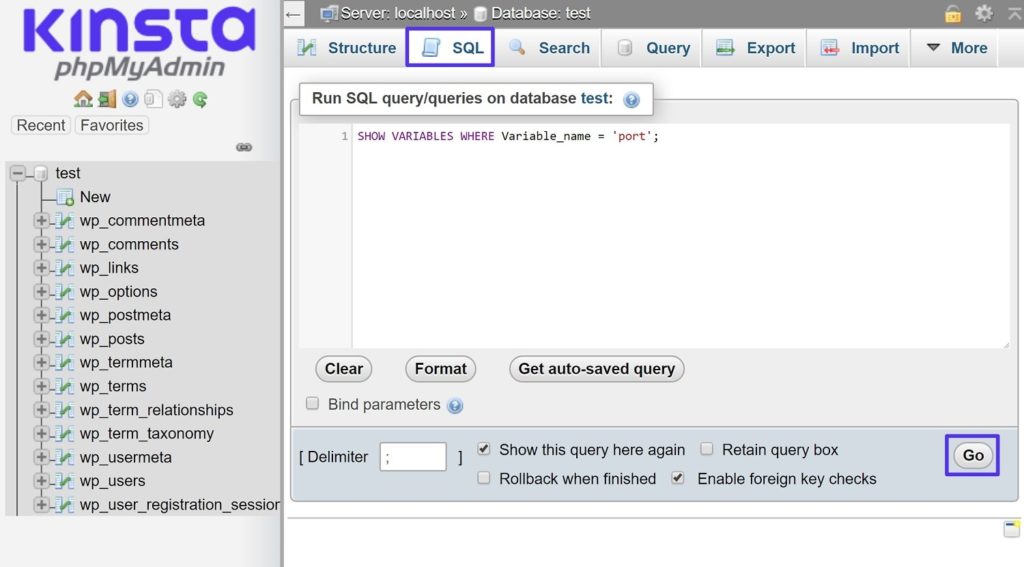
The SQL query SHOW VARIABLES WHERE Variable_name = ‘hostname’ will show you the hostname of the MySQL server which you can easily resolve to its IP address. SHOW VARIABLES WHERE Variable_name = ‘port’ Will give you the port number.
6. How do I find my MySQL host and port?
It is usually in the form jdbc:mysql://hostname:port/database, where hostname is the hostname or IP address of your MySQL server and port is the port number that the MySQL server is listening on.
7. What is the port 3306 used for?
Port 3306 is the default port for the classic MySQL protocol (port), which is used by the mysql client, MySQL Connectors, and utilities such as mysqldump and mysqlpump.
8. How do I know if port 3306 is blocked?
netsh firewall show config If you are running an application/service that is listening on 3306, the firewall config should show it to be Enabled. If this is not seen, you have probably missed adding an exception with the firewall to allow this app/service. Finally, port 3306 is typically used for MySQL.
9. Is MySQL 3306 TCP or UDP?
TCP Is MySQL Port 3306 TCP or UDP MySQL Port 3306 is a Transmission Control Protocol (TCP) port. TCP is a connection-oriented protocol that provides reliable, ordered delivery of data between applications running on different hosts.
10. What is the difference between MySQL 3306 and 3307?
MySQL (or most/all other processes) can listen on just about any port (0-65535) though ports below 1024 are privileged and require special permissions (usually root/admin). There is no difference in port 3306, 3307, or 8279 for that matter other than that 3306 is the default port for MySQL.
11. Is MySQL port always 3306?
Port 3306 is the default port for the classic MySQL protocol (port), which is used by the mysql client, MySQL Connectors, and utilities such as mysqldump and mysqlpump.
12. How do I know if MySQL is running on port 3306?
TelNet Test From a Windows machine, access the command line from start -> run -> cmd. If you are using a Mac, open up the Terminal application. From inside the command prompt, type the command “te”
How can I check MySQL port
If you are using Windows, you can look for the MySQL port number in the settings file:Navigate to the "my. ini" file. It will be located in the MySQL installation directory, e.g. C:\Program Files\MySQL\MySQL Server 8.0\.Open the. ini configuration file with Notepad.Find the MySQL port that is listening on Windows.
Cached
Is port 3306 a vulnerability
MySQL port – 3306 is used by MySQL server to listen requests from clients. Allowing inbound traffic from all external IP addresses to MySQL is vulnerable to DoS, Buffer Overflow, SQL Injection attacks.
Cached
What is the TCP port for MySQL
The default MySQL port 3306 is TCP (Transmission Control Protocol).
Cached
Can I use port 3307 for MySQL
For example, if you want to use port 3307, change the line to port=3307. Save the configuration file and restart the MySQL server.
Cached
How do I find my MySQL port and IP
The SQL query SHOW VARIABLES WHERE Variable_name = 'hostname' will show you the hostname of the MySQL server which you can easily resolve to its IP address. SHOW VARIABLES WHERE Variable_name = 'port' Will give you the port number.
How do I find my MySQL host and port
It is usually in the form jdbc:mysql://hostname:port/database , where hostname is the hostname or IP address of your MySQL server and port is the port number that the MySQL server is listening on.
What is the port 3306 used for
classic MySQL protocol
Port 3306 is the default port for the classic MySQL protocol ( port ), which is used by the mysql client, MySQL Connectors, and utilities such as mysqldump and mysqlpump.
How do I know if port 3306 is blocked
netsh firewall show config
If you are running an application/service that is listening on 3306, the firewall config should show it to be Enabled. If this is not seen, you have probably missed adding an exception with the firewall to allow this app/service. Finally, port 3306 is typically used for MySQL.
Is MySQL 3306 TCP or UDP
TCP
Is MySQL Port 3306 TCP or UDP MySQL Port 3306 is a Transmission Control Protocol (TCP) port. TCP is a connection-oriented protocol that provides reliable, ordered delivery of data between applications running on different hosts.
What is the difference between MySQL 3306 and 3307
MySQL (or most/all other processes) can listen on just about any port (0-65535) though ports below 1024 are privileged and require special permissions (usually root/admin). There is no difference in port 3306, 3307 or 8279 for that matter other than that 3306 is the default port for MySQL.
Is MySQL port always 3306
Port 3306 is the default port for the classic MySQL protocol ( port ), which is used by the mysql client, MySQL Connectors, and utilities such as mysqldump and mysqlpump.
How do I know if MySQL is running on port 3306
TelNet TestFrom a windows machine, access the command line from start -> run -> cmd. If you are using a Mac, open up the Terminal application.From inside the command prompt, type the command telnet <domain name> 3306.Hit enter to activate the command.
How to check SQL Server port
Open SQL Server Configuration Manager
In the SQL Server Network Configuration menu, select Protocols for MSSSLSERVER. Right-click TCP/IP and select Properties. In the window that opens, click the IP Addresses tab. Check what port the SQL Server is currently running on.
How do I connect to MySQL database
To Connect to a MySQL Database
Expand the Drivers node from the Database Explorer. Right-click the MySQL (Connector/J driver) and choose Connect Using…. The New Database Connection dialog box is displayed. In the Basic Setting tab, enter the Database's URL <HOST>:<PORT>/<DB> in the corresponding text field.
How do I know if port 3306 is being used
To verify if port 3306 is open, you can use NetStat, CurrPorts, or PortQry. We recommend NetStat, as you won't have to download new software for this. Run the Command Prompt as administrator. Type the command: netstat -ab and hit Enter.
What is 3306 port used for
Port 3306 is the default port for the classic MySQL protocol ( port ), which is used by the mysql client, MySQL Connectors, and utilities such as mysqldump and mysqlpump.
How do I fix MySQL port 3306 already in use
4 AnswersIn the search, Go to Run.Type "services.msc"Search "MySQL" in running status and "stop" it.Refresh the server and now install.
What is UDP 3306 used for
Port 3306 is the default port for the classic MySQL protocol ( port ), which is used by the mysql client, MySQL Connectors, and utilities such as mysqldump and mysqlpump.
Is SQL port TCP or UDP
SQL Server Browser service uses UDP static port 1434. It reads the registry for the assigned TCP port. SQL Server client library connects and sends a UDP message using port 1434. SQL Server Browser service gives back the port number of a specific instance.
How do I change my MySQL port from 3306 to 3307
To change it follow the steps:Open "my. ini" file in MySQL server installation directory.You will see the default port number "port=3306"Change it to desired port number.After changing, save the "my. ini" file.Restart MySQL server.
How do I know if 3306 is open
You can press Ctrl + F and type 3306 in the word box to search for it. If the port is open, it will show in the results as LISTENING. To check if port 3306 is open via CurrPorts, just sort by Local Port, then find port 3306. If the port is available, it will show in the list.
What is TCP port 1433 used for
Port 1433 for TCP is needed to connect to the SQL database instance. By default, SQL will attempt to use 1433. If that port is unavailable, it will automatically choose another port. If this is the case, that port will need to be opened through the firewall instead.
How do I know if port 1433 is open
You can check TCP/IP connectivity to SQL Server by using telnet. For example, at the command prompt, type telnet 192.168. 0.0 1433 where 192.168. 0.0 is the address of the computer that is running SQL Server and 1433 is the port it is listening on.
How to connect MySQL server to localhost
This can be done with the mysql_connect PHP function: $mysqli = new mysqli("localhost", $username, $password, $database); With this line PHP connects to the MySQL database server at localhost with the provided username and password. After the connection is established you should select the database you wish to use.
How to connect to MySQL command line
How to use MySQL Command Line ClientOpen Command Prompt.Navigate to the bin folder. For example: cd C:\Program Files\MySQL\MySQL Server 8.0\bin.Run the mysql -u root -p command.Enter the password.


0 Comments