
How do I see all the websites visited on my home network?
Can I find out what websites were visited on my router
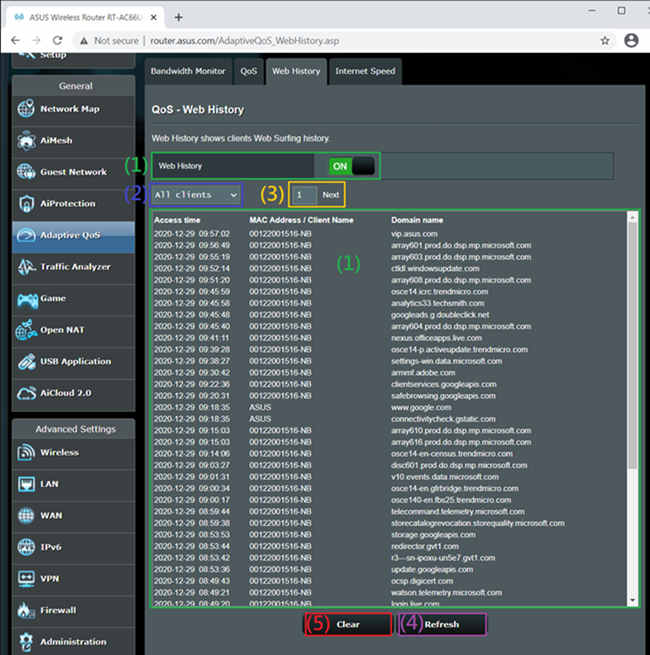
Anyone with access to your Wi-Fi router’s admin panel can check your browsing history, be it at home, work, or school. Most modern routers keep a log of connected devices, event timestamps, bandwidth used, visited website URLs, and IP addresses.
Can I see what websites are visited on my router
Can Someone See My Internet History On Their WIFI Yes. The WiFi owner has access to the admin panel from the WiFi router, meaning they can see the browsing information performed on their WiFi network. In addition, routers see log information, including when and what you did on your computer. Cached
How can I monitor my home network internet activity
The easiest way to monitor internet usage is to use your ISP’s home network management app. Many ISPs offer apps that allow you to view your data usage, set usage limits, and even set up parental controls to restrict access to certain websites.
How can I see what websites have been visited on data
View other activityGo to your Google Account.On the left, click Data & privacy.On the “History settings,” click My Activity.Above your activity, in the search bar, click More Other Google Activity.Below the activity you want to view, select your option.
Can parents see Internet history on WiFi bill
However, your parents will be able to see if you have made any purchases that were directly charged to your phone service, as those will be presented in the bill. Yes, your parents can see your search history because all wifi routers have logs to store your wifi history.
Does my Internet service provider know what I am browsing in incognito
Incognito or private mode will keep your local browsing private, but it won’t stop your ISP, school, or employer from seeing where you’ve been online. In fact, your ISP has access to all your browsing activity pretty much no matter what you do.
Can you track Internet usage on home network
With the Google Home appOpen the Google Home app.Tap Wi-Fi.Tap Internet. Real-time usage: How much data your network is currently uploading and downloading.
How can I monitor my home router traffic
To monitor Internet traffic:Launch a web browser from a computer or wireless device that is connected to your router’s network.Enter the router username and password.Select ADVANCED > Advanced Setup > Traffic Meter.Select the Enable Traffic Meter checkbox.(Optional) Control the volume of Internet traffic.
How can I see what people search on my WiFi
With the Google Wifi appOpen the Google Wifi app.Tap Network Devices. The numbers next to “Devices” represent your total Internet (WAN) traffic to and from your network.Tap a specific device and a tab to find additional details. Usage: How much data the device has used over the selected time frame.
Can you see browser history through data
Yes. Internet providers can see everything you do on the internet. The only way to defend against this is by encrypting your data. Solutions like VPNs, HTTPS proxies, and the Tor browser can help you protect your data.
How do I stop Wi-Fi owner from viewing my history
If you’re using a reputable VPN service or the Tor browser, your internet traffic will be encrypted, preventing the Wi-Fi owner from viewing your browsing history.
Can I find out what websites were visited on my router
Anyone with access to your Wi-Fi router's admin panel can check your browsing history, be it at home, work, or school. Most modern routers keep a log of connected devices, event timestamps, bandwidth used, visited website URLs, and IP addresses.
Can I see what websites are visited on my router
Can Someone See My Internet History On Their WIFI Yes. The WiFi owner has access to the admin panel from the WiFi router, meaning they can see the browsing information performed on their WiFi network. In addition, routers see log information, including when and what you did on your computer.
Cached
How can I monitor my home network internet activity
The easiest way to monitor internet usage is to use your ISP's home network management app. Many ISPs offer apps that allow you to view your data usage, set usage limits, and even set up parental controls to restrict access to certain websites.
How can I see what websites have been visited on data
View other activityGo to your Google Account.On the left, click Data & privacy.On the "History settings," click My Activity.Above your activity, in the search bar, click More Other Google Activity.Below the activity you want to view, select your option.
Can parents see Internet history on WiFi bill
However, your parents will be able to see if you have made any purchases that were directly charged to your phone service, as those will be presented in the bill. Yes, your parents can see your search history because all wifi routers have logs to store your wifi history.
Does my Internet service provider know what I am browsing in incognito
Incognito or private mode will keep your local browsing private, but it won't stop your ISP, school, or employer from seeing where you've been online. In fact, your ISP has access to all your browsing activity pretty much no matter what you do.
Can you track Internet usage on home network
With the Google Home app
Open the Google Home app . Tap Wi-Fi . Tap Internet. Real time usage: How much data your network is currently uploading and downloading.
How can I monitor my home router traffic
To monitor Internet traffic:Launch a web browser from a computer or wireless device that is connected to your router's network.Enter the router user name and password.Select ADVANCED > Advanced Setup > Traffic Meter.Select the Enable Traffic Meter check box.(Optional) Control the volume of Internet traffic.
How can I see what people search on my WiFi
With the Google Wifi appOpen the Google Wifi app .Tap Network Devices. The numbers next to "Devices" represent your total Internet (WAN) traffic to and from your network.Tap a specific device and a tab to find additional details. Usage: How much data the device has used over the selected time frame.
Can you see browser history through data
Yes. Internet providers can see everything you do on the internet. The only way to defend against this is by encrypting your data. Solutions like VPNs, HTTPS proxies, and the Tor browser can help you protect your data.
How do I stop Wi-Fi owner from viewing my history
If you're using a reputable VPN service or the Tor network, the WiFi owner will not be able to see your browsing history. They may be able to tell that you're using a VPN or Tor, but they won't be able to see what websites you're visiting or what data you're transmitting.
Can your parents see what you search on incognito
Yes, incognito mode does leave a data trail. It doesn't hide your browsing activity from your ISP, employer, or other websites. They can see your browsing history, location, and any personal data you may be sharing along the way. Incognito mode hides your activity only from other people who share your device.
How do I stop WiFi owner from viewing my history
If you're using a reputable VPN service or the Tor network, the WiFi owner will not be able to see your browsing history. They may be able to tell that you're using a VPN or Tor, but they won't be able to see what websites you're visiting or what data you're transmitting.
Can parents see internet history on WiFi bill
However, your parents will be able to see if you have made any purchases that were directly charged to your phone service, as those will be presented in the bill. Yes, your parents can see your search history because all wifi routers have logs to store your wifi history.
What is the app to monitor websites visited on my WiFi
OpenDNS is one of the best apps to monitor websites visited on your WiFi. It is easier to set up and use than other tools that have a similar purpose. It also works on the web and other platforms. Read the rest of this article for more information about how OpenDNS works, including its pros and cons.
What uses the most data on home WiFi
Audio and video streaming
Streaming, downloading, and watching videos (YouTube, NetFlix, etc.) and downloading or streaming music (Pandora, iTunes, Spotify, etc.) dramatically increases data usage. Video is the biggest culprit.
Can I use Wireshark on my home network
Yes. Wireshark can capture packets off of a WiFi network as long as the computer it is installed on has a WiFi transceiver and is in promiscuous mode. Wireshark uses the Airpcap standard for wireless packet capture.
Can you see your search history on your WiFi bill
You cannot see your search history on your Wi-Fi bill, but your ISP can track your data usage and notify you if your network security is compromised.
Can my parents see what I search on WiFi
By Requesting your ISP:
Parents can request access to your browsing history from their internet service provider (ISP). ISPs keep logs of their customers' internet activity; parents can request these logs from the ISP.
Can parents see Internet history on Wi-Fi bill
However, your parents will be able to see if you have made any purchases that were directly charged to your phone service, as those will be presented in the bill. Yes, your parents can see your search history because all wifi routers have logs to store your wifi history.
Can your Internet provider see your incognito history
Incognito or private mode will keep your local browsing private, but it won't stop your ISP, school, or employer from seeing where you've been online. In fact, your ISP has access to all your browsing activity pretty much no matter what you do.
Can my parents see my search history through the WiFi bill
No, your parents cannot see your internet history on the bill. The bill is unable to record destination addresses, sites, or web surfing. However, your parents will be able to see if you have made any purchases that were directly charged to your phone service, as those will be presented in the bill.
Can my parents see my browsing history on WiFi
Your parents can see or may not see what you search on Wi-Fi. This depends on the tech-savvy of your parents and the measures they have put in place to monitor your online activities. Nonetheless, you can hide your Wi-Fi search history and other online activities using the methods described in this article.
Can WIFI owner see what sites I visited incognito
The answer is yes! Your WiFi operators, including the owner, company manager, administrators, etc., are aware of the sites and webpages you are visiting, even when you are browsing in the incognito mode.
Can you see what someone searches on your WIFI
Can someone view the websites I visit while using their Wi-Fi network Yes, a Wi-Fi owner can monitor your browsing history through the router's admin panel. They can check the router logs to see the connected devices, timestamps, sources, and IP addresses, but not necessarily specific URLs.


0 Comments