
How do I connect to a hidden wireless network?
Summary
To connect to a private wireless network, go to Settings > Network & internet > Wi-Fi. Select Manage known networks, choose the network you’re connected to, and change the Network profile type to Public or Private.
Key Questions
- How do I connect to a private wireless network?
- Go to Settings > Network & internet > Wi-Fi.
- Select Manage known networks.
- Choose the network you’re connected to.
- Change the Network profile type to Public or Private.
- Why can’t I connect to a hidden network?
- What is the SSID for a hidden network?
- How can I connect to a hidden Wi-Fi without knowing the SSID?
- How do I connect to an unsecured public Wi-Fi?
- Click the wireless connection icon on your computer’s taskbar.
- Look for open networks without padlock icons.
- Select the open network you want to join.
- How can I access a private network from the outside?
- Why would a Wi-Fi network be hidden?
- What does it mean to connect to a hidden network?
- Can a hidden SSID be found?
- Why would someone have a hidden network?
To connect to a private wireless network, follow these steps:
If you’re unable to connect to a hidden Wi-Fi network on Android 10 and the status shows ‘Not in range’, enable the Wi-Fi advanced setting ‘Hidden network’ by going to Settings > Network & internet > Wi-Fi.
A hidden network does not broadcast its Service Set Identifier (SSID), which means its name is not disclosed. However, finding hidden networks is not difficult and they are not necessarily more secure than networks that broadcast their SSID.
If you don’t know the network name (SSID), you can use the BSSID (Basic Service Set Identifier), which is the access point’s MAC address. Look for the BSSID on the underside of the access point. Also, check the security settings for the wireless access point.
To connect to an unsecured public Wi-Fi network with a PC or laptop:
You can use a VPN (Virtual Private Network) connection to access a private network from the outside. VPN allows secure remote control and makes the host PC part of the same network as the VPN connection.
People hide networks to maintain a certain level of security. Hidden networks are not easily discoverable by the average user, even though tools exist to detect them. Some users also hide networks to keep their browsing experience tidy when searching for new networks.
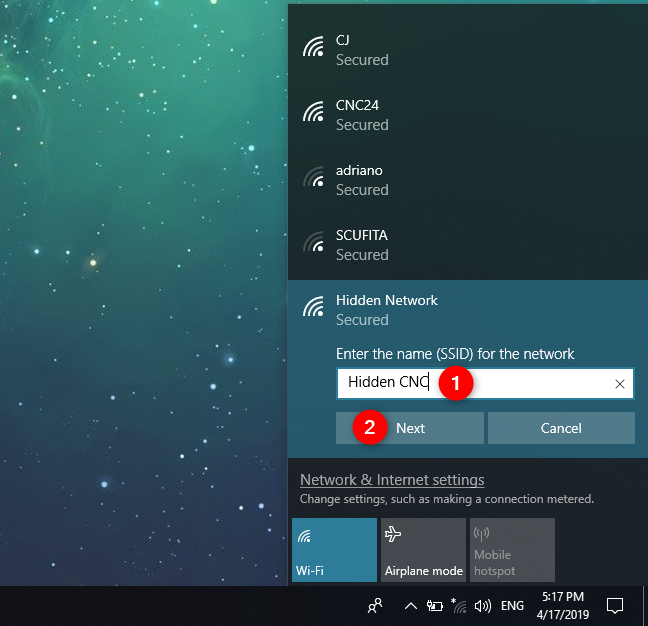
Connecting to a hidden Wi-Fi network requires knowing the network name, wireless security type, and other necessary details such as mode, username, and password. Contact the network administrator if you’re unsure what information to enter.
Hidden networks are essentially the same as regular Wi-Fi networks, except they do not broadcast their names (SSID) in the beacon frames. Without the network name, your computer cannot find it through scanning for nearby hotspots. To join a hidden network, you need to know its name or SSID.
Hidden networks offer a slightly higher level of security since they are not easily detectable by average users who are not actively looking for them. Some users also create hidden networks to keep their browsing experience organized when searching for new networks.
How do I connect to a private wireless network
To change a Wi-Fi network to public or private
Select Settings > Network & internet > Wi-Fi. On the Wi-Fi settings screen, select Manage known networks, and select the network you're connected to. On the Wi-Fi network screen, under Network profile type, select Public (Recommended) or Private.
Why can’t I connect to hidden network
To resolve the issue where your Android 10 device is unable to connect to a hidden Wi-Fi network and the status shows 'Not in range' even though the device is within the Wi-Fi coverage, you will need to enable the Wi-Fi advanced setting 'Hidden network'. Procedure: Navigate to Settings > Network & internet > Wi-Fi.
Cached
What is the SSID for hidden network
A hidden network doesn't broadcast the so-called Service Set Identifier (SSID), which is essentially a fancy way to say that it doesn't disclose its name. Such networks are not really any more secure than networks that do broadcast their SSID because finding them isn't difficult.
Cached
How to connect to hidden Wi-Fi without SSID
If you don't have the network name (SSID), you can use the BSSID (Basic Service Set Identifier, the access point's MAC address), which looks something like 02:00:01:02:03:04 and can usually be found on the underside of the access point. You should also check the security settings for the wireless access point.
CachedSimilar
How do I connect to unsecured public WIFI
How to connect with a PC or laptopClick the wireless connection icon on your computer's taskbar.Look for open networks, with no padlock icons.Select the open network you would like to join.
How do I access a private network from the outside
Use VPN connection. Some of the users will choose VPN to realize remote control for the security of VPN. Actually, we can also remote in to a server from outside the network by using VPN. The host PC will act as one of the parts on the same network when you use a VPN to connect.
Why would a Wi-Fi network be hidden
People use a hidden network to keep things slightly more secure. While tools are available to detect these networks, the average user won't think to look for something they don't even know exists. Some users also set up hidden networks to keep things tidier when browsing new networks.
What does connect to a hidden network mean
A hidden Wi-Fi network is a network whose name is not broadcast. To join a hidden network, you need to know the name of the network, the type of wireless security, and if necessary, the mode, user name, and password. Check with the network administrator if you're not sure what to enter.
Can a hidden SSID be found
Hidden networks are actually the same as regular Wi-Fi networks; only they don't broadcast their names (SSID) in the beacon frames. If the name isn't included, your computer will never find it just by scanning for nearby hotspots to join. To join a hidden network, you need to know its name first or the SSID.
Why would someone have a hidden network
People use a hidden network to keep things slightly more secure. While tools are available to detect these networks, the average user won't think to look for something they don't even know exists. Some users also set up hidden networks to keep things tidier when browsing new networks.
How do I manually connect to a hidden Wi-Fi on Android
We locate our wi-fi section to do this you can pull down the status bar and long press the wi-fi. Button this will bring available networks as we can see the network tech and mask that we need to
How do I bypass an unsecured network
Reader TipsOpen Settings > WiFi > tap on the “i” next to the unsecured network you want to join.Forget the network.Find that network again and click the “i” again.Choose configure DNS.Click Manual > Add Server > Type in 192.1.1.1 and SAVE.Join the network again.Wait for the WiFi icon to show up on-screen.
How do I bypass public Wi-Fi restrictions
We've handpicked some of the most popular ones for you — let's take a closer look.Unblock websites with VPN. By encrypting your data and hiding your IP address, a VPN lets you bypass Internet restrictions and access geo-blocked content from anywhere in the world.Use Tor.Use web proxy or proxy extension.Use SSH tunnel.
How do I connect to a WiFi network far away
How To Receive A WiFi Signal From A Long DistanceBuy a WiFi extender. This is likely one of the first answers you'll find when doing a Google search – and with good reason.Invest in a WiFi antenna.Drop the frequency.DIY a reflector panel.
How do I access a private IP address
Windows. Search for cmd in the Windows search bar, then in the command line prompt, type ipconfig to view the private IP address.
Is it possible to find a hidden Wi-Fi network
Open the Settings app and go to the WiFi settings. Tap the three dots in the top-right corner of the screen and select the "Show Hidden Networks" option. Find the network you want to connect to and tap on it to connect.
Should I be concerned about a hidden network
Revealing a hidden network doesn't mean you can (or should) connect it to since you'd still need the password to connect. A hidden network is no more or less safe to connect to than a regular network. What's important is knowing who owns and controls the network.
Why is there a hidden Wi-Fi network in my house
People use a hidden network to keep things slightly more secure. While tools are available to detect these networks, the average user won't think to look for something they don't even know exists. Some users also set up hidden networks to keep things tidier when browsing new networks.
What is an SSID and how can you find yours
SSID stands for Service Set IDentifier and is your network's name. If you open the list of Wi-Fi networks on your laptop or phone, you'll see a list of SSIDs. Wireless router or access points broadcast SSIDs so nearby devices can find and display any available networks.
Can a hidden network spy on me
If someone hacks your Wi-Fi, they can monitor all of your unencrypted traffic. That means they can spy on data sent across your network from all of your devices, including personal information like your name, address, and even financial account details.
How do I open hidden network settings on Android
So now you can use Wi-Fi like a pro on your Samsung Galaxy phone running on one UI 5.0. Now the Wi-Fi section has plenty of information but that is hidden inside settings to use all those Wi-Fi tools
How do I force my Android to connect to Wi-Fi
How to connect to wi-fi on your android. From the home. Screen hit menu and go to settings. Under wireless and networks tab you will see the option of wi-fi. Turn wi-fi on if not already switched on
How do I bypass network restrictions
Method 1: Use a proxyMethod 1: Use a proxy.Method 2: Use the Google cache.Method 3: Try a URL shortener.Method 4: Try the IP address.Method 5: Unblock websites in Chrome and Safari.Method 6: Switch between HTTP and HTTPS.Method 7: Use Tor Browser.Method 8: Use a VPN.
What happens if you connect to an unsecured network
Unsecured networks lack cybersecurity measures that keep your information safe. Therefore, you need to be very cautious about what information you are accessing when using an unsecured WiFi network. Many experts recommend never connecting to unsecured networks because you are far too vulnerable.
How do I connect to unsecured public Wi-Fi
How to connect with a PC or laptopClick the wireless connection icon on your computer's taskbar.Look for open networks, with no padlock icons.Select the open network you would like to join.


0 Comments