
How do I delete all traces of Bitdefender?
How do I completely remove Bitdefender?
To uninstall Bitdefender from a Windows PC, click the Start menu and then type APPWIZ. Right-click on the Bitdefender app and select Uninstall or click the Uninstall button at the top. If the User Account Control shows up, confirm the uninstallation by choosing Yes.
Is Bitdefender easy to remove?To remove Bitdefender Antivirus from a Windows PC, click Start, head to Settings, and select Apps. Locate Bitdefender Antivirus in the list of installed apps and click Uninstall. Follow the on-screen prompts and restart your device to complete the uninstallation.
How do I manually remove Bitdefender from my Mac?If the Bitdefender icon is still in your Dock, right-click on it, select Options, and then choose Remove from Dock. If you want to use the app again, follow these steps to reinstall it – How to install Bitdefender Antivirus for Mac.
Does Bitdefender have a cleanup tool?The optimizer will start scanning your computer for three types of issues and display a summary of what it finds: Disk Cleanup – detects unnecessary files that can be safely cleaned up to free up space.
Does Bitdefender remove all malware?Bitdefender Total Security works against all e-threats, from viruses, worms and Trojans, to ransomware, zero-day exploits, rootkits and spyware. Your data and privacy are safe.
Will Bitdefender find all malware?Bitdefender Total Security works against all e-threats, from viruses, worms and Trojans, to ransomware, zero-day exploits, rootkits and spyware. Your data and privacy are safe.
How do I remove Bitdefender virus scanner from my Mac?Alternatively, you can right-click on Bitdefender Virus Scanner and choose Move to Trash. This last action will remove the Virus Scanner application. It’s that simple!
How do I clean my computer with Bitdefender?To clean infected Temporary Files, restart your device. Immediately after restarting, perform a new scan using Bitdefender. The infected temporary files should now be deleted. Remove the files with a temporary file cleaner such as Disk Cleanup. Remove the files manually in Safe Mode.
What is the best program to cleanup my computer?Top 10 Best Windows Cleaner Apps: Cleaner One Pro Windows, CCleaner, BleachBit, Glary Utilities, Clean Master, Advanced System Care, Wise Disk Cleaner, CleanMyPC.
What are the bad things about Bitdefender?One of the biggest drawbacks to Bitdefender is the price. It’s one of the more expensive services on the market, and some critical features, such as email security, will cost you extra. You could end up spending hundreds more on a subscription compared to other options depending on the features you need.
Does Bitdefender find all Trojans?Bitdefender won’t only protect you against Trojans, but also equip you to contend with nearly every kind of digital threat imaginable.
Will Bitdefender remove existing viruses? 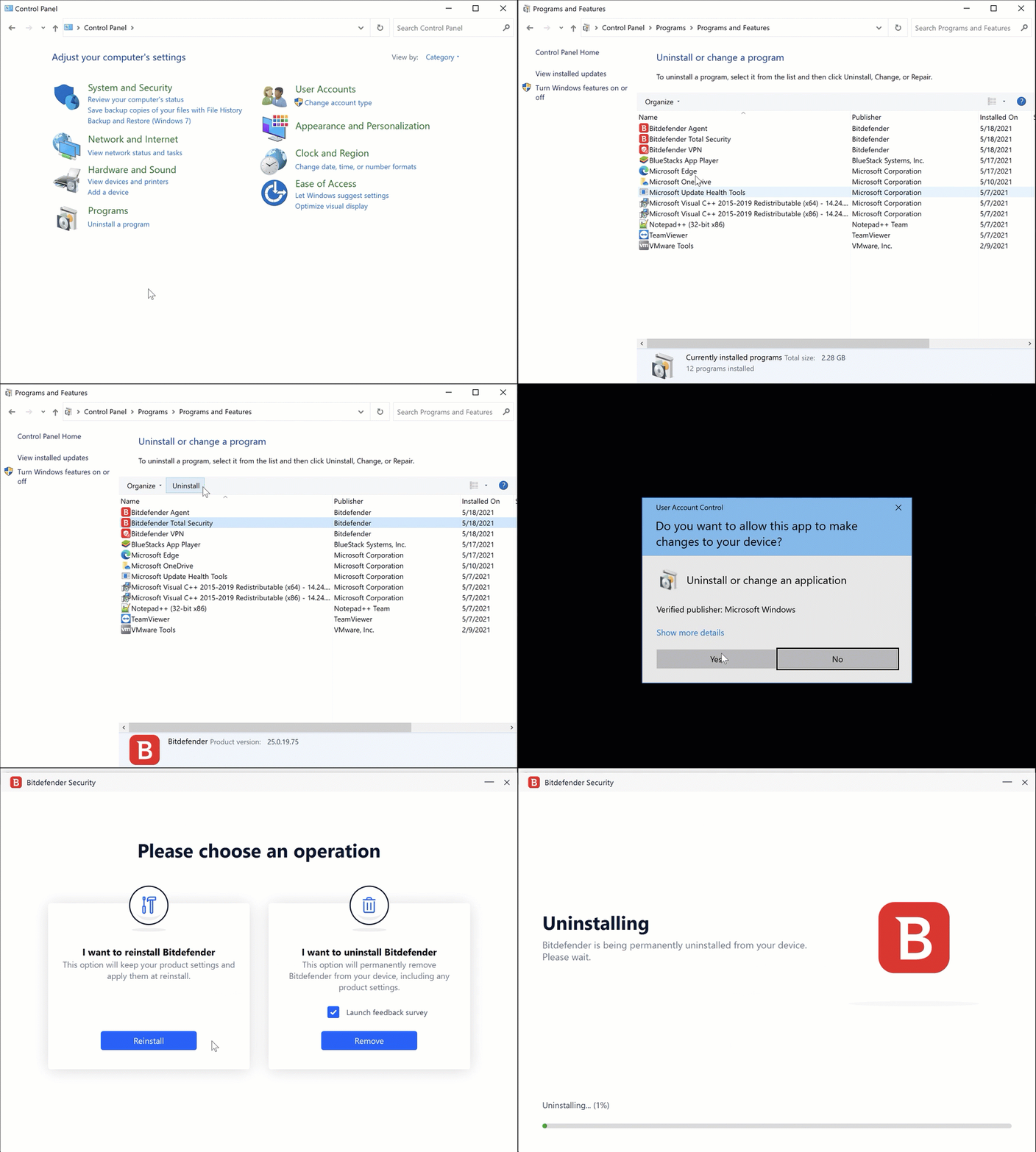
How do I completely remove Bitdefender
How to uninstall Bitdefender from a Windows PCClick the Start menu ⊞ and then type APPWIZ.Right-click on the Bitdefender app and select Uninstall or click the Uninstall button up at the top.If the User Account Control shows up, confirm the uninstallation by choosing Yes.
Cached
Is Bitdefender easy to remove
Click Start, head to Settings, and select Apps. Locate Bitdefender Antivirus in the list of installed apps and click Uninstall. Follow the on-screen prompts and restart your device to complete the uninstallation.
Cached
How do I manually remove Bitdefender from my Mac
If the Bitdefender icon is still in your Dock, right-click on it, select Options, and then choose Remove from Dock. If you want to use the app again, follow these steps to reinstall it – How to install Bitdefender Antivirus for Mac.
Does Bitdefender have a cleanup tool
The optimizer will start scanning your computer for three types of issues and display a summary of what it finds: Disk Cleanup – detects unnecessary files that can be safely cleaned up to free up space.
Does Bitdefender remove all malware
Bitdefender Total Security works against all e-threats, from viruses, worms and Trojans, to ransomware, zero-day exploits, rootkits and spyware. Your data and privacy are safe.
Will Bitdefender find all malware
Bitdefender Total Security works against all e-threats, from viruses, worms and Trojans, to ransomware, zero-day exploits, rootkits and spyware. Your data and privacy are safe.
How do I remove Bitdefender virus scanner from my Mac
Alternatively, you can right-click on Bitdefender Virus Scanner and choose Move to Trash. This last action will remove the Virus Scanner application. It's that simple!
How do I clean my computer with Bitdefender
How to clean infected Temporary FilesRestart your device.Immediately after restarting, perform a new scan using Bitdefender. The infected temporary files should now be deleted.Remove the files with a temporary file cleaner such as Disk Cleanup.Remove the files manually in Safe Mode.
What is the best program to cleanup my computer
Top 10 Best Windows Cleaner AppsCleaner One Pro Windows. Cleaner One Pro Windows is an all-in-one disk cleaning and optimization software that frees up disk space by removing invalid and unnecessary files.CCleaner.BleachBit.Glary Utilities.Clean Master.Advanced System Care.Wise Disk Cleaner.CleanMyPC.
What are the bad things about Bitdefender
One of the biggest drawbacks to Bitdefender is price. It's one of the more expensive services on the market, and some critical features, such as email security, will cost you extra. You could end up spending hundreds more on a subscription compared to other options depending on the features you need.
Does Bitdefender find all Trojans
Bitdefender won't only protect you against Trojans, but also equip you to contend with nearly every kind of digital threat imaginable.
Will Bitdefender remove existing viruses
We eliminate all viruses from your system
Bitdefender's engineers will clean your files via a remote, ultra-secure connection to make sure that viruses are gone without a trace.
How do I completely remove malware from my Mac
Malware removal from a Mac can be accomplished in six simple steps.Step 1: Disconnect from the internet.Step 2: Enter safe mode.Step 3: Check your activity monitor for malicious applications.Step 4: Run a malware scanner.Step 5: Verify your browser's homepage.Step 6: Clear your cache.
How do I remove old antivirus software from my Mac
To manually uninstall existing antivirus software for Mac:Open your Finder window.Select Applications.Locate and open the folder for your existing antivirus software and then select Uninstall.
How do I completely remove Bitdefender from Windows 10
And we're going to go ahead and jump right into it so we're going to start off by opening up the search menu. And type in control panel. Best result should go back with control panel so go ahead and
Does Bitdefender have a PC cleaner
Bitdefender — Simple One-Click PC Cleanup Tool
Its cleanup scan targets a wide range of items on your PC, including Windows junk files, temporary system files, browser history, broken registry items, and more.
How to do a deep clean of your computer
How to clean up your PC and hard diskPerform a disk cleanup.Use a specialized cleanup app.Delete huge files to free up space on your hard drive.Uninstall applications you don't need.Use CHKDSK to test your hard drive's integrity and health.Use cloud or external storage if you're running out of local space.
Is Bitdefender a Russian company
Bitdefender is a Romanian cybersecurity technology company headquartered in Bucharest, Romania, with offices in the United States, Europe, Australia and the Middle East. The company was founded in 2001 by the current CEO and main shareholder, Florin Talpeș.
Is Bitdefender legit or not
Bitdefender is a safe anti-malware application. Actually, it's at the top of the list of antivirus software. It even got the AV-Comparatives' Product of the Year ranking four times in total – more than any other antivirus program.
How do I find hidden malware on my Mac
Identify malware in Activity Monitor
Use the Activity Monitor to identify potential malware: Go to Applications > Utilities > Activity Monitor. Go through the list of apps and search for ones with unusually high CPU or memory usage. Click the X in the upper-left area of the window to close the chosen apps.
Will a factory reset remove malware on Mac
The short answer is yes, a factory reset can remove viruses and malware from your Mac. However, it is important to understand that a factory reset should not be the first solution you fall upon. It should be your last resort when all other options fail to eliminate the threat.
How do I completely remove antivirus software
How To Uninstall AntivirusFrom the Start menu, select the Control Panel.From the Programs category, select Programs and Features.Choose the antivirus program you want to remove, and then select Uninstall/Change.When prompted, restart your computer.
Can you really wipe a computer clean
Yes, you can completely wipe a hard drive, but you'll need to do more than simply delete the files stored on it. Deleting files from a hard drive doesn't actually remove them — it just reassigns that space so new files can be added later on. To clean a drive completely, you need to actually erase the data.
Is Bitdefender safe in USA
Bitdefender is a safe anti-malware application. Actually, it's at the top of the list of antivirus software. It even got the AV-Comparatives' Product of the Year ranking four times in total – more than any other antivirus program.
What is the Bitdefender controversy
In 2021, Bitdefender was accused of self-promotion when releasing and publicly announcing a decryptor to the detriment of actual victims with regards to DarkSide, a hacking group.


0 Comments