
How do I find the IP address of my VPN server?
Summary of the Article
A VPN replaces your actual IP address to make it look like you’ve connected to the internet from a different location: the physical location of the VPN server, rather than your real location. You can find your VPN on your computer by selecting Start > Settings > Network & internet > VPN. A VPN can hide your IP address and block your location and browser history. To find your VPN IP address in Windows, open the Start menu, type network, and select network connection settings. VPNs usually use shared IP addresses, but dedicated IPs are less likely to be blacklisted. VPNs assign IP addresses to clients using a Virtual Adapter. A VPN hides your IP address and establishes an encrypted connection between your device and a VPN server. To find your IP address and location, go to your phone’s settings and select “About device” > “Status”. To locate an IP address, find it in Windows by selecting Start > Settings > Network & internet > Wi-Fi and then selecting the Wi-Fi network. On Windows, you can also use the commands “ipconfig” and “arp -a” to find IP addresses on your network. VPNs automatically change your IP address, making it appear as if all requests are originating from the server. When you connect to a VPN server, your IP address is changed with the server’s address, establishing a secure connection between you and the internet.
Questions:
- Does a VPN server have an IP address?
- How do I find my VPN on my computer?
- Does a VPN show my IP address?
- How do I find my VPN IP address in Windows?
- Which IP address is used in VPN?
- How does VPN assign IP address?
- What is a VPN and how do I find it?
- Where is my IP address and location?
- How do I locate an IP address?
- How do I find an IP address on my network?
- Does VPN automatically change IP address?
- What happens to your IP address when you connect to the VPN server?
Answers:
- A VPN server has an IP address, which is used to establish a connection between the client and the server.
- You can find your VPN on your computer by selecting Start > Settings > Network & internet > VPN.
- A VPN can hide your IP address and block your location and browser history. However, your IP address can still be collected even if you use a private browsing mode.
- To find your VPN IP address in Windows, open the Start menu, type network, and select network connection settings. Your IP address will be shown there.
- VPNs usually use shared IP addresses, in which multiple users access the internet from a single IP address. However, dedicated IPs are less likely to be blacklisted.
- A VPN can assign IP addresses to clients using a Virtual Adapter, independent of the address the client computer uses in its local network.
- A VPN is a virtual private network that hides your IP address and establishes an encrypted connection between your device and a VPN server. To find it, you can check the settings of your device or consult the VPN provider’s documentation.
- You can find your IP address and location in your phone’s settings. Go to “About device” and then “Status”.
- To locate an IP address in Windows, select Start > Settings > Network & internet > Wi-Fi and then select the Wi-Fi network to find your IP address listed next to IPv4 address.
- To find an IP address on your network, type the command “ipconfig” and press Return in Windows. You can get more information by typing the command “arp -a”.
- Yes, VPN automatically changes your IP address. Every online entity you connect with will assume that the server is the source of your requests.
- When you connect to the VPN server, your IP address is replaced with the server’s address, making it appear as if all requests are originating from the server.
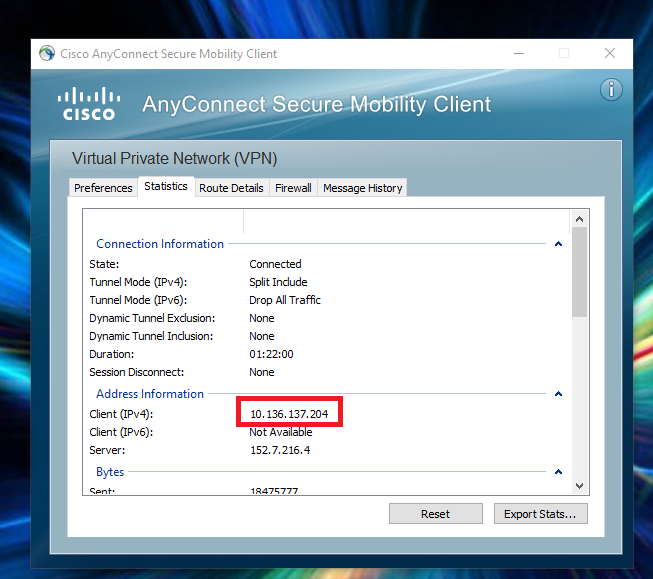
Does a VPN server have an IP address
A VPN replaces your actual IP address to make it look like you've connected to the internet from a different location: the physical location of the VPN server, rather than your real location.
Cached
How do I find my VPN on my computer
Select Start > Settings > Network & internet > VPN.
Does a VPN show my IP address
A virtual private network (VPN) can hide a user's internal protocol address (IP address) and block their location and browser history. This allows them to share and receive information on public internet networks more privately. Even if you use a private browsing mode, your IP address can still be collected.
Cached
How do I find my VPN IP address in Windows
Open the Start menu, type network, and select network connection settings. Click Network in the Connections menu. Your IP address will be shown here.
Which IP address is used in VPN
VPNs usually use shared IP addresses, in which multiple users access the internet from a single IP address. This approach improves privacy by making it impossible to trace online activity back to a single user. But dedicated IPs are less likely to be blacklisted by websites, apps, services, and censorship systems.
How does VPN assign IP address
You can use a Virtual Adapter to assign the VPN client an IP address in the VPN, independent of the address the VPN client computer uses in its local network. You can use a Virtual Adapter to assign the VPN client an IP address in the VPN.
What is a VPN and how do I find it
A VPN hides your IP address and establishes an encrypted connection between your laptop computer, tablet, or other internet-enabled device and a VPN server. This means data you send to the VPN server is secure. Plus, no one can snoop on your online activities if you use a VPN connection.
Where is my IP address and location
Go to your phone's settings. Select “About device.” Tap on “Status.” Here you can find information about your device, including the IP address.
How do I locate an IP address
Find your IP address in WindowsSelect Start > Settings > Network & internet > Wi-Fi and then select the Wi-Fi network you're connected to.Under Properties, look for your IP address listed next to IPv4 address.
How do I find an IP address on my network
On Windows, type the command “ipconfig” and press Return. Get more information by typing the command “arp -a.” You should now see a basic list of the IP addresses for devices connected to your network.
Does VPN automatically change IP address
Every online entity you connect with will assume that the server is the source of your requests, so yes, VPN does change your IP. This means your public IP is changed with the server's address, making it appear as if all requests are originating from the server.
What happens to your IP address when you connect to the VPN server
A VPN connection establishes a secure connection between you and the internet. Via the VPN, all your data traffic is routed through an encrypted virtual tunnel. This disguises your IP address when you use the internet, making its location invisible to everyone.
What is the server name or address of a VPN
What is a Server name or address of VPN The VPN server hostaname or in oder words VPN address is the specific location of the VPN server. The address can be an IP address or a domain name.
What is the connection name for VPN
VPN stands for Virtual Private Networking. VPN allows for a secure remote connection to UWSP network resources.
Can I find IP address based on location
Through a useful internet tool called IP Geolocation Lookup, you can track an IP address close to someone's exact location. You can get pretty close, depending on a variety of factors, to finding the physical location of someone's IP address.
Is your IP address your exact location
IP addresses do reveal your geolocation, but not your precise location like a home address does. IP addresses will also never reveal your name, phone number, or other precise personal information.
Can my IP address be found
You can find your IP address by running a Google search for ”What is my IP address” Once you do this, the internet sends your IP address to you. The internet knows your IP address because it's assigned to your device and is required to browse the internet.
What does an IP address look like
An IP address is a string of numbers separated by periods. IP addresses are expressed as a set of four numbers — an example address might be 192.158.1.38. Each number in the set can range from 0 to 255. So, the full IP addressing range goes from 0.0.0.0 to 255.255.255.255.
How do I find the IP address of a device connected to my router
Type the command "arp -a" to view the list of all IP addresses connected to your network. This will also display the MAC address and the allocation type (static and dynamic) of all your network devices. Type "nslookup" followed by any IP address obtained through the "arp" command in the previous step.
How to find all IP addresses on network terminal
Open a terminal window to get to the command line. Enter the command arp -a to get a list of all IP addresses on your network.
Does restarting router change IP
Your internet provider assigns a public, dynamic IP address to your router or wireless gateway. When you reboot either device, it receives a new IP address from your internet provider.
Does changing your VPN change your IP address
A VPN configuration will not only change your IP address, it will also improve your overall internet experience. Using a VPN service can improve your speed by helping you defeat throttling and avoid network congestion.
What is the difference between VPN and VPN server
What Is the Difference Between a VPN and VPS A virtual private network (VPN) is a tool designed to provide online privacy and security. On the other hand, a virtual private server (VPS) is a virtual space or machine that runs a dedicated operating system.
What is VPN server on router
A virtual private network (VPN) router is like a normal router you would use in your home except it has a VPN installed inside it. It is powered by firmware that allows it to manage VPN connections and then allow various devices in the home to connect to the VPN service.
What is the address for the VPN server
The VPN server hostaname or in oder words VPN address is the specific location of the VPN server. The address can be an IP address or a domain name. While setting up a manual connection on some platforms and advanced configurations you might be required to define a server hostname address.


0 Comments