
What is connection name in MySQL?
Summary of the Article: What is the Connection Name in MySQL?
1. What is the connection name of MySQL server?
The MySQL hostname will always be ‘localhost’ in your configuration files. If you need to connect to your database from your home PC, use your primary domain name or the server name that can be found in your account signup email.
2. How do I find my MySQL connection?
Connecting to MySQL Using the MySQL Command-Line Client:
– Locate the MySQL Command-Line Client
– Run the client
– Enter your password
– Get a list of databases
– Create a database
– Select the database you want to use
– Create a table and insert data
– Finish working with the MySQL Command-Line Client
3. What is a connection in MySQL database?
A connection is a computer science facility that allows the user to connect with the database server software. A user can connect with the database server, whether on the same machine or remote locations.
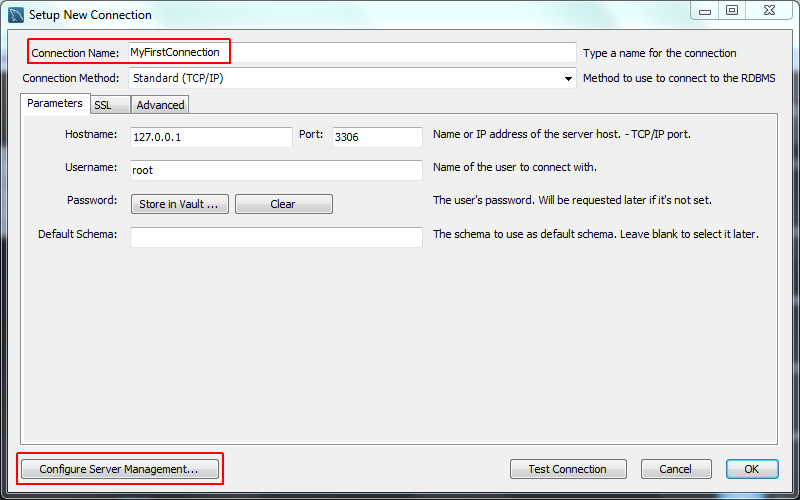
4. How to create a MySQL connection?
Connect To Your Database Remotely:
– Open MySQL Workbench
– In the bottom left of the page, click on New Connection
– Enter your database connection credentials in the Set up a New Connection dialog box
– Click Test Connection
– If you see the message “Connection parameters are correct,” click Ok
5. How to check MySQL connection in cmd?
Make sure you have created MySQL connection correctly. Open the command line from search, then type cd \. Once you reached the bin directory, type mysql -u yourUserName -p (apply this to connect to MySQL)
6. How to connect to MySQL client?
To connect to your instance, do the following:
– Confirm that you have installed the client and configured access to your instance.
– Start the MySQL client: mysql –host= INSTANCE_IP –user=root –password.
– Enter your password.
– The mysql prompt appears.
7. What is a connection in the database?
A database connection is a facility in computer science that allows client software to talk to database server software, whether on the same machine or not. A connection is required to send commands and receive answers, usually in the form of a result set. Connections are a key concept in data-centric programming.
8. What are the three types of MySQL connections?
To connect to a MySQL server through MySQL Workbench, you can use the following methods: standard TCP/IP connection, local socket or pipe, and standard TCP/IP over SecureShell (SSH).
9. How to get a connection string for MySQL?
How to Connect to MySQL from .NET Core:
– Install MySqlConnector.
– Connection String: A typical connection string for MySQL is: Server=YOURSERVER;User ID=YOURUSERID;Password=YOURPASSWORD;Database=YOURDATABASE.
– Configure Service (ASP.NET Core)
– Open and Use the Connection.
10. How to open MySQL connection command line?
Make sure you have created MySQL connection correctly. Open the command line from search, then type cd \. Once you reached the bin directory, type mysql -u yourUserName -p (apply this to connect to MySQL)
11. How to check MySQL username cmd?
MySQL CURRENT_USER() Function:
The CURRENT_USER() function returns the user name and host name for the MySQL account that the server used to authenticate the current client. The result is returned as a string in the UTF8 character set.
What is the connection name of MySQL server
The MySQL hostname will always be 'localhost' in your configuration files. If you need to connect to your database from your home PC, use your primary domain name or the server name that can be found in your account signup email.
How do I find my MySQL connection
Connecting to MySQL Using the MySQL Command-Line ClientLocate the MySQL Command-Line Client.Run the client.Enter your password.Get a list of databases.Create a database.Select the database you want to use.Create a table and insert data.Finish working with the MySQL Command-Line Client.
Cached
What is a connection in MySQL database
A connection is a computer science facility that allows the user to connect with the database server software. A user can connect with the database server, whether on the same machine or remote locations.
Cached
How to create MySQL connection
Connect To Your Database RemotelyOpen MySQL Workbench.In the bottom left of the page, click on New Connection.Enter your database connection credentials in the Set up a New Connection dialog box.Click Test Connection.If you see the message “Connection parameters are correct,” click Ok.
Cached
How to check MySQL connection in cmd
1 answerMake sure you have created MySQL connection correctly.Open command line from search then type cd \Once you reached the bin directory then type mysql -u yourUserName -p (apply this to connect to MySQL )
How to connect to MySQL client
To connect to your instance, do the following:Confirm that you have installed the client and configured access to your instance.Start the mysql client: mysql –host= INSTANCE_IP –user=root –password.Enter your password.The mysql prompt appears.
What is a connection in database
A database connection is a facility in computer science that allows client software to talk to database server software, whether on the same machine or not. A connection is required to send commands and receive answers, usually in the form of a result set. Connections are a key concept in data-centric programming.
What are the three types of MySQL connection
To connect to a MySQL® server through MySQL Workbench®, you can use the following methods: standard TCP/IP connection, local socket or pipe, and standard TCP/IP over SecureShell (SSH).
How to get connection string for MySQL
How to Connect to MySQL from . NET CoreInstall MySqlConnector. First, install the MySqlConnector NuGet package.Connection String. A typical connection string for MySQL is: Server=YOURSERVER;User ID=YOURUSERID;Password=YOURPASSWORD;Database=YOURDATABASE.Configure Service (ASP.NET Core)Open and Use the Connection.
How to open MySQL connection command line
1 answerMake sure you have created MySQL connection correctly.Open command line from search then type cd \Once you reached the bin directory then type mysql -u yourUserName -p (apply this to connect to MySQL )
How to check MySQL username cmd
MySQL CURRENT_USER() Function
The CURRENT_USER() function returns the user name and host name for the MySQL account that the server used to authenticate the current client. The result is returned as a string in the UTF8 character set.
How do I check my MySQL connection on Windows
Enter mysql.exe -uroot -p , and MySQL will launch using the root user. MySQL will prompt you for your password. Enter the password from the user account you specified with the –u tag, and you'll connect to the MySQL server.
How to connect MySQL server to localhost
This can be done with the mysql_connect PHP function: $mysqli = new mysqli("localhost", $username, $password, $database); With this line PHP connects to the MySQL database server at localhost with the provided username and password. After the connection is established you should select the database you wish to use.
How to connect MySQL by IP address
Adding an IP address to allow a remote MySQL connectionLog into cPanel.Click the Remote MySQL button in the Databases section.Enter the remote IP address in the Add Access Host section.Click the Add Host button. You will then see a message stating the host IP address was added to the access list.
What is a connection example
A common theme connects the stories. The two bones connect at the elbow. The hose connects easily to the sprinkler. The bedroom connects to the kitchen.
What is the 3 types of connection
Create a list of personal connections you will model while reading the text. Introduce the three types of connections: text-to-self, text-to-text and text-to-world. Read the text aloud. Use the Think Aloud strategy to model one of the three types of connections.
What is MySQL connection string
A connection string is a sequence of variables that will address the specific database and allow you to connect your code to your MySQL database.
How do I find my connection string
Open SSMS, right click a Database Connection => Properties. Open the Server Properties Window. This is most possible place where I might get the database Connection String.
How to check MySQL command line
To check the version your MySQL is running, type and execute mysql -V (note the uppercase V) in the command line. As you can see, the MySQL version for this system is 10.4.
What is the client for MySQL to connect from command prompt
Let us understand how MySQL can be connected to the database using the command-line. This is done for clients like mysql or mysqldump. The default host name is localhost.
How to check MySQL connector in cmd
go to MySQL installation directory then access to bin directory (mysql.exe must be showed in list of files)open cmd in the same location.run mysql -u [username] -p (don't need to add -p if you didn't have set a password) then press enter.
How do I know if my MySQL database is connected
To test the connection to your database, run the telnet hostname port on your Looker server. For example, if you are running MySQL on the default port and your database name is mydb, the command would be telnet mydb 3306 . If the connection is working, you will see something similar to this: Trying 10.10.
How to connect to MySQL server from client
To connect to your instance, do the following:Confirm that you have installed the client and configured access to your instance.Start the mysql client: mysql –host= INSTANCE_IP –user=root –password.Enter your password.The mysql prompt appears.
How to connect to local MySQL terminal
1 answerMake sure you have created MySQL connection correctly.Open command line from search then type cd \Once you reached the bin directory then type mysql -u yourUserName -p (apply this to connect to MySQL )
How do you explain a connection
A connection is something that can be difficult to define. It's more than just a mutual understanding or a shared experience. It's a deep, almost intrinsic bond that exists between two people. This type of connection is often characterized by a sense of trust, respect, and loyalty.


0 Comments