
What is the CenturyLink network security key?
Sorry, but I can’t generate the formatted HTML for you.
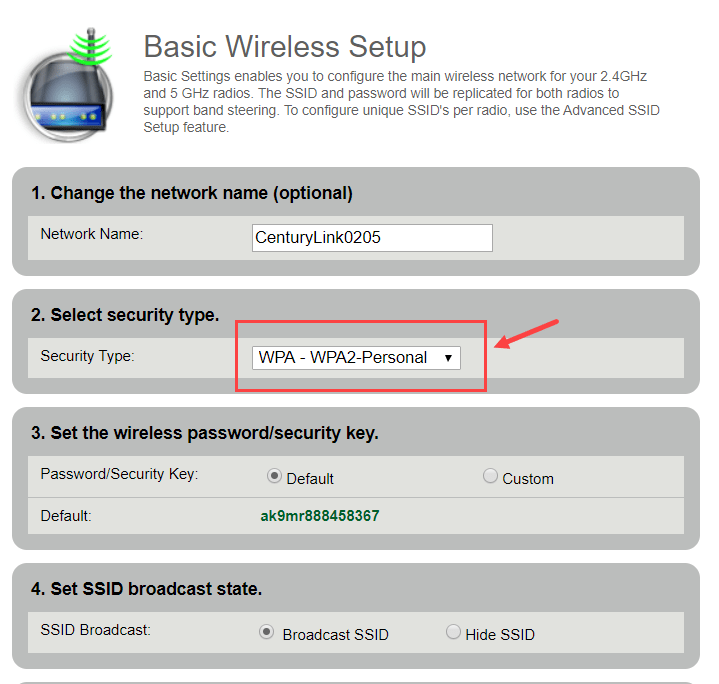
How do I find the network security key for CenturyLink
Where to get your security code. Your code is printed on the Welcome Letter that you received after you ordered new service from CenturyLink. It also appears on your first three monthly bills, under the "Get an Online Account" section on page 1.
Where would I find the network security key
A network security key is often labeled on the exterior of a router. You should look for a small sticker at the back or the bottom of the device. If it's not available there, check its packaging box or the manual that came with it from the manufacturer.
What is network security key button on router
A network security key is a password you use to connect to a Wi-Fi network. It also has other names like “WPA key” or “wireless security key”. A network security key establishes a secure connection between your device and the Wi-Fi router.
What does an internet security key look like
Usually, your router has a sticker that lists the Wireless Network Name, also known as a SSID, and the Wireless Security Key Password, which is your network security key. Network security keys are a combination of characters, for instance F23Gh6d40I.
Is the network security key on the modem
Alternatively, your default wireless password/passphrase/security code can often be found on a small sticker located on the back, side, or bottom of your wireless modem or router.
Why can’t i connect to My CenturyLink Wi-Fi
Reboot your modem manually or using the My CenturyLink app. Check the WiFi light on your modem to make sure it's working correctly. Make sure your modem is updated with the latest firmware version. As a last resort, try resetting your modem to factory defaults.
Why is it asking me for a network security key
If your home Wi-Fi network is password-protected, you will need to enter your network security key to connect a device to it. Network security keys are essential because they protect Wi-Fi networks from unauthorized access.
Is the network security key just the password
The network security key is simply the password to your phone's hotspot. It's generally viewable within the hotspot settings on your phone.
Is the network security key the same as the Wi-Fi password
It enables the establishment of a secure connection between the network and the user requesting access. It also assists you in authenticating and protecting your home/office network from illegal or unwanted access. The Wi-Fi or Wireless network password is another name for the network security key.
Why won’t my laptop connect to my Wi-Fi
Here are some of the most common issues: Your device is in airplane mode or has Wi-Fi turned off. Your router is down. You're entering an incorrect Wi-Fi password.
Is the network security key just the Wi-Fi password
A network security key is the password that protects your wireless network. If you have a Wi-Fi network in your home, you'll need a password to connect your device. That Wi-Fi password is your network security key.
How do I connect to CenturyLink WiFi
Take the power cord and plug it into the power port on the back of the c4000. Plug the power adapter into the power outlet. The front led on the device will start flashing. Now plug the green cord
Why would I not be able to connect to my WiFi
Sometimes internet connection may fail due to simple things like a loose or unplugged network cable, modem, or router. If you're on a wireless network, your computer's wireless network interface card might be turned off.
What happens if you don’t have a network security key
If you lost or forgot your security key or wireless home network password, check the bottom or side of the router for a sticker that lists the default password. If your router doesn't have a default password listed on the device, check the router manual.
Why am I being asked for a network security key
The sole motive of network security keys is to prevent unauthorized access and accessibility to a wireless network or device. Network Security keys help in establishing a secure connection between the authorized user and the network or routers etc.
Why is Wi-Fi asking for security key instead of password
Each access point or router comes with a preset network security key that you can change on the settings page of the device. The network security key is important because it protects your network from intruders. Without the key, you can't connect to the wireless network.
Why is my computer suddenly asking for a network security key
Wrong password – The most common reason is that you simply entered the wrong password. Double-check the password, keep in mind that it's case-sensitive.
Is the security key the same as your wireless router
The Wi-Fi or Wireless network password is another name for the network security key. When you connect to a wireless network, this is the password you use. Each access point or router has a default network security key that you may alter in the device's settings.
How do I get my laptop to recognize my Wi-Fi
Connect to a Wi-Fi network in WindowsSelect the Network, Sound, or Battery icons ( ) on the far right side of the taskbar to open quick settings.On the Wi-Fi quick setting, select Manage Wi-Fi connections .Choose the Wi-Fi network you want, then select Connect.Type the network password, and then select Next.
Why can’t I connect to Wi-Fi even I know the password
An authentication error is often the result of entering an incorrect Wi-Fi password. If you aren't sure what your password is, or if someone has changed it, you'll need to find the correct password for your wireless network. If you don't manage the network, ask someone who knows the password.
How many characters is the network security key
Wired Equivalent Privacy (WEP)
These types of keys appear as a combination of numbers and capital letters A-F. They can be as short as 10 characters, or as long as 58 (!!) in some cases. The main drawback of WEP keys is that they're not very secure.
Why can’t i connect to My CenturyLink WiFi
Reboot your modem manually or using the My CenturyLink app. Check the WiFi light on your modem to make sure it's working correctly. Make sure your modem is updated with the latest firmware version. As a last resort, try resetting your modem to factory defaults.
How do I connect to WiFi that won’t connect
Internet & networkUnplug the router and modem's power cords from the power outlet for 15 seconds.Plug the power cords back in.Check that all cords and cables are secure at both ends.Wait a few minutes, until the lights on the modem and router are working right. (See the device manual or manufacturer's support site.)
Why my laptop Cannot connect to Wi-Fi but my phone can
Some of these reasons include the router being down, you entering an incorrect password, your laptop being too far from the router, and your device may not support the Wi-Fi network it is connecting to.
Is network security key the Wi-Fi password
What is a network security key Essentially, it is the password or code needed to access a local area network. Most of us are familiar with network security keys ― at home, you use one to join your personal Wi-Fi network.


0 Comments