
How do I keep VPN on all the time Android?
How do I keep VPN on all the time Android?
If you haven’t already, add a VPN.
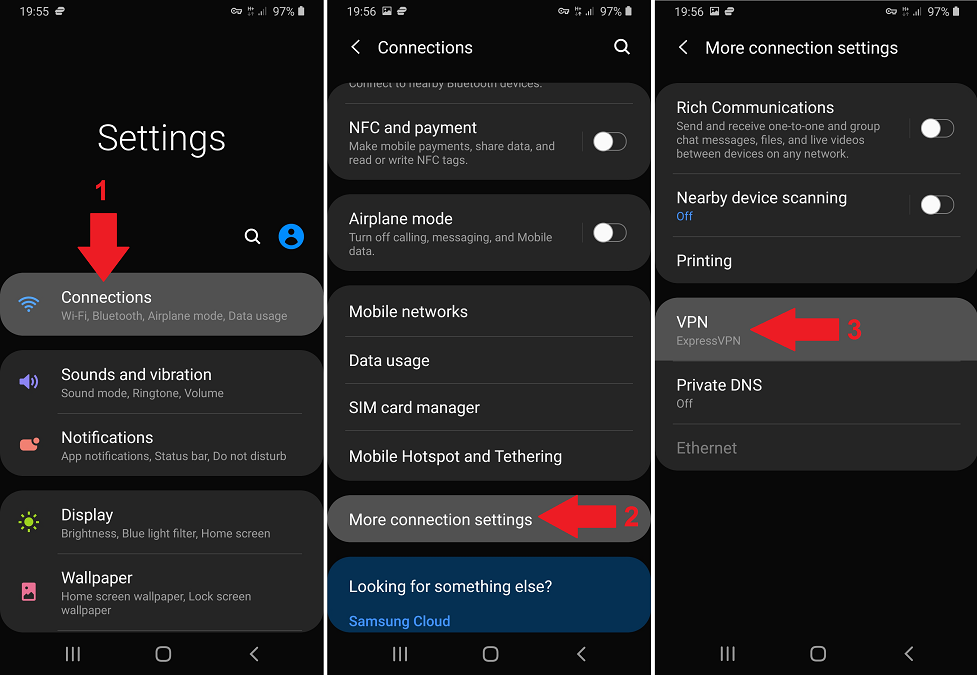
Open your phone’s Settings app.
Tap Network & internet. VPN.
Next to the VPN you want to change, tap Settings.
Turn Always-on VPN on or off. If you’ve set up a VPN through an app, you won’t have the always-on option.
If needed, tap Save.
How do I make my VPN stay on all the time?
Using a VPN app
On your phone, tablet, or computer, you can easily turn on your VPN app and leave it running at all times. Most apps have the option to turn VPN on automatically when you turn on your device, and some even have the ability to disconnect you from the internet if your VPN disconnects.
How do I stop my Android from disconnecting from VPN?
The power saving feature in Android could cause your VPN to disconnect, so try disabling it:
Go to Settings.
Tap on Apps & notifications.
Tap Advanced.
Select Special app access.
Tap on Battery optimization.
Select All Apps at the top.
Find your VPN app and select it.
Select Don’t Optimize.
Should I use VPN on my phone all the time?
You should use a Virtual Private Network (VPN) whenever you’re online. By doing so, you make sure that your data and privacy are protected. Without a VPN, your every action online may be monitored and taken advantage of. A VPN encrypts all of your data, effectively hiding any information about you from prying eyes.
Why won’t my VPN stay on my phone?
One of the most common causes of why your VPN connection keeps disconnecting is that you possibly have reached the device limit allowed by your VPN provider. Most commonly, you get 5-10 simultaneous connections per subscription. If you exceed this number, then your VPN may start randomly disconnecting.
Can I be connected to VPN all the time?
VPN can be kept on all the time
To sum it up, keeping your VPN on all the time is not only perfectly safe but actually recommended. It can keep your online identity anonymous, protect you from attacks associated with unsecured public Wi-Fi networks and help you bypass various artificial restrictions.
Why doesn’t VPN stay connected?
The main reason why your VPN keeps disconnecting could be an unstable internet connection. To stop your VPN from disconnecting, do the following: Make sure your internet connection is stable and strong. Try switching to a VPN server in a different location.
Why won’t my VPN stay connected?
A number of reasons can result in your VPN becoming disconnected. The most common causes are related to the stability of your internet connection, using old VPN software, slow internet speeds, and your VPN being blocked by other software like your firewall or antivirus.
Is it bad to have a VPN on 24/7?
But if you’re using a VPN for privacy reasons or to keep yourself anonymous online, then you should keep it on all the time. Since your VPN is your best form of protection against hackers and helps keep your information private, it’s best to leave your VPN on whenever you’re on the internet.
Does Android have built-in VPN?
Android includes a built-in (PPTP, L2TP/IPSec, and IPSec) VPN client. Devices running Android 4.0 and later also support VPN apps. You might need a VPN app (instead of built-in VPN) for the following reasons: To configure the VPN using an enterprise mobility management (EMM) console.
How do I stay connected to VPN on Android
If you haven't already, add a VPN.Open your phone's Settings app.Tap Network & internet. VPN.Next to the VPN you want to change, tap Settings .Turn Always-on VPN on or off. If you've set up a VPN through an app, you won't have the always-on option.If needed, tap Save.
How do I make my VPN stay on all the time
Using a VPN app
On your phone, tablet, or computer, you can easily turn on your VPN app and leave it running at all times. Most apps have the option to turn VPN on automatically when you turn on your device, and some even have the ability to disconnect you from the internet if your VPN disconnects.
Cached
How do I stop my Android from disconnecting from VPN
The power saving feature in Android could cause your VPN to disconnect, so try disabling it:Go to Settings.Tap on Apps & notifications.Tap Advanced.Select Special app access.Tap on Battery optimization.Select All Apps at the top.Find your VPN app and select it.Select Don't Optimize.
Cached
Should I use VPN on my phone all the time
You should use a Virtual Private Network (VPN) whenever you're online. By doing so, you make sure that your data and privacy are protected. Without a VPN, your every action online may be monitored and taken advantage of. A VPN encrypts all of your data, effectively hiding any information about you from prying eyes.
Cached
Why wont my VPN stay on my phone
One of the most common causes of why your VPN connection keeps disconnecting is that you possibly have reached the device limit allowed by your VPN provider. Most commonly, you get 5-10 simultaneous connections per subscription. If you exceed this number, then your VPN may start randomly disconnecting.
Can I be connected to VPN all the time
VPN can be kept on all the time
To sum it up, keeping your VPN on all the time is not only perfectly safe but actually recommended. It can keep your online identity anonymous, protect you from attacks associated with unsecured public Wi-Fi networks and help you bypass various artificial restrictions.
Why doesn’t VPN stay connected
The main reason why your VPN keeps disconnecting could be an unstable internet connection. To stop your VPN from disconnecting, do the following: Make sure your internet connection is stable and strong. Try switching to a VPN server in a different location.
Why wont my VPN stay connected
A number of reasons can result in your VPN becoming disconnected. The most common causes are related to the stability of your internet connection, using old VPN software, slow internet speeds, and your VPN being blocked by other software like your firewall or antivirus.
Is it bad to have a VPN on 24 7
But if you're using a VPN for privacy reasons or to keep yourself anonymous online, then you should keep it on all the time. Since your VPN is your best form of protection against hackers and helps keep your information private, it's best to leave your VPN on whenever you're on the internet.
Does Android have built in VPN
Android includes a built-in (PPTP, L2TP/IPSec, and IPSec) VPN client. Devices running Android 4.0 and later also support VPN apps. You might need a VPN app (instead of built-in VPN) for the following reasons: To configure the VPN using an enterprise mobility management (EMM) console.
Why does my VPN turn off sometimes
A number of reasons can result in your VPN becoming disconnected. The most common causes are related to the stability of your internet connection, using old VPN software, slow internet speeds, and your VPN being blocked by other software like your firewall or antivirus.
Why does my internet disconnect when I connect to VPN
If the internet is not working when you're connected to VPN, using an older VPN version might be the reason. Having an updated VPN is important to avoid connection issues. If you are running an outdated version, update it. You can also re-install the VPN software again.
Does VPN drain battery
If you're wondering “does a VPN affect battery health” the answer is yes, but no more than any other app on your device. On average, you should expect around a 5-15% drop in battery life on your Android or iOS device when a VPN is connected.
Can you use VPN Unlimited
Just follow a few simple steps: Download VPN Unlimited and launch the app. Connect to the appropriate streaming server / Movies & TV server. Login to your streaming account and enjoy your favorite films and TV shows.
How to fix VPN automatically closed by phone in the background
Guide to fix the Android VPN disconnects automatically issueTroubleshoot your internet connection.Change your VPN settings.Check your firewall settings.Switch DNS servers and provider.Update your VPN client.Reinstalling your VPN client.Disable the device's Power Saving feature.Enable the Always-On VPN feature.
Why does my VPN keep turning off on my phone
A number of reasons can result in your VPN becoming disconnected. The most common causes are related to the stability of your internet connection, using old VPN software, slow internet speeds, and your VPN being blocked by other software like your firewall or antivirus.
Is VPN killing my internet speed
In terms of speed, your VPN can only be as fast as your internet connection. In fact, slight drops of around 10-20% in speed are absolutely normal when using a VPN since their main priority should always be security and privacy.
Where is VPN located on Android
You can also go into Android's settings:Click Network & Internet.Click Advanced.Click VPN.Type in the name of your VPN.Fill in your username and password.Click Connect.
Does Samsung have built-in VPN
The Samsung Knox Virtual Private Network (VPN) framework enables advanced configurations using VPN clients from various vendors. Each client has unique features that can be researched to find the best match for your needs.
Why does my VPN drop when idle
As the computer goes to sleep, any active VPN connection will be disconnected. By default your display will turn off after several minutes of inactivity. You can disable this behaviour by going to System Preferences->Energy Saver and tick the "Preventing computer from sleeping automatically when the display is off".
How do I stop my VPN from disconnecting
How to fix disconnecting VPNChange VPN tunneling protocol.Change the VPN server.Enable obfuscation feature.Change DNS settings.Disable the Trusted Network function.Disable the Multi-Hop feature.Change the encryption level.Update your VPN app.
Why won’t my VPN stay on
VPN disconnects frequently — The easiest way to fix this issue is to change your VPN protocol or connect to a different WiFi network. Slow speeds — If your VPN is consistently slow and laggy, try switching to a fast VPN like ExpressVPN. You can also boost your speeds by connecting to a different server.
Does VPN drain Wi-Fi
Yes, a VPN will use data. Data consumption will depend on the encryption protocol your VPN provider relies on, but usually the extra data used doesn't exceed the 5–15% range. This extra usage is to account for the encryption process.
Is there a free VPN Unlimited
Proton VPN has one of the only free plans that allows unlimited data. It also provides access to servers in 3 countries (the US, the Netherlands, and Japan), strong security and privacy features, and decent speeds.
What is the maximum time for VPN
By default, the maximum VPN session duration is 24 hours.


0 Comments