
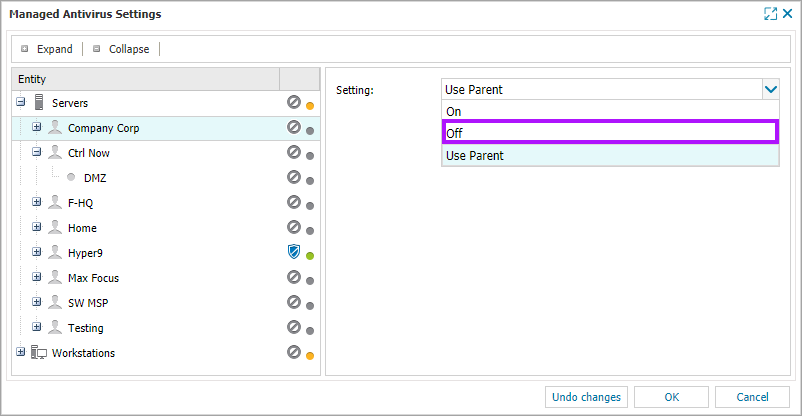
How do I disable managed antivirus?
Security. In the Privacy & Security preferences, click the General tab. Here, you can enable or disable various security features, including antivirus settings.
[/wpremark]
How do I disable antivirus on Windows 10
How to disable Windows Defender Antivirus using Security CenterOpen Windows Defender Security Center.Click on Virus & threat protection.Click on Manage settings.Turn off the Real-time protection toggle switch.
How do I disable my antivirus program Windows 7
To disable your antivirus software, locate its icon in the notification area on the taskbar (usually in the lower right corner of the desktop). Right-click the icon and choose the option to disable or exit the program.
How do I temporarily disable Windows Defender
Go to Virus & threat protection > Manage settings. Switch the Real-time protection setting to Off and click Yes to confirm. Temporarily disabling Windows Defender Antivirus on Windows 10
How do I disable McAfee
Open your McAfee software.Click PC Security.Click Real-Time Scanning.Click the Turn Off button.Choose a time limit:
How do I disable Avast antivirus
To disable Avast temporarily, follow these steps:Right-click on the Avast system tray icon and select Avast shields control. There you can choose the option to disable it for 10 minutes or until computer restart.
How do I disable Windows Defender real-time protection
To disable Windows Defender Antivirus real-time protection on Windows 10, use these steps:Open Start.Search for Windows Security and click the top result to open the app.Click on Virus & threat protection.Click on Manage settings.Turn off the Real-time protection toggle switch.
How do I turn off malware detection
How to Disable Antivirus on a Computer Here’s how you turn it off:Open Windows Security settings.Select Virus & threat protection.Click Manage settings.Turn Real-time protection off.
How do I disable Norton Antivirus startup
Turning off Norton Antivirus StartupLaunch the Norton software.Read the options on the main screen and locate “Settings.”Click “Settings” and look for any options regarding startup, such as “Startup Manager” or “Startup Protection”
How do I disable antivirus on Chromebook
To disable the chrome virus scanning open the menu and click on settings. Now select privacy and security from the left. Side. Then click on security. Now here under the safe browsing select no
How can I temporarily disable my antivirus software
Windows SecurityClick Start.Scroll down and select Settings.Go to Update & Security.Select Windows Security.Open Virus & Threat Protection.Click Manage Settings.Switch Real-Time Protection to off.
Cached
What is managed antivirus
Managed antivirus, sometimes referred to as centrally managed antivirus, is a software option that is designed to protect your business systems from viruses and other threats. It is referred to as central because the protection it offers comes from a single source, i.e. a network server.
How do I disable antivirus on my Mac
Access the Mac menu bar, and there you should see the antivirus icon.Right-click it or just left click and a drop-down menu appears.Click the ideal function such as Disable or Stop and if it asks for any confirmation, hit “Yes” or “Confirm.”
Cached
How do I find my antivirus on my Chromebook
Installing an antivirus on your Chromebook from Google PlayOpen the Google Play Store.Search for your preferred antivirus app, for example, TotalAV.Install the software.Open the app.Log in or create an account.Enjoy using your Chromebook without worrying about viruses.
How do I check my antivirus on my Chromebook
As you never know if the next website you're visiting contains a virus. Hi. This is Phil from make tech easier. And this is how to use Chrome's secret antivirus scanner Google Chrome offers a built-in
How can an administrator disable Windows Defender antivirus permanently
Turn off Defender Antivirus Protection on Windows 11 and 10Open Settings -> Privacy and Security -> Windows Security (or run a quick access URI command: ms-settings:windowsdefender ) in Windows 11;Open Virus and threat protection and click Manage Settings;Move the Real-time protection toggle to Off.
How do you fix this setting is managed by your administrator
This is how you can fix the “setting is managed by your administrator” error in Windows 11.Check for and Install Available Windows 11 Updates.Reset the Windows Security and Settings Apps.Uninstall Third-Party Antivirus Software.Edit the Registry.Set Group Policy's Real-time Protection Settings to "Not Configured"
Why use managed security services
Automate Your Vulnerability Management
Ongoing vulnerability scans of your environment are a critical element to a successful security posture. A benefit of working with an MSSP is they can provide accurate internal and external scans across your IT network assets, hosts, web applications, and databases.
How do I remove other antivirus provider
Open the Add or Remove Programs. In the list of installed programs, find the antivirus program and select it by clicking it once with the left mouse button. To the right of the program name, click the Change/Remove or Uninstall button to initiate the uninstall process.
How do I find my antivirus settings on my Mac
On your Mac, choose Apple menu > System Settings, then click Privacy & Security in the sidebar.
How do I disable antivirus and firewall on Mac
To change these settings, choose Apple menu > System Settings, click Network in the sidebar, then click Firewall on the right. (You may need to scroll down.) Prevent unwanted connections from the internet or other networks. Choose how much to block incoming connections.
Does Chromebook have built-in antivirus
Chromebooks have excellent built-in security features that can prevent viruses and malware. For example, ChromeOS, the Chromebook operating system, keeps users safe with a variety of tools, including sandboxing, limited user permissions, proprietary file formats, and verified boot.
Where is my antivirus located
Users using the classic start menu: Start > Settings > Control Panel > Security Center. Users using start menu: Start > Control Panel > Security Center.
Does Chromebook require antivirus
Do Chromebooks need an antivirus Yes — while ChromeOS has some built-in security features, it's not 100% safe. ChromeOS users remain vulnerable to: Fake Chrome extensions.
Where is the antivirus on Google Chrome
Did you know that google chrome has a hidden antivirus scanning feature that can scan for malicious software running on your windows. Computer to get to it click the top right menu. And go to settings
Why can’t I turn off Windows Defender
Open the Windows Security app. Click Virus & threat protection on the main menu or the left-side pane. Under Virus & threat protection settings, click Manage settings. Switch the toggle under Real-time protection to Off.
How do I disable Windows Defender and exploit protection
However. If you need to get directly to controlled folder. Access we can as you can see here we'll start right down here. Again. And we're go to virus and threat protection.
How do I get rid of managed administrator
How to Remove Chrome “Managed by Your Organization” in 2023Preliminary Step: Uninstall Recent Apps & Extensions.Use an Antivirus to Identify the PUP Causing the Chrome “Managed by Your Organization” Message to Appear.Remove the Chrome “Managed by Your Organization” Infection and Delete Any Other Infected Files.
How do I disable device managed by administrator
Go to Settings > Security. Tap Device administrators. Tap the administrator app, and then tap Activate or Deactivate.
What does managed services mean in IT
Managed IT services are tasks handled by a third party, frequently in the context of business information technology services. The managed services model is a way to offload general tasks to an expert in order to reduce costs, improve service quality, or free internal teams to do work that's specific to their business.
How does managed security services work
Managed security services includes outsourced monitoring and management of your security systems and devices. An MSSP manages your Security Incident and Event Management (SIEM) tools, Intrusion Detection Systems/Intrusion Prevention Systems, firewalls, anti-virus, vulnerability and compliance management, and more.
How do I disable other antivirus providers in Windows 10
Select Start and type "Windows Security" to search for that app. Select the Windows Security app from the search results, go to Virus & threat protection, and under Virus & threat protection settings select Manage settings. Switch Real-time protection to Off.
How do I change my antivirus provider on Windows 10
Select Start > Settings > Update & Security > Windows Security and then Virus & threat protection > Manage settings. (In early versions of Windows 10, select Virus & threat protection > Virus & threat protection settings.)
Do Macs automatically have antivirus
The technically sophisticated runtime protections in macOS work at the very core of your Mac to keep your system safe from malware. This starts with state-of-the-art antivirus software built in to block and remove malware.


0 Comments