
Is it safe to remove McAfee WebAdvisor?
Is it safe to remove McAfee WebAdvisor?
Moving forward, let’s address some common questions about McAfee WebAdvisor and its removal:
1. Do I need McAfee WebAdvisor? What is it?
As well as disabling or removing the McAfee SiteAdvisor add-on in your browser, and resetting your search engine, you should uninstall it through the Control Panel in Windows. You may need to restart your PC to complete the removal.
2. Do I really need McAfee WebAdvisor?
Overall, McAfee WebAdvisor has been deemed a reliable tool for web security, allowing users to browse the internet without fear of cyber threats or unwanted activities.
3. What will happen if I uninstall McAfee antivirus?
IMPORTANT: Your PC is no longer protected from viruses and malware when your McAfee software is removed. Make sure that you reinstall your security software as soon as possible to restore protection.
4. Do I need McAfee WebAdvisor if I have Windows Defender?
Short answer is yes, you can use it, but it is not needed nor recommended. There have been many reports in this forum regarding WebAdvisor falsely identifying malware and blocking downloads.
5. What is the purpose of McAfee WebAdvisor?
McAfee WebAdvisor is your trusty companion that helps keep you safe from threats while you browse and search the web. WebAdvisor helps protect you from malware and phishing attempts while you surf, without impacting your browsing performance or experience.
6. Why do I suddenly have McAfee on my computer?
Has a McAfee pop-up randomly appeared on your screen informing you that your subscription has expired and your system is at risk of virus attacks? If you use McAfee antivirus or other related tools from the company, your subscription may have genuinely expired.
7. Why is McAfee WebAdvisor popping up?
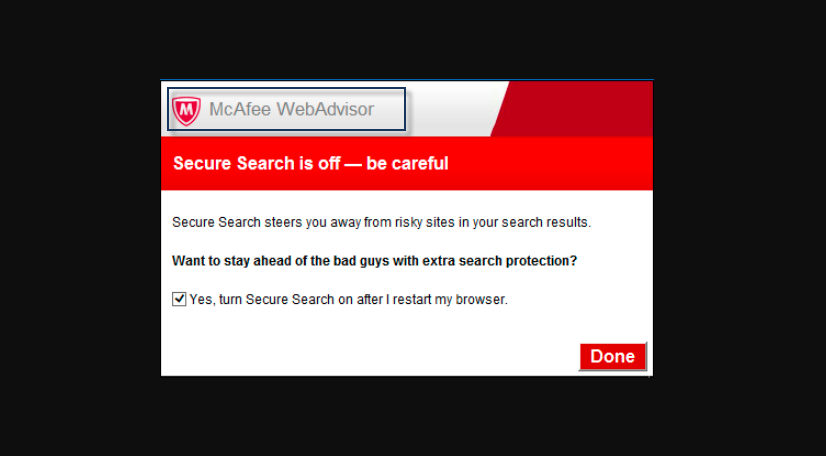
For example, here’s a pop-up that you might see from McAfee WebAdvisor on your PC: This pop-up is genuine. It’s asking you to turn on McAfee WebAdvisor’s Secure Search, which makes your internet browsing experience even more secure. So it’s safe to accept this prompt.
8. Can I just uninstall McAfee?
If you wish to uninstall McAfee Internet Security, follow these steps: In the Start menu, select Control Panel. Click Programs and Features. Right-click McAfee Security Center and select Uninstall/Change.
9. Can I safely uninstall McAfee?
You can remove McAfee software without much effort using your computer’s system settings. This is possible whether your computer came preinstalled with McAfee or you have decided to go with a different antivirus program.
10. Should Windows Defender be turned off with McAfee?
While installing McAfee, Windows Defender gets turned off, and McAfee starts protecting your system. You can run one Antivirus at a time. You can’t turn On both McAfee & Defender at the same time to protect your system. You can have only one AV protection turned On at a time that will protect your computer.
11. Is it okay to disable McAfee?
Disabling McAfee will not remove it from your computer. Keep in mind that if McAfee is your only antivirus software, turning it off will leave your computer vulnerable to malware.
Is it okay to Uninstall WebAdvisor by McAfee
Do i need mcafee webadvisor What is mcafee webadvisor and do i need it As well as disabling or removing the McAfee SiteAdvisor add-on in your browser, and resetting your search engine, you should uninstall it through the Control Panel in Windows. You may need to restart your PC to complete the removal.
Cached
Do I really need McAfee WebAdvisor
Overall, McAfee WebAdvisor has been deemed a reliable tool for web security, allowing users to browse the internet without fear of cyber threats or unwanted activities. TrustRadius Insights are created leveraging user sentiment to help you understand more about software products and help when making purchase decisions.
What will happen if I Uninstall McAfee antivirus
IMPORTANT: Your PC is no longer protected from viruses and malware when your McAfee software is removed. Make sure that you reinstall your security software as soon as possible to restore protection.
Do I need McAfee WebAdvisor if I have Windows Defender
Short answer is yes, you can use it, but it is not needed nor recommended. There have been many reports in this forum regarding WebAdvisor falsely identifying malware and blocking downloads.
What is the purpose of McAfee WebAdvisor
McAfee WebAdvisor is your trusty companion that helps keep you safe from threats while you browse and search the web. WebAdvisor helps protect you from malware and phishing attempts while you surf, without impacting your browsing performance or experience.
Why do I suddenly have McAfee on my computer
Has a McAfee pop-up randomly appeared on your screen informing you that your subscription has expired and your system is at risk of virus attacks If you use McAfee antivirus or other related tools from the company, your subscription may have genuinely expired.
Why is McAfee WebAdvisor popping up
For example, here's a pop-up that you might see from McAfee WebAdvisor on your PC: This pop-up is genuine. It's asking you to turn on McAfee WebAdvisor's Secure Search, which makes your internet browsing experience even more secure. So it's safe to accept this prompt.
Can I just uninstall McAfee
If you wish to uninstall McAfee Internet Security follow these steps: In the Start menu, select Control Panel. Click Programs and Features. Right-click McAfee Security Center and select Uninstall/Change.
Can I safely uninstall McAfee
You can remove McAfee software without much effort using your computer's system settings. This is possible whether your computer came preinstalled with McAfee or you have decided to go with a different antivirus program.
Should Windows Defender be turned off with McAfee
While installing McAfee, Windows Defender gets turned off and McAfee starts protecting your system. You can run one Anti Virus at a time. You can't turn On both McAfee & Defender at the same time to protect your system. You can have only one AV protection turned On at a time that will protect your computer.
Is it OK to disable McAfee
Disabling McAfee will not remove it from your computer. Keep in mind that, if McAfee is your only antivirus software, turning it off will leave your computer vulnerable to malware.
Should I turn off McAfee
There are a number of reasons why you may need to disable your McAfee software. One of the most common is the need to install new software. Because legitimate software and malware have the same actions during installation, sometimes your antivirus program can mistake legitimate programs for malicious ones.
Why is McAfee popping up when I don’t have McAfee
These messages are 'spoofed' (fake) messages that pretend to be from McAfee and try to make you click one of their options. TIP: If you click the options in a fake pop-up or alert, the security of your PC might be compromised. So, it's always a best practice to read pop-ups or alert messages carefully.
How do I get rid of McAfee bloatware
Type settings in your search bar and click on the Settings App. Click Apps. Locate McAfee in the list of installed programs and click Uninstall. When prompted, click Uninstall again to confirm that you want to remove the software.
Does McAfee WebAdvisor do anything
McAfee WebAdvisor is your trusty companion that helps keep you safe from threats while you browse and search the web. WebAdvisor helps protect you from malware and phishing attempts while you surf, without impacting your browsing performance or experience.
Why are McAfee files still on my computer after Uninstall
McAfee has changed the Windows security software. This change ensures that the WebAdvisor or SiteAdvisor component remains installed even if you remove the main product. This change is part of our ongoing efforts to protect your PC and your data. This continued support is provided free of charge.
How do I make sure McAfee is completely removed
So make sure that your PC is connected to the internet during the uninstalled. Process next type control panel in the search field in the bottom left and then click the icon to open it. Click programs
Why is McAfee WebAdvisor on my computer
McAfee WebAdvisor is part of McAfee Windows security products. If you uninstall the McAfee security product, WebAdvisor is still installed. This is for security and to protect your data. (or, SiteAdvisor is still installed on PCs running Windows XP or Vista.)
Why is McAfee on my computer after Uninstall
McAfee has changed the Windows security software. This change ensures that the WebAdvisor or SiteAdvisor component remains installed even if you remove the main product. This change is part of our ongoing efforts to protect your PC and your data. This continued support is provided free of charge.
Do I need both Microsoft Defender and McAfee
Overall, both antiviruses offer excellent protection against real-time malware attacks, phishing, and other online threats, but Microsoft Defender offers near-perfect protection, while McAfee protects you from 100% of threats online and offline.
Should you run Windows Defender and McAfee at the same time
Defender Pro and McAfee should not be running at the same time on a computer because both include anti-virus components. Running one anti-virus program is better for a computer than running two because dual anti-virus programs can create unnecessary extra work by scanning everything twice.
Do I need to keep McAfee on my computer
Using Microsoft's built-in antivirus software can protect your Windows devices from viruses and malware. But to really keep your network and all of your devices secure, it's good to rely on comprehensive protection like McAfee Total Protection.
Can I take McAfee off my computer
From the Start menu, select the Control Panel. From the Programs category, select Programs and Features. Choose the antivirus program you want to remove, and then select Uninstall/Change. When prompted, restart your computer.
Why did McAfee randomly install on my computer
If you do not use a McAfee product, the pop-up is a scam. If you use McAfee antivirus but get this pop-up randomly even when McAfee antivirus software isn't open, it's probably a fake alert from a scammer. Similarly, if you encounter it on a website or as a push notification, it should be clear that it's not real.
How do I get rid of fake McAfee virus
To remove the fake McAfee pop-up alerts from your computer, follow these steps: STEP 1: Reset browsers back to default settings. STEP 2: Use Malwarebytes Anti-Malware to remove malware and unwanted programs.


0 Comments