
How do I shoot 360-degree pictures on my smartphone?
to take 360-degree photos on my smartphone?
There are several apps available for both Android and iPhone that allow you to take 360-degree photos. Some popular options include Google Cardboard Camera, Photo Sphere Camera by Google, and 360 Camera by Xiaomi. These apps utilize the gyroscope in your phone to capture a full 360-degree view, allowing you to create immersive photos that can be viewed from any angle. Simply search for these apps in your phone’s app store and download the one that suits your needs.
[/wpremark]
Are there any free apps for taking 360 photos?
Yes, there are free apps available for taking 360-degree photos. Some popular free options include Google Cardboard Camera, which is available for both Android and iPhone, and Camera360 Ultimate, which is available only for Android. These apps offer a range of features and editing options, allowing you to create stunning 360-degree photos without spending any money.
Can I use my iPhone to take 360-degree photos?
Yes, you can use your iPhone to take 360-degree photos. There are several apps available in the App Store that allow you to capture 360-degree photos, such as Photo Sphere Camera by Google and Panorama 360. Simply download one of these apps, follow the instructions, and start capturing immersive photos with your iPhone.
How do I view 360-degree photos on my smartphone?
To view 360-degree photos on your smartphone, you can use apps such as Google VR View or Panorama 360. These apps allow you to import your 360-degree photos and view them in a fully immersive way, either by moving your phone around or by using virtual reality (VR) goggles. Simply download one of these apps from your phone’s app store, import your photos, and start exploring the world in 360 degrees.
Can I share my 360-degree photos with others?
Yes, you can share your 360-degree photos with others. Many of the apps mentioned earlier, such as Google Cardboard Camera and Panorama 360, offer options to share your photos directly from the app. You can also upload your photos to social media platforms like Facebook and Instagram, which support 360-degree photos. Simply follow the app’s instructions or the platform’s guidelines to share your immersive photos with friends and family.
Are there any tips for taking great 360-degree photos on my phone?
Yes, here are a few tips for taking great 360-degree photos on your phone:
1. Keep your phone steady: Avoid any movement or shaking while capturing the photo to ensure a clear and sharp image.
2. Find an interesting subject: Look for unique or visually appealing subjects to capture in your 360-degree photo.
3. Experiment with different angles: Try capturing the same scene from different angles to see which perspective works best.
4. Use good lighting: Adequate lighting can greatly enhance the quality of your 360-degree photo, so try to capture your photos in well-lit environments.
5. Edit your photo: After capturing the photo, you can use editing tools within the app to adjust the exposure, contrast, and other aspects to enhance the overall quality of your image.
By following these tips, you can improve the quality of your 360-degree photos and create stunning immersive images.
Can I take 360-degree videos with my phone?
Yes, many of the apps mentioned earlier, such as Google Cardboard Camera and 360 Camera by Xiaomi, also allow you to capture 360-degree videos with your phone. Simply open the app, select the video recording mode, and start recording your 360-degree video. Keep in mind that capturing 360-degree videos requires more storage space than regular videos, so make sure you have enough space on your phone before starting to record.
Is there a limit to how long a 360-degree video can be?
The length of a 360-degree video can vary depending on the app you’re using and the storage capacity of your phone. Some apps may have a time limit for recording 360-degree videos, while others may allow you to record for as long as your phone’s storage space allows. It’s best to check the app’s documentation or settings to see if there are any specific limitations for recording 360-degree videos.
Can I edit my 360-degree photos or videos on my phone?
Yes, you can edit your 360-degree photos or videos on your phone using various editing apps. Most of the apps mentioned earlier, such as Google Cardboard Camera and Camera360 Ultimate, offer built-in editing tools that allow you to adjust the exposure, contrast, and other aspects of your 360-degree photos or videos. Additionally, there are several third-party editing apps available in the app stores that are specifically designed for editing 360-degree content. Simply search for “360-degree photo editor” or “360-degree video editor” in your phone’s app store to find options that suit your needs.
How can I view 360-degree photos on my computer?
To view 360-degree photos on your computer, you can use various desktop applications or online platforms. One popular option is to use the Google VR View website, which allows you to upload and view 360-degree photos in a browser window. Alternatively, you can use photo viewing software like Adobe Photoshop or PTGui, which support the viewing of 360-degree photos. Simply open the photo in the respective software and explore the image using your mouse or keyboard controls.
Can I convert my regular photos into 360-degree photos?
While you can’t directly convert regular photos into 360-degree photos, there are some software options available that can help you stitch multiple photos together to create a 360-degree effect. Programs like PTGui and Hugin allow you to import multiple photos, align them, and create a panoramic or 360-degree image. Keep in mind that these software options require some technical knowledge and may not provide the same level of quality as capturing a true 360-degree photo with a dedicated app.
Are there any virtual reality (VR) headsets available for viewing 360-degree photos on my smartphone?
Yes, there are several virtual reality (VR) headsets available that allow you to view 360-degree photos on your smartphone. Some popular options include the Google Cardboard, Samsung Gear VR, and Oculus Go. These headsets use your smartphone as the display and provide an immersive VR experience, allowing you to fully explore and interact with 360-degree photos. Simply insert your phone into the headset, launch the VR app, and start enjoying 360-degree content.
How can I share my 360-degree photos on social media platforms?
Many social media platforms, such as Facebook and Instagram, support the sharing of 360-degree photos. To share your 360-degree photos on these platforms, simply open the app, create a new post, and upload your 360-degree photo. The platform will automatically recognize the format and allow users to explore your photo in 360 degrees using their phone or computer. You can also add captions, tags, and other information to your post to provide context for your photo.
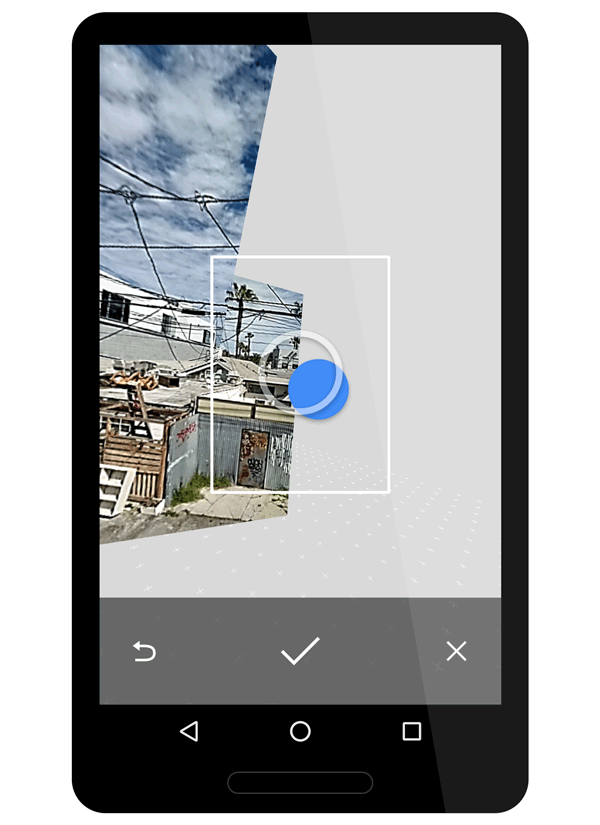
Can I take 360-degree photos from my phone
Take photos with Cardboard CameraOn your Android phone, open the Cardboard Camera app .In the bottom right, tap Take picture .Tap Record .With your arms outstretched, move your device slowly in a circle to the left or right.The camera stops recording automatically once you complete a full 360-degree turn.
How to do a 360 with your phone
But the best part is you don't need to buy any fancy equipment you can use your phone and a free google app to do this let me show you how so the first thing we're gonna do is download. The correct
Can I take a 360 photo with my Android phone
Google created the app Photo Sphere Camera, which enables users to take and share 360-degree images. Additionally, it contains a feature that enables users to submit their images to Google Maps so that others can see them. Xiaomi created the 360 Camera app, which enables users to take 360-degree pictures and videos.
Cached
How to make a 360-degree photo
Taken on a phone. For Apple users open the camera app and capture a panorama. Any handset newer than an iPhone 4s or tablet newer than an iPad Mini 2 will work for Android users download Google's
Can you make a 360 photo on iPhone
But a lot of people just stick with the standard photo. And of course you can do slow motion videos you can do time-lapse. All in the camera app.
How do you make 360 pictures on iPhone
Take panoramic photos with your iPhone cameraChoose Pano mode.Tap the Shutter button.Pan slowly in the direction of the arrow, keeping it on the center line.To finish, tap the Shutter button again.
Is camera 360 app free
Camera360 Ultimate is one of the best image-editing tools that you can currently find on Android, especially because beyond having an enormous amount of features it is free and very easy to use.
How do I set up 360 on my iPhone
Watch the video till the end. And don't forget to subscribe to our Channel by hitting that subscribe button press the notification Bell. So that you'll never miss another upcoming upload from us to
What is the 360 photo viewer app
Google VR is a 360 panorama viewer that developers can use to embed 360 images and video content into websites and apps. This is a great all-round photosphere viewer as it can be used on both desktop and Android and iOS mobile devices.
What is the free 360 photo app for iPhone
Panorama 360 is the fastest 360 panorama capture available on Appstore. Ever wished to view your iPhone camera captured panoramas in the true way they should be enjoyed. Import your photos through our gallery and instantly view them on the 360-degree viewer. With one more tap and you can share it with the entire world.
What app can I use for 360 photos
Google VR View
Google VR is a 360 panorama viewer that developers can use to embed 360 images and video content into websites and apps. This is a great all-round photosphere viewer as it can be used on both desktop and Android and iOS mobile devices.
What app do I download for 360 camera
Photaf Panorama Pro
This 360 camera app Android helps you create exciting virtual tours or 3D images of apartments and houses to excite customers in new ways. The Pro package is $4. It allows you to upload pictures to the company's website to view them from your PC.
Can I take a 360 photo with my iPhone
But a lot of people just stick with the standard photo. And of course you can do slow motion videos you can do time-lapse. All in the camera app. And then there are ton of different apps that make
Is there a 360 app for iPhone
Panorama 360 is the fastest 360 panorama capture available on Appstore. Ever wished to view your iPhone camera captured panoramas in the true way they should be enjoyed. Import your photos through our gallery and instantly view them on the 360-degree viewer. With one more tap and you can share it with the entire world.
What is the free alternative to Camera360
Camera360Pixlr. Freemium. Pixlr is a mobile app that combines the power of a camera app, a collage maker, and a photo edito…Instagram. Free.Pixlr-o-matic. Free.BeFunky. Freemium.VSCO Cam. Freemium.PicsArt. Freemium.Facetune. Freemium.PicSay. Freemium.
Is there a better free app than Life360
Glympse. With over 5 million downloads, Glympse is one of the more popular GPS tracking apps and a great alternative to Life360. One of the best parts of using this app is that it doesn't require you to sign up, nor do your family members need to download the app to view your location.
How long is Life360 free
7-day
Does Life360 offer a free trial And what does it include Yes, all our membership plans include a 7-day free trial. Except for Roadside Assistance in the Gold and Platinum memberships, all membership features are available to try for free during the trial period.
What is the free version of Life360
Unlike the other Life360 plans, the free version doesn't have functionality like crime reports, individual driver reports, and roadside assistance. You won't have the option to use the app to call in emergency dispatch or access towing.
Can you use Life360 without paying
Our basic service is free to download and use. We also offer three paid memberships (Silver, Gold and Platinum) that provide your Circle with additional safety features. For users outside of the U.S. and Canada, we offer Life360 Premium with additional features. Try any of these paid plans free for 7 days.
What is the difference between free and paid Life360
Unlike the other Life360 plans, the free version doesn't have functionality like crime reports, individual driver reports, and roadside assistance. You won't have the option to use the app to call in emergency dispatch or access towing.
What is the monthly cost for Life360
How much does a Life360 membership cost Our Silver membership costs $7.99 per month, our Gold membership costs $14.99 per month, and our Platinum membership costs $24.99 per month.
Can you use Life360 without a subscription
Our basic service is free to download and use. We also offer three paid memberships (Silver, Gold and Platinum) that provide your Circle with additional safety features. For users outside of the U.S. and Canada, we offer Life360 Premium with additional features. Try any of these paid plans free for 7 days.
Is Life360 really free
Discover Life360 for free! Download the app today to stay connected with your friends and family and share your location with them using advanced Location Sharing. You'll also have access to two days of Location History as well as two Place Alerts.
What does the free version of Life360 do
Discover Life360 for free! Download the app today to stay connected with your friends and family and share your location with them using advanced Location Sharing. You'll also have access to two days of Location History as well as two Place Alerts.
Does Life360 cost money now
Discover Life360 for free! Download the app today to stay connected with your friends and family and share your location with them using advanced Location Sharing. You'll also have access to two days of Location History as well as two Place Alerts.


0 Comments