
How do I connect my H 264 DVR to the Internet?
How to Connect My Old DVR to the Internet
Question 1: Why won’t my DVR connect to the internet?
To check your Ethernet cable connection:
– Power cycle your DVR / NVR. To power cycle your DVR / NVR, please power it off and disconnect the power source for approximately 30 seconds. Reconnect, and power back on. If you do not have a connection, connect your router to your DVR / NVR using a different Ethernet cable.
Question 2: What is the IP address for H 264 network DVR?
The default IP Address of H. 264 HD IP camera is 192.168. 0.200. A user can use this IP address to verify the network connection between a local PC and H.
Question 3: How do I setup my H 264 DVR?
Easy Setup Guide 8ch H.264 DVR. Connecting the DVR to TV.
– Back of DVR: Connect the RCA end of the cable to the BNC plug end. of the cable to the top. Tune your TV to the correct INPUT – this is.A. BNC to RCA Cable.Easy Set Up Components. Cameras and Accessories Optional.Camera Connections. Cameras Optional.
Question 4: Does my DVR have to be connected to the internet?
Internet connection is not needed for the following functions:
– Live view of the camera feed via TV and mouse.
– Playback/export of recordings via TV and mouse.
– Storing/erasing recordings in the DVR’s built-in hard drive.
Question 5: Does DVR need Ethernet cable?
The DVR converts the video from analog to digital signals, compresses the file, and stores it on a hard drive. An Ethernet cable is ideal for both IP security cameras and Analog security cameras.
Question 6: Why is my box not connecting to the internet?
Restarting your modem and router should be the first thing you do when encountering an internet signal issue. Don’t skip this step! This is almost always what tech support will ask you to try first, as it often solves the problem. To restart your equipment, unplug the power cable for 60 seconds and plug it back in.
Question 7: How do I find my DVR IP address on my router?
So common to both dvrs and nvrs is you go to main menu. And it may ask you for a graphical password log in. And go to network then go to tcpip. Under network and tcp it’ll give you an ip address.
Question 8: How do I set my DVR IP address?
In this video, I’m going to show you how to change the IP address on the LAN port of your DVR or NVR. Right click and go to the main menu. You may be prompted to enter your username and password or draw a
Question 9: How do I get my DVR to work?
DVR Troubleshooting:
– Make sure your equipment (TV and cable) is properly connected and powered on.
– Make sure the coax cable is connected to the outlet.
– Remove any objects around your receiver to allow proper ventilation.
– Refresh your receiver.
– Unplug your receiver and wait at least 60 seconds before plugging it back in.
Question 10: What does H264 DVR mean?
H. 264 (also called AVC or Advanced Video Coding) is an industry standard for video compression that allows for the recording, compression, and distribution of digital video content. It works by processing frames of video using a block-oriented, motion-compensation-based video compression standard.
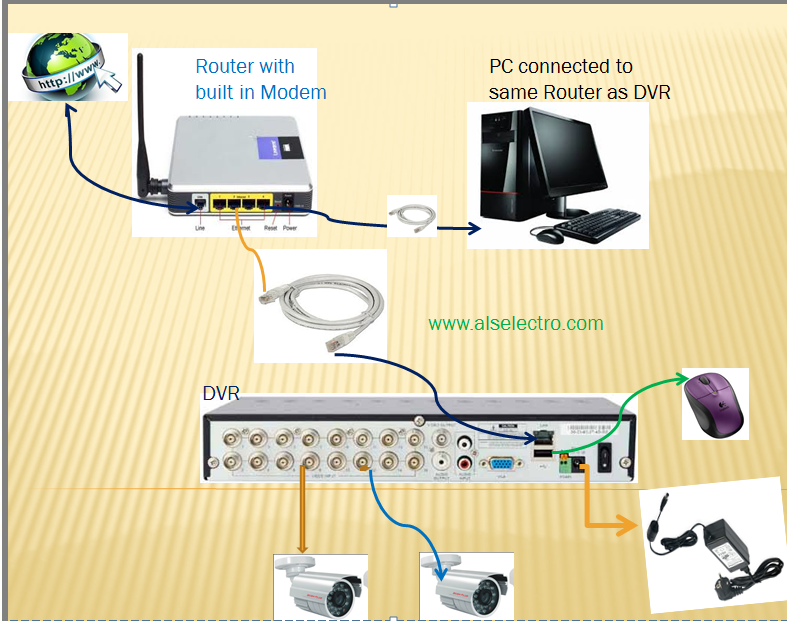
How do I connect my old DVR to the internet
Getting StartedMake sure that your Modem is connected to the internet.Connect your modem to the internet port on your router.Connect your DVR to one of the data ports of your router.Connect your DVR to your monitor.
Cached
Why won’t my DVR connect to the internet
To check your Ethernet cable connection:
Power cycle your DVR / NVR. To power cycle your DVR / NVR, please power it off and disconnect the power source for approximately 30 seconds. Reconnect, and power back on. If you do not have a connection, connect your router to your DVR / NVR using a different Ethernet cable.
Cached
What is the IP address for H 264 network DVR
The default IP Address of H. 264 HD IP camera is 192.168. 0.200. A user can use this IP address to verify the network connection between a local PC and H.
How do I setup my H 264 DVR
Easy Setup Guide 8ch H.264 DVR. Connecting the DVR to TV.C. Back of DVR. Back of TV.INPUT. Connect the RCA end of the.Connect the BNC plug end. of the cable to the top.Tune your TV to the. correct INPUT – this is.A. BNC to RCA Cable.Easy Set Up Components. Cameras and Accessories Optional.Camera Connections. Cameras Optional.
Does my DVR have to be connected to the internet
Internet connection is not needed for the following functions: Live view of the camera feed via TV and mouse. Playback/export of recordings via TV and mouse. Storing/erasing recordings in the DVR's built-in hard drive.
Does DVR need Ethernet cable
The DVR converts the video from analog to digital signals, compresses the file, and stores it on a hard drive. An Ethernet cable is ideal for both IP security cameras and Analog security cameras.
Why is my box not connecting to the internet
Restarting your modem and router should be the first thing you do when encountering an internet signal issue. Don't skip this step! This is almost always what tech support will ask you to try first, as it often solves the problem. To restart your equipment, unplug the power cable for 60 seconds and plug it back in.
How do I find my DVR IP address on my router
So common to both dvrs. And nvrs is you go to main menu. And it may ask you for a graphical password log in. And go to network then go to tcpip. Under network and tcp it'll give you an ip address.
How do I set my DVR IP address
In this video i'm going to show you how to change the ip address on the lan port of your dvr. Or nvr. Right click and go to main menu you may be prompted to enter your username. And password or draw a
How do I get my DVR to work
DVR TroubleshootingMake sure your equipment (TV and cable) is properly connected and powered on.Make sure the coax cable is connected to the outlet.Remove any objects around your receiver to allow proper ventilation.Refresh your receiver.Unplug your receiver and wait at least 60 seconds before plugging it back in.
What does H264 DVR mean
H. 264 (also called AVC, or Advanced Video Coding) is an industry standard for video compression that allows for the recording, compression, and distribution of digital video content. It works by processing frames of video using a block-oriented, motion-compensation-based video compression standard.
How do I connect my DVR to the internet without static IP
Step1: Login Camera on Web Browser > Now Go to Config Tab > Network > Put HTTP Port and Server Port – By default HTTP Port 80 assign (i.e 81 and 6036)> Check mark on use the Following IP Address > Assign IP Address on Camera as given example > Apply.
Do I need HDMI with Ethernet for cable
HDMI and Ethernet are very different cables though they both operate in communication and multimedia. They cannot be used in place of one another, as HDMI is not a networking cable, and Ethernet cables do not support video signal transmission and audio signal transmission.
What does no internet connection mean
For those of you using a wireless connection, you may see an error message pop up stating "WiFi connected but no internet connection". This means that your device/computer is correctly connected to the router, however, it is still not connected to the Internet.
Why does my TV box say connected but no internet
Android TV Has Not Reconnected
Once the power comes back after an outage, it takes some time for the router to re-establish an internet connection. The outage might cause you to see connectivity on your TV box while it's still not receiving a Wi-Fi signal. Give the modem a few minutes.
Where is DVR IP address
If you are unsure of what your DVR LAN IP address is, you can find this by accessing the Network Setup menu from the DVR. Press the 'Setup' button. Enter the system password and press 'Enter'. Select 'System Setup' and press 'Enter'.
Where this IP address is located
Click on “Start”, then “Settings”, “Network & internet”, “Wi-Fi”. Select the network you're connected to. Click on “Properties.” Scroll down to the bottom of the window — your IP will be shown next to “IPv4 address.”
What is the default IP for DVR
192.168.1.108
Connect the DVR to your network router with an ethernet cable. The DVR's default IP address is 192.168. 1.108. If the default IP does not work, it might have acquired an IP address via DHCP.
Does DVR need Internet to work
Internet connection is not needed for the following functions: Live view of the camera feed via TV and mouse. Playback/export of recordings via TV and mouse. Storing/erasing recordings in the DVR's built-in hard drive.
Why is my DVR not working
Make sure your equipment (TV and cable) is properly connected and powered on. Make sure the coax cable is connected to the outlet. Remove any objects around your receiver to allow proper ventilation. Refresh your receiver.
Why do people still use H264
H.264 bitrate is lower than other formats
It's estimated the bitrate savings can be as much as 50% or more compared to MPEG-2. For example, H. 264 can provide a better image quality at the same compressed bit rate. At a lower bit rate, it provides the same image quality.
Is H264 good for streaming
H. 264 is highly recommended for compressing and distributing video files to various streaming devices. It's great because you can compress files to a small size for easier uploads, downloads, and all-around playback.
Does my DVR have to be connected to the Internet
Internet connection is not needed for the following functions: Live view of the camera feed via TV and mouse. Playback/export of recordings via TV and mouse. Storing/erasing recordings in the DVR's built-in hard drive.
What is the difference between an ethernet cable and a HDMI cable
HDMI and Ethernet are two data transmission cables that cannot be more different. HDMI transmits audio and video signals, while ethernet cables transmit regular data. However, there is HDMI with Ethernet, a cable combining both features for multimedia purposes.
Can you convert HDMI to Ethernet
By compressing the HDMI signal into a data stream, HDMI over Ethernet allows users to transmit HDMI signals up to 100 meters/328 feet or more. To extend HDMI over Ethernet, you will need an HDMI over Ethernet extender kit, Ethernet cables, and power supply.


0 Comments