
Why does my Windows Update keep disabling?
Summary of the Article: How to Stop Windows Update from Disabling
1. How do I stop Windows Update from disabling?
To stop Windows Update from disabling, follow these steps:
– Use the Windows key + R keyboard shortcut to open the Run command.
– Type gpedit and press Enter.
– Browse the following path: \Computer Configuration\Administrative Templates\Windows Components\Windows Update.
– On the right side, double-click the “Do not include drivers with Windows Update” policy.
– Select the Enabled option.
– Click Apply and then OK.
2. How do I permanently enable Windows updates?
To permanently enable Windows updates, do the following:
– Press the Windows logo key + R at the same time to open the Run box.
– Type services.msc and press Enter.
– Scroll down to Windows Update and double-click it.
– In Startup type, select “Disabled”.
– Click Apply and then OK to save the settings.
3. What program disables Windows Update?
Windows Update Blocker is a freeware program that allows you to completely disable or enable Automatic Updates on your Windows system with just a click of a button.
4. What happens if Windows Update is disabled?
Disabling Windows updates can leave your computer vulnerable to security threats because you haven’t installed the latest security patches.
5. How do I enable or disable Windows 10 update?
To enable or disable Windows 10 updates:
– Press the Win + R keyboard shortcut to open the Run box.
– Type services.msc to access your PC’s service settings.
– Scroll down and double-click on Windows Update to access the General settings.
– Select Disabled from the Startup type dropdown menu.
– Click OK and then restart your PC.
6. How do I enable or disable Windows Automatic updates?
To disable Automatic Updates for Windows Servers and Workstations:
– Click Start, go to Settings, and open Control Panel.
– Select System and go to the Automatic Updates tab.
– Click Turn off Automatic Updates.
– Click Apply and then OK.
7. Can Windows Update be permanently disabled?
Yes, in the Services window, you can find the Windows Update service and double-click it. In the popup window, change the Startup type to Disabled, and then change the Service status to Stop. Click Apply and OK to execute the changes.
8. How do I trigger a Windows feature update?
To trigger a Windows feature update:
– Type and search “Check for updates” in the Windows search bar.
– Click Open to access the Windows Update settings.
– Click Check for updates.
– If a feature update is available, click Download and install to start the update.
9. Why is Windows allowed to force updates?
Microsoft believes that automatically downloading software updates is necessary for security purposes and to protect your files and information from hackers.
10. How do I fix Windows Update failing?
To fix Windows Update failing errors, you can try the following methods:
– Run the Windows Update Troubleshooter tool.
– Restart Windows Update related services.
– Reset Windows Components.
– Run the System File Checker (SFC) scan.
– Execute the DISM command.
– Temporarily disable your antivirus.
– Restore Windows 10 from a backup.
11. How do I manually update Windows 10?
To manually update Windows 10:
– Open the Windows Start Menu.
– Click Settings.
– Click Update & Security.
– Select Install Now or Check for Updates.
– Wait for the update to be installed.
– Click Restart now after the update is installed.
How do I stop Windows Update from disabling
Windows 10 – Stopping Automatic Driver and BIOS UpdatesUse the Windows key + R keyboard shortcut to open the Run command.Type gpedit.Browse the following path:On the right side, double-click the Do not include drivers with Windows Update policy.Select the Enabled option.Click Apply.Click OK.
How do I permanently enable Windows updates
How to Disable Windows 10 UpdatePress the Windows logo key + R at the same time to invoke the Run box.Type services. msc and press Enter.Scroll down to Windows Update, and double-click it.In Startup type, select "Disabled". Then click "Apply" and "OK" to save the settings.
What program disables Windows Update
Windows Update Blocker is a freeware that helps you to completely disable or enable Automatic Updates on your Windows system , with just a click of the button .
Cached
What happens if Windows Update is disabled
Always keep in mind that disabling Windows updates comes with the risk that your computer will be vulnerable because you haven't installed the latest security patch.
How do I enable or disable Windows 10 update
How to Disable Windows 10 UpdatesUsing the Win + R keyboard shortcut, type services.msc to access your PC's service settings.Next, scroll down and double-click on Windows Update to access the General settings.Now, select Disabled from the Startup type dropdown menu.Once done, click OK and then restart your PC.
How do I enable or disable Windows Automatic updates
To disable the Automatic Updates for Windows Servers and Workstations manually, follow the steps given below:Click start>Settings>Control Panel>System.Select the Automatic Updates tab.Click Turn off Automatic Updates.Click Apply.Click OK.
Can Windows Update be permanently disabled
In the services window, please find out the Windows Update service and double-click it. In the popup window, change the Startup type to Disabled. Then change the Service status to Stop. Click Apply and OK to execute the changes.
How do I trigger Windows feature update
Get the feature updates via Windows Update
Type and search [Check for updates] in the Windows search bar①, then click [Open]②. Click [Check for updates]③. If the notice of feature updates is available, click [Download and install] to start to update④.
Why is Windows allowed to force updates
Microsoft thinks automatically downloading big software updates are necessary for security purposes and stopping hackers from exposing your files and information.
How do I fix Windows Update failing
8 Methods to fix Windows Update failing errorsRun the Windows Update Troubleshooter tool.Restart Windows Update related services.Reset Windows Components to solve the problem.Run the System File Checker (SFC) scan.Execute the DISM command.Temporarily disable your antivirus.Restore Windows 10 from a backup.
How do I manually update Windows 10
How to Update Windows 10 ManuallyOpen the Windows Start Menu.Then click Settings.Next, click Update & Security.Then select Install Now or Check for Updates.Next, wait for the update to be installed.Finally, click Restart now after the update is installed.
How to enable Windows Update service in Windows 10 Access is denied
How to Fix the Windows Access Denied Error 0x80070005Give Yourself Full Permissions.Scan for Malware and Viruses.Perform a Clean Boot.Take Ownership With Command Prompt.Run the Windows Troubleshooter.SFC (System File Checker)Reset Permissions with SubInACL.Update Windows 10 Manually.
How do I stop Windows 10 21h2 update
Now to avoid new updates, Windows+R> type: services. msc> press enter> double click Windows update> startup type> leave Manual or Disabled, as you prefer. Now click on Stop.
How do I permanently disable Windows Update in Windows 11
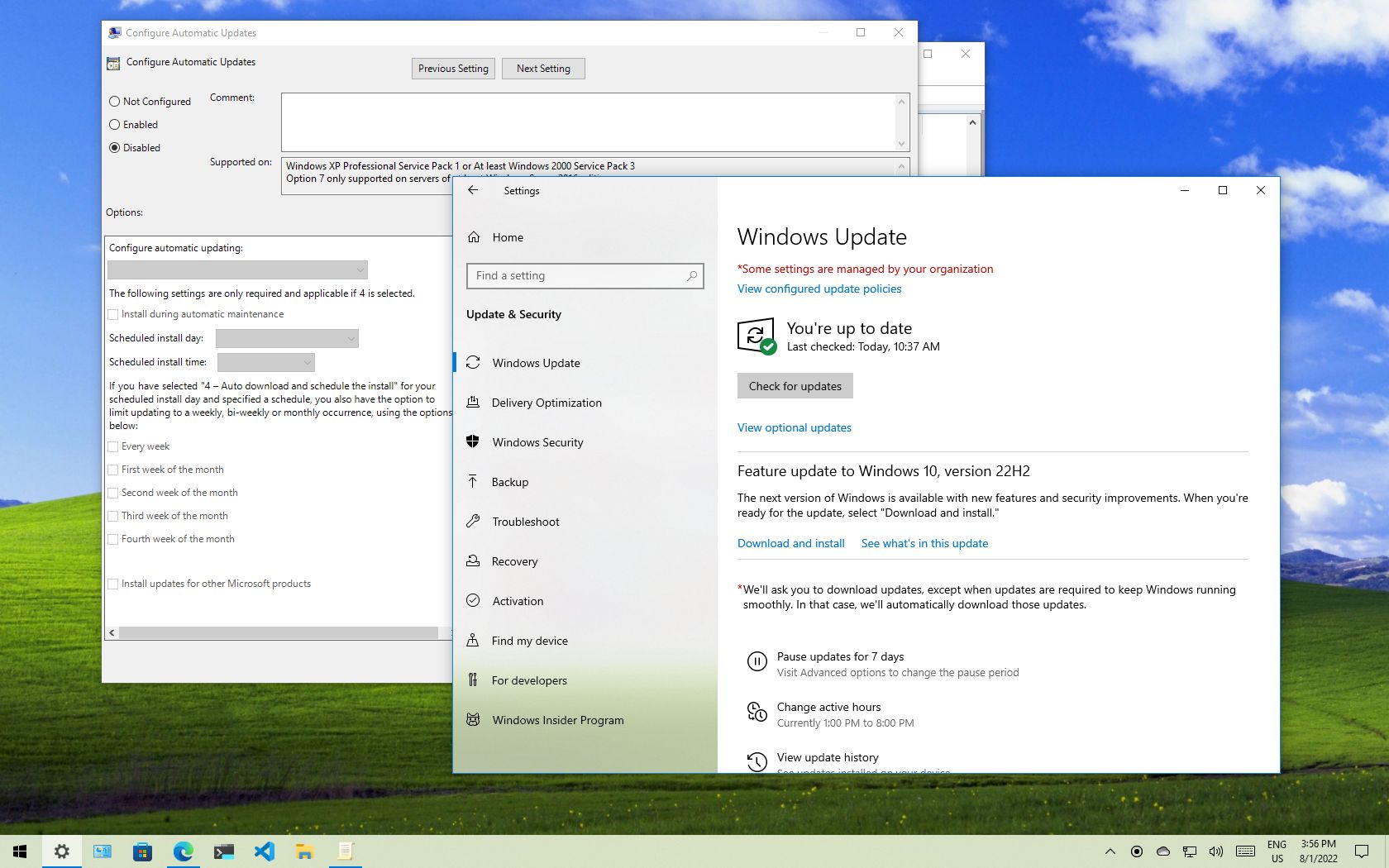
Open the “Manage and user experience” folder in the path: Computer Configuration > Administrative Templates > Windows Components > Windows Update. Double-click to open the “Configure Automatic Updates” policy. Choose the “Disabled” option to disable Windows Update permanently.
How do I force Windows 10 to update automatically
To turn on Automatic Updates yourself, follow these steps:Click Start, click Run, type wscui. cpl, and then click OK.Click Automatic Updates.The following options are available: Automatic (recommended) This option lets you select the day and the time that updates are automatically downloaded and installed.
Are Windows feature updates automatic
To help keep devices on a supported version of Windows, Windows Update automatically initiates a feature update for devices before—or as they are approaching—end of servicing. Automatic updates allow your devices to continue to receive the monthly updates that are critical to security and ecosystem health.
Why is Windows Update disabled in Windows 10
This happens when the antivirus software reads a false positive on a program on your computer. Some antivirus programs are known for causing issues like these. The first thing you want to do is disable the antivirus application and see if this fixes the problem.
Why Windows Cannot install updates
Restart the device and run setup again. If restarting device does not resolve the issue, then use the Disk Cleanup utility and clean up the temporary files and the System files. For more information, see Disk cleanup in Windows. A file needed by Windows Update is likely damaged or missing.
Why does Windows 10 update fail everytime
Sometimes, your antivirus software may block or interfere with the Windows Update process. You can try temporarily disabling your antivirus software and then running Windows Update again to fix this. To disable your antivirus, follow the instructions provided by the software manufacturer.
How do I fix a corrupted Windows 10 update
Type the sfc /scannow command and press Enter. It may take several minutes for the command operation to be completed. Close the command prompt, and then run Windows Update again.
How do I fix Windows 10 not updating
Run Windows Update again
Even if you have downloaded some updates, there may be more available. After trying the preceding steps, run Windows Update again by selecting Start > Settings > Update & Security > Windows Update > Check for updates . Download and install any new updates.
How do I force a System Update
The best way to force an Android update is to go to Settings > Software update > Download and install. You can also force Android updates by reinstalling Android OS using a PC or rooting your Android for deeper customizations.
Why is my Windows update not working Access Denied
This can happen if users are unable to install Windows updates or encounter other issues. The “Access is denied” error prevents some people from doing so. This can be caused by the interference of a third-party security program or lack of ownership over the particular Windows service's registry keys.
How do I enable updates disabled by administrator
Step 1: Close the Chrome browser at first. Step 2: Open the Run window by pressing Windows and R keys. Step 4: Navigate to the Services tab and then scroll down the list to find Google Update Service (gupdate) and Google Update Service (gupdatem). Check the two checkboxes and click on OK.
Is Windows 10 21H2 forced
Microsoft Will Force Windows 10 Users to Upgrade to 22H2
According to Microsoft, Windows 10 21H2 will reach the end of its service life on June 13, 2023. So, it will automatically update all Windows 10 users to keep them protected.


0 Comments