
How do I unlock my childs iPhone?
Summary of the Article:
How do you unlock a child’s iPhone lock? To unlock a child’s iPhone, go to Settings and tap Screen Time. Then, tap Content & Privacy Restrictions and enter your Screen Time passcode. After that, tap Content Restrictions and choose Unrestricted Access, Limit Adult Websites, or Allowed Websites.
How do I access my child’s iPhone? To access your child’s iPhone, go to Settings, then tap your name, followed by Family Sharing, and finally, Screen Time. Tap the child you want to set up Screen Time for and follow the onscreen instructions.
Can you unlock an iPhone without passcode or Face ID? Yes, you can use iTunes to unlock an iPhone without a passcode or Face ID. The restore feature in iTunes allows you to delete all data on the iPhone, including the lock screen password.
How do you unlock a family member’s iPhone? To unlock a family member’s iPhone, go to Settings, then tap your name, followed by Password & Security and Account Recovery. Tap your contact’s name and then tap Get Recovery Code. When your friend is ready, read them their recovery code.
Can a parent unlock a child’s phone? Yes, a parent can unlock a child’s Android device using a parent access code, even if it isn’t connected to the Internet.
How can I open my child lock on a mobile device? To open a child lock on a mobile device, go to Settings, then select Add a User or Profile. Next, choose Restricted Profile and set it up with a name and security settings.
How can I get access to my child’s phone? To get access to your child’s phone, unlock their device and enter the password for the parent’s account used to supervise the child. If the password option is not visible, ensure that the child’s device is turned on and connected to the internet.
How can I see everything on my child’s phone? You can use Family Link to monitor content, set screen time limits, and track your child’s location when their device is with them. Parents can manage their child’s device through the Family Link app on Android and iOS.
Can you unlock a locked iPhone? Only your carrier can unlock your iPhone. Contact them and request an unlock. The process may take a few days to complete, so check with your carrier for the status of your request.
How much does it cost to unlock an iPhone without a passcode? Apple does not charge any money to unlock a disabled iPhone. The “iPhone is disabled” prompt appears when you enter the wrong passcode multiple times.
How do I take restrictions off my son’s iPhone? If you have restrictions or parental controls set up on your son’s iPhone, go to the settings and disable or adjust the restrictions as necessary.
Questions:
- How do you unlock a child’s iPhone lock?
Answer: To unlock a child’s iPhone, go to Settings and tap Screen Time. Then, tap Content & Privacy Restrictions and enter your Screen Time passcode. After that, tap Content Restrictions and choose Unrestricted Access, Limit Adult Websites, or Allowed Websites. - How do I access my child’s iPhone?
Answer: To access your child’s iPhone, go to Settings, then tap your name, followed by Family Sharing, and finally, Screen Time. Tap the child you want to set up Screen Time for and follow the onscreen instructions. - Can you unlock an iPhone without passcode or Face ID?
Answer: Yes, you can use iTunes to unlock an iPhone without a passcode or Face ID. The restore feature in iTunes allows you to delete all data on the iPhone, including the lock screen password. - How do you unlock a family member’s iPhone?
Answer: To unlock a family member’s iPhone, go to Settings, then tap your name, followed by Password & Security and Account Recovery. Tap your contact’s name and then tap Get Recovery Code. When your friend is ready, read them their recovery code. - Can a parent unlock a child’s phone?
Answer: Yes, a parent can unlock a child’s Android device using a parent access code, even if it isn’t connected to the Internet. - How can I open my child lock on a mobile device?
Answer: To open a child lock on a mobile device, go to Settings, then select Add a User or Profile. Next, choose Restricted Profile and set it up with a name and security settings. - How can I get access to my child’s phone?
Answer: To get access to your child’s phone, unlock their device and enter the password for the parent’s account used to supervise the child. If the password option is not visible, ensure that the child’s device is turned on and connected to the internet. - How can I see everything on my child’s phone?
Answer: You can use Family Link to monitor content, set screen time limits, and track your child’s location when their device is with them. Parents can manage their child’s device through the Family Link app on Android and iOS. - Can you unlock a locked iPhone?
Answer: Only your carrier can unlock your iPhone. Contact them and request an unlock. The process may take a few days to complete, so check with your carrier for the status of your request. - How much does it cost to unlock an iPhone without a passcode?
Answer: Apple does not charge any money to unlock a disabled iPhone. The “iPhone is disabled” prompt appears when you enter the wrong passcode multiple times. - How do I take restrictions off my son’s iPhone?
Answer: If you have restrictions or parental controls set up on your son’s iPhone, go to the settings and disable or adjust the restrictions as necessary.
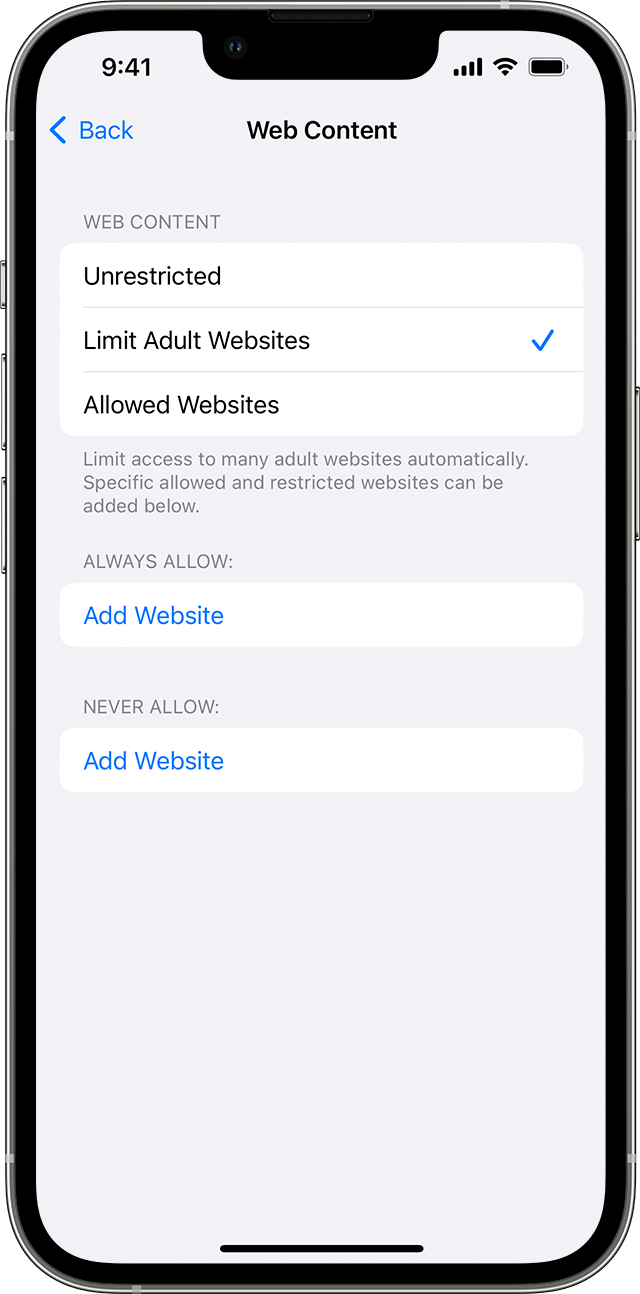
How do you unlock a childs iPhone lock
Go to Settings and tap Screen Time. Tap Content & Privacy Restrictions and enter your Screen Time passcode. Tap Content Restrictions, then tap Web Content. Choose Unrestricted Access, Limit Adult Websites or Allowed Websites.
How do I access my childs iPhone
Go to Settings > [your name] > Family Sharing > Screen Time. Tap the child you want to set up Screen Time for. Tap Screen Time, then follow the onscreen instructions. For information about Screen Time settings, see Set up Screen Time for a family member on iPhone.
Can you unlock an iPhone without passcode or Face ID
iTunes is also a good choice for you to resolve how to unlock an iPhone without passcode or Face ID. Its restore feature is a technique for deleting all data on an iPhone, including the lock screen password. If you've recently synced your iPhone with iTunes, this method will work.
Cached
How do you unlock a family members iPhone
On your iPhone, iPad, or iPod touch with iOS 15 or iPadOS 15 or laterGo to Settings, then tap your name.Tap Password & Security > Account Recovery.Tap your contact's name.Tap Get Recovery Code.When your friend is ready, read them their recovery code.
Can a parent unlock a child’s phone
Note: You can also use a parent access code to unlock your child's Android device if it isn't connected to the Internet.
How can I open my child lock in Mobile
And select add a user or profile. Next choose restricted profile. If you don't have a screen lock setup it will prompt you to do this now tap. New profile to give it a name and set it up.
How can I get access to my childs phone
Unlock your child's deviceOn your child's device, click Parent Access.Enter the password for the parent's account used to supervise the child. If you don't see the password option: Make sure the child's device is turned on and connected to the internet.Click Next.
How can I see everything on my child’s phone
You can use Family Link to monitor content, set screen time limits, and even see their child's location when they have their device with them (parents can manage their device through the Family Link app on Android and iOS). For more tips on using Family link check out families.google.com/familylink.
Can you unlock a locked iPhone
Only your carrier can unlock your iPhone. Contact them and request an unlock. After you submit the request, it might take a few days to complete. Contact your carrier to check the status of your request.
How much is it to unlock an iPhone without passcode
The short answer is no; Apple doesn't charge any money to unlock a disabled iPhone. The “iPhone is disabled” prompt appears when you put in the wrong passcode too many times.
How do I take restrictions off my sons iPhone
And let's get right into this you may find you're restricted or just not allowed to do certain things on your iPhone. And this is probably because there are parental controls set up on your iPhone. So
Can Apple open a locked phone
Only your carrier can unlock your iPhone. Contact them and request an unlock. After you submit the request, it might take a few days to complete. Contact your carrier to check the status of your request.
How do I unlock my daughter’s phone
Unlock your child's device with parent accessTo unlock your child's device, you can also use parent access. You get an access code in the Family Link app. or on the web. You won't receive this number through email or SMS.Enter this one-time use only number into the child's device before the code expires.
Can I unlock my child’s iPhone through Family Link
Unlock your child's device with a parent access code
Family Link or on the web. This number will not be sent via email or SMS. Enter this one-time use only number into the child's device before the code expires. Tip: You can also manage your child's account by clicking on your child's name at families.google.com.
Can I unlock my child’s phone through Family Link
To unlock your child's device, you can also use parent access. You get an access code in the Family Link app. or on the web. You won't receive this number through email or SMS. Enter this one-time use only number into the child's device before the code expires.
Can you bypass child lock
The easiest way to bypass parental controls on a mobile device is to perform a factory reset. Factory resetting your phone will not work if parental controls are set on your router. If this is the case, use a VPN or Proxy site.
Can I monitor my child’s iPhone without them knowing
Yes, you can see everything on your child's phone without them knowing. You need to monitor their phone discreetly with a phone monitoring app. However, not all monitoring apps are discreet and invisible. Hence, you should use an app like the AirDroid Parental Monitoring app that works in stealth mode.
How can I mirror my daughters iPhone
Creating a Child AccountOpen the Settings app on your iPhone or iPad and go to [Your Name] > Family Sharing.Tap Add Family Member and choose to Create a Child Account.After creating the account, use the email address and password you created to sign in to that account on your child's iPhone or iPad.
Can you unlock a phone without the passcode
You can use your connected Google account to unlock your phone without a password. The Android Device Manager can help you erase or reset a locked phone. If your device supports a backup PIN option, you can use this method to access a locked phone.
Can you unlock iPhone 13 without passcode
Thank you foreign if you can't remember your Apple ID. You can also unlock it with 4K. First run the program and put your phone in next click Start to begin tap next in the new window you need to
How do you unlock a phone if you forgot your password
If you forget your Android lock screen password, is there a way to unlock your phone The short answer is no – you will have to factory reset your device to be able to use your phone again.
How do I turn off restricted mode on my child
Android appSign in to your account.At the top right, tap your profile photo .Tap Settings General.Turn on or off Restricted Mode.
Can kids turn off restricted mode
If you find videos or channels you don't want your child to see, add it to your list of blocked content. Anyone, even kids, can search how to disable the Restricted Mode online. To prevent them from turning the feature off, check the Restricted Mode setting again and click Lock Restricted Mode for this browser.
How do I get back into my iPhone after being locked out
If you can't remember your passcode when you try again, use a computer to put your iPhone in recovery mode. Recovery mode allows you to erase the iPhone, giving you access to set it up again. After you erase your iPhone, you can restore your data and settings from a backup.
Can you unlock a locked iPhone with another iPhone
Can you unlock your iPhone from another device Yes, you can. Using iCloud allows you to unlock iPhone with Apple ID remotely. You can do it on another iOS device with the same Apple ID.


0 Comments