
How can I tell if my computer is using IPv6?
How can I tell if my computer is using IPv6?
1. How do I know if I have IPv4 or IPv6 on Windows?
Open the Start menu and select Settings. Choose Network & internet from the menu on the left, then click Properties along the top. You’ll find your IPv4 and IPv6 address listed here.
2. Is IPv6 automatically enabled?
To enable IPv6, make sure that the Configure IPv6 option is set to Automatically. Click OK to exit the adapter configurations window and then Apply.
3. How do I know my IPv4 and IPv6 address?
IPv4 uses four 1 byte decimal numbers, separated by a dot (i.e. 192.168.1.1), while IPv6 uses hexadecimal numbers that are separated by colons (i.e. fe80::d4a8:6435:d2d8:d9f3b11).
4. Should I disable IPv6 on my computer?
We do not recommend that you disable IPv6 or its components. If you do, some Windows components may not function. We recommend using Prefer IPv4 over IPv6 in prefix policies instead of disabling IPV6.
5. Do I have both IPv4 and IPv6?
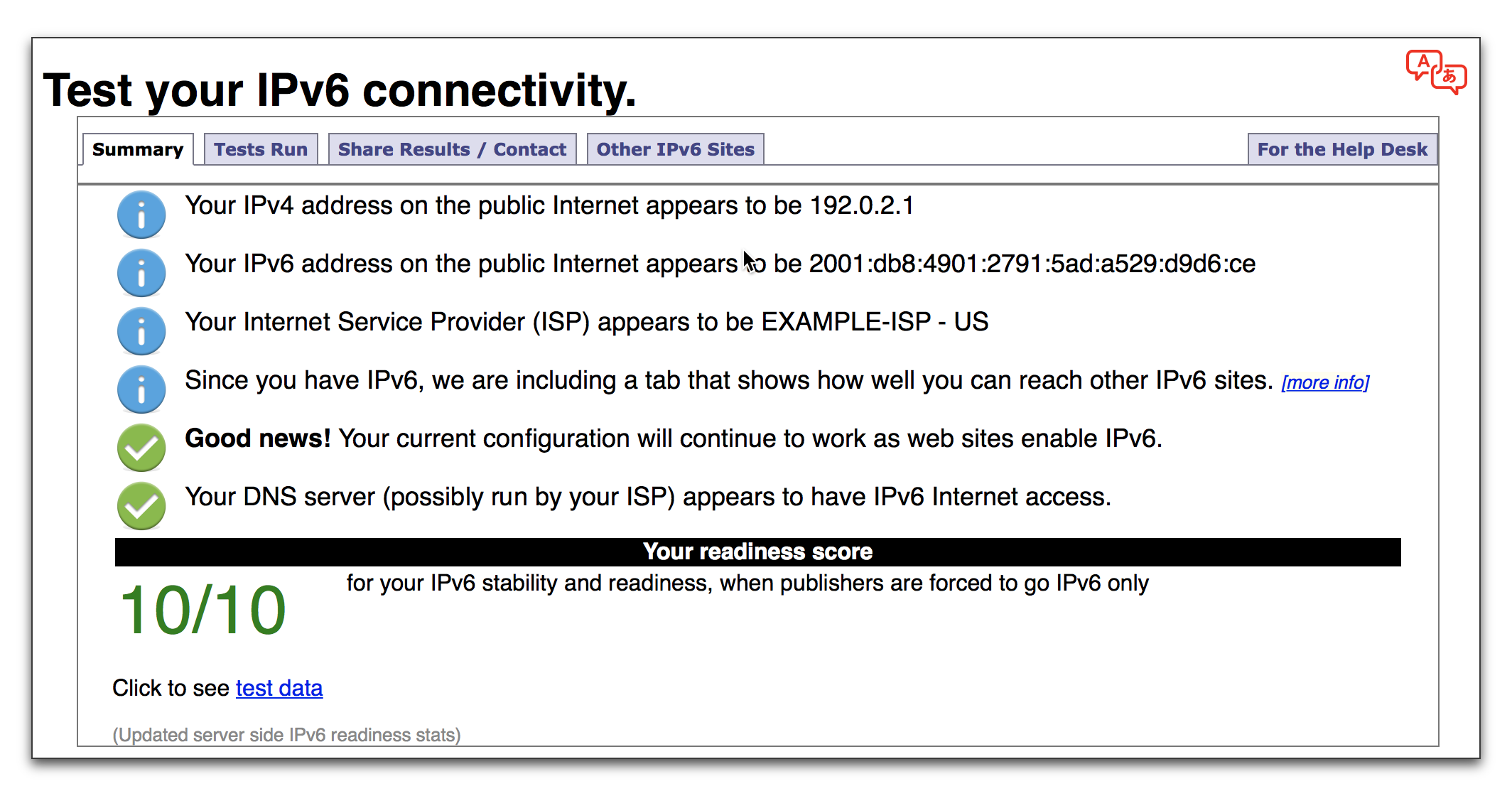
By going to WhatIsMyIPAddress.com, you’ll be able to see if you’re connecting with an IPv4 address, an IPv6 address, or both. If you see only an IPv4 address on your laptop or desktop computer, your Internet provider isn’t delivering dual-stack connectivity yet.
6. What does an IPv6 IP look like?
An IPv6 address is represented as eight groups of four hexadecimal digits, each group representing 16 bits. The groups are separated by colons (:). An example of an IPv6 address is: 2001:0db8:85a3:0000:0000:8a2e:0370:7334. The standards provide flexibility in the representation of IPv6 addresses.
7. How do I know if my IPv6 is disabled?
If you want to test if your system has IPv6 enabled, the best way is to use the “ping” command. The “-6” option tells ping to use an IPv6 address. You will get an error message if the system is not configured for IPv6.
8. Is IPv6 enabled by default on Windows 10?
Internet Protocol version 6 (IPv6) is enabled by default in all versions of Microsoft Windows 8 and later, and Server and 10 Enterprise versions released in 2013 or later. No action is required to enable IPv6.
9. Can you have both an IPv4 and IPv6 address?
IPv4 applications continue to run on a dual-stack that is also IPv6 enabled with at least one IPv6 interface. No changes need to be made to these applications (no porting required). IPv6 applications that run on a dual-stack can also use the IPv4 protocol. IPv6 applications use an IPv4-mapped IPv6 address.
10. What is the downside of using IPv6?
IPv6 uses a 128-bit address and can provide 340 undecillion IP addresses, while IPv4 is limited to 4.3 billion IP addresses. However, IPv6 implementation by ISPs and/or network admins can lead to various leaks and security issues. This way, your personal information can potentially be compromised.
11. Can IPv4 and IPv6 coexist on the same network?
IPv4 and IPv6 Coexistence via Dual Stack
Dual stack is the most basic and direct strategy to achieve IPv4 and IPv6 coexistence. With this solution, every networking device, including using IPv4 or IPv6 switches, in an ISP’s network will be configured with the capabilities to run IPv4 and IPv6 simultaneously.
How do I know if I have IPv4 or IPv6 on Windows
Open the Start menu and select Settings. Choose Network & internet from the menu on the left, then click Properties along the top. You'll find your IPv4 and IPv6 address listed here.
Is IPv6 automatically enabled
To enable IPv6, make sure that the Configure IPv6 option is set to Automatically. Click OK to exit the adapter configurations window and then Apply.
Cached
How do I know my IPv4 and IPv6 address
IPv4 uses four 1 byte decimal numbers, separated by a dot (i.e. 192.168. 1.1), while IPv6 uses hexadecimal numbers that are separated by colons (i.e. fe80::d4a8:6435:d2d8:d9f3b11).
Should I disable IPv6 on my computer
We do not recommend that you disable IPv6 or its components. If you do, some Windows components may not function. We recommend using Prefer IPv4 over IPv6 in prefix policies instead of disabling IPV6.
Cached
Do I have both IPv4 and IPv6
By going to WhatIsMyIPAddress.com, you'll be able to see if you're connecting with an IPv4 address, an IPv6 address, or both. If you see only an IPv4 address on your laptop or desktop computer, your Internet provider isn't delivering dual-stack connectivity yet.
What does an IPv6 IP look like
An IPv6 address is represented as eight groups of four hexadecimal digits, each group representing 16 bits The groups are separated by colons (:). An example of an IPv6 address is: 2001:0db8:85a3:0000:0000:8a2e:0370:7334. The standards provide flexibility in the representation of IPv6 addresses.
How do I know if my IPv6 is disabled
If you want to test if your system has IPv6 enabled, the best way is to use the “ping” command. The “-6” option tells ping to use an IPv6 address. You will get an error message if the system is not configured for IPv6.
Is IPv6 enabled by default on Windows 10
Internet Protocol version 6 (IPv6) is enabled by default in all versions of Microsoft Windows 8 and later, and Server and 10 Enterprise versions released in 2013 or later. No action is required to enable IPv6.
Can you have both an IPv4 and IPv6 address
IPv4 applications continue to run on a dual– stack that is also IPv6 enabled with at least one IPv6 interface. No changes need to be made to these applications (no porting required). IPv6 applications that run on a dual-stack can also use the IPv4 protocol. IPv6 applications use an IPv4-mapped IPv6 address.
What is the downside of using IPv6
IPv6 uses a 128-bit address and can provide 340 undecillion IP addresses, while IPv4 is limited to 4.3 billion IP addresses. However, IPv6 implementation by ISPs and/or network admins can lead to various leaks and security issues. This way, your personal information can potentially compromised.
Can IPv4 and IPv6 coexist on same network
IPv4 and IPv6 Coexistence via Dual Stack
Dual stack is the most basic and direct strategy to achieve IPv4 and IPv6 coexistence. With this solution, every networking device, including using IPv4 or IPv6 switches, in an ISP's network will be configured with the capabilities to run IPv4 and IPv6 simultaneously.
Should I enable both IPv4 and IPv6 on my router
When possible, it is better to keep both IPv4 and IPv6 addresses enabled. For example, using only IPv6 can cause some accessibility issues, as only about one third of the internet supports IPv6 addresses. Likewise, disabling IPv6 can cause certain problems, especially if your router is already using an IPv6 address.
What is the IPv6 address of a computer network
An IPv6 address is a 128-bit alphanumeric value that identifies an endpoint device in an Internet Protocol Version 6 (IPv6) network. IPv6 is the successor to a previous addressing infrastructure, IPv4, which had limitations IPv6 was designed to overcome.
How do I change from IPv4 to IPv6
How to enable/disable IPv6 on AndroidGo to “Settings” > “Connections” > “Mobile networks” > “Access Point Names.”Select your mobile network operator.Scroll down to “APN protocol.”To disable IPv6, select “IPv4” in the menu.
How do I access my IPv6 settings
In Settings go to Network & Internet and click the Properties button for the interface you wish to configure. Click the Edit button under IP settings, change the configuration type to Manual, enable IPv6, and populate your settings.
How do I change from IPv4 to IPv6 in Windows 10
To Disable IPv6:Use the shortcut, Windows Key + X to open the Control Panel.Open Network and Internet.Open Network and Sharing Center.Click Change Adapter Settings.Right-click your connection and go to Properties.Uncheck the box next to Internet Protocol Version 6 (TCP/IPv6) to disable it.
How do I know if my IPv6 address is on the same network
If the prefix lengths are different then they are not on the same network. If the prefix lengths are the same then take the length ( very probably 64, so let's assume that) and compare the first 64 bits of both addresses with each other. If they are the same then they are both on the same network.
Can IPv6 cause WIFI problems
The most common problem with IPv6 is that it can cause compatibility issues with specific devices on your network. For example, if you're having trouble connecting to a printer or another device, you may need to disable IPv6. Another problem with IPv6 occurs when your VPN connection suffers IPv6 leaks.
Should I enable IPv6 on my router
Do you need both IPv4 and IPv6 When possible, it is better to keep both IPv4 and IPv6 addresses enabled. For example, using only IPv6 can cause some accessibility issues, as only about one third of the internet supports IPv6 addresses.
Which is faster IPv4 or IPv6
In general, there's no major difference between IPv4 vs IPv6 speeds, though some evidence does suggest that IPv6 might be slightly faster in some situations.
How do I switch from IPv4 to IPv6
When switching from IPv4 to IPv6, this is one of the simplest ways to utilize. Install any router with both IPv4 and IP6 address on its interfaces, and then point the network to the appropriate IP scheme. A dual-stack router can communicate with both IPv6 and IPv4 networks at the same time.
What does an IPv6 address look like
The IPv6 address size is 128 bits. The preferred IPv6 address representation is: x:x:x:x:x:x:x:x , where each x is the hexadecimal values of the eight 16-bit pieces of the address. IPv6 addresses range from 0000:0000:0000:0000:0000:0000:0000:0000 to ffff:ffff:ffff:ffff:ffff:ffff:ffff:ffff .
How do I enable or disable IPv6
IPv6: How To DisableUse the shortcut, Windows Key + X to open the Control Panel.Open Network and Internet.Open Network and Sharing Center.Click Change Adapter Settings.Right-click your connection and go to Properties.Uncheck the box next to Internet Protocol Version 6 (TCP/IPv6) to disable it.
Can you enable IPv4 and IPv6 at the same time
With the dual-stack solution, every networking device, server, switch, router, and firewall in an ISP's network will be configured with both IPv4 and IPv6 connectivity capabilities. Most importantly, dual-stack technology allows ISPs to process IPv4 and IPv6 data traffic simultaneously.
How do I enable both IPv4 and IPv6
IPv4 and IPv6 Coexistence via Dual Stack
Dual stack is the most basic and direct strategy to achieve IPv4 and IPv6 coexistence. With this solution, every networking device, including using IPv4 or IPv6 switches, in an ISP's network will be configured with the capabilities to run IPv4 and IPv6 simultaneously.


0 Comments