
How do I turn on emergency alerts?
Summary of the Article
To turn on or turn off emergency alerts on your iPhone, open the settings app and scroll down to tap on notifications. Then, scroll down to the bottom of the page and follow the instructions. Make sure your emergency alert settings are turned on to receive emergency alerts.
1. How do you turn on emergency alerts on iPhone?
To turn on or turn off emergency alerts, open the settings app on your iPhone. Scroll down and tap on notifications. Scroll down to the bottom of the page and follow the instructions.
2. How do I make sure my emergency alerts are turned on?
To make sure your emergency alerts are turned on, open the settings app on your Android device. Tap on notifications. Select the alerts you want to receive.
3. Why am I not getting the emergency alerts on my iPhone?
If you are not getting emergency alerts on your iPhone, it is possible that your emergency alert settings are switched off. Go to settings, type ’emergency alerts’ into the navigation bar, and switch the ‘Extreme Alerts’ button to on.
4. Why am I not getting emergency alerts on my phone?
To receive emergency alerts on your phone, go to the Messaging app’s menu, settings, and then “Emergency alert settings” to configure the options. Depending on your phone, you’ll be able to toggle each of the alerts independently and choose how they alert you.
5. Are there emergency alerts on iPhone?
Yes, there are emergency alerts on iPhone. In the notifications menu, you can toggle the Emergency Alerts and Severe Alerts off to disable government notifications.
6. How do I check my Apple emergency alerts?
To check your Apple emergency alerts, swipe up from the middle of the screen if you are on the Lock Screen. If you are on any other screen, swipe down from the center of the top of your screen to access the Notification Center.
7. Where is my emergency alert settings?
To access your emergency alert settings, open the Settings app, tap on Sounds & vibration, tap on More settings, and then tap on Wireless Emergency Alerts. Toggle off ‘Allow alerts’ to disable emergency alerts.
8. Where is emergency alert on my phone?
To find emergency alert settings on your phone, open the Settings app, tap on Notifications, and then tap on Wireless emergency alerts. Choose how often you want to receive alerts and turn on the desired settings.
9. Why do I not receive alerts?
If you are not receiving alerts, make sure your Android device is connected to the internet. Check the notification settings for your app and ensure that notifications are turned on with the correct sound or vibration settings.
10. Where are the emergency alerts on my phone?
To find emergency alerts on your Android device, go to the settings menu and select the notifications option. Press advanced settings and scroll down to find wireless emergency alerts.
Remember to always check and update your emergency alert settings to ensure that you receive important notifications in times of emergency.
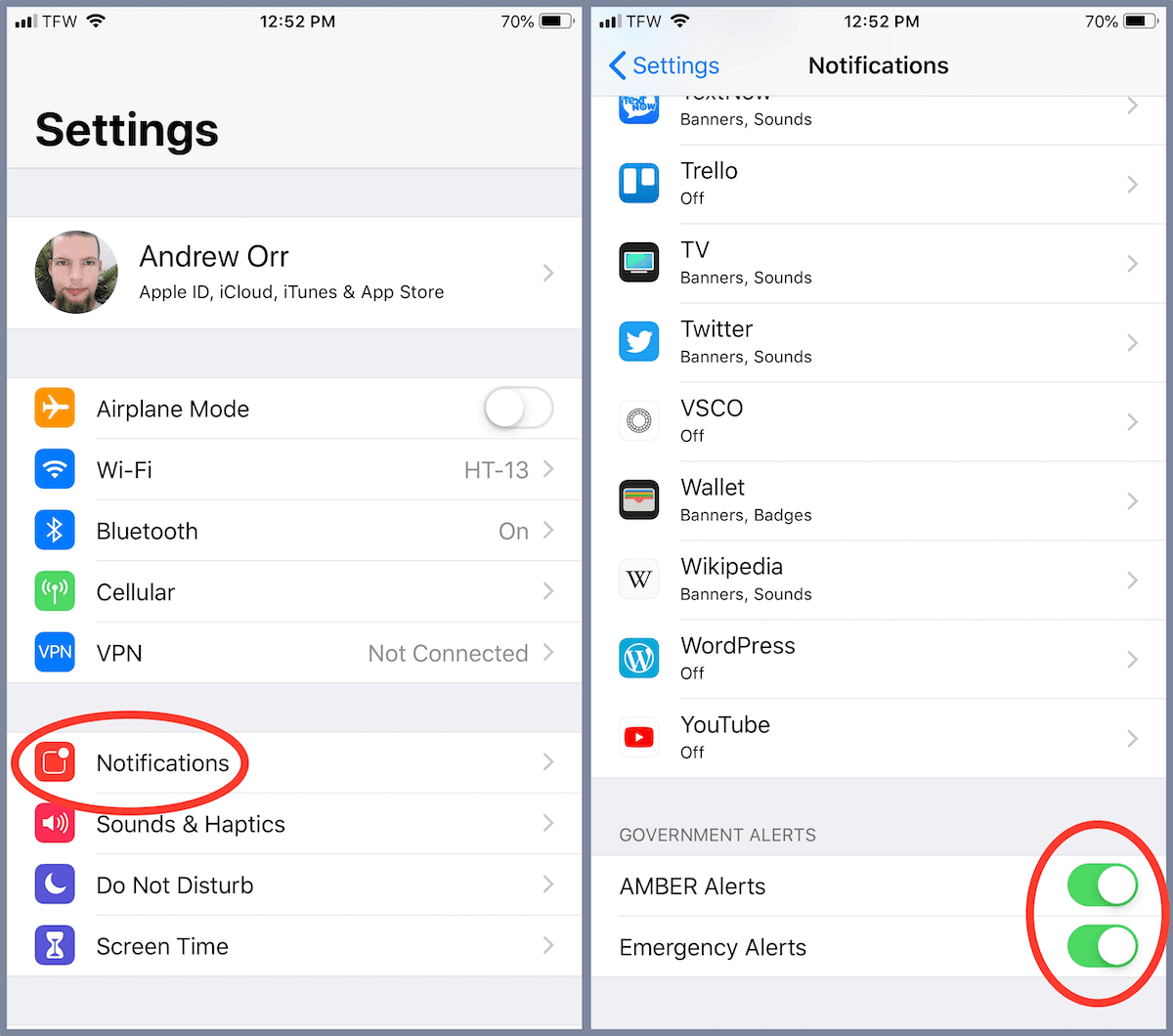
How do you turn on emergency alerts on iPhone
To turn on or turn off emergency alerts. Open the settings app on your iPhone. And then scroll down and tap on notifications. Within here scroll down all the way to the bottom of the page. And there
How do I make sure my emergency alerts are turned on
Turn emergency alerts on or offOn your Android device, open Settings .Tap Notifications. Wireless emergency alerts.Select the alerts you want to receive.
CachedSimilar
Why am I not getting the emergency alerts on my iPhone
Your phone could also have the emergency alert settings switched off. Despite being an automatic alert, it is possible to switch them on iPhones and Androids by going into settings, typing 'emergency alerts' into the navigation bar and switching the 'Extreme Alerts' button to on.
Why am I not getting emergency alerts on my phone
Go to the Messaging app's menu, settings, and then "Emergency alert settings" to configure the options. Depending on your phone, you'll be able to toggle each of the alerts independently, choose how they alert you and whether or not they vibrate when you receive one.
Are there emergency alerts on iPhone
In the Notifications menu, scroll right to the bottom of the page. You should see two toggles – one for Emergency Alerts and another for Severe Alerts. Simply toggle both of these off to disable government notifications on your iPhone.
How do I check my Apple emergency alerts
Notification Center shows your notifications history, allowing you to scroll back and see what you've missed. There are two ways to see your alerts from the Notification Center: From the Lock Screen, swipe up from the middle of the screen. From any other screen, swipe down from the center of the top of your screen.
Where is my emergency alert settings
The Short VersionOpen the Settings app.Tap Sounds & vibration.Tap More settings.Tap Wireless Emergency Alerts.Toggle off 'Allow alerts'
Where is emergency alert on my phone
You can turn alert types on or off, find past alerts and control sound and vibration.On your phone, open the Settings app.Tap Notifications. Wireless emergency alerts.Choose how often you want to receive alerts and which settings you want to turn on.
Why do I not receive alerts
Make sure your Android device is connected to the internet. Notifications need an internet connection to be delivered. Check the notification settings for your app. Ensure notifications are turned on and set to the correct sound or vibration.
Where are the emergency alerts on my phone
For an Android device, find the settings menu and select the notifications option. From there, press advanced settings and head towards the bottom of the screen. There you will see wireless emergency alerts.
How do I set emergency settings on my iPhone
To turn these settings on:Open the Settings app on your iPhone.Tap Emergency SOS.Turn Call with Hold and Release, Call with 5 Button Presses, or Call Quietly on.
How do I set up emergency settings
We are now going to show you how to set up emergency contacts on an android. Phone when we swipe up the screen. And press the emergency. Call. We can see that there's no emergency information in the
What are emergency alerts on iPhone
Government alerts – sometimes known as Emergency Alerts, Severe Alerts and Amber Alerts – are a special type of notification utilised by countries around the world. The idea is simple; if there's any kind of threat or emergency, a notification will go out to all phones in the affected area alerting them to the issue.
Where do I find emergency alerts on my Android phone
Click to Expand. Android 12: Settings > Safety and Emergency. Android 11: Settings > Search for “emergency alerts” OR Settings > Notifications > Advanced Settings > Wireless Emergency Alerts. Android 10 and older OS versions: Messages app > Settings > Emergency Alert settings > Emergency Alerts.
Why wont my iPhone show me Messages or alert me when I get a message
When text messages are not showing up on your iPhone as notifications, make sure the Messages app is permitted to show them on the Lock Screen, Notification Center, and elsewhere. To do this, follow these simple instructions: Open Settings and tap Notifications > Messages. Ensure Allow Notifications is green.
Why am I not getting notifications on my iPhone until I open the app
Change App Notifications From the Settings Menu
Launch the Settings app and select Notifications. Next, choose the affected app and make sure Allow Notifications is toggled on. In addition, make sure Lock Screen, Notification Center, and Banners are enabled per your preferences.
How do I turn on emergency alerts on my Android phone
Click to Expand. Android 12: Settings > Safety and Emergency. Android 11: Settings > Search for “emergency alerts” OR Settings > Notifications > Advanced Settings > Wireless Emergency Alerts. Android 10 and older OS versions: Messages app > Settings > Emergency Alert settings > Emergency Alerts.
Where is my emergency settings
Turn Emergency Location Service on or offOn your phone, open the Settings app.Tap Location Location services. Emergency Location Service or Google Emergency Location Service.Turn Emergency Location Service or Google Emergency Location Service on or off.
Do iPhones have emergency alerts
On an iPhone, you need to head to the Settings app and find the Notifications section. If you scroll all the way to the bottom of the resulting menu, you will see two toggle buttons labelled 'Extreme Alerts' and 'Severe Alerts'. One or both of these can be turned off, meaning you will not be receiving any alerts.
How do I enable emergency alerts on my Samsung phone
You can turn alert types on or off, find past alerts and control sound and vibration.On your phone, open the Settings app.Tap Notifications. Wireless emergency alerts.Choose how often you want to receive alerts and which settings you want to turn on.
How do I check emergency alerts on my Samsung
In advance settings go down to the bottom and tap on wireless emergency alerts. And then go down and tap on emergency alert. History in here you'll be able to find all the paths emergency alert.
How do I get my iPhone to alert me when I get a message
And tap manage. If deliver quietly is already on you will see an option to deliver prominently. Select this option and the app will start sending you alerts again when notifications come through. If.
How do I get my iPhone to alert me when I get a text
Go to Settings > Notifications > Messages. Choose options, including the following: Turn Allow Notifications and immediate delivery for Time Sensitive Notifications on or off. Set the position, locations, style, and sounds for alerts.
How do I turn on notifications for all apps on my iPhone
Hi in front of me is iPhone 14 pro. And today I would like to show you how you can turn on or off app notifications from apps of your choosing. On this device. You need to start by exiting settings
Why am I not getting emergency alerts on my Android phone
Check your phone settings and make sure you have emergency alerts turned on. If you're with someone who got a WEA alert and you did not, the FCC recommends checking that your phone is WEA-capable, turned on, and getting service from a carrier's cell tower that participates in WEA–not all carriers do.


0 Comments