
How does smart switch for lights work?
Summary of the Article: How Does Smart Switch for Lights Work?
Do you need an electrician to install a smart light switch?
While your first instinct may be to have this done by an electrician, smart light switch installation isn’t overly complicated, and you may well be able to do it yourself if you follow these simple steps: Verify what kind of existing wall switch set-up you have and check the wiring. Choose the smart switch you want.
What is required for a smart light switch?
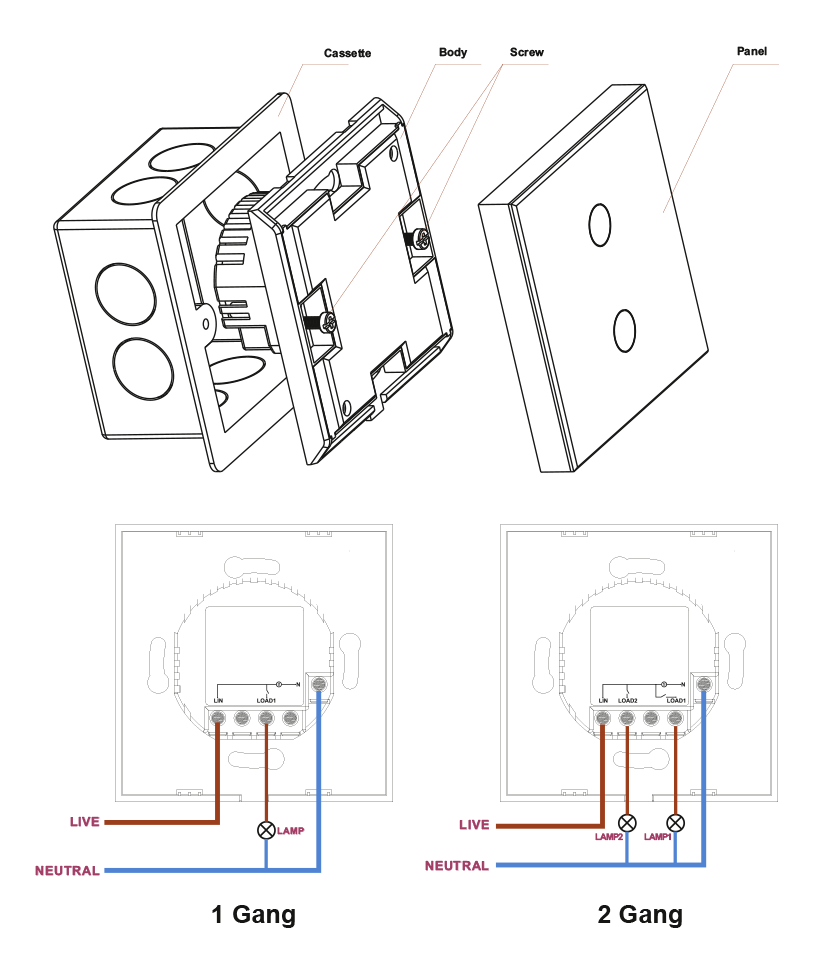
Most smart light switches require a ground wire, an “in” wire, an “out” wire, and a neutral wire. Most homes have the in, out, and ground wires, but some homes built before the 1980s don’t have neutral wires. Typically, the neutral wire is a white wire (or group of white wires).
Do smart switches work with any light?
Your light bulbs don’t need to be smart lights, they just need to be the lights connected to that switch. Smart light switches come with smartphone apps that provide setup, schedule, dimming, and control options.
What are the cons of smart light switches?
The downsides to smart light switches:
– They may not work in older homes due to the need for a neutral wire. There are a few workarounds, but they aren’t ideal.
– Smart switches usually just turn your lights on and off. You can’t change colors unless you have both a smart bulb and a smart switch.
How much does an electrician charge to install a smart switch?
The cost to replace a light switch is $50 to $250 on average for labor and materials, while new light switch installation costs $100 to $300. Replacing an existing switch with a dimmer or smart switch costs $80 to $250+.
How do you wire a smart switch?
Ground wires are usually either colored green or just bare wire. Finally neutral is a wire that carries electricity. Back to the circuit breaker completing.
Do smart switches need internet?
All smart devices rely on the internet to function, so it is a natural assumption that when smart switches WiFi drops out, the devices will stop working. But in practice, you will find that this isn’t entirely true. Smart switches for home lighting will continue to function even when your home network is down.
Does a smart switch require a Wi-Fi connection?
The Samsung Smart switch application works in two ways, wireless and wired. The wireless transfer of data is powered by WiFi, where the user must connect both the phones via WiFi through the application and initiate the transfer of data.
Do smart lights work if the switch is off?
Unlike smart plugs, smart bulbs work only with light fixtures, and those fixtures need to be turned on at all times. If someone flips the switch, you won’t be able to access a smart bulb without an add-on like the Lutron Aurora dimmer, which works with Philips Hue and other Zigbee-certified smart bulbs.
Do smart switches work without Wi-Fi?
Smart switches for home lighting will continue to function even when your home network is down. But their high-tech functionality will be absent, you will only be able to use them to switch the lights on and off, as you would a standard light switch.
Do smart switches work without Internet?
Smart switches for home lighting will continue to function even when your home network is down. But their high-tech functionality will be absent, you will only be able to use them to switch the lights on and off, as you would a standard light switch.
Do you need an electrician to install a smart light switch
While your first instinct may be to have this done by an electrician, smart light switch installation isn't overly complicated, and you may well be able to do it yourself if you follow these simple steps: Verify what kind of existing wall switch set-up you have and check the wiring. Choose the smart switch you want.
What is required for smart light switch
Most smart light switches require a ground wire, an “in” wire, an “out” wire, and a neutral wire. Most homes have the in, out, and ground wires, but some homes built before the 1980s don't have neutral wires. Typically, the neutral wire is a white wire (or group of white wires).
Do smart switches work with any light
Your light bulbs don't need to be smart lights, they just need to be the lights connected to that switch. Smart light switches come with smartphone apps that provide setup, schedule, dimming, and control options.
Cached
What are the cons of smart light switches
The downsides to smart light switches:
They may not work in older homes due to the need for a neutral wire. There are a few workarounds, but they aren't ideal. Smart switches usually just turn your lights on and off. You can't change colors unless you have both a smart bulb and a smart switch.
Cached
How much does an electrician charge to install a smart switch
The cost to replace a light switch is $50 to $250 on average for labor and materials, while new light switch installation costs $100 to $300. Replacing an existing switch with a dimmer or smart switch costs $80 to $250+.
How do you wire a smart switch
Ground wires are usually either colored green or just bare wire. Finally neutral is a wire that carries electricity. Back to the circuit breaker completing.
Do smart switches need internet
All smart devices rely on the internet to function, so it is a natural assumption that when smart switches WiFi drops out, the devices will stop working. But in practice, you will find that this isn't entirely true. Smart switches for home lighting will continue to function even when your home network is down.
Does smart switch require Wi-Fi connection
The Samsung Smart switch application works in two ways, wireless and wired. The wireless transfer of data is powered by WiFi, where the user must connect both the phones via WiFi through the application and initiate the transfer of data.
Do smart lights work if the switch is off
Unlike smart plugs, smart bulbs work only with light fixtures, and those fixtures need to be turned on at all times. If someone flips the switch, you won't be able to access a smart bulb without an add-on like the Lutron Aurora dimmer, which works with Philips Hue and other Zigbee-certified smart bulbs.
Do smart switches work without WiFi
Smart switches for home lighting will continue to function even when your home network is down. But their high-tech functionality will be absent, you will only be able to use them to switch the lights on and off, as you would a standard light switch.
Do smart switches work without Internet
Smart switches for home lighting will continue to function even when your home network is down. But their high-tech functionality will be absent, you will only be able to use them to switch the lights on and off, as you would a standard light switch.
Are smart light switches worth it
A smart switch replaces your old wall switch and controls the power to your light fixture. Most people install standard lights in the fixture. If you have no desire for color changing bulbs, then you don't really have a decision to make. Smart switches are the better choice for sure.
Do smart switches use more electricity
Smart Lights Use Less Electricity
Compare that to CFL light bulbs, which are only 25-30% more efficient than incandescent bulbs.
Does smart switch use electricity
Using different radio wave frequencies such as Wi-Fi, Z-wave, or ZigBee, smart switches consume between 0.2 and 0.5 watts of electricity when on standby. On the other hand, your flat-screen TV, which is probably one of the least power-consuming appliances in your home, consumes 0.5 to 3 watts when idle.
How do I turn my light switch into a smart switch
Transforming your “dumb” light switches into smart products is super easy, thanks to products like the Switchmate. The Switchmate is super easy to use. All you need to do is attach it to your existing switches and viola, it's instantly smart.
How does smart switch without neutral wire work
Here's the trick: a no-neutral smart switch turns the light on and off by regulating the amount of electricity being sent to the light. Essentially, in its “OFF” state, the no-neutral smart switch must send as little wattage as possible (minimum wattage, or min.
Does smart switch work off Wi-Fi
The Samsung Smart switch application works in two ways, wireless and wired. The wireless transfer of data is powered by WiFi, where the user must connect both the phones via WiFi through the application and initiate the transfer of data.
Will smart switch stop if I leave Wi-Fi
So, do I need Wi-Fi for Smart Switch Yes, you need. Smart Switch needs Wi-Fi connectivity to transfer data from one device to another, not the internet. You can use a USB cable or Wi-Fi connectivity which turns on automatically once you select the receiving or sending data options.
What Cannot be transferred using smart switch
Items that cannot be backed up with Smart SwitchContacts: Contacts saved on the SIM card, social networks (Facebook, Twitter, etc.),Calender: Appointments synced with external accounts, such as Google, and calendar stickers are excluded.App data: Data saved in private storage cannot be backed up.
Can you use smart switch without a cable
Switch with Samsung Smart Switch
With Samsung Smart Switch, you can switch wirelessly or via cable. This isn't just for smartphones, but also for Samsung tablets. Smart Switch copies your old data and copies it to your new device automatically. This means that your data will still be on the old device as well.
Do smart lights work without Wi-Fi
Will smart light bulbs work if the Wi-Fi goes out If your Wi-Fi goes out, the smart features of your light bulb won't work. This means you won't be able to turn the light on/off via your phone or through a voice assistant.
Is smart switch better with cable or wireless
4. Is Smart Switch faster with cable or wireless The USB cable transfer via Smart Switch for Android is faster as compared to wireless transfer.
Do smart switches work without Wi-Fi
Smart switches for home lighting will continue to function even when your home network is down. But their high-tech functionality will be absent, you will only be able to use them to switch the lights on and off, as you would a standard light switch.
Do I need two smart switches if I have two switches to control one light
Yes. If you have two switches that control one light and want to control the light with a Decora Smart Zigbee switch or dimmer, you will need to replace one switch with a Decora Smart Zigbee switch or dimmer.
Do smart lights still use electricity when off
Smart lights are “vampire devices”, which means they use electricity even when they're turned off or in standby mode. The reasoning is simple: In order to be turned on with your smartphone or any other smart device, the lightbulb still needs to be connected to Bluetooth or the internet.


0 Comments