
What is the blue ring on Alexa?
Summary of the Article: What Does the Blue Ring on Alexa Mean?
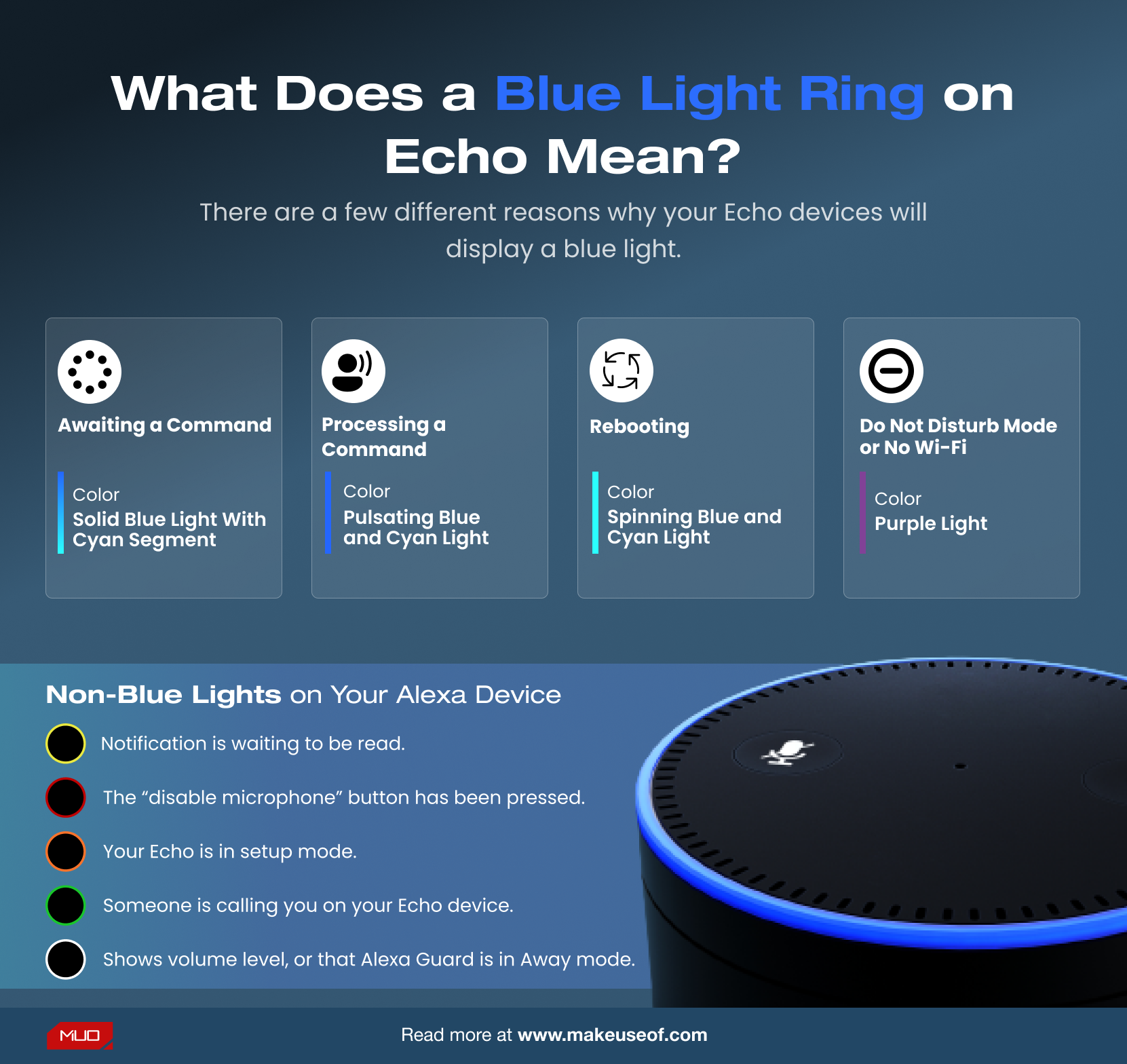
The blue ring on an Alexa device indicates different states and functions. When the blue ring is lit up, it means that Alexa is listening and processing a request. It can also indicate that the device is receiving a software update. The blue ring can also circle in combination with green, which means an incoming call or drop-in. Other colored rings on Alexa have different meanings, such as yellow for messages or notifications, green for calls or drop-ins, and purple for Do Not Disturb mode. The blue light on Alexa can sometimes stay on or not respond, which can be fixed by troubleshooting steps or ensuring that the Do Not Disturb feature is turned off. Users can also stop the blue and green light on Alexa by disabling notifications through the Do Not Disturb option. If the blue light keeps spinning on Alexa, it may indicate that the device is starting up due to a power interruption. Lastly, users can enable a night light feature on Alexa to keep the blue light on for a specific period of time.
15 Questions and Detailed Answers
1. Why does my Alexa have a blue ring?
A blue ring on Alexa means that the device is listening and processing a request. It can also indicate a software update.
2. How do I fix Alexa’s blue ring of death?
To troubleshoot the blue ring issue, try unplugging the device for five minutes and then power it back on. Check the Alexa settings to ensure that “do not disturb” mode is turned off. Also, use the original adapter that came with the device.
3. Why is Alexa circling in blue and green?
A circling blue light on Alexa means it is listening and waiting for a command. A green light indicates an incoming call or drop-in.
4. What do the colored rings on Alexa mean?
Blue indicates that Alexa is listening or responding to a voice command. Yellow is for messages, reminders, or notifications. Green is for calls or drop-ins, and purple usually indicates Do Not Disturb mode. White signals volume changes or Alexa Guard switching to Away mode.
5. Why won’t the blue light on my Alexa turn off?
If the blue light on Alexa won’t turn off, it may be due to insufficient power. Try changing the power adapter.
6. How do you know if someone is dropping in on Alexa?
A chime or a flashing green light on the device indicates that someone has started a Drop In. The duration of the Drop In depends on the settings and ends automatically.
7. Why does my Alexa have a blue ring but not respond?
Make sure that the Do Not Disturb feature is turned off. If the issue persists, check if Alexa heard your voice command in the dialog history.
8. How do I stop the blue and green light on my Alexa?
To stop the green light, end the call and turn off notifications by enabling the “Do Not Disturb” mode through voice commands.
9. How do I stop the spinning blue light on my Alexa?
Try turning off and on the Echo speaker by unplugging it for 30 seconds and then plugging it back in. The spinning blue lights should turn off after a few seconds.
10. Why does Alexa turn blue in the middle of the night?
A solid blue light with spinning cyan lights means that the device is starting up, which can occur due to a power interruption. Check the dialog history to see if Alexa heard you.
11. Can Alexa keep her blue light on?
Users can enable a night light feature on Alexa, which keeps the blue light on until it is turned off using voice commands.
12. How do I reset Alexa’s blue ring?
To reset Alexa’s blue ring, follow the troubleshooting steps mentioned earlier, such as unplugging the device and checking the settings.
13. What does it mean when my Alexa’s blue ring is pulsing?
A pulsing blue light indicates that Alexa is actively listening and processing a request. It can also mean that the device is receiving a software update.
14. How do I turn off the blue light on Alexa?
If you want to turn off the blue light on Alexa, you can enable the “Do Not Disturb” mode or use any specific features provided by the device to control the light settings.
15. Why does my Echo Dot have a blue ring but no response?
If your Echo Dot has a blue ring but does not respond, ensure that the Do Not Disturb feature is turned off. If the problem persists, try restarting the device or contacting customer support.
Why does my Alexa have a blue ring
What it means: A cyan spotlight on a blue ring means that Alexa is listening. The light ring glimmers briefly when Alexa has heard and is processing your request. A briefly glimmering blue light might also mean the device is receiving a software update.
How do I fix Alexa blue ring of death
Try these simple troubleshooting stepsUnplug for FIVE minutes then power up and see if that solve the problem.Navigate to Alexa settings and make sure that “do not disturb” is turned off.Ensure you're using the original adapter that came with the Amazon Alexa.
Why is Alexa circling blue and green
Quick Answer: A flashing blue light indicates Alexa is listening and waiting for a command. A flashing green light means your device is receiving a call or drop-in.
Cached
What do the Coloured rings on Alexa mean
QUICK ANSWER. Blue means your Echo is listening to or responding to a voice command. Yellow is a message, reminder, or notification alert, while green is a call or Drop In, and purple (usually) indicates Do Not Disturb mode. White signals volume changes or Alexa Guard switching to Away mode.
Cached
Why won’t the blue light on my Alexa turn off
If the blue light on Alexa won't turn off, change your power adapter. In most cases, it is due to insufficient power due to a bad adapter or cable.
How do you know if someone is dropping in on Alexa
A chime or a green light flashing on the device is an indication that someone has started a Drop In. The Drop In can last for 10 minutes and ends automatically depending on the duration settings.
Why does my Alexa have a blue ring but not responding
Ensure the Do Not Disturb feature is turned off
You will most commonly see a spinning blue light ending with a purple light. The simplest way to turn do not disturb off is to open your Alexa app, select Devices, select your device, and select Do Not Disturb. Make sure it is set to off.
How do I stop the blue and green light on my Alexa
If you still see the green light after ending the call, you can turn off all notifications on Alexa through the “Do Not Disturb or DND” option. Since the green light is a notification alert, you can simply ask Alexa to turn on “Do Not Disturb” mode through voice commands.
How do I stop the spinning blue light on my Alexa
The first thing to try, as with many malfunctioning devices, is to turn it off and on again. Unplug the Echo speaker, wait around 30 seconds, and plug it back in. Hopefully, the spinning blue lights that appear then turn off after a few seconds.
Why does Alexa turn blue in the middle of the night
A solid blue with spinning cyan lights means that your device is starting up. This could happen if there is a power interruption. Check your dialog history and see if Alexa heard you.
Can Alexa keep her blue light on
Once installed, you just need to say 'Alexa, open night light' to enable it. The light ring on the top of the Echo will illuminate and will stay lit until you turn it off with 'Alexa, turn off night light' or simply 'Alexa turn off.
Can someone drop in on Alexa without me knowing
You can't drop in on Alexa without them knowing. If you want to drop in with someone who isn't from your household, you'll need permission first. And when you drop in, the other person will see a spinning green light on their device. In addition, they'll also hear a notification sound.
What does Alexa look like when someone is listening in
Green Alexa ring color
The color will flash green when someone is calling you or Dropping In on your device. This will turn into a spinning green light during a call.
How do I restart my Alexa
Press and hold the Mute and Volume Down buttons for about 15 seconds until the Amazon logo appears.
How do I reset my Alexa
Android is illustrated below. Open the Alexa app, then tap the Devices icon in the bottom right corner. On the Devices page, tap Echo & Alexa, then choose the device to reset. In Device Settings, scroll down and tap Factory Reset.
Why did my Alexa randomly beep at 3am
If you've enabled notification sounds for new messages, events, or low battery levels on your Amazon Alexa device then she might beeping periodically throughout the night.
How can you tell if someone is listening on Alexa
If you're worried that Amazon Echo or Amazon Echo Dot is spying on you without your permission, it's easy to tell when the device is listening. Just look for a circular blue LED light on the device or listen for the tone that sounds when Alexa wakes up.
How can I tell if someone is listening in on my Alexa
If you're worried that Amazon Echo or Amazon Echo Dot is spying on you without your permission, it's easy to tell when the device is listening. Just look for a circular blue LED light on the device or listen for the tone that sounds when Alexa wakes up.
Can someone listen to your conversations through Alexa
Hackers can access Alexa
A hacker will send an Alexa user a fake link, usually via email or a messaging app. And clicking on that link grants the hacker access to your voice recording history on the Alexa app. Hackers could then use your voice history to create audio forgeries and then send commands to your device.
Can people hear your conversations on Alexa
Alexa is a part of your life only when you ask Alexa to be. By default, Alexa begins listening after your Echo device detects the wake word, so Alexa does not listen to your personal conversations.
How do you know if Alexa is listening to your conversation
Still wondering, 'Does Alexa listen to my conversations ' Remember this: You'll hear a tone or see a light appear on your device whenever Alexa is listening to your requests. Amazon likens this to the “On the Air" signs that flash on and off in TV studios.
How do I manually reset Alexa
Up top you've got your action button your volume up your volume down in your mute button in order to reset this we're going to hold down for approximately 20 seconds on the action button. And it's
How do I know when Alexa is reset
The light ring on the device will turn orange and spin, signifying that it properly reset.
How do I get my Alexa to work again
Restart your Alexa-enabled device
Sometimes, a simple restart is all you need to get your Alexa device back online. Just unplug your device or the power adapter from the outlet, wait about 10 seconds, then plug it back in and connect to Wi-Fi. If it works, your problem is solved.
How do I reset my Alexa to the Wi-Fi
In the Alexa app, open the left panel menu and then select Settings. Select Device Settings. Choose your device. Select Change next to WiFi Network and follow the prompts in the app.


0 Comments