
Where is device on my phone?
Summary of the article:
Where do I find my device on my phone? To locate your device, open your device’s Settings app. Tap on Security and then find My Device. If you can’t locate “Security,” tap on Security & Location or Google. Check if “Find My Device” is turned on.
How do I find the device? To find, lock, or erase a device remotely, go to android.com/find on a browser. Sign in to your Google Account. The lost device will receive a notification. On the map, you’ll get information about the device’s location. If prompted, tap on Enable lock & erase and select the action you want to take.
Where can I find my device settings? To change settings on your Android device, open the settings menu by locating the cog either on the notification panel or by swiping up to view your apps. Please note that these steps may vary.
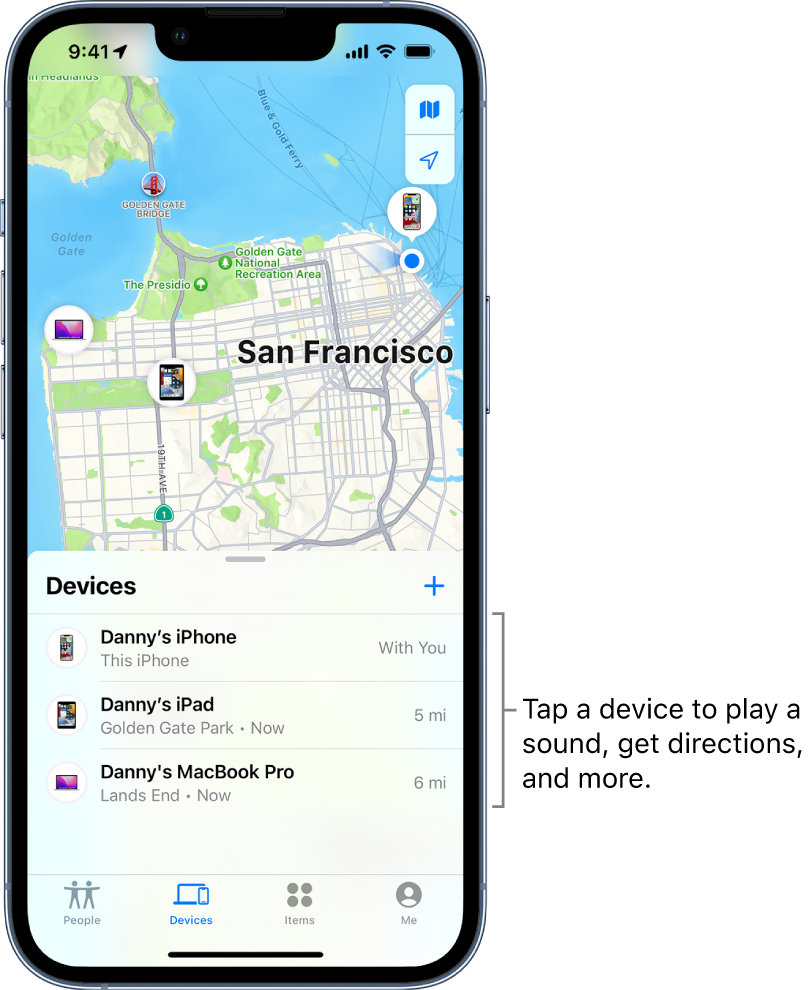
Where is the device located on iPhone? To see the location of your device on a map, open the Find My app. Tap on “Devices” at the bottom of the screen, then select the name of the device you want to locate. If the device can be located, it will appear on the map.
Where do I find my device on my Samsung phone? To set up Find My Mobile on your Samsung phone, go to settings. Tap on your Samsung Account at the top of the menu. Go to “Find My Mobile” and turn on the “Allow this phone to be found” switch. You can also access Find My Mobile through the Samsung account settings.
Why can’t I find my device? There are several reasons why you may be unable to find your device. It’s possible that Google Find My Device is not enabled on your Android smartphone. Additionally, your device may be turned off, and Find My Device needs GPS signals to provide its services.
Do I need Find My Device? The Find My Device feature is highly recommended. By signing into the service on your Android phone, you can easily erase your phone if it gets lost or stolen.
How do I find devices on my Android phone? Even if you turn off notifications, you can still see devices near you by opening your phone’s Settings app. Go to Google Devices & Sharing and select “Devices.” Toggle the “Scan for nearby devices” option on or off.
Where do I find device settings on my Samsung phone? To access device settings on a Samsung phone, tap on Apps on the home screen, then go to Settings. The settings layout may vary depending on the device model.
What is device setting? The device settings section is primarily used to configure devices based on existing business rules.
Where is the device location on Android? Open your phone’s Settings app and tap on Security & Location or Location (may vary). In the location settings, select the desired mode. For high accuracy, use GPS, Wi-Fi, mobile networks, and sensors.
Questions:
- 1. Where do I find my device on my phone?
To locate your device on your phone, open the Settings app and tap on Security. Find My Device should be listed there. If you can’t find it, try looking under Security & Location or Google settings. - 2. How do I find the device?
To find your device, go to android.com/find on a browser and sign in to your Google Account. From there, you can view the device’s location and take actions like locking or erasing it remotely. - 3. Where can I find my device settings?
To access your device settings, open the settings menu on your Android phone. Look for the cog icon in the notification panel or swipe up to view your apps. The steps may vary depending on your phone model. - 4. Where is the device located on iPhone?
To see the location of your device on an iPhone, open the Find My app and tap on “Devices” at the bottom of the screen. Select the device you want to locate, and its location will be displayed on a map. - 5. Where do I find my device on my Samsung phone?
On a Samsung phone, go to Settings and tap on your Samsung Account. Look for “Find My Mobile,” and make sure the option to allow the phone to be found is turned on. - 6. Why can’t I find my device?
There are various reasons why you may not be able to find your device. One possibility is that Find My Device is not enabled on your Android phone. Another reason could be that your phone is turned off, as the service requires GPS signals to work. - 7. Do I need Find My Device?
It is highly recommended to have Find My Device enabled on your Android phone. This feature allows you to easily locate and remotely erase your phone in case it is lost or stolen. - 8. How do I find devices on my Android phone?
To find devices on your Android phone, open the Settings app and go to Google Devices & Sharing. Under “Devices,” you can enable or disable the option to scan for nearby devices. - 9. Where do I find device settings on my Samsung phone?
To access device settings on a Samsung phone, tap on the Apps icon on the home screen and open the Settings app. The location of settings may vary depending on the specific Samsung phone model. - 10. What is device setting?
Device settings refer to the configuration options for your phone or other devices. These settings allow you to customize various features and functions to suit your preferences.
Where do I find my device on my phone
Open your device's Settings app .Tap Security. Find My Device. If you can't find "Security," tap Security & location or Google. Security.Check if “Find My Device” is turned on.
How do I find the device
Find, lock, or erase a device remotelyOn a browser, go to android.com/find.Sign in to your Google Account.The lost device gets a notification.On the map, you'll get info about where the device is.If you get a prompt, tap Enable lock & erase.Select what you want to do:
Where can I find my device settings
Your preferences to change settings on your android. Device open the settings menu by locating the cog either on the notification panel or by swiping up to view your apps. These steps may vary
Where is device located on iPhone
See the location of your device on a map
You can see your device's current or last known location in the Find My app. Tap Devices at the bottom of the screen, then tap the name of the device you want to locate. If the device can be located: It appears on the map so you can see where it is.
Where do I find my device on my Samsung phone
SET UP FIND MY MOBILEGo to settings.Tap your Samsung Account on the top of the menu.Go to 'Find My Mobile'.Turn 'Allow this phone to be found' Switch On. Next. selected 'settings' icon. selected Samsung account. selected 'Find My Mobile'. Turn 'Allow this phone to be found' Switch On.
Why can’t I find my device
The first and foremost reason behind the problem can be that Google Find My device is not enabled on your Android smartphone. Find my device is not working because your smartphone is turned off. As you must know, Find My device needs GPS signals to offer its services.
Do I need find my device
The Find My Device feature should be considered a must-have. Make sure your Android phone is signed into the service, so if your phone gets lost or stolen, the option to erase it is only a click away.
How do I find devices on my Android phone
If you turn off notifications, you can still see devices near you by opening your phone's Settings app.Open your phone's Settings app.Tap Google Devices & sharing. Devices.Turn Scan for nearby devices on or off.
Where do I find device settings on my Samsung phone
Video in which we will show you how to use the new Settings app of the Samsung Galaxy s5 to access your new Settings app first tap apps on the home screen then tap Settings the default layout of the
What is device setting
The primary purpose of the Device Settings section is to configure the devices based on existing business rules.
Where is Device location on Android
Open your phone's Settings app.Tap Security & Location. Location. If you don't find "Security & Location," tap Location.Tap Mode.Select a mode: High accuracy: Use GPS, Wi-Fi, mobile networks, and sensors to get the most accurate location.
Does Samsung have a Find My Device option
Samsung's Find My Mobile is a free service that is accessed via your Samsung account and allows you to locate, remotely backup and wipe data on a registered Galaxy mobile device. It can be accessed at findmymobile.samsung.com.
Why won’t my iPhone find a device
If you're using iCloud.com/find, you can't see your device's location if it's powered off, the battery has run out, or more than 24 hours has passed since its last location was sent to Apple. Learn how you can still protect your information.
Can I still find my device
On a browser, go to android.com/find. Sign in to your Google Account. If you have more than one device: At the top of the sidebar, select the lost device. If your lost device has more than one user profile: Sign in with a Google Account that's on the main or personal profile.
What happens if I turn off Find My Device
Turning off all location tracking will ensure your location information isn't shared with other services and apps. Open the Settings app on your Android phone. Tap on Location.
What happens when you remove a device from Find My phone
All your content is erased, Activation Lock is turned off, and someone else can now activate the device.
How do I see all devices
How to Find Devices on a Home NetworkType CMD in the search box and click Run as Administrator from the menu.Enter the net view command to view devices connected to your network You will then see a list of devices connected to your network in the output.
Where can I find devices on my Samsung
To access the connected devices screen from the homescreen scroll to and tap Settings. Tap Wi-Fi. Tap Devices.
Where is the Device Manager on Samsung
Select "Security" from the Settings menu. Scroll down and tap "Device administrators". Ensure that "Android Device Manager" is checked.
Where is device manager on Samsung phone
Device manager specifically for finding. Your phone if it's been lost or stolen. You're gonna go to android.com slash. Device manager in your browser. And it's gonna take you specifically to your
Where is Device Manager in settings
Select Start, point to Administrative Tools, and then select Computer Management. Under System Tools in the console tree, select Device Manager. The devices that are installed on your computer are listed in the right pane. Double-click the type of device that you want to configure–for example, Ports (COM & LPT).
What is find my device on Android
Find My Device Android allows you to remotely locate , lock , ring or erase your device.
How can I locate my Samsung phone
Samsung's Find My Mobile is a free service that is accessed via your Samsung account and allows you to locate, remotely backup and wipe data on a registered Galaxy mobile device. It can be accessed at findmymobile.samsung.com.
How does Samsung find my device work
1 Check if “Settings” > “Samsung account” > “Find My Mobile“ > “Allow this phone to be found” is turned on. (It is activated when you log in to your Samsung account on your device). 2 Access the SmartThings Find Website. 3 Select the device you want to find from the device list and run the desired function.
How do you track someone’s location on Samsung
Find someone's locationOn your Android phone or tablet, open the Google Maps app .Tap your profile picture or initial. Location sharing.Tap the profile of the person you want to find. To update the person's location: Tap on a friend's icon More. Refresh.


0 Comments