
How do I turn off YouCam?
Summary of the Article
How do I disable YouCam at startup
What can I do if you don’t want to have YouCam icon display in the system tray when you log in to Windows? Go to Setting > UI Settings > Disable Show system tray icon at startup.
Can I uninstall YouCam
Method 2: Uninstall CyberLink YouCam via Apps and Features/Programs and Features. Look for CyberLink YouCam in the list and click on it. The next step is to click on uninstall, so you can initiate the uninstallation.
How do I turn on my YouCam CyberLink
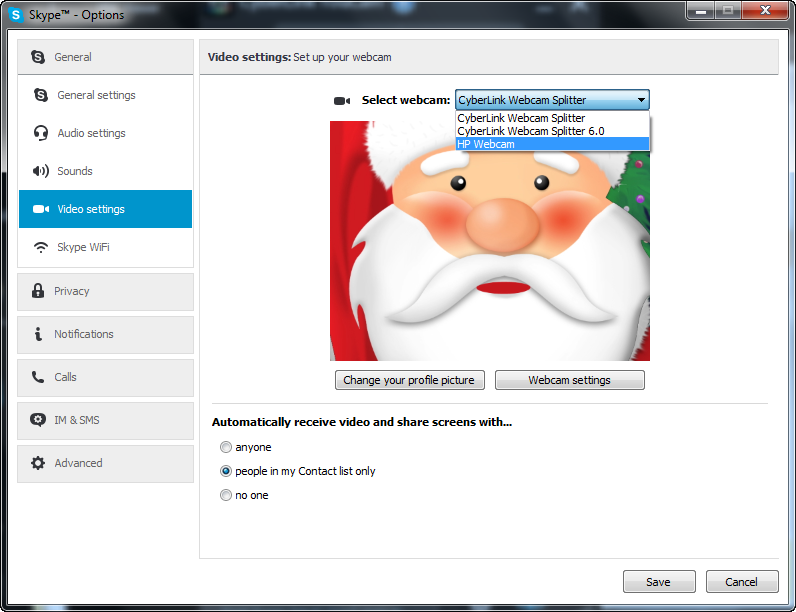
In the Windows Live Messenger main window, select Tools – Audio and video setup. In the Webcam window of the Set Up Audio and Video wizard, select CyberLink Webcam Splitter from the drop-down menu. Select the Finish button to save your changes and enable CyberLink YouCam.
What is CyberLink YouCam used for
CyberLink YouCam is designed for people who have a webcam connected to their PC or notebook. It can capture photos/videos and apply fun video effects during video communication.
How do I stop an app from opening on startup
What you want to do is go into the top-left hand corner and select the Apple icon. Then go down to system settings. From here, once this pops up, we’re going to go into the search option.
Can I turn off all startup programs
Go to Settings > Apps > Startup to view a list of all apps that can start up automatically and determine which should be disabled. You can sort the list by name, status, or startup impact.
How do I Uninstall the camera app
Delete apps that you installed. Open the Google Play Store app. At the top right, tap the Profile icon. Tap Manage apps & devices. Manage. Tap the name of the app you want to delete. Tap Uninstall.
How do I Uninstall camera software
Uninstall your camera driver and scan for hardware changes. In Device Manager, right-click (or press and hold) on your camera, and then select Properties. Select the Driver tab, then select Uninstall Device. Select the check box for Delete the driver software for this device, then select OK.
Why is CyberLink on my computer
What is CyberLink do CyberLink Media Suite is a multimedia software package installed on Windows 8 systems ordered with an optical drive. This software includes tools to perform various functions such as video editing, movie creation, burning discs, and backup and recovery.
How much is the YouCam app
This app is also free, and the final result comes out perfect.
How do I get rid of CyberLink
For Windows 10, right-click on the Start menu, then select “Control Panel” from the dropdown. Click on “Programs and Features”. Select the product you want to uninstall and click “Uninstall / Change”.
What is CyberLink and why is it on my computer
CyberLink YouCam uses a virtual driver to easily work with most webcam devices and messaging software. Here are the main functions: Add effects to your webcam video, including Avatars, Filters and Particles, Emotions, Distortions, and Frames. Add acces
Questions:
1. How do I disable YouCam at startup?
What can I do if you don’t want to have YouCam icon display in the system tray when you log in to Windows? Go to Setting > UI Settings > Disable Show system tray icon at startup.
2. Can I uninstall YouCam?
Method 2: Uninstall CyberLink YouCam via Apps and Features/Programs and Features. Look for CyberLink YouCam in the list and click on it. The next step is to click on uninstall, so you can initiate the uninstallation.
3. How do I turn on my YouCam CyberLink?
In the Windows Live Messenger main window, select Tools – Audio and video setup. In the Webcam window of the Set Up Audio and Video wizard, select CyberLink Webcam Splitter from the drop-down menu. Select the Finish button to save your changes and enable CyberLink YouCam.
4. What is CyberLink YouCam used for?
CyberLink YouCam is designed for people who have a webcam connected to their PC or notebook. It can capture photos/videos and apply fun video effects during video communication.
5. How do I stop an app from opening on startup?
What you want to do is go into the top-left hand corner and select the Apple icon. Then go down to system settings. From here, once this pops up, we’re going to go into the search option.
6. Can I turn off all startup programs?
Go to Settings > Apps > Startup to view a list of all apps that can start up automatically and determine which should be disabled. You can sort the list by name, status, or startup impact.
7. How do I Uninstall the camera app?
Delete apps that you installed. Open the Google Play Store app. At the top right, tap the Profile icon. Tap Manage apps & devices. Manage. Tap the name of the app you want to delete. Tap Uninstall.
8. How do I Uninstall camera software?
Uninstall your camera driver and scan for hardware changes. In Device Manager, right-click (or press and hold) on your camera, and then select Properties. Select the Driver tab, then select Uninstall Device. Select the check box for Delete the driver software for this device, then select OK.
9. Why is CyberLink on my computer?
What is CyberLink do CyberLink Media Suite is a multimedia software package installed on Windows 8 systems ordered with an optical drive. This software includes tools to perform various functions such as video editing, movie creation, burning discs, and backup and recovery.
10. How much is the YouCam app?
This app is also free, and the final result comes out perfect.
11. How do I get rid of CyberLink?
For Windows 10, right-click on the Start menu, then select “Control Panel” from the dropdown. Click on “Programs and Features”. Select the product you want to uninstall and click “Uninstall / Change”.
12. What is CyberLink and why is it on my computer?
CyberLink YouCam uses a virtual driver to easily work with most webcam devices and messaging software. Here are the main functions: Add effects to your webcam video, including Avatars, Filters and Particles, Emotions, Distortions, and Frames. Add acces
How do I disable YouCam at startup
What can I do If you don't want to have YouCam icon display in system tray when you log in to Windows, go to Setting > UI Settings > Disable Show system tray icon at startup.
Cached
Can I uninstall YouCam
Method 2: Uninstall CyberLink YouCam via Apps and Features/Programs and Features. Look for CyberLink YouCam in the list and click on it. The next step is to click on uninstall, so you can initiate the uninstallation.
Cached
How do I turn on my YouCam CyberLink
In the Windows Live Messenger main window, select Tools – Audio and video setup. In the Webcam window of the Set Up Audio and Video wizard, select CyberLink Webcam Splitter from the drop-down menu. Select the Finish button to save your changes and enable CyberLink YouCam.
What is CyberLink YouCam used for
CyberLink YouCam is designed for people who have a webcam connected to their PC or notebook. It can capture photos/videos and apply fun video effects during video communication.
How do I stop an app from opening on startup
What you want to do is go into the top left hand corner. And select on the Apple icon. And go down to system settings. From here one once this pops up we're going to go into the search option. And we'
Can I turn off all startup programs
Go to Settings > Apps > Startup to view a list of all apps that can start up automatically and determine which should be disabled. You can sort the list by name, status, or startup impact.
How do I Uninstall the camera app
Delete apps that you installedOpen the Google Play Store app .At the top right, tap the Profile icon.Tap Manage apps & devices. Manage.Tap the name of the app you want to delete.Tap Uninstall.
How do I Uninstall camera software
Uninstall your camera driver and scan for hardware changes
In Device Manager, right-click (or press and hold) on your camera, and then select Properties. Select the Driver tab, then select Uninstall Device. Select the check box for Delete the driver software for this device, then select OK.
Why is CyberLink on my computer
What is CyberLink do CyberLink Media Suite is a multimedia software package installed on Windows 8 systems ordered with an optical drive. … This software includes tools to perform various functions such as video editing, movie creation, burning discs, and backup and recovery. Accuracy.
How much is the YouCam app
This app is also free and the final result comes out perfect.
How do I get rid of CyberLink
For Windows 10
Right-click on the Start menu, then select "Control Panel" from the dropdown. Click on "Programs and Features". Select the product you want to uninstall, and click “Uninstall / Change”.
What is CyberLink and why is it on my computer
CyberLink YouCam uses a virtual driver to easily work with most webcam devices and messaging software, Here are the main functions: Add effects to your webcam video, including Avatars, Filters and Particles, Emotions, Distortions and Frames. Add accessory gadget effects, such as hats and masks to your webcam image.
Should I turn off all startup apps
As a general rule, it's safe to remove any startup program. If a program starts automatically, it usually provides a service that works best if it's always running, such as an antivirus program. Or, the software may be necessary to access special hardware features, such as proprietary printer software.
How do I stop apps from automatically opening on my Iphone
So just select it but hold down until the menu. Comes up when the menu comes up swipe up until you see open in new tab. Or it might even just say open with safari icon next to it. Select that.
How do I stop programs from running in the background
Stop an app from running in the backgroundSelect Start , then select Settings > Apps > Apps & features.Scroll to the desired app, select More options on the right edge of the window, then select Advanced options.In the Background apps permissions section, under Let this app run in the background, select Never.
How do I stop programs running in the background on startup
On most Windows computers, you can access the Task Manager by pressing Ctrl+Shift+Esc, then clicking the Startup tab. Select any program in the list and click the Disable button if you don't want it to run on startup.
How do I delete an app that won’t uninstall
Here's how to remove admin privileges for an app in android. First open settings next tap on biometrics. And security select other security settings tap device admin apps. Now find the app you want to
How do I find out what app is using my camera
1 In the Settings menu, tap on the "Privacy" option. 2 In the Privacy menu, tap on “Camera access/Microphone access”.
What app is running my camera
Open the Start menu and click the gear-shaped icon to launch the Settings app. Switch to the Privacy & security tab. Under App permissions, click on Camera. Click on Let apps access your camera.
What happens if you delete the camera app
If you delete your Camera app, you will only be unable to click pictures or shoot videos until you reinstall the Camera app on your Android.
Should I Uninstall CyberLink
Should it be removed It is a video editing application, and if you don't intend to do that you should remove it because it takes up a lot of room. PowerDirector makes it easy to fix lighting and color and to stabilize your video. The stabilization tool gives you the ability to fix rotational camera shake.
Is the YouCam app free
YouCam Makeup app is a free virtual makeover and selfie retouch editing app with optional paid content��♂️ If you're interested in premium features but not sure about subscribing, welcome to try the free trial and see if you like it!
Is there a free version of YouCam
CyberLink YouCam Free Download (Updated 2023 Version)
Should I uninstall CyberLink
Should it be removed It is a video editing application, and if you don't intend to do that you should remove it because it takes up a lot of room. PowerDirector makes it easy to fix lighting and color and to stabilize your video. The stabilization tool gives you the ability to fix rotational camera shake.
What apps can I turn off on startup
Go to Settings > Apps > Startup to view a list of all apps that can start up automatically and determine which should be disabled. You can sort the list by name, status, or startup impact. A switch next to each app indicates a status of On or Off to tell you whether or not that app is currently in your startup routine.


0 Comments