
Why is my echo dot showing a red ring?
Why does my echo dot keep going red?
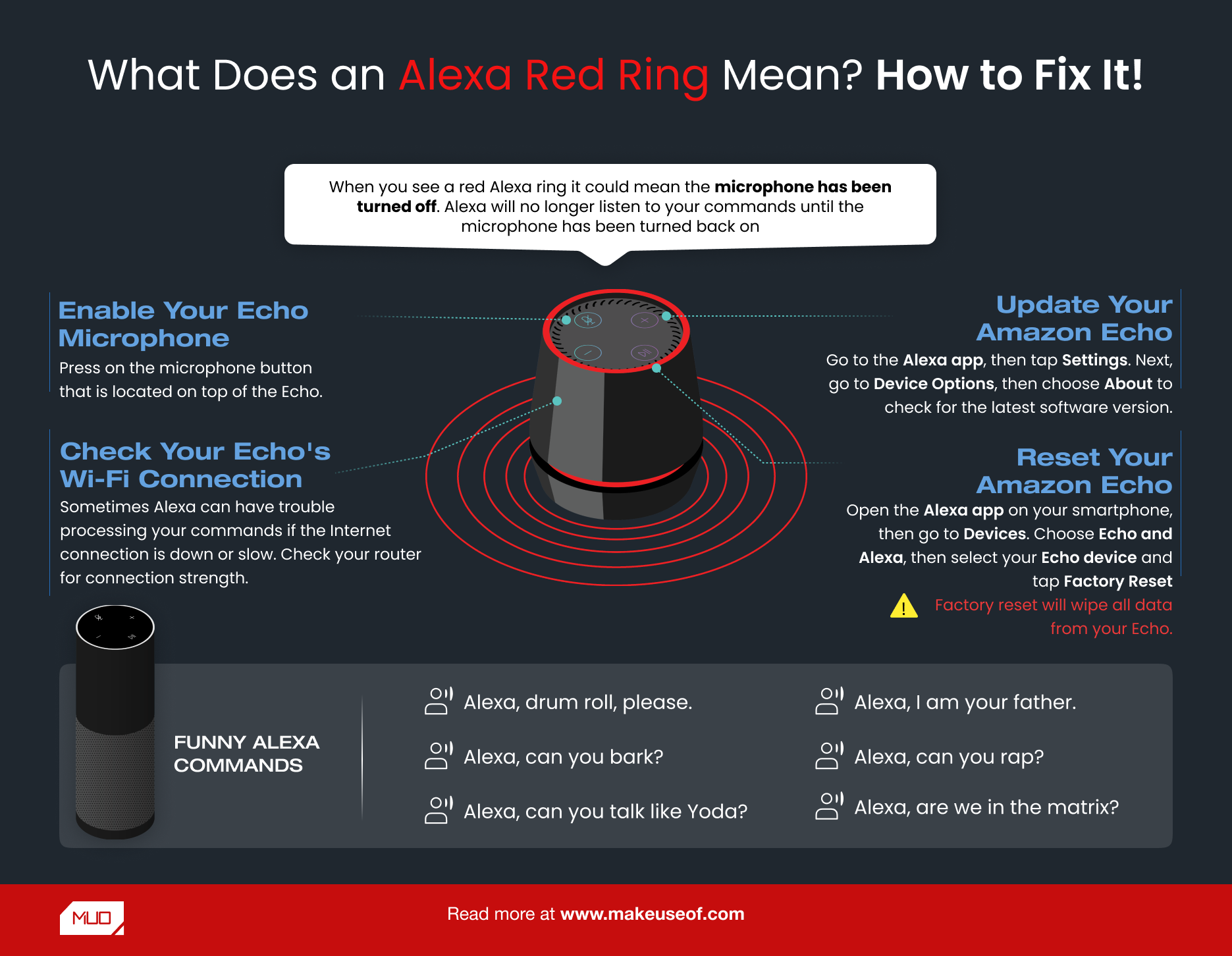
Red. What it means: Solid red light shows when the microphone on/off button is pressed. That means the device microphone is disconnected and Alexa is not listening.
How do I turn off the red light on my echo dot?
Okay now the easiest way and hopefully this works for you but if not i’ll go over another way towards the end of the video the easiest way to turn off this red light is to push this button right here.
What does the circle with a line through it mean on Alexa?
Can I turn off the microphone on Echo Devices? Yes, you can turn off the microphone by pushing the microphone on/off button on the top of your device (this button is signified by a circle with a line through it).
Cached
Why is Alexa not connecting to the internet?
Restart your Alexa-enabled device.
Sometimes, a simple restart is all you need to get your Alexa device back online. Just unplug your device or the power adapter from the outlet, wait about 10 seconds, then plug it back in and connect to Wi-Fi. If it works, your problem is solved.
Cached
How do I restart Alexa dot?
Press and hold the Volume down and Microphone off buttons for 20 seconds. Wait for the light ring to turn off and on again.
How do I reset my Echo?
Here’s how to complete the process using the Alexa app on your iOS® or Android™ smartphone.
Go to Devices.
Tap the Echo & Alexa icon at the top.
Select the speaker you want to factory reset.
Scroll down and tap Factory Reset.
Confirm the factory reset.
How do you restart Alexa?
To reset your device and keep your smart home connections:
Press and hold the Action button for 20 seconds.
Wait for the light ring to turn off and on again.
Why is Echo Dot not responding?
Often, an unresponsive Echo can be the result of a faulty Wi-Fi connection. To start, try performing a hard reset of all your network hardware; starting with your Echo Dot, then your router, then your modem. Wait a solid 10-15 seconds for each component, then re-power everything in reverse.
What do the colors around Alexa mean?
QUICK ANSWER.
Blue means your Echo is listening to or responding to a voice command. Yellow is a message, reminder, or notification alert, while green is a call or Drop In, and purple (usually) indicates Do Not Disturb mode. White signals volume changes or Alexa Guard switching to Away mode.
How do I reboot my Alexa Echo?
Unplug the power adapter from the device or the outlet and wait for 10 seconds. Plug it back in to restart it.
How do I put Echo Dot in pairing mode?
Welcome guys in this video I’m going to show you how you can get into the setup mode on your Amazon Echo. Speaker.
Okay so as you can see my speaker is in the setup mode already and when this ring is.
Does Alexa dot have a reset button?
Press and hold the Mute and Volume Down buttons for 20 seconds. The light ring will turn off and on. Your device is reset. If you want to add it back to your network, open the Alexa app and follow the steps.
Why does my echo dot keep going red
Red. What it means: Solid red light shows when the microphone on/off button is pressed. That means the device microphone is disconnected and Alexa is not listening.
How do I turn off the red light on my echo dot
Okay now the easiest way and hopefully this works for you but if not i'll go over another way towards the end of the video the easiest way to turn off this red light is to push this button right here
What does the circle with a line through it mean on Alexa
Can I turn off the microphone on Echo Devices Yes, you can turn off the microphone by pushing the microphone on/off button on the top of your device (this button is signified by a circle with a line through it).
Cached
Why is Alexa not connecting to the internet
Restart your Alexa-enabled device
Sometimes, a simple restart is all you need to get your Alexa device back online. Just unplug your device or the power adapter from the outlet, wait about 10 seconds, then plug it back in and connect to Wi-Fi. If it works, your problem is solved.
Cached
How do I restart Alexa dot
Press and hold the Volume down and Microphone off buttons for 20 seconds. Wait for the light ring to turn off and on again.
How do I reset my Echo
Here's how to complete the process using the Alexa app on your iOS® or Android™ smartphone.Go to Devices.Tap the Echo & Alexa icon at the top.Select the speaker you want to factory reset.Scroll down and tap Factory Reset.Confirm the factory reset.
How do you restart Alexa
To reset your device and keep your smart home connections: Press and hold the Action button for 20 seconds. Wait for the light ring to turn off and on again.
Why is Echo Dot not responding
Often, an unresponsive Echo can be the result of a faulty Wi-Fi connection. To start, try performing a hard reset of all your network hardware; starting with your Echo Dot, then your router, then your modem. Wait a solid 10-15 seconds for each component, then re-power everything in reverse.
What do the colors around Alexa mean
QUICK ANSWER. Blue means your Echo is listening to or responding to a voice command. Yellow is a message, reminder, or notification alert, while green is a call or Drop In, and purple (usually) indicates Do Not Disturb mode. White signals volume changes or Alexa Guard switching to Away mode.
How do I reboot my Alexa Echo
Unplug the power adapter from the device or the outlet and wait for 10 seconds. Plug it back in to restart it.
How do I put Echo Dot in pairing mode
Welcome guys in this video I'm going to show you how you can get into the setup mode on your Amazon Echo. Speaker. Okay so as you can see my speaker is in the setup mode already and when this ring is
Does Alexa dot have a reset button
Press and hold the Mute and Volume Down buttons for 20 seconds. The light ring will turn off and on. Your device is reset. If you want to add it back to your network, open the Alexa app and follow the steps to connect it to a Wi-Fi network.
How do I manually reset Alexa
Up top you've got your action button your volume up your volume down in your mute button in order to reset this we're going to hold down for approximately 20 seconds on the action button. And it's
Where is the echo dot reset button
So I'm just gonna mute it for right now doesn't matter. But all you have to do is there's these different buttons this is a mute button this is the plus and minus volume button and then this is what
Does Alexa Echo have a reset button
To reset your Echo (2nd Generation), press and hold the Microphone Off and Volume down buttons at the same time. Wait until the light ring turns orange, which should take around 20 seconds. To reset an Echo (3rd Generation, 4th Generation), hold down the action button for 25 seconds.
How do I reboot Echo Dot
Unplug the power adapter from the device or the outlet and wait for 10 seconds. Plug it back in to restart it.
Can I tell Alexa to reboot
Press and hold the Mute and Volume Down buttons for 20 seconds. The light ring will turn off and on. Your device is reset. If you want to add it back to your network, open the Alexa app and follow the steps to connect it to a Wi-Fi network.
Is there a reset button on Echo Dot
How to reset an Amazon Echo Dot to its factory settings:Press and hold the Microphone Off and Volume Down buttons at the same time for approximately 20 seconds.Release both buttons when you see a spinning orange light ring on the device.
Why is Alexa red and not understanding
Typically, when Alexa says “I'm having trouble understanding you” it's because your Echo device isn't able to contact Amazon's servers, which is where your voice commands are sent to be translated into instructions your speaker can understand.
How do you reboot Alexa
Restart Your Alexa Enabled DeviceUnplug your device or the power adapter from the power outlet. Then plug it back in.For devices with removable batteries, remove and reinsert the batteries to restart the device.
How do I reset my Alexa
Here's how to complete the process using the Alexa app on your iOS® or Android™ smartphone.Go to Devices.Tap the Echo & Alexa icon at the top.Select the speaker you want to factory reset.Scroll down and tap Factory Reset.Confirm the factory reset.
How do I physically reset Alexa
And also and the device will perform the hard reset automatically you don't have to do anything. There's also the second method how to make it you have to use this button there is the action button
Can I just pair echo dot to Bluetooth
You can pair the Amazon Echo Dot via Bluetooth to phones, computers, tablets, and other devices with the ability to connect to a Bluetooth speaker. When you pair it in that manner, the Echo Dot acts as a wireless Bluetooth speaker for your phone or other devices.
What color is echo dot pairing mode
One of the first colors to appear on any new Echo device is orange. A spinning orange light generally means the speaker is in pairing mode, i.e., ready for setup.
How do you reboot an Alexa
Restart Your Alexa Enabled DeviceUnplug your device or the power adapter from the power outlet. Then plug it back in.For devices with removable batteries, remove and reinsert the batteries to restart the device.


0 Comments