
Can I have 2 fire sticks at the same time?
Can I have 2 fire sticks at the same time?
Having two Firesticks is no different than watching Netflix on your TV in addition to your computer (or tablet or whatever). You do not have to buy another Prime membership or pay anything extra. Your account is universal. Having two Firesticks is no different than watching Netflix on your TV in addition to your computer (or tablet or whatever).
How many fire sticks can I use on one account?
A: There is no limit on how many devices you can have on your account but there are limits on how many can stream video simultaneously from one account. Amazon Prime limit is two, Netflix, Hulu, and HBO limit you to one simultaneous stream per account.
Can you use 2 Firesticks in the same house?
There is no limit on how many devices you can have on your account, so buying another Fire Stick for your second TV and registering it to your account won’t be a problem. However, as you already understand, there are limits on how many devices can stream video simultaneously from one account. I hope this helps!
Can you use two fire sticks on one Amazon account?
Please try again. A: You can only watch Prime on one TV at a time. If you sign out, then you can move the fire stick to a different location and sign back in or if you have a second fire stick sign in on it. Only one can be active for your account.
How many fire sticks do I need for 2 TVs?
2 Fire Sticks
A: You have 2 TVs you need 2 Fire Sticks unless you unplug the Fire Stick from 1 TV and plug it to the 2nd TV (not recommended) then you need only 1 Fire Stick.
What is the best way to make a fire with two sticks?
At this point, push a little faster. And use your strong hand to pull down adding pressure to the tip. You should see a lot more smoke now and bits of charred wood starting to pile up at the top.
Do I need a Firestick for each TV in the house?
Is it necessary to have a distinct Firestick device for each TV? To answer your question in a nutshell, the quick answer is yes, you will need a unique Amazon Firestick gadget for each TV. It is not possible to utilize a single Firestick with numerous TVs at the same time.
Is there a monthly fee for Firestick?
Is there a monthly fee for the Amazon Fire Stick? You don’t need to pay a monthly fee to use a Fire TV Stick. Once you pay for the device, you can use it to stream movies and TV shows for free.
Do I need a separate Firestick for each TV in my house?
Is it necessary to have a distinct Firestick device for each TV? To answer your question in a nutshell, the quick answer is yes, you will need a unique Amazon Firestick gadget for each TV. It is not possible to utilize a single Firestick with numerous TVs at the same time.
How many Firesticks do I need for 2 TVs?
2 Fire Sticks
A: You have 2 TVs you need 2 Fire Sticks unless you unplug the Fire Stick from 1 TV and plug it to the 2nd TV (not recommended) then you need only 1 Fire Stick.
Which is better Roku or Firestick?
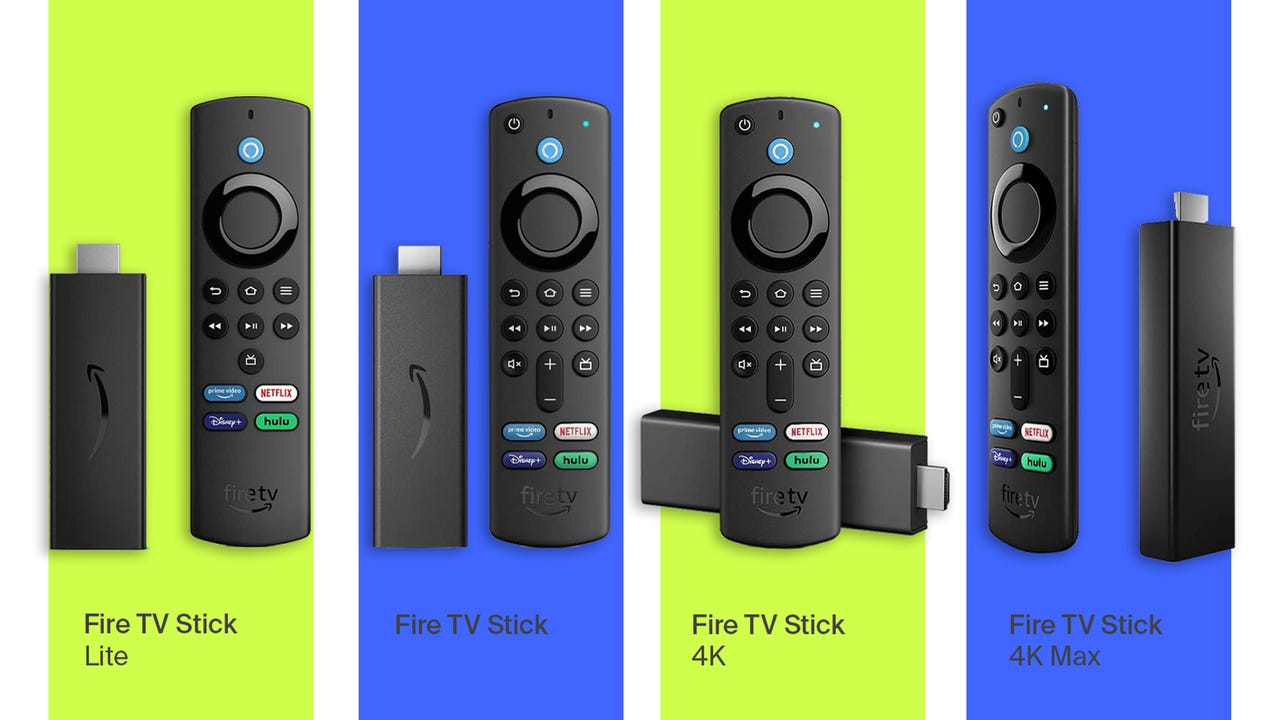
The Fire TV Stick 4K Max is the best value for the price. It’s Amazon’s most powerful streaming device and has twice the memory of any Roku streaming stick. You get a cinematic picture with vibrant 4K Ultra HD and immersive sound.
Can you run 2 fire sticks at once
Having two Firesticks is no different than watching Netflix on your TV in addition to your computer (or tablet or whatever). You do … see more. Your account is universal. Having two Firesticks is no different than watching Netflix on your TV in addition to your computer (or tablet or whatever).
How many fire sticks can I use on one account
A: There is no limit on how many devices you can have on your account but there are limits on how many can stream video simultaneously from one account. Amazon Prime limit is two, Netflix, Hulu and HBO limit you to one simultaneous stream per account.
Can you use 2 Firesticks in same house
There is no limit on how many devices you can have on your account so buying another Fire Stick for your second TV and registering it to your account won't be a problem. However, as you already understand, there are limits on how many devices can stream video simultaneously from one account. I hope this helps!
Can you use two fire sticks on one Amazon account
Please try again. A: You can only watch prime on one tv at at time. If you sign out then you can move the fire stick to a different location and sign back in or if you have a second fire stick sign in on it. Only one can be active for your account.
How many fire sticks do I need for 2 TVs
2 Fire Sticks
A: You have 2 TVs you need 2 Fire Sticks unless you unplug the Fire Stick from 1 TV and plug it to the 2nd TV (not recommended) then you need only 1 Fire Stick.
What is the best way to make a fire with two sticks
At this point push a little faster. And use your strong hand to pull down adding pressure to the tip. You should see a lot more smoke now and bits of charred wood does starting to pile up at the top.
Do I need a Firestick for each TV in the house
Is it necessary To Have a Distinct Firestick Device For Each TV To answer your question in a nutshell, the quick answer is yes, you will need a unique Amazon Firestick gadget for each TV. It is not possible to utilize a single Firestick with numerous TVs at the same time.
Is there a monthly fee for Firestick
Is There a Monthly Fee for the Amazon Fire Stick You don't need to pay a monthly fee to use a Fire TV Stick. Once you pay for the device, you can use it to stream movies and TV shows for free.
Do I need a separate Firestick for each TV in my house
Is it necessary To Have a Distinct Firestick Device For Each TV To answer your question in a nutshell, the quick answer is yes, you will need a unique Amazon Firestick gadget for each TV. It is not possible to utilize a single Firestick with numerous TVs at the same time.
How many Firesticks do I need for 2 TVs
2 Fire Sticks
A: You have 2 TVs you need 2 Fire Sticks unless you unplug the Fire Stick from 1 TV and plug it to the 2nd TV (not recommended) then you need only 1 Fire Stick.
Which is better Roku or Firestick
The Fire TV Stick 4K Max is the best value for the price. It's Amazon's most powerful streaming device and has twice the memory of any Roku streaming stick. You get a cinematic picture with vibrant 4K Ultra HD and immersive sound that supports Dolby Atmos audio.
What does rubbing two sticks together mean
It's a combustion reaction caused by friction heating. You will see the point of contact turn black because it will eventually become pure carbon. This is because the other elements in the wood are more easily burned off. The sticks themselves don't ignite; the friction heat is used to ignite tinder.
How long does it take to start a fire with two sticks
How long does it take to start a fire with sticks There isn't a general answer to this question. However, some seasoned survivalists have mastered how to start a fire with sticks in between 10 and 15 minutes. Others have managed the same time using a bow fire starter.
Which is better Roku or Fire Stick
The Fire TV Stick 4K Max is the best value for the price. It's Amazon's most powerful streaming device and has twice the memory of any Roku streaming stick. You get a cinematic picture with vibrant 4K Ultra HD and immersive sound that supports Dolby Atmos audio.
What is the point of a Fire Stick if you have a smart TV
The Amazon Fire TV Stick is a media streaming device that transforms your TV into a smart one. It lets you to watch your favorite TV shows and movies from top services like Netflix, Hulu, HBO Max, Disney+, and Amazon Prime in one place on a popular, easy-to-navigate platform.
Does the FireStick have to be connected to the wall
Start by powering on the Amazon Fire Stick: connect the micro USB adapter from your device to the AC adapter and plug it into the wall outlet. However, if you have a USB connector on your TV, you can plug the USB adapter into your TV as your power source. Then, you will not need to use the wall outlet.
Can you get local channels on Firestick
Amazon's Fire TV is one of the best streaming devices on the market. It's perfect with Netflix and other streaming video on demand (SVOD) services, but that's not all it can do. It's also a great tool for watching live TV, including local channels.
How long does it take to start a fire by rubbing two sticks together
How long does it take to start a fire with sticks There isn't a general answer to this question. However, some seasoned survivalists have mastered how to start a fire with sticks in between 10 and 15 minutes. Others have managed the same time using a bow fire starter.
What happens when you rub two surfaces together
Whenever two objects rub against each other, they cause friction. Friction works against the motion and acts in the opposite direction. The amount of friction depends on the materials from which the two surfaces are made. The rougher the surface, the more friction is produced.
Why can rubbing two sticks together quickly start a fire
When two sticks are rubbed together, the action creates friction, which causes heat. Heat coaxes the wood into a smoldering charcoal, which is fed tinder and dry sticks to become a full-fledged fire.
What are the best sticks to start a fire
You can create an effective fire starter, even with a wet piece of wood. Just grab your knife so you can make a “fuzz stick.” The best piece of wood to use is one without knots that's about a foot in length and a couple of inches in diameter. Soft woods like pine, birch and cedar are ideal.
Is there a monthly fee for fire stick
Is There a Monthly Fee for the Amazon Fire Stick You don't need to pay a monthly fee to use a Fire TV Stick. Once you pay for the device, you can use it to stream movies and TV shows for free.
Do I need a separate Fire Stick for each TV in my house
Is it necessary To Have a Distinct Firestick Device For Each TV To answer your question in a nutshell, the quick answer is yes, you will need a unique Amazon Firestick gadget for each TV. It is not possible to utilize a single Firestick with numerous TVs at the same time.
Can I watch normal TV on a FireStick
Note: If you have a Fire TV Smart TV, you can connect a live TV source (like a digital antenna) to your device. Choose a show that you'd like to watch. To browse what's currently airing, go to the On Now row on your home screen or use the Channel Guide button on your remote.
Which is better Roku or FireStick
The Fire TV Stick 4K Max is the best value for the price. It's Amazon's most powerful streaming device and has twice the memory of any Roku streaming stick. You get a cinematic picture with vibrant 4K Ultra HD and immersive sound that supports Dolby Atmos audio.


0 Comments