
Is IPv4 or IPv6 the IP address?
Is IPv4 or IPv6 the IP address?
1. What is the biggest difference between IPv4 and IPv6?
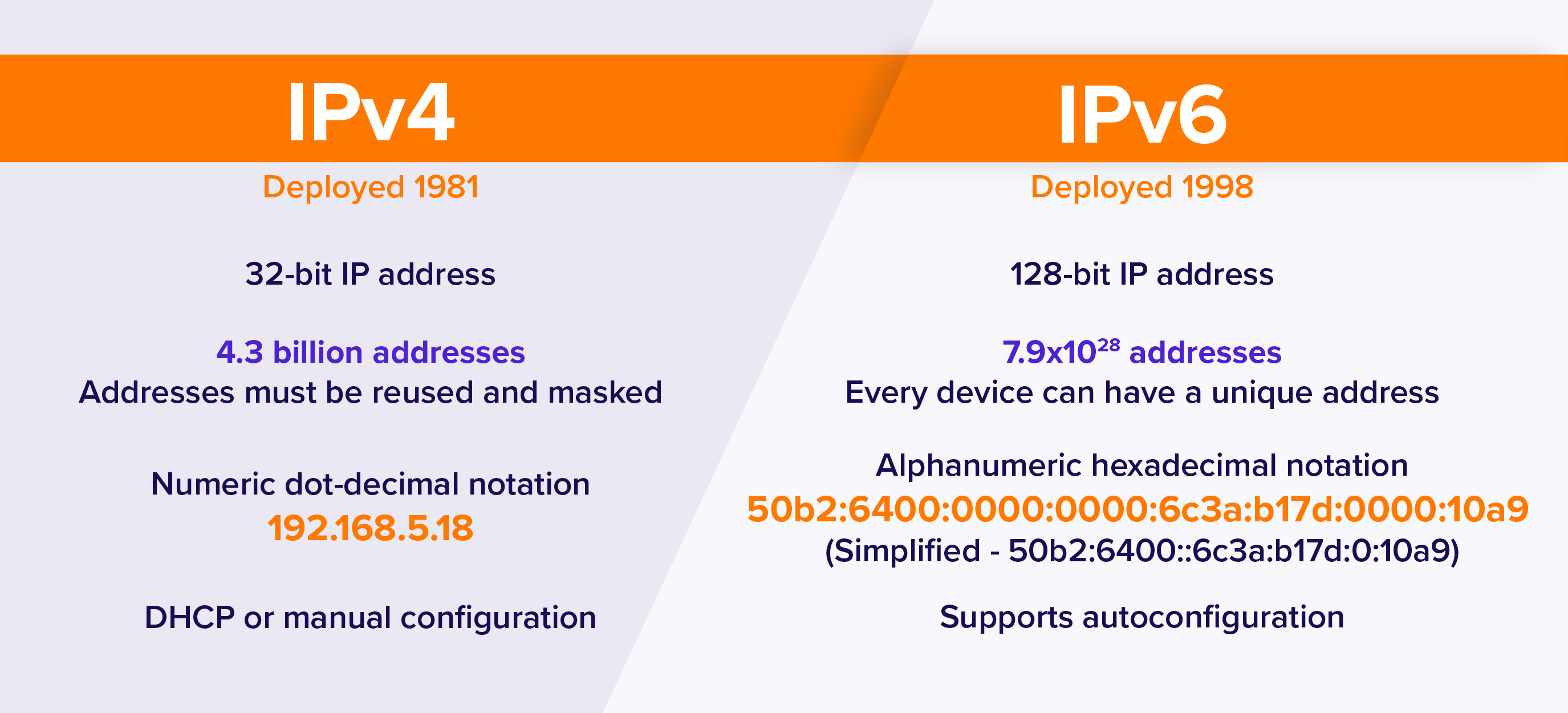
The biggest and most notable difference between IPv4 and IPv6 is the increase in addresses. With IPv4 being a 32-bit IP address and IPv6 being a 128-bit IP address, the number of IP addresses available grows drastically.
2. Is IPv4 your IP address?
When you ask “what is my IP address” or “what is my IPv4 address” you usually mean “what is my public IP.” It’s the IP address provided by your internet service provider. Devices on the same network share this IP address when accessing the internet.
3. What is the difference between IPv4 and IPv6 IP address?
IPv4 addresses are usually represented in dot-decimal notation, consisting of four decimal numbers, each ranging from 0 to 255, separated by dots. An IPv6 address is represented as eight groups of four hexadecimal digits, each group representing 16 bits. Fragmentation is performed only by the sender in IPv6.
4. What type of IP address is IPv6?
The three types of IPv6 addresses are: unicast, anycast, and multicast. Unicast addresses identify a single interface. Anycast addresses identify a set of interfaces in such a way that a packet sent to an anycast address is delivered to a member of the set.
5. How do I find my IPv6 IP address?
Type “ipconfig/all” on the blinking cursor then press [Enter]. NOTE: You will find the IPv6 Address network details under the Ethernet adapter Local Area Connection section.
6. How to find your IP address on Android?
Swipe one finger down from the top of the screen and long press on the Internet tile to open the internet settings. Tap the cog icon next to the network you’re connected to. Scroll down and you’ll find your IP address under Network details.
7. What is my local IP address?
To check IP address of the local network on the Android device: Go to Settings → Network & internet on the tablet and select Wi-Fi. Tap the name of active network and expand the Advanced section. Find the Network details field with the local IP address.
8. Should I use IPv4 or IPv6 in router settings?
IPv6 simplified the router’s task compared to IPv4. IPv6 is more compatible to mobile networks than IPv4. IPv6 allows for bigger payloads than what is allowed in IPv4. IPv6 is used by less than 1% of the networks, while IPv4 is still in use by the remaining 99%.
9. Should I use IPv4 or IPv6 on my router?
Based on the content mentioned above, IPv6 is extremely important for the long-term health of the Internet. Switching from IPv4 to IPv6 will give the Internet a much larger pool of IP addresses. It should also allow every device to have its own public IP address, rather than be hidden behind a NAT router.
10. How do I identify an IPv6 address?
Type “ipconfig/all” on the blinking cursor then press [Enter]. NOTE: You will find the IPv6 Address network details under the Ethernet adapter Local Area Connection section.
11. What does an IPv6 IP look like?
An IPv6 address is represented as eight groups of four hexadecimal digits, each group representing 16 bits. The groups are separated by colons (:). An example of an IPv6 address is: 2001:0db8:85a3:0000:0000:8a2e:0370:7334. The standards provide flexibility in the representation of IPv6 addresses.
Is IPv6 an IP address
The biggest and most notable difference between IPv4 and IPv6 is the increase in addresses. With IPv4 being a 32-bit IP address and IPv6 being a 128-bit IP address, the number of IP addresses available grows drastically.
Is the IPv4 your IP address
When you ask “what is my IP address” or “what is my ipv4 address” you usually mean “what is my public IP.” It's the IP address provided by your internet service provider. Devices on the same network share this IP address when accessing the internet.
What is the difference between IPv4 and IPv6 IP address
IPv4 addresses are usually represented in dot-decimal notation, consisting of four decimal numbers, each ranging from 0 to 255, separated by dots. An IPv6 address is represented as eight groups of four hexadecimal digits, each group representing 16 bits. Fragmentation is performed only by the sender in IPv6.
What type of IP address is IPv6
The three types of IPv6 addresses are: unicast, anycast, and multicast. Unicast addresses identify a single interface. Anycast addresses identify a set of interfaces in such a way that a packet sent to an anycast address is delivered to a member of the set.
How do I find my IPv6 IP address
Type “ipconfig/all” on the blinking cursor then press [Enter]. NOTE: You will find the IPv6 Address network details under the Ethernet adapter Local Area Connection section.
How to find your IP address
On AndroidSwipe one finger down from the top of the screen and long press on the Internet tile to open the internet settings.Tap the cog icon next to the network you're connected to.Scroll down and you'll find your IP address under Network details.
What is my local IP address
To check IP address of the local network on the Android device: Go to Settings → Network & internet on the tablet and select Wi-Fi. Tap the name of active network and expand the Advanced section. Find the Network details field with the local IP address.
Should I use IPv4 or IPv6 in router settings
IPv6 simplified the router's task compared to IPv4. IPv6 is more compatible to mobile networks than IPv4. IPv6 allows for bigger payloads than what is allowed in IPv4. IPv6 is used by less than 1% of the networks, while IPv4 is still in use by the remaining 99%.
Should I use IPv4 or IPv6 on my router
Based on the content mentioned above, IPv6 is extremely important for the long-term health of the Internet. Switching from IPv4 to IPv6 will give the Internet a much larger pool of IP addresses. It should also allow every device to have its own public IP address, rather than be hidden behind a NAT router.
How do I identify an IPv6 address
Type “ipconfig/all” on the blinking cursor then press [Enter]. NOTE: You will find the IPv6 Address network details under the Ethernet adapter Local Area Connection section.
What does an IPv6 IP look like
An IPv6 address is represented as eight groups of four hexadecimal digits, each group representing 16 bits The groups are separated by colons (:). An example of an IPv6 address is: 2001:0db8:85a3:0000:0000:8a2e:0370:7334. The standards provide flexibility in the representation of IPv6 addresses.
What is the default IP address for IPv6
The default is 255. IPv6 address of the primary DNS server on the ISP IPv6 network.
What is the IP address of a computer network
An Internet Protocol (IP) address is a unique numerical identifier for every device or network that connects to the internet. Typically assigned by an internet service provider (ISP), an IP address is an online device address used for communicating across the internet.
What does an IP address look like
An IP address is a string of numbers separated by periods. IP addresses are expressed as a set of four numbers — an example address might be 192.158.1.38. Each number in the set can range from 0 to 255. So, the full IP addressing range goes from 0.0.0.0 to 255.255.255.255.
What is the local IP address of a router
A local IP address is assigned by your router to every device connected to it, including itself. This local IP address is not revealed to the wider internet and only works within your local network. Most routers assign IP addresses starting with 192.168. XXX.
What is a 192.168 IP address
192.168. 0.1 is a common Internet Protocol (IP) address for many wireless home routers, used to access administrative functions.
Should I enable both IPv4 and IPv6 on my router
When possible, it is better to keep both IPv4 and IPv6 addresses enabled. For example, using only IPv6 can cause some accessibility issues, as only about one third of the internet supports IPv6 addresses. Likewise, disabling IPv6 can cause certain problems, especially if your router is already using an IPv6 address.
How do I choose between IPv4 and IPv6
Based on current testing with Geode , IPv4 is generally recommended. IPv6 connections tend to take longer to form and the communication tends to be slower. Not all machines support IPv6 addressing. To use IPv6, all machines in your distributed system must support it or you will have connectivity problems.
What happens if I enable IPv6 on my router
Additional IPv6 benefits
More efficient packet routing thanks to a prefix allocation scheme that allows data to flow more efficiently through routers on the internet. More flexible address scoping rules designed to support a broader range of usage scenarios for all types of networks.
Does every device have an IPv6 address
All modern computers and mobile phones support both IPv4 and IPv6, and if you look at your device IP addresses you will probably see both.
Where do I find my IPv6 address on my router
In the Modem Status section of your user settings, you can locate and view the IPv6 address for your modem. Please note that IPv6 is not available in all areas, and not all modems are compatible with IPv6. NOTE: Depending on your modem, your settings interface may appear slightly different from the images below.
How do I know if I’m using IPv6
By using I-P. show, you can check whether you are: On an IPv4 supported device here: https://v4.i-p.show. On an IPv6 supported device here: https://v6.i-p.show.
Why is my IP address showing IPv6
Why is my IPv6 Address showing instead of my IPv4 The real short answer is because and IP v6 address is an IP address and the website you used shows the actually used IP address.
How do I know if my IP is IPv6
For Windows usersClick the Windows Start menu, type ncpa.In the Network Connection window, right-click on the connection that you wish to check and select Properties.In the Networking tab, under This connection uses the following items, make sure the box next to Internet Protocol Version 6 is checked.
How do I find my IP address on IPv6
Type “ipconfig/all” on the blinking cursor then press [Enter]. NOTE: You will find the IPv6 Address network details under the Ethernet adapter Local Area Connection section.


0 Comments