
How do I know if I have IPv4 or IPv6?
“Do I have IPv4 and IPv6”
By going to WhatIsMyIPAddress.com, you’ll be able to see if you’re connecting with an IPv4 address, an IPv6 address, or both. If you see only an IPv4 address on your laptop or desktop computer, your Internet provider isn’t delivering dual-stack connectivity yet.
“How do I know if I have IPv4 or IPv6 on Windows”
Open the Start menu and select Settings. Choose Network & internet from the menu on the left, then click Properties along the top. You’ll find your IPv4 and IPv6 address listed here.
“How do you know if you have IPv6”
Type “ipconfig/all” on the blinking cursor then press [Enter]. NOTE: You will find the IPv6 Address network details under the Ethernet adapter Local Area Connection section.
“What is an example of IPv4 vs IPv6”
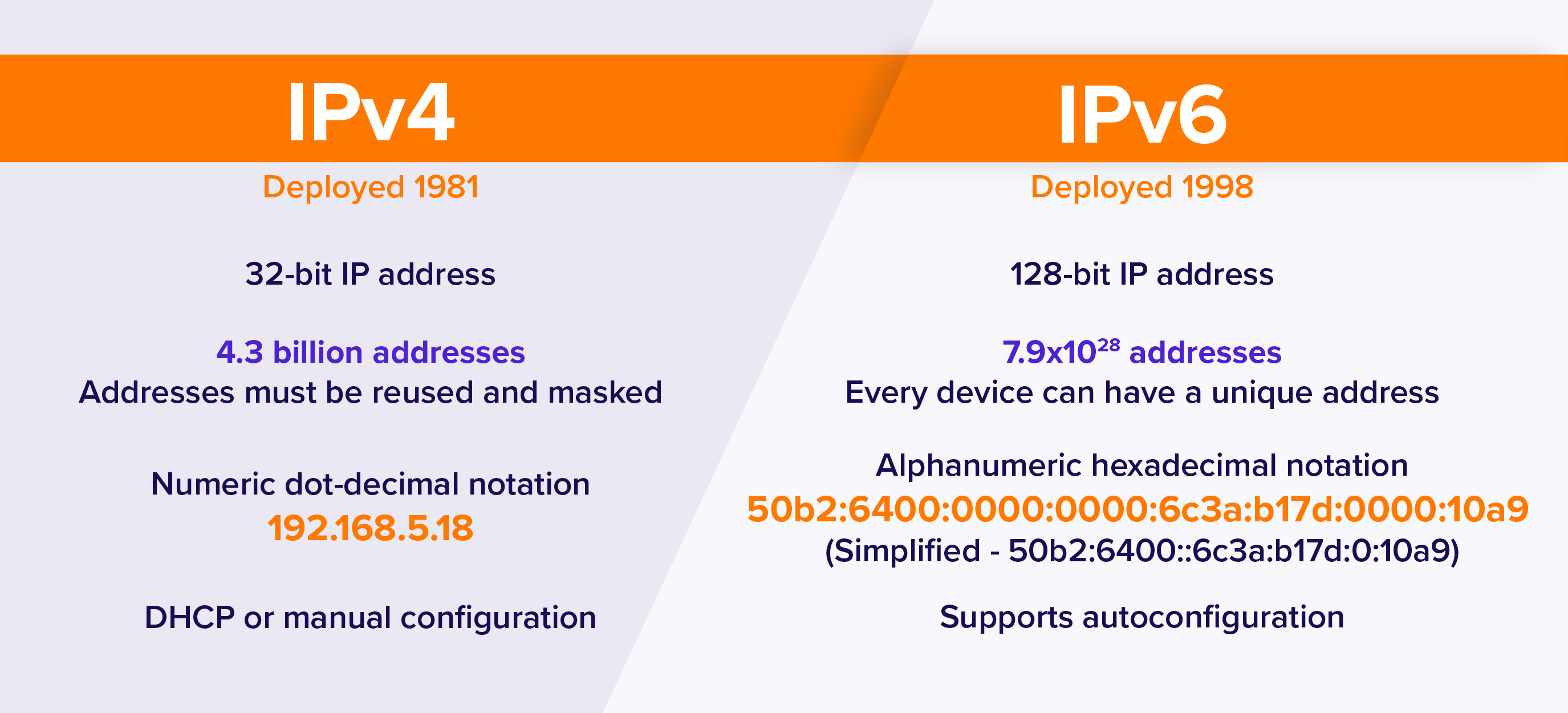
IPv4 does not provide the encryption and authentication facility. On the other hand, IPv6 provides an encryption and authentication facility. Example of IPv4: 86.124. 49.54, Example of IPv6: 1851:0000:3238:DEF1:0177:0000:0000:0125.
“Do I need to enable IPv6 on my router”
Some users disable IPv6 on routers or devices because they don’t run any applications or services that rely on IPv6. Disabling IPv6 is also common when troubleshooting network issues. However, service providers discourage users from disabling IPv6 and warn that it may cause connectivity problems.
“Is IPv6 automatically enabled”
To enable IPv6, make sure that the Configure IPv6 option is set to Automatically. Click OK to exit the adapter configurations window and then Apply.
“What does an IPv6 IP look like”
An IPv6 address is represented as eight groups of four hexadecimal digits, each group representing 16 bits The groups are separated by colons (:). An example of an IPv6 address is: 2001:0db8:85a3:0000:0000:8a2e:0370:7334. The standards provide flexibility in the representation of IPv6 addresses.
“How do I change from IPv4 to IPv6”
To enable/disable IPv6 on Android:
– Go to “Settings” > “Connections” > “Mobile networks” > “Access Point Names.”
– Select your mobile network operator.
– Scroll down to “APN protocol.”
– To disable IPv6, select “IPv4” in the menu.
“Should I use IPv4 or IPv6 in router settings”
IPv6 simplified the router’s task compared to IPv4. IPv6 is more compatible with mobile networks than IPv4. IPv6 allows for bigger payloads than what is allowed in IPv4. IPv6 is used by less than 1% of the networks, while IPv4 is still in use by the remaining 99%.
“How do I enable IPv4 and IPv6 connectivity”
According to your situation, I would provide the following suggestions:
– Update the wireless router.
– Update/reset driver for adapter – if it says it’s using the latest remove/delete driver then re-install.
– Uninstall the third-party VPN software.
– Add the WiFi connection manually.
“How do I enable IPv6 on my router”
To set up a fixed IPv6 Internet connection:
– Launch an Internet browser from a computer or wireless device that is connected to the network.
– Enter the router username and password.
– Select ADVANCED > Advanced Setup > IPv6.
– In the Internet Connection Type list, select Fixed.
Do I have IPv4 and IPv6
By going to WhatIsMyIPAddress.com, you'll be able to see if you're connecting with an IPv4 address, an IPv6 address, or both. If you see only an IPv4 address on your laptop or desktop computer, your Internet provider isn't delivering dual-stack connectivity yet.
Cached
How do I know if I have IPv4 or IPv6 on Windows
Open the Start menu and select Settings. Choose Network & internet from the menu on the left, then click Properties along the top. You'll find your IPv4 and IPv6 address listed here.
How do you know if you have IPv6
Type “ipconfig/all” on the blinking cursor then press [Enter]. NOTE: You will find the IPv6 Address network details under the Ethernet adapter Local Area Connection section.
What is an example of IPv4 vs IPv6
IPv4 does not provide the encryption and authentication facility. On the other hand, IPv6 provides an encryption and authentication facility. Example of IPv4: 86.124. 49.54, Example of IPv6: 1851:0000:3238:DEF1:0177:0000:0000:0125.
Do I need to enable IPv6 on my router
Some users disable IPv6 on routers or devices because they don't run any applications or services that rely on IPv6. Disabling IPv6 is also common when troubleshooting network issues. However, service providers discourage users from disabling IPv6 and warn that it may cause connectivity problems.
Is IPv6 automatically enabled
To enable IPv6, make sure that the Configure IPv6 option is set to Automatically. Click OK to exit the adapter configurations window and then Apply.
What does an IPv6 IP look like
An IPv6 address is represented as eight groups of four hexadecimal digits, each group representing 16 bits The groups are separated by colons (:). An example of an IPv6 address is: 2001:0db8:85a3:0000:0000:8a2e:0370:7334. The standards provide flexibility in the representation of IPv6 addresses.
How do I change from IPv4 to IPv6
How to enable/disable IPv6 on AndroidGo to “Settings” > “Connections” > “Mobile networks” > “Access Point Names.”Select your mobile network operator.Scroll down to “APN protocol.”To disable IPv6, select “IPv4” in the menu.
Should I use IPv4 or IPv6 in router settings
IPv6 simplified the router's task compared to IPv4. IPv6 is more compatible to mobile networks than IPv4. IPv6 allows for bigger payloads than what is allowed in IPv4. IPv6 is used by less than 1% of the networks, while IPv4 is still in use by the remaining 99%.
How do I enable IPv4 and IPv6 connectivity
According to your situation, I would provide the following suggestions:Update the wireless router.Update / reset driver for adapter – if it says its using the latest remove/delet driver then re-install.Uninstall the third-party VPN software.Add the wifi connection mannually.
How do I enable IPv6 on my router
To set up a fixed IPv6 Internet connection:Launch an Internet browser from a computer or wireless device that is connected to the network.Enter the router user name and password.Select ADVANCED > Advanced Setup > IPv6.In the Internet Connection Type list, select Fixed.
What is IPv6 address on Wi-Fi
An IPv6 address is a 128-bit alphanumeric value that identifies an endpoint device in an Internet Protocol Version 6 (IPv6) network. IPv6 is the successor to a previous addressing infrastructure, IPv4, which had limitations IPv6 was designed to overcome.
Should IPv6 be enabled on router
Likewise, disabling IPv6 can cause certain problems, especially if your router is already using an IPv6 address. However, you should keep IPv6 enabled even if you use an IPv4 network or install a VPN that supports IPv6, like NordVPN. Otherwise, some Windows features (like Quick Assist) might not work properly.
Should I enable both IPv4 and IPv6 on my router
When possible, it is better to keep both IPv4 and IPv6 addresses enabled. For example, using only IPv6 can cause some accessibility issues, as only about one third of the internet supports IPv6 addresses. Likewise, disabling IPv6 can cause certain problems, especially if your router is already using an IPv6 address.
How do I change my network from IPv4 to IPv6
When switching from IPv4 to IPv6, this is one of the simplest ways to utilize. Install any router with both IPv4 and IP6 address on its interfaces, and then point the network to the appropriate IP scheme. A dual-stack router can communicate with both IPv6 and IPv4 networks at the same time.
Do all routers have IPv6
Currently, all home networks still use IPv4, with some also using IPv6 alongside. Most home routers support IPv6, but few service providers, if at all, use this new protocol exclusively. You can choose to disable IPv6 at the router level or an individual device most of the time.
How do I enable IPv6 on my Wi-Fi
How to enable/disable IPv6 on a routerLog in to the web-based interface of your router.Go to “Advanced” settings and find “IPv6.”Disable or enable IPv6.Click “Save.”
How can I tell if my router is using IPv6
By using I-P. show, you can check whether you are: On an IPv4 supported device here: https://v4.i-p.show. On an IPv6 supported device here: https://v6.i-p.show.
Does IPv6 make WIFI faster
IPv6 is faster than IPv4 in network devices because it lacks network-address translation (NAT). Using IPv6 is a better choice for people that require high speed for their network processing.
How do I switch from IPv4 to IPv6
When switching from IPv4 to IPv6, this is one of the simplest ways to utilize. Install any router with both IPv4 and IP6 address on its interfaces, and then point the network to the appropriate IP scheme. A dual-stack router can communicate with both IPv6 and IPv4 networks at the same time.
How do I change my router from IPv4 to IPv6
In Settings go to Network & Internet and click the Properties button for the interface you wish to configure. Click the Edit button under IP settings, change the configuration type to Manual, enable IPv6, and populate your settings.
Should I set my router to IPv4 or IPv6
IPv6 is more compatible to mobile networks than IPv4. IPv6 allows for bigger payloads than what is allowed in IPv4. IPv6 is used by less than 1% of the networks, while IPv4 is still in use by the remaining 99%.
Should I set my router to IPv6
When possible, it is better to keep both IPv4 and IPv6 addresses enabled. For example, using only IPv6 can cause some accessibility issues, as only about one third of the internet supports IPv6 addresses. Likewise, disabling IPv6 can cause certain problems, especially if your router is already using an IPv6 address.


0 Comments