
How do I get rid of a virus without deleting it?
Summary of the Article
Note that we suggest you follow Method 1 or Method 2 to remove the shortcut virus and unhide missing files first. Type cmd in the Search box and right-click Command Prompt, select “Run as Administrator”. Type H and hit Enter. Type del *. Type attrib -s -r -h *.
Questions and Answers:
Q: How do I get rid of a virus without deleting files?
A: The easiest way to remove viruses is by using an antivirus program designed to clean your system safely. If a virus is already on your computer, however, you may need to run this program under very specific conditions.
Q: How do I wipe out a virus?
A: Removing a virus from a PC: Download and install antivirus software. Run a virus scan. Delete or quarantine infected files. Restart your computer. More virus removal options. Install the latest macOS update. Use a specialized Mac antivirus tool. Uninstall suspicious apps.
Q: Can you remove a virus yourself?
A: The easiest way to remove viruses is by using an antivirus program designed to clean your system safely. If a virus is already on your computer, however, you may need to run this program under very specific conditions.
Q: How do I get rid of a virus without?
A: To do that, press Ctrl + Alt + Delete and open the task manager. Then, go to ‘Processes’ and check for any unfamiliar programs running. To confirm if it is a virus, search online. Once confirmed, highlight it and press ‘End Process’ to stop it.
Q: Can viruses damage files?
A: A computer virus is a program that spreads by first infecting files or the system areas of a computer or network router’s hard drive and then making copies of itself. Some viruses are harmless, others may damage data files, and some may destroy files.
Q: What virus steals files?
A: Data stealing malware is a web threat that divests victims of personal and proprietary information with the intent of monetizing stolen data through direct use or underground distribution. Content security threats that fall under this umbrella include keyloggers, screen scrapers, spyware, adware, backdoors, and bots.
Q: How long does a virus last?
A: A viral infection usually lasts only a week or two. But when you’re feeling rotten, this can seem like a long time! Here are some tips to help ease symptoms and get better faster: Rest.
Q: Does deleting a virus work?
A: If you just delete the suspicious file, the malware will probably keep reinstalling itself anyway and continue causing damage to your device. This is not to say that computer viruses cannot be deleted manually—they can, but this is a very complex process that would require a lot of time and effort.
Q: What kills viruses naturally?
A: Using Vitamins and Minerals to Fight Viruses and Support Immunity: Vitamin D, commonly known for its role in bone health, also helps make proteins that kill viruses and bacteria, especially in the respiratory tract. Vitamin C, Zinc, Polyphenols, Potassium, Probiotics, and Supplementing Wisely can also help combat viruses.
Q: Do viruses go away naturally?
A: Many viruses go away on their own, but some cause life-threatening or chronic illnesses.
Q: Can one virus ruin your entire computer?
A: Some viruses will even crash your entire system. Viruses can also give their cybercriminal creators a backdoor to destroy or steal your sensitive data and documents. The idea of having a virus on your computer is scary, but we’re here to help!
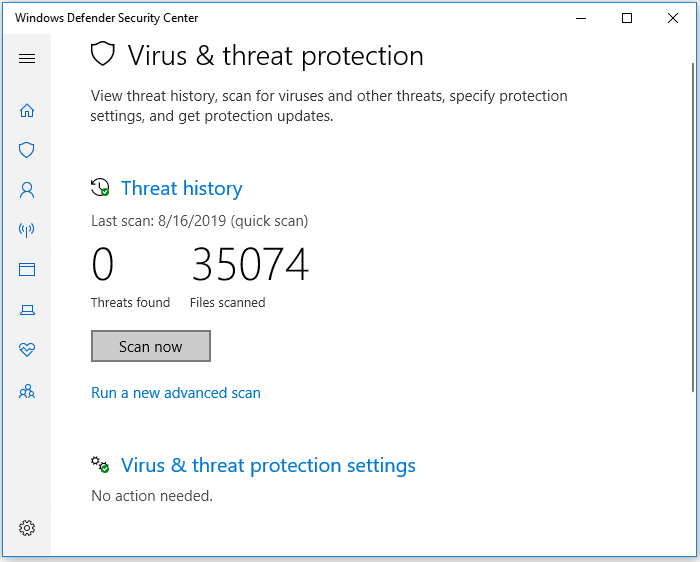
How do I get rid of a virus without deleting files
Note that we suggest you follow Method 1 or Method 2 to remove the shortcut virus and unhide missing files first.Type cmd in the Search box and right-click Command Prompt, select "Run as Administrator".Type H and hit Enter.Type del *.Type attrib -s – r -h *.
How do I wipe out a virus
Removing a virus from a PCDownload and install antivirus software.Run a virus scan.Delete or quarantine infected files.Restart your computer.More virus removal options.Install the latest macOS update.Use a specialized Mac antivirus tool.Uninstall suspicious apps.
Cached
Can you remove a virus yourself
The easiest way to remove viruses is by using an antivirus program designed to clean your system safely. If a virus is already on your computer, however, you may need to run this program under very specific conditions.
Cached
How do I get rid of a virus without
To do that, press Ctrl + Alt + Delete and open the task manager. Then, go to 'Processes' and check for any unfamiliar programs running. To confirm if it is a virus, search online. Once confirmed, highlight it and press 'End Process' to stop it.
Can viruses damage files
A computer virus is a program that spreads by first infecting files or the system areas of a computer or network router's hard drive and then making copies of itself. Some viruses are harmless, others may damage data files, and some may destroy files.
What virus steals files
Data stealing malware is a web threat that divests victims of personal and proprietary information with the intent of monetizing stolen data through direct use or underground distribution. Content security threats that fall under this umbrella include keyloggers, screen scrapers, spyware, adware, backdoors, and bots.
How long does a virus last
A viral infection usually lasts only a week or two. But when you're feeling rotten, this can seem like a long time! Here are some tips to help ease symptoms and get better faster: Rest.
Does deleting a virus work
If you just delete the suspicious file, the malware will probably keep reinstalling itself anyway and continue causing damage to your device. This is not to say that computer viruses cannot be deleted manually—they can, but this is a very complex process that would require a lot of time and effort.
What kills viruses naturally
Using Vitamins and Minerals to Fight Viruses and Support ImmunityVitamin D: Vitamin D, commonly known for its role in bone health, also helps make proteins that kill viruses and bacteria, especially in the respiratory tract.Vitamin C:Zinc:Polyphenols:Potassium:Probiotics:Supplement Wisely.
Do viruses go away naturally
Many viruses go away on their own, but some cause life-threatening or chronic illnesses.
Can one virus ruin your entire computer
Some viruses will even crash your entire system. Viruses can also give their cybercriminal creators a backdoor to destroy or steal your sensitive data and documents. The idea of having a virus on your computer is scary, but we're here to help!
Does deleting a file get rid of a virus
If a virus is found, it may affect multiple files. Select 'Delete' or 'Quarantine' to remove the file(s) and get rid of the virus. Rescan your computer to check there's no further threats.
What virus deletes everything
Is Autorun a virus Autorun.in is a virus that is usually spread through infected external devices like USB drives. Once an infected USB disk is introduced to your system, the virus can destroy your computer, self-executing files, destroying important documents, and replicating itself so that it is hard to remove.
Can viruses track you
Spyware: This virus monitors your internet activity and steals your data, such as passwords and financial information. Trojan: This virus attaches itself to a legitimate app and interferes with your phone's operations . Trojan viruses can take control of your device or corrupt data.
What helps a virus go away faster
Here are 12 tips to help you recover more quickly.Stay home. Your body needs time and energy to fight off the flu virus, which means that your daily routine should be put on the backburner.Hydrate.Sleep as much as possible.Ease your breathing.Eat healthy foods.Add moisture to the air.Take OTC medications.Try elderberry.
How do you know if a virus is gone
Scan your device for malware.
Run a malware or security Delete anything it identifies as a problem. You may have to restart your device for the changes to take effect. Run your scan again to make sure everything is clear. If the scan shows there are no more issues, you've likely removed the malware.
How do I know if I still have a virus
Run a full-system scan
If you ever suspect your computer has a virus, use antivirus software to run a full-system scan of your device. It is best to set your antivirus program to do this automatically on a regular basis so you can detect any issues before they become emergencies.
How do you beat a virus fast
Here are 12 tips to help you recover more quickly.Stay home. Your body needs time and energy to fight off the flu virus, which means that your daily routine should be put on the backburner.Hydrate.Sleep as much as possible.Ease your breathing.Eat healthy foods.Add moisture to the air.Take OTC medications.Try elderberry.
How long should a virus last
A viral infection usually lasts only a week or two. But when you're feeling rotten, this can seem like a long time! Here are some tips to help ease symptoms and get better faster: Rest.
How do you cure a virus fast
Here are 12 tips to help you recover more quickly.Stay home. Your body needs time and energy to fight off the flu virus, which means that your daily routine should be put on the backburner.Hydrate.Sleep as much as possible.Ease your breathing.Eat healthy foods.Add moisture to the air.Take OTC medications.Try elderberry.
What is the most damaging computer virus ever
Mydoom
Mydoom. Mydoom is arguably the worst malware in history, causing more than $38 billion worth of damages in 2004. Like Sobig, it was another type of mass mailing computer worm that stole email addresses from infected computers and sent itself to those addresses.
How do you tell if your PC has a virus
10 signs your computer is infectedUnexpected pop-up windows.Random sounds.Unexplained file or folder changes.Slow operation.Random connections to unknown websites.Unexpected images.Inability to download antivirus programs or updates.Spam sent from your email address or social media.
How can I tell if my computer has a virus
How do I tell if my computer has a virusSuddenly slow computer performance, meaning it takes a noticeably longer time to start up or open programs.Problems unexpectedly shutting down or restarting.Missing files.Frequent system crashes.Frequent error messages.Unexpected pop-up windows.
Should I wipe my computer if I get a virus
Performing a factory reset is the best way to get rid of viruses, spyware, and other malware. A factory reset will delete everything that wasn't originally installed on the device. This includes any viruses that infected your operating system and files.
What are the 3 worst computer viruses
Here are seven of the nastiest computer viruses in history.Mydoom. Considered by many to be the most dangerous computer virus in history, the Mydoom virus cost around $38 billion worth of damage in 2004.Sobig. The Sobig virus is a computer worm.Conficker.Klez.ILOVEYOU.WannaCry.Sasser.Zeus.


0 Comments