
How do you update your antivirus on Windows 10?
Summary of the Article
How do you update your antivirus on Windows 10? Check for updates manually. This means that you should open your antivirus program and look for an option to check for updates, download them, and install them. This way, you can ensure that you have the latest version of your antivirus software, and that you are aware of any changes or features that it may have.
Does antivirus update automatically? Most antivirus updates itself automatically whenever it is online. Some operate a push notification, such that when new signatures are presented, the signatures are immediately pushed into the antivirus library. Otherwise, updates run on a schedule – typically hourly – generally defined by the product and vendor.
What happens if antivirus is not updated? If you delay updating your antivirus software program, you might not be as protected from cyber security risks as you might think. Even worse, your device could be at risk of the latest threats that your security product is not yet aware of.
Why is my antivirus not working in Windows 10? Corrupted system files can cause massive problems with your operating system. One of the leading causes for Windows Defender not opening is file corruption. You can identify and repair faulty system files through the SFC scan. The System File Checker (SFC) is a built-in tool to help troubleshoot in Windows 10.
How do I know if my antivirus is up to date? The status of your antivirus software is typically displayed in Windows Security Center. Open Security Center by clicking the Start button, clicking Control Panel, clicking Security, and then clicking Security Center. Click Malware protection.
How often is your antivirus software updated? Your antivirus software should be set as default to check for updates at least once a day, but it is worth checking to make sure this is the case. You can run an on-the-spot scan to check for the latest threats if you have any doubts. Most antivirus software will carry out a full device scan once a week as standard.
How do I know if my antivirus is expired? The status of your antivirus software is typically displayed in Windows Security Center. Open Security Center by clicking the Start button, clicking Control Panel, clicking Security, and then clicking Security Center. Click Malware protection.
Is Windows 10 built-in antivirus good enough? Yes, Windows Defender is a good basic virus protection software. You may not find everything you want if you are extremely security focused. A third-party antivirus or anti-malware software will likely find threats that Windows Defender may miss.
How do you check if your antivirus is working or not? The status of your antivirus software is typically displayed in Windows Security Center. Open Security Center by clicking the Start button, clicking Control Panel, clicking Security, and then clicking Security Center. Click Malware protection.
What happens when antivirus expires? You will normally be able to run a scan, but you likely won’t be able to deal with any malware or security threats. Features like automated scanning will also be turned off. Other programs will stop updating the essential virus and malware databases that are used by the program to identify and clean new malware.
Questions and Answers
1. How do you update your antivirus on Windows 10?
Check for updates manually. This means that you should open your antivirus program and look for an option to check for updates, download them, and install them. This way, you can ensure that you have the latest version of your antivirus software, and that you are aware of any changes or features that it may have.
2. Does antivirus update automatically?
Most antivirus updates itself automatically whenever it is online. Some operate a push notification, such that when new signatures are presented, the signatures are immediately pushed into the antivirus library. Otherwise, updates run on a schedule – typically hourly – generally defined by the product and vendor.
3. What happens if antivirus is not updated?
If you delay updating your antivirus software program, you might not be as protected from cyber security risks as you might think. Even worse, your device could be at risk of the latest threats that your security product is not yet aware of.
4. Why is my antivirus not working in Windows 10?
Corrupted system files can cause massive problems with your operating system. One of the leading causes for Windows Defender not opening is file corruption. You can identify and repair faulty system files through the SFC scan. The System File Checker (SFC) is a built-in tool to help troubleshoot in Windows 10.
5. How do I know if my antivirus is up to date?
The status of your antivirus software is typically displayed in Windows Security Center. Open Security Center by clicking the Start button, clicking Control Panel, clicking Security, and then clicking Security Center. Click Malware protection.
6. How often is your antivirus software updated?
Your antivirus software should be set as default to check for updates at least once a day, but it is worth checking to make sure this is the case. You can run an on-the-spot scan to check for the latest threats if you have any doubts. Most antivirus software will carry out a full device scan once a week as standard.
7. How do I know if my antivirus is expired?
The status of your antivirus software is typically displayed in Windows Security Center. Open Security Center by clicking the Start button, clicking Control Panel, clicking Security, and then clicking Security Center. Click Malware protection.
8. Is Windows 10 built-in antivirus good enough?
Yes, Windows Defender is a good basic virus protection software. You may not find everything you want if you are extremely security focused. A third-party antivirus or anti-malware software will likely find threats that Windows Defender may miss.
9. How do you check if your antivirus is working or not?
The status of your antivirus software is typically displayed in Windows Security Center. Open Security Center by clicking the Start button, clicking Control Panel, clicking Security, and then clicking Security Center. Click Malware protection.
10. What happens when antivirus expires?
You will normally be able to run a scan, but you likely won’t be able to deal with any malware or security threats. Features like automated scanning will also be turned off. Other programs will stop updating the essential virus and malware databases that are used by the program to identify and clean new malware.
How do you Update an antivirus
Check for updates manually
This means that you should open your antivirus program and look for an option to check for updates, download them, and install them. This way, you can ensure that you have the latest version of your antivirus software, and that you are aware of any changes or features that it may have.
Does antivirus Update automatically
Most antivirus updates itself automatically whenever it is online. Some operate a push notification, such that when new signatures are presented the signatures are immediately pushed into the antivirus library. Otherwise updates run on a schedule – typically hourly – generally defined by the product and vendor.
What happens if antivirus is not updated
If you will delay updating your antivirus software program, you might not be as protected from cyber security risks as you might think. Even worse, your device could be at risk of the latest threats that your security product is not yet aware of.
Why my antivirus is not working in Windows 10
Corrupted systems files can cause massive problems with your operating system. One of the leading causes for Windows Defender not opening is file corruption. You can identify and repair faulty system files through the SFC scan. The System File Checker (SFC) is a built-in tool to help to troubleshoot in Windows 10.
How do I know if my antivirus is up to date
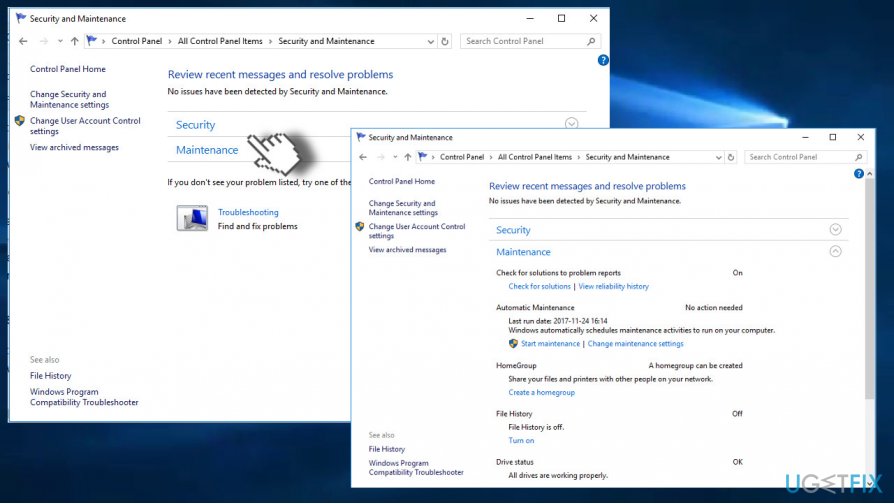
The status of your antivirus software is typically displayed in Windows Security Center.Open Security Center by clicking the Start button , clicking Control Panel, clicking Security, and then clicking Security Center.Click Malware protection.
How often your antivirus software is updated
Your antivirus software should be set as default to check for updates at least once a day, but it is worth checking to make sure this is the case. You can run an on the spot scan to check for the latest threats if you have any doubts. Most antivirus software will carry out a full device scan once a week as standard.
How do I know if my antivirus is expired
The status of your antivirus software is typically displayed in Windows Security Center.Open Security Center by clicking the Start button , clicking Control Panel, clicking Security, and then clicking Security Center.Click Malware protection.
Is Windows 10 built in antivirus good enough
Is Windows Defender good enough Yes, Windows Defender is a good basic virus protection software. You may not find everything you want if you are extremely security focused. A third-party antivirus or anti-malware software will likely find threats that Windows Defender may miss.
How do you check my antivirus is working or not
The status of your antivirus software is typically displayed in Windows Security Center.Open Security Center by clicking the Start button , clicking Control Panel, clicking Security, and then clicking Security Center.Click Malware protection.
What happens when antivirus expires
You will normally be able to run a scan, but you likely won't be able to deal with any malware or security threats. Features like automated scanning will also be turned off. Other programs will stop updating the essential virus and malware databases that are used by the program to identify and clean new malware.
How do I check my antivirus status on my computer
Related TopicsClick the [Start] icon on the taskbar①, and then click [Settings] ②.Click [Privacy & security]③, and then click [Windows Security]④.Click [Virus & threat protection]⑤.In the Virus & threat protection section, it will display which antivirus software is currently installed on your computer.
Does Windows antivirus expire
Once the trial version software has expired, the operating system will detect that it is expired and remind you to renew your subscription. If you do nothing or choose not to renew, Windows® Defender tool will automatically be enabled on the third day to ensure your computer is protected at all times.
What happens if antivirus expires
You will normally be able to run a scan, but you likely won't be able to deal with any malware or security threats. Features like automated scanning will also be turned off. Other programs will stop updating the essential virus and malware databases that are used by the program to identify and clean new malware.
Do I still need to download an antivirus software with Windows 10
So, does Windows 10 need antivirus tools Absolutely. You need antivirus software for Windows 10 that can shield you from all types of malware and attacks, from viruses and ransomware to phishing websites and emails.
How do I know what antivirus I have Windows 10
Users using the classic start menu: Start > Settings > Control Panel > Security Center. Users using start menu: Start > Control Panel > Security Center.
How do I access my antivirus settings
Open the Windows Security app by searching the start menu for Security, and then selecting Windows Security. Select the Virus & threat protection tile (or the shield icon on the left menu bar). Under Virus & threat protection settings, select Manage settings.
Does Windows 10 need antivirus
You do need an antivirus for Windows 10, even though it comes with Microsoft Defender Antivirus. That's because this software lacks endpoint protection and response plus automated investigation and remediation.
Is it necessary to renew antivirus
When your license expires, you may wonder whether it's worth the money to renew it or buy the newest version of the program. While anti-virus software can be a recurring expense, keeping your license up-to-date is an important step in protecting yourself from malware.
Do I still need an antivirus with Windows 10
So, does Windows 10 need antivirus tools Absolutely. You need antivirus software for Windows 10 that can shield you from all types of malware and attacks, from viruses and ransomware to phishing websites and emails.
Does Windows 10 have antivirus software built in
Windows 10 and 11 include Windows Security, which provides the latest antivirus protection. Your device will be actively protected from the moment you start Windows. Windows Security continually scans for malware (malicious software), viruses, and security threats.
Does Windows 10 automatically have antivirus
Windows 10 and 11 include Windows Security, which provides the latest antivirus protection. Your device will be actively protected from the moment you start Windows. Windows Security continually scans for malware (malicious software), viruses, and security threats.
Does Windows 10 need an antivirus
You do need an antivirus for Windows 10, even though it comes with Microsoft Defender Antivirus. That's because this software lacks endpoint protection and response plus automated investigation and remediation.
How can I check if my antivirus is working
The status of your antivirus software is typically displayed in Windows Security Center. Open Security Center by clicking the Start button , clicking Control Panel, clicking Security, and then clicking Security Center.
What antivirus should I use for Windows 10 free
Microsoft Defender Antivirus is what comes preinstalled on Windows PCs. While it's not as feature-rich as some of the other options on this list, it does offer solid protection against viruses and malware. Plus, it's free to use and easy to set up.
How do I renew my antivirus for free
To renew the software, open the program and access the settings and configuration options. Usually, there will be an option for renewing the license, when the software is near its expiration date. You may also be able to go to the software developers website to renew the license directly.


0 Comments