
Where is the Remind class code?
Joining a Class on Remind: Key Points
How do I join a class on Remind?
Text the class code to 81010.
Why can’t I join a class on Remind?
Students under 13 can’t join certain classes for safety reasons. They can only join classes linked to a school.
What does a Remind code look like?
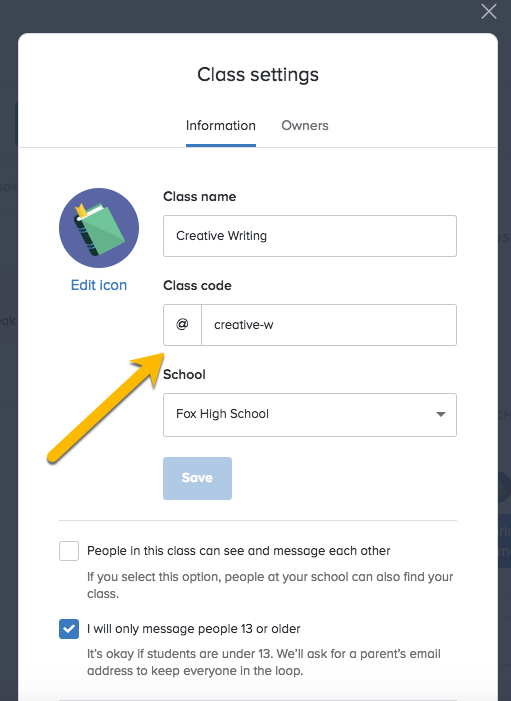
A Remind code is unique and always looks like this: @classcode. Sign up for text notifications by texting @classcode to 81010.
How do I share a Remind code?
If you’re already logged in to Remind, simply click on the button and share the link to the content you want to share.
What is the Remind number?
The Remind number is 81010. People can text your class code to this number to join your class.
Is Remind free for students?
Access to Remind is free, but additional features may require fees, such as Remind Tutoring services.
How do I join a Remind group with a code?
Go to remind.com/join, enter the class code, and select Join. Provide your first and last name along with your mobile phone number or email address. Click Sign up.
How do you join a class code on Remind on your phone?
Download the Remind app, create a new account, tap “+ Join a class,” enter the class code, and click Join. If you don’t have the class code, you can search for the class instead.
How do you connect with people on Remind?
To connect a family member to a Student/Parent account, log in to your Remind account online, select a class, go to the People tab, and add a family member to the student or parent’s account.
What is the Remind code to text?
The Remind code to text is 81010. Teachers can send messages quickly using this number.
How do I find my Remind account?
Enter your email address or phone number on the Remind website, click “Send reset instructions,” and check your email inbox for further instructions to reset your password and access your account.
How do you join a class on Remind without a code?
If you don’t have the class code, access your Remind account on the web and search for the class.
How do I join a class on Remind
Eight ten ten is a free short code that US participants can use to join a class on remind to join a class on remind participants. Text the class code to eight ten ten this number is the same for
Why can’t i join a class in Remind
Students under 13 can't be a participant in a class owned by a student or parent for safety reasons. Ask a parent join the class instead. Students under 13 can only join classes linked to a school: Students under 13 can't join classes that aren't linked to a school for safety reasons.
What does a Remind code look like
To join a Remind class, you'll need a class code from a teacher, coach, administrator, or organization leader. Each code is unique, but it always looks like this: @classcode. Sign up for text notifications by texting @classcode to 81010.
How do I share a Remind code
If you're already logged in to Remind, clicking on the button will take you directly to the Remind composer—with a link to the content you want to share. From there, sharing is as easy as writing your message and sending it as usual.
What is the Remind number
They'll receive easy-to-follow instructions for joining your class. Or, you can ask people to text your class code to the phone number 81010*.
Is Remind free for students
Access to and use of Remind itself is free, but we do offer additional features that require fees, such as our Remind Tutoring services.
How do I join a Remind group with code
Go to remind.com/join. Enter the class code, and select Join. Enter you first and last name along with your mobile phone number or email address. Click Sign up.
How do you join a class code on Remind on your phone
AppDownload the mobile app for iOS and Android devices.Create a new account (or log in if you already have one).Tap +Join a class (located under the Joined section).Enter the class code, and then click Join. If you don't have the class code, you can click Search for the class instead.
How do you connect with people on Remind
To connect a family member to a Student/Parent account:Log in to your Remind account online.Select a class from the left navigation menu.Click the People tab.Hover your cursor under the Family members column for the student or parent you need to add a family member to their account.Click on the blue plus sign icon.
What is the Remind code to text
Remind can now send your messages faster with 81010. Whether you're sending time-sensitive updates or real time questions, busy teachers need messages delivered quickly!
How do I find my Remind account
Enter your email address or phone number to access your account here, and click Send reset instructions. If you entered an email, please check your inbox for an email from [email protected]. It will contain a link that you can use to reset your password and reaccess your account.
How do you join a class on Remind without a code
Your Remind account on web
If you don't have the class code, you can click Search for your class instead. Type in the name of your school. Search for your teacher. Select Join for the class you want to add.
Is Remind still free
We will charge fees to those individuals who select our Individual Plans, or those schools or districts that sign contracts to purchase Remind Hub. You may choose to use and pay for additional products and services that we or our partners offer. We'll make it clear when fees are added to Remind.
How do you reuse a class code in Remind
Web. To archive a class, click the Settings tab for the class then choose between: Reusing class code: The messages and participants will be archived, and you can use the same class code with new participants.
How do you create a class code on Remind app
WebLog in to your account.Click Add class which is located on the top left side of your dashboard.Select Create new class.Add a Class name. A Class name should not exceed 60 characters including spaces.Under School, select the organization your class should be connected from the dropdown menu.Click Create.
How do I join a classroom on my phone
How to join google classroom using a tablet or phone this is the google classroom icon tap it once to go to your classroom. Here you will see all of your classes. You can choose the class by tapping
How do I add a classroom to my phone
Install the Classroom app on AndroidOn your device, tap Play Store .Find and install the Google Classroom app.
Can students under 13 join Remind
We collect limited information for under-13 users and only if we have parental consent. If we don't have consent from a parent or guardian, we delete the information. If you are a teacher or a school providing consent on behalf of parents, you are also responsible for complying with COPPA.
How do I join a Remind group without the app
Remind's join site
Go to remind.com/join. Enter the class code, and select Join. Enter you first and last name along with your mobile phone number or email address.
How to find the Google Classroom code of a class you are already in
And um yeah that's basically it. So that's how you can um find the google. Classroom. Code it's super easy you all you basically have to do is just click on it. And it should be right there.
Can two people own a class in Remind
You can make another person a co-owner of your class. As a co-owner, they will have the same capabilities as you. This means that they can manage the class participant list, send announcements or chat messages to participants as well as change the class settings.
How do you create a classroom code
Create a classTap Classroom .Tap Add.Enter the class name.(Optional) To enter a short description, grade level, or class time, tap Section and enter the details.(Optional) To enter the location for the class, tap Room and enter the details.(Optional) To add a subject, tap Subject and enter a name.Tap Create.
How do I join a Remind class for my parents
Step 1: Set up your parent account. Step 2: Choose your notification preferences and account settings. Step 3: Join classes. Step 4: Send and receive messages.
How do I join a class on my Iphone
Join a classTap the class link your teacher shared.Make sure you're signed in with the correct account for Classroom. If you need to switch accounts, tap the Down arrow and select or add your account. Learn more.Tap Join class.
Where can I see the class code in Google Classroom
The first step is to open Google Classroom and click class you need. Click the settings wheel in the upper right corner of your classroom. This will open your class settings. Scroll down and locate your class code.


0 Comments