
Is DISM better than SFC?
Is DISM better than SFC?
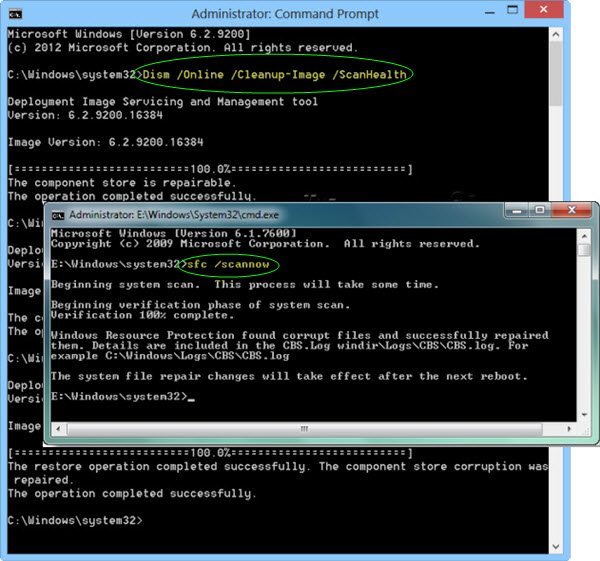
Which is better SFC or DISM
What is the Difference Between SFC, CHKDSK, and DISM
SFC analyzes your system files while CHKDSK searches your hard drive and DISM scans and patches faulty files in the component store of the Windows system image, allowing SFC to function correctly.
Should I do dism or SFC first
Run SFC first, and only if SFC finds a problem is it necessary to run DISM. Run SFC first, and — no matter what SFC reports — you might as well run DISM after that.
Does DISM replace SFC
Run the DISM Command to Fix SFC Problems
However, if the SFC command fails to run properly or can’t replace a corrupted file with the correct one, the DISM command — or System Update Readiness Tool in Windows 7 — can sometimes fix the underlying Windows system and make SFC run correctly.
When should I use DISM
DISM can be used to service Windows images and their associated versions of WinPE and WinRE. The commands and options that are available for servicing an image depend on which Windows operating system you are servicing, and whether the image is offline or a currently running operating system.
Does DISM fix corrupt files
In short, DISM is not a complete reinstallation of Windows; instead, it finds critical core files required to run and gather information, then upgrades or repairs any files that are corrupted or out-of-date.
Does SFC fix corrupted files
The sfc /scannow command will scan all protected system files, and replace corrupted files with a cached copy that is located in a compressed folder at %WinDir%\System32\dllcache. The %WinDir% placeholder represents the Windows operating system folder.
How long should DISM take
The duration of the DISM restorehealth depends on the amount of damage that needs to be repaired. The more corruption, the longer it will take to repair them. As mentioned above, the whole process may even last for several hours. So, you can just wait and see.
What can DISM fix
Windows could not search for new updates. For example, an update might not install if a system file is damaged. The DISM or System Update Readiness tool may help you fix some Windows corruption errors.
Does sfc scannow fix corrupted files
The sfc /scannow command will scan all protected system files, and replace corrupted files with a cached copy that is located in a compressed folder at %WinDir%\System32\dllcache.
How to clean corrupted files with cmd
1. Run the SFC Scan to Repair Corrupt System FilesEnter “cmd” in the Windows search bar.
2. Right-click on Command Prompt and select Run as administrator.
3. Enter the command “SFC /scannow” and press Enter. ( Be sure to add a space between “SFC” and “/scannow”)
What does DISM do
Deployment Image Servicing and Management (DISM) is a command-line tool that is used to service Windows images. You can use DISM image management commands to mount and get information about Windows image (. wim) files, Full-flash utility (FFU) files, or virtual hard disks (VHD).
Can I use SFC instead of DISM?
SFC and DISM serve different purposes, but in some cases, running SFC alone may fix the issue. However, if the SFC scan does not solve the problem, you can try running DISM to repair the underlying Windows system.
Which is better SFC or DISM
What is the Difference Between SFC, CHKDSK, and DISM SFC analyzes your system files while CHKDSK searches your hard drive and DISM scans and patches faulty files in the component store of the Windows system image, allowing SFC to function correctly.
Cached
Should I do dism or SFC first
Run SFC first, and only if SFC finds a problem is it necessary to run DISM. Run SFC first, and — no matter what SFC reports — you might as well run DISM after that.
Cached
Does DISM replace SFC
Run the DISM Command to Fix SFC Problems
However, if the SFC command fails to run properly or can't replace a corrupted file with the correct one, the DISM command — or System Update Readiness Tool in Windows 7 — can sometimes fix the underlying Windows system and make SFC run correctly.
CachedSimilar
When should I use DISM
DISM can be used to service Windows images and their associated versions of WinPE and WinRE. The commands and options that are available for servicing an image depend on which Windows operating system you are servicing, and whether the image is offline or a currently running operating system.
Does DISM fix corrupt files
In short, DISM is not a complete reinstallation of Windows; instead, it finds critical core files required to run and gather information, then upgrades or repairs any files that are corrupted or out-of-date.
Does SFC fix corrupted files
The sfc /scannow command will scan all protected system files, and replace corrupted files with a cached copy that is located in a compressed folder at %WinDir%\System32\dllcache. The %WinDir% placeholder represents the Windows operating system folder.
How long should DISM take
The duration of the DISM restorehealth depends on the amount of damage that needs to be repaired. The more corruption, the longer it will take to repair them. As mentioned above, the whole process may even last for several hours. So, you can just wait and see.
What can DISM fix
Windows could not search for new updates. For example, an update might not install if a system file is damaged. The DISM or System Update Readiness tool may help you fix some Windows corruption errors.
Does sfc scannow fix corrupted files
The sfc /scannow command will scan all protected system files, and replace corrupted files with a cached copy that is located in a compressed folder at %WinDir%\System32\dllcache.
How to clean corrupted files with cmd
1. Run the SFC Scan to Repair Corrupt System FilesEnter "cmd" in the Windows search bar.Right-click on Command Prompt and select Run as administrator.Enter the command "SFC /scannow" and press Enter. ( Be sure to add a space between "SFC" and "/scannow")
What does DISM do
Deployment Image Servicing and Management (DISM) is a command-line tool that is used to service Windows images. You can use DISM image management commands to mount and get information about Windows image (. wim) files, Full-flash utility (FFU) files, or virtual hard disks (VHD).
Can I use PC while DISM is running
You can use your PC while running the scans. Even though there's no problem, then too avoid running heavy apps like games, Photo editing, etc.
How long does DISM repair take
Running DISM /online /cleanup-image /restorehealth or DISM.exe /online /cleanup-image /restorehealth is not a quick process. It will take some minutes or even hours to finish the whole process.
How do I run SFC command to repair corrupted boot files
Click Start.In the search bar, type CMD .Right-click CMD.exe and select Run as Administrator.On the User Account Control (UAC) prompt, click Yes.In the command prompt window, type SFC /scannow and press Enter .System file checker utility checks the integrity of Windows system files and repairs them if required.
Which tool should you use to fix a corrupt filesystem
Repair file system
For Windows, you can use the CHKDSK command or the Error Checking tool to repair NTFS, FAT32, or exFAT file systems.
How to repair corrupt Windows 10 using CMD
In the command prompt window, type SFC /scannow and press Enter . System file checker utility checks the integrity of Windows system files and repairs them if required. After the process is complete, reboot the computer.
How to fix all corrupted files using CMD
The sfc /scannow command will scan all protected system files, and replace corrupted files with a cached copy that is located in a compressed folder at %WinDir%\System32\dllcache. The %WinDir% placeholder represents the Windows operating system folder. For example, C:\Windows.
How long does dism scan take
It starts functioning once you put it to work, which takes around five to ten minutes or sometimes more, depending on your system and the number of corrupted files. Once the scan completes, you can restart your PC for a fresh and error-free start.
Should I run chkdsk or SFC first
First, I run a chkdsk and then reboot to complete the process. Then, I use sfc /scannow to verify the system files When required, I use DISM to repair. Since the DOS days, chkdsk was the utility for disk and file allocation space integrity.
Does SFC scannow fix corrupt files
The sfc /scannow command will scan all protected system files, and replace corrupted files with a cached copy that is located in a compressed folder at %WinDir%\System32\dllcache.
How to repair corrupted hard disk using CMD
Here's how to repair the drive:Close the Error Checking dialog.Open the Command Prompt by typing cmd into the desktop search field and selecting Run as administrator.Type the command chkdsk C: /f. If the drive you're trying to repair isn't the C drive, replace “C” with the letter of the relevant drive.
How to recover corrupted hard disk using CMD
Run CHKDSK from Command PromptType cmd (Command Prompt) in the Start menu search bar, then click Run as administrator.Type chkdsk and hit Enter. CHKDSK will scan for drive errors and let you know if it found any you should repair, but it won't try to fix them without a command.
How to recover corrupted hard disk using cmd
Run CHKDSK from Command PromptType cmd (Command Prompt) in the Start menu search bar, then click Run as administrator.Type chkdsk and hit Enter. CHKDSK will scan for drive errors and let you know if it found any you should repair, but it won't try to fix them without a command.
How to repair corrupted hard disk using cmd
To repair errors without scanning the disk for bad sectors, at the command prompt, type chkdsk volume: /f, and then press <Enter>. To repair errors, bad sectors, and readable information, at the command prompt, type chkdsk volume: /r, and then press <Enter>.
How long does DISM take to complete
The duration of the DISM restorehealth depends on the amount of damage that needs to be repaired. The more corruption, the longer it will take to repair them. As mentioned above, the whole process may even last for several hours.


0 Comments