
Why is there a red ring around my Echo Dot?
Why is there a red ring around my Echo Dot?
Why does my Alexa dot have a red ring
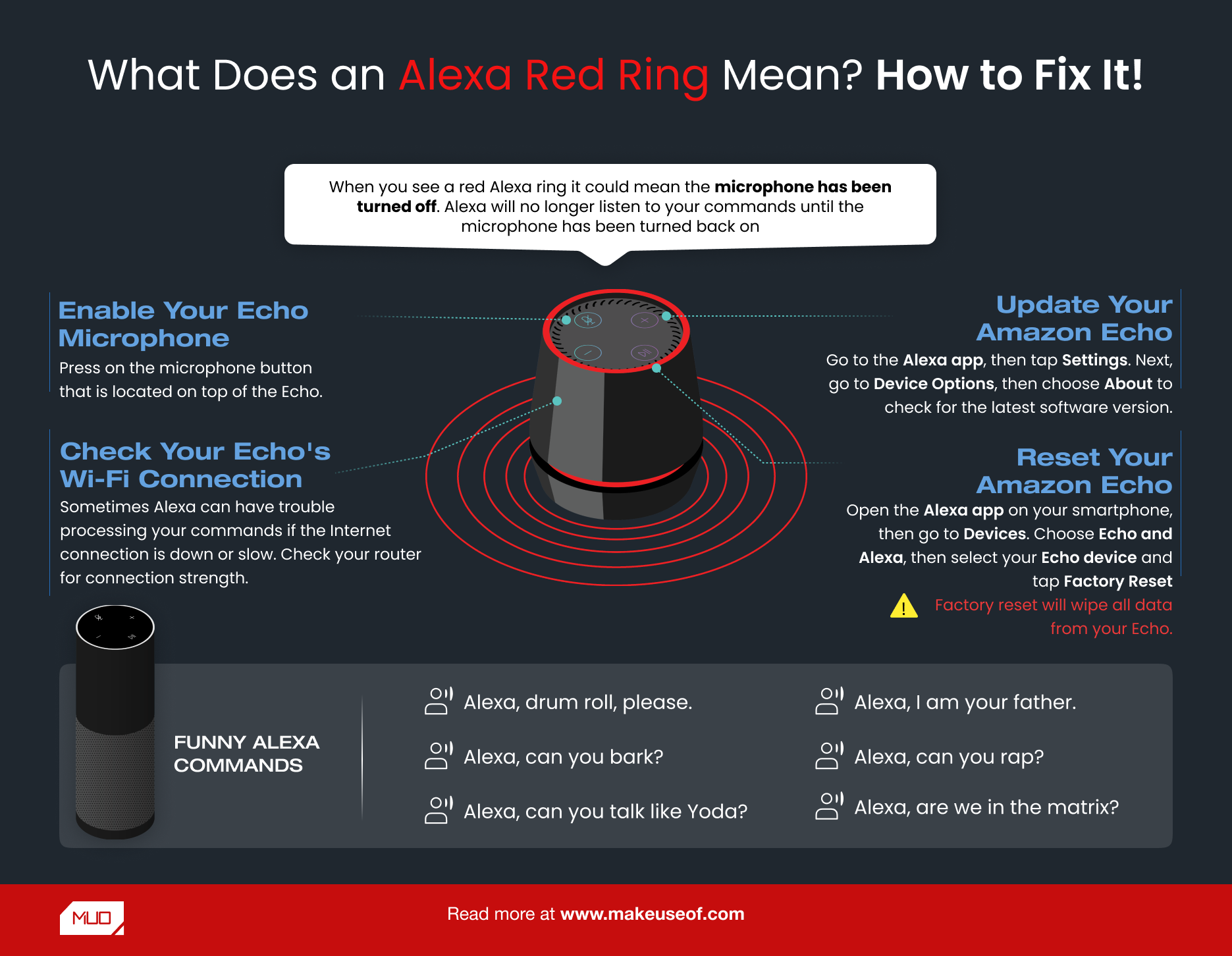
Red. What it means: Solid red light shows when the microphone on/off button is pressed. That means the device microphone is disconnected and Alexa is not listening.
Why is my Alexa stuck on mute
As a part of basic troubleshooting, restart your device by unplugging it from the power source. Keep it unplugged for 30 minutes before you plug it back in. Plug the power adapter back in and while it’s booting hold down the mute button until the red light resets back to normal.
How do I turn off the color ring on my echo dot
The yellow light ring is easy to fix. Just say “Alexa, read my messages” or “Alexa, show me the notifications” and the ring will disappear.
How do I unmute echo dot
Turn Your Echo Device’s Microphones On or OffPress the microphone button. A red light will appear on the device. To turn on the microphone, press the button again.
How do I reset an echo dot
But all you have to do is there’s these different buttons this is a mute button this is the plus and minus volume button and then this is what they call the action button so in order to reset Alexa
How do I reconnect Alexa
Bluetooth PairingOpen the Alexa app. Select Devices. Select Echo & Alexa. Select your device. Select Bluetooth Devices, and then Pair a New Device.
How do I reset my Alexa Echo Dot
Right on the front here. So in order to reset the echo dot 5th gen there’s a couple buttons. Up top you’ve got your action button your volume up your volume down in your mute button in order to reset
How do I get Alexa to speak again
Most fixes are straightforward, but others require working through the Alexa app on your phone.Power Cycle Your Alexa Device.Check the Microphone on Your Alexa Device.Check Wi-Fi Connection Signal Strength.Speak Clearly to Your Alexa Device.Change Your Alexa Device Wake Word.Update Your Alexa Device.
Can you turn off the red ring on Echo dot
Let’s get right into the video. That’s right i called this tutorial just that easy peasy super duper easy tutorial because it is so absolutely easy but if you are a beginner to the echo dot you might
Does the Echo light ring always stay on
Most of the time, the light ring stays off. If the device is plugged in and there are no lights showing, it means the speaker is active and waiting for you to speak the wake word. When you interact with Alexa, you will see white and various tones of blue.
How do I get sound back on Alexa
To restart your device, unplug the power adapter from the back of the device or from the wall outlet. Then, plug the power adapter back in. If your Amazon device is on and connected but still not playing audio, check to see if it muted. On some devices you will need to turn the volume ring shown here.
How do I force Alexa Echo to reboot
Press and hold the Mute and Volume Down buttons for about 15 seconds until the Amazon logo appears.
Why does my Alexa dot have a red ring
Red. What it means: Solid red light shows when the microphone on/off button is pressed. That means the device microphone is disconnected and Alexa is not listening.
Why is my Alexa stuck on mute
As a part of basic troubleshooting, restart your device by unplugging it from the power source. Keep it unplugged for 30 minutes before you plug it back in. Plug the power adapter back in and while it's booting hold down the mute button until the red light resets back to normal.
How do I turn off the color ring on my echo dot
The yellow light ring is easy to fix. Just say “Alexa, read my messages” or “Alexa, show me the notifications” and the ring will disappear.
Cached
How do I unmute echo dot
Turn Your Echo Device's Microphones On or OffPress the microphone button . A red light will appear on the device.To turn on the microphone, press the button again.
How do I reset an echo dot
But all you have to do is there's these different buttons this is a mute button this is the plus and minus volume button and then this is what they call the action button so in order to reset Alexa
How do I reconnect Alexa
Bluetooth PairingOpen the Alexa app.Select Devices.Select Echo & Alexa.Select your device.Select Bluetooth Devices, and then Pair a New Device.
How do I reset my Alexa Echo Dot
Right on the front here. So in order to reset the echo dot 5th gen there's a couple buttons. Up top you've got your action button your volume up your volume down in your mute button in order to reset
How do I get Alexa to speak again
Most fixes are straightforward, but others require working through the Alexa app on your phone.Power Cycle Your Alexa Device.Check the Microphone on Your Alexa Device.Check Wi-Fi Connection Signal Strength.Speak Clearly to Your Alexa Device.Change Your Alexa Device Wake Word.Update Your Alexa Device.
Can you turn off the red ring on Echo dot
Let's get right into the video. That's right i called this tutorial just that easy peasy super duper easy tutorial because it is so absolutely easy but if you are a beginner to the echo dot you might
Does the Echo light ring always stay on
Most of the time, the light ring stays off. If the device is plugged in and there are no lights showing, it means the speaker is active and waiting for you to speak the wake word. When you interact with Alexa, you will see white and various tones of blue.
How do I get sound back on Alexa
To restart your device, unplug the power adapter from the back of the device or from the wall outlet. Then, plug the power adapter back in. If your Amazon device is on and connected but still not playing audio, check to see if it muted. On some devices you will need to turn the volume ring shown here.
How do I force Alexa Echo to reboot
Press and hold the Mute and Volume Down buttons for about 15 seconds until the Amazon logo appears.
Does unplugging Echo Dot reset it
Saying Alexa my lights on and off or dim it is an extra thing I love about this device. see less And nope if you plug amazon echo out from the outlet or cord, it will not reset it will boot up again and all is the same as you would use it in the other room.
How do I reset my Alexa Echo dot
Right on the front here. So in order to reset the echo dot 5th gen there's a couple buttons. Up top you've got your action button your volume up your volume down in your mute button in order to reset
How do I manually restart Alexa
Press and hold the Microphone Off and Volume Down buttons at the same time for about 20 seconds. Release both buttons when you see a spinning orange light ring on the device.
How do I force restart Alexa
To reset your device and keep your smart home connections: Press and hold the Action button for 20 seconds. Wait for the light ring to turn off and on again.
How do I fix Alexa when red
If your Echo speaker is showing a red ring light then it's likely your microphone has been turned off. You can simply turn them back on using the top of the device or factory reset it to get back to the original factory settings.
How do I reset unresponsive Alexa
Press and hold the Microphone Off and Volume Down buttons at the same time for approximately 20 seconds. Release both buttons when you see a spinning orange light ring on the device.
How do I reset an Echo Dot
But all you have to do is there's these different buttons this is a mute button this is the plus and minus volume button and then this is what they call the action button so in order to reset Alexa
Why is Alexa flashing red when I speak to her
'At best, solid red means the microphone is muted, or in the case of the Echo Show, the camera is disabled,' explains Awais. 'If you see flashing red however, it may mean your Echo isn't connected to the Internet. Your speaker will often tell you as much if you try to ask for something. '
How do I turn off my ring light
Select live view. And then click the light icon to turn them on. And again really quickly turn them off. You can also go into the full screen version press the plus button turn on the light icon. And
Is it OK to turn Echo Dot off at night
They are intended to stay plugged in and always on. They don't use hardly any electricity when not actively in use, so I wouldn't worry about it too much. I personally leave an echo plus and 2 dots plugged in at all times.
Why is my echo dot not making sound
To restart your device, unplug the power adapter from the back of the device or from the wall outlet. Then, plug the power adapter back in. If your Amazon device is on and connected but still not playing audio, check to see if it muted. On some devices you will need to turn the volume ring shown here.
How do I manually reset my Echo Dot
In order to reset this we've got four buttons on the top here we've got our volume up volume down mute. And then our action button to reset this we're going to hold down approximately. 15 seconds it's
Does Alexa Echo have a reset button
To reset your Echo (2nd Generation), press and hold the Microphone Off and Volume down buttons at the same time. Wait until the light ring turns orange, which should take around 20 seconds. To reset an Echo (3rd Generation, 4th Generation), hold down the action button for 25 seconds.


0 Comments