
How do I know if my VPN is split tunnel?
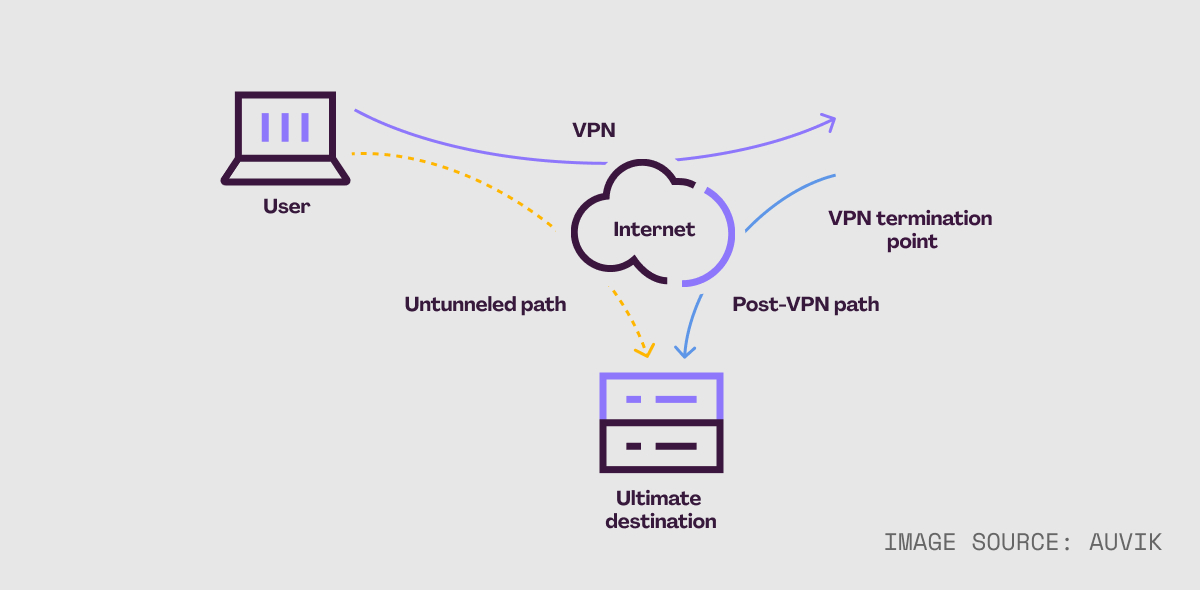
Key points about split tunneling VPN:
1. Which VPN service has split tunnelling?
IPVanish Offers split tunneling on its Android and Fire OS apps. PureVPN Implements a split tunneling feature in its Windows and Android apps. Hotspot Shield A very fast, novice-friendly VPN that allows users to tunnel browser traffic.
2. How do I find my VPN tunnel?
Check the current status using the Amazon VPC console. Sign in to the Amazon VPC console. In the navigation pane, under Site-to-Site VPN Connections, choose Site-to-Site VPN Connections. Select your VPN connection. Choose the Tunnel Details view. Review the Status of your VPN tunnel.
3. How do I turn off split tunneling?
Go to VPN -> SSL VPN Portals -> Edit SSL-VPN Portal and under ‘Tunnel Mode’ disable ‘Enable Split Tunneling’. Once the split tunnel option is disabled, all user Internet traffic will reach FortiGate and VPN interface to WAN policy is needed.
4. How do I enable split tunneling in open VPN?
In the Admin Web UI, you can start split tunneling with a simple click of a toggle button. Under Configuration > VPN Settings > Routing, switch “Should client Internet traffic be routed through the VPN” to No. Once set to ‘no’, traffic destined to your private networks will traverse the VPN. Cached
5. Does NordVPN have split Tunnelling?
Split tunneling is available on Windows, Android, and Android TV NordVPN apps.
6. What is split tunneling and how do you avoid it?
Split tunneling is a VPN feature that divides your internet traffic and sends some of it through an encrypted virtual private network (VPN) tunnel, but routes the rest through a separate tunnel on the open network. Typically, split tunneling will let you choose which apps to secure and which can connect normally.
7. How do I check my router tunnel status?
To display GRE tunneling Information, use the following commands:
show ip interface.
show ip route.
show ip interface tunnel.
show ip tunnel traffic.
show interface tunnel.
show statistics tunnel.
8. What is the difference between a tunnel and a VPN?
A VPN is a secure, encrypted connection over a publicly shared network. Tunneling is the process by which VPN packets reach their intended destination, which is typically a private network.
9. What is the difference between a split VPN and a full VPN?
What is the difference between a full tunnel VPN and a split-tunnel VPN? A tunnel-mode (or full tunnel) VPN will encrypt all of your traffic and route it through a secure VPN server, whereas a split-tunnel VPN will only encrypt and route traffic you designate.
10. How do I get out of split mode?
To close Split View, tap the Multitasking button in the Safari window that you want to keep, then tap the full screen button. Or you can drag the app divider left or right over the Safari window that you want to close.
11. How do I change VPN tunnel options?
To modify the VPN tunnel options using the console:
Open the Amazon VPC console at https://console.aws.amazon.com/vpc/.
In the navigation pane, choose Site-to-Site VPN connections.
Select the Site-to-Site VPN connection, and choose Actions, Modify VPN tunnel options.
Which VPN service has split tunnelling
IPVanish Offers split tunneling on its Android and Fire OS apps. PureVPN Implements a split tunneling feature in its Windows and Android apps. Hotspot Shield A very fast, novice-friendly VPN that allows users to tunnel browser traffic.
How do I find my VPN tunnel
Check the current status using the Amazon VPC consoleSign in to the Amazon VPC console.In the navigation pane, under Site-to-Site VPN Connections, choose Site-to-Site VPN Connections.Select your VPN connection.Choose the Tunnel Details view.Review the Status of your VPN tunnel.
How do I turn off split tunneling
Go to VPN -> SSL VPN Portals -> Edit SSL-VPN Portal and under 'Tunnel Mode' disable 'Enable Split Tunneling'. Once the split tunnel option is disabled, all user Internet traffic will reach FortiGate and VPN interface to WAN policy is needed.
How do I enable split tunneling in open VPN
In the Admin Web UI, you can start split tunneling with a simple click of a toggle button. Under Configuration > VPN Settings > Routing, switch “Should client Internet traffic be routed through the VPN” to No. Once set to 'no', traffic destined to your private networks will traverse the VPN.
Cached
Does NordVPN have split Tunnelling
Split tunneling is available on Windows, Android, and Android TV NordVPN apps.
What is split tunneling and how do you avoid it
Split tunneling is a VPN feature that divides your internet traffic and sends some of it through an encrypted virtual private network (VPN) tunnel, but routes the rest through a separate tunnel on the open network. Typically, split tunneling will let you choose which apps to secure and which can connect normally.
How do I check my router tunnel status
To display GRE tunneling Information, use the following commands:show ip interface.show ip route.show ip interface tunnel.show ip tunnel traffic.show interface tunnel.show statistics tunnel.
What is the difference between a tunnel and a VPN
A VPN is a secure, encrypted connection over a publicly shared network. Tunneling is the process by which VPN packets reach their intended destination, which is typically a private network.
What is the difference between a split VPN and a full VPN
What is the difference between a full tunnel VPN and a split-tunnel VPN A tunnel-mode (or full tunnel) VPN will encrypt all of your traffic and route it through a secure VPN server, whereas a split-tunnel VPN will only encrypt and route traffic you designate.
How do I get out of split mode
To close Split View, tap the Multitasking button in the Safari window that you want to keep, then tap the full screen button . Or you can drag the app divider left or right over the Safari window that you want to close.
How do I change VPN tunnel options
To modify the VPN tunnel options using the console
Open the Amazon VPC console at https://console.aws.amazon.com/vpc/ . In the navigation pane, choose Site-to-Site VPN connections. Select the Site-to-Site VPN connection, and choose Actions, Modify VPN tunnel options.
Why is Split Tunnel VPN bad
Split tunneling introduces some security challenges. Any data that does not traverse a secure VPN is not protected by the corporate firewall, endpoint detection and response system, antimalware and other security mechanisms, so it may be accessible and/or intercepted by ISPs and malicious hackers.
How do I enable split tunneling on Nord
Tap on the profile icon and open the settings menu by tapping on the gear icon. Head over to the VPN connection settings and choose the Split tunneling option.
What is an example of a split tunnel
For example, suppose a user utilizes a remote access VPN software client connecting to a campus network using a hotel wireless network. The user with split tunneling enabled is able to connect to file servers, database servers, mail servers and other servers on the corporate network through the VPN connection.
How do I know if my traffic is routed through VPN
Usage: traceroute www.google.com . With both utilities you should hopefully get a trace of the route that packets take to reach the destination. You'll be able to tell if it's passing through your VPN gateway. Save this answer.
How do I check my IPsec tunnel status
To view status information about active IPsec tunnels, use the show ipsec tunnel command. This command prints status output for all IPsec tunnels, and it also supports printing tunnel information individually by providing the tunnel ID.
What is an example of tunnel mode VPN
Another example of tunnel mode is an IPSec tunnel between a Cisco VPN Client and an IPSec Gateway (e.g ASA5510 or PIX Firewall). The client connects to the IPSec Gateway. Traffic from the client is encrypted, encapsulated inside a new IP packet and sent to the other end.
Are all VPNs tunnels
Regardless of which protocol you choose, VPNs need to “Tunnel” the data between the two devices. So, in essence, a VPN Tunnel is the actual connection mechanism, it is the data link that surrounds the encrypted traffic and establishes a secure connection.
What are the risks of VPN split tunneling
Split tunneling introduces some security challenges. Any data that does not traverse a secure VPN is not protected by the corporate firewall, endpoint detection and response system, antimalware and other security mechanisms, so it may be accessible and/or intercepted by ISPs and malicious hackers.
What are the two types of VPN connections
Types of VPNsSite-to-Site VPN: A site-to-site VPN is designed to securely connect two geographically-distributed sites.Remote Access VPN: A remote access VPN is designed to link remote users securely to a corporate network.
How do I get my split keyboard back to normal
Pro. So maybe you know holding these around the buttons. Here they're not doing anything you may be tapping on this bottom bar here. And it's still not working.
Where is the split view button
Button at the top of the screen. And then tap split view to send procreate to one side. Now you can tap photos on your home screen or in the app library to open it on the other. Side.
How do I split tunnel Express VPN
In Split tunneling, check the box for Manage connection on a per-app basis and click Settings. Selecting this option will make all of your apps use the VPN when you are connected to ExpressVPN. In the Split Tunneling menu, select All apps use the VPN, then click OK.
What is VPN tunnel mode
Tunnel Mode is a method of sending data over the Internet where the data is encrypted and the original IP address information is also encrypted. The Encapsulating Security Payload (ESP) operates in Transport Mode or Tunnel Mode. In Tunnel Mode, ESP encrypts the data and the IP header information.
Should I use VPN split tunnel
Choose Which Traffic Goes Through the VPN
The default setting of a VPN is to route 100% of internet traffic through the VPN, but if you want to access local devices or obtain higher speeds while encrypting specific data, consider using split tunneling.


0 Comments