
How do I remove device encryption?
Summary of the Article
How do I turn off device encryption?
How long does it take to turn off device encryption?
Should I turn off device encryption?
What is device encryption?
Why did my phone get encrypted?
How do I turn off administrator encryption on Android?
Does factory reset remove encryption?
Why would someone encrypt my phone?
Why does my phone have end to end encryption?
How do I check my device encryption status?
Should I have device encryption on?
Detailed Answers
How do I turn off device encryption
Type and search [Device encryption settings] in the Windows search bar①, then click [Open]②.On the Device encryption field, set the option to [Off]③.Confirm whether you need to turn off device encryption, select [Turn off] to disable the device encryption function④.
How long does it take to turn off device encryption
NOTE: Decryption can take anywhere from 20 minutes to a couple of hours. The time depends on the amount of data that has been encrypted, the speed of the computer, and whether the process is interrupted. Interruptions include the computer being turned off or going to sleep.
Should I turn off device encryption
Device encryption is a feature intended to protect your data. It should be enabled, but you should use it with caution. You should make sure you have your recovery key in case you need it, and you should have a backup of your files in case you lose access to the device.
What is device encryption
Encryption is the process of encoding all user data on an Android device using symmetric encryption keys. Once a device is encrypted, all user-created data is automatically encrypted before committing it to disk and all reads automatically decrypt data before returning it to the calling process.
Why did my phone get encrypted
Whole-phone encryption means that all the data contained on a device is protected from unauthorised access. It would prevent, for example, somebody accessing your data if your phone was lost or stolen and protected with the encryption PIN or password.
How do I turn off administrator encryption on Android
This firstly go to general option. And then go for security. And you have an option call as device administrator. Click on that and you have to deactivate.
Does factory reset remove encryption
The data on most Android phones is encrypted which means that it can’t be accessed following a factory reset. As such, you don’t need to worry about another person accessing this information if you sell your Android phone.
Why would someone encrypt my phone
Encrypting your device means that the data (such as credit card info, social security numbers, addresses, or any other extremely personal information) that is entered into the phone will be jumbled up, making it indecipherable to anyone who might be trying to steal your information.
Why does my phone have end to end encryption
End-to-end encryption is a security method that keeps your communications secure. With end-to-end encryption, no one, including Google and third parties, can read eligible messages as they travel between your phone and the phone you message.
How do I check my device encryption status
Select the Start button, then select Settings > Update & Security > Device encryption. If Device encryption doesn’t appear, it isn’t available. If device encryption is turned off, select Turn on.
Should I have device encryption on
Yes, like Android devices, iOS devices also need encryption to protect user data from unauthorized access in case of loss or theft.
How do I turn off device encryption
Type and search [Device encryption settings] in the Windows search bar①, then click [Open]②.On the Device encryption field, set the option to [Off]③.Confirm whether you need to turn off device encryption, select [Turn off] to disable the device encryption function④.
How long does it take to turn off device encryption
NOTE: Decryption can take anywhere from 20 minutes to a couple of hours. The time depends on the amount of data that has been encrypted, the speed of the computer, and whether the process is interrupted. Interruptions include the computer being turned off or going to sleep.
Should I turn off device encryption
Device encryption is a feature intended to protect your data. It should be enabled, but you should use it with caution. You should make sure you have your recovery key in case you need it, and you should have a backup of your files in case you lose access to the device.
What is device encryption
Encryption is the process of encoding all user data on an Android device using symmetric encryption keys. Once a device is encrypted, all user-created data is automatically encrypted before committing it to disk and all reads automatically decrypt data before returning it to the calling process.
Why did my phone get encrypted
Whole-phone encryption means that all the data contained on a device is protected from unauthorised access. It would prevent, for example, somebody accessing your data if your phone was lost or stolen and protected with the encryption PIN or password.
How do I turn off administrator encryption on Android
This firstly go to general option. And then go for security. And you have an option call as device administrator. Click on that and you have to deactivate.
Does factory reset remove encryption
The data on most Android phones is encrypted which means that it can't be accessed following a factory reset. As such, you don't need to worry about another person accessing this information if you sell your Android phone.
Why would someone encrypt my phone
Encrypting your device means that the data (such as credit card info, social security numbers, addresses, or any other extremely personal information) that is entered into the phone will be jumbled up, making it indecipherable to anyone who might be trying to steal your information.
Why does my phone have end to end encryption
End-to-end encryption is a security method that keeps your communications secure. With end-to-end encryption, no one, including Google and third parties, can read eligible messages as they travel between your phone and the phone you message.
How do I check my device encryption status
Select the Start button, then select Settings > Update & Security > Device encryption. If Device encryption doesn't appear, it isn't available. If device encryption is turned off, select Turn on.
Should I have device encryption on
Yes, like Android devices, iOS devices also need encryption to protect user data from unauthorized access in case of loss or theft.
Where do I turn off encryption on my iPhone
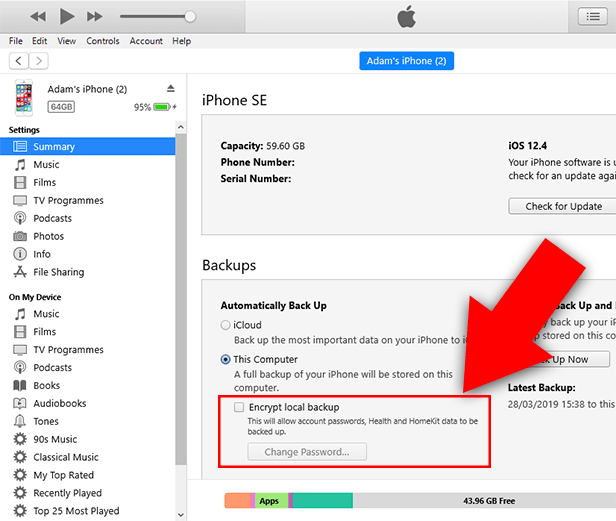
To turn off backup encryption, uncheck the "Encrypt local backup" checkbox in the Finder or iTunes and enter the password. If you can't remember your password, you have two options: If you have an iCloud account, you can use iCloud to back up and restore. Learn how to reset your backup password.
How do I know if my device is encrypted
You can check the encryption status for Android devices by navigating to Settings > Security > Encryption. This tab shows whether the device is encrypted or not. In case the Android device is not encrypted, you can enable encryption from the same tab.
How do I disable device administrator lock
How to Disable the Device Administrator PrivilegesGo to your phone Settings and tap on “Security & privacy option.”Look for “Device administrators” and press it.You would see the applications that have device administrator rights.Tap on the app for which you want to disable the privileges and press Deactivate.
How do I remove administrator restrictions on my phone
Go to Settings > Security. Tap Device administrators. Tap the administrator app, and then tap Activate or Deactivate.
How can an Android device’s encrypted data be wiped
On Stock Android you do this by going to Settings > Backup & Reset > Factory Data Reset and select Reset Phone. Once this process is completed, your data is gone.
Should I remove my SIM card before factory reset
First of all, you should manually remove every account that you have signed in with.Then, remove any MicroSD card and your SIM card from the device.It is important that you give your old Android phone a proper factory reset before selling or trading it.
How do you check if your phone is encrypted
So if you see here a cross symbol or a red have it with a cross sample indication that means that your android smartphone is not encrypted that means what it means that if your phone is lost then
Where do I find my phone encryption code
Open your device's Settings app. Tap Security & Location. Under "Encryption," tap Encrypt phone or Encrypt tablet. (If your battery isn't charged or your device isn't plugged in, you won't be able to tap this option.)
What happens if my phone is encrypted
What does encrypting your phone do Encrypting your phone makes your data unreadable without a password. On a mobile phone, the "password" could be a literal password or thumbprint. Until that password is entered, all the data on your phone—including your text messages, emails, documents, and photos—is unreadable.
What is end-to-end encryption on Android phone
To verify end-to-end encryption for individual conversations:Open the Messages app .Open a conversation or create a new message with a contact you want to verify. In the conversation, all participants must have RCS chats turned on.At the top right of the conversation window, tap More Details. Verify encryption.
Where do I turn off encryption on my Iphone
To turn off backup encryption, uncheck the "Encrypt local backup" checkbox in the Finder or iTunes and enter the password. If you can't remember your password, you have two options: If you have an iCloud account, you can use iCloud to back up and restore. Learn how to reset your backup password.
What if my phone is encrypted
Encryption stores your data in a form that can be read only when your phone or tablet is unlocked. Unlocking your encrypted device decrypts your data. Encryption can add protection in case your device is stolen.
How do I turn off encryption on Android
To turn off encryption on your Android device, you will need to do the following:Go to Settings and select Security or Lock Screen and Security.Select Encryption.Follow the on-screen instructions to decrypt your device.
Why is my iPhone encrypted
Without encryption, data stored in your iPhone will be in its original form. If an unauthorized person gains control of your device, all data stored on it is easily accessible. Once your device is encrypted, the data in it is scrambled and only the decryption key can unscramble the data.


0 Comments