
How do I remove a virus from my Android phone from Safe Mode?
Summary of Removing Viruses from Android Phone
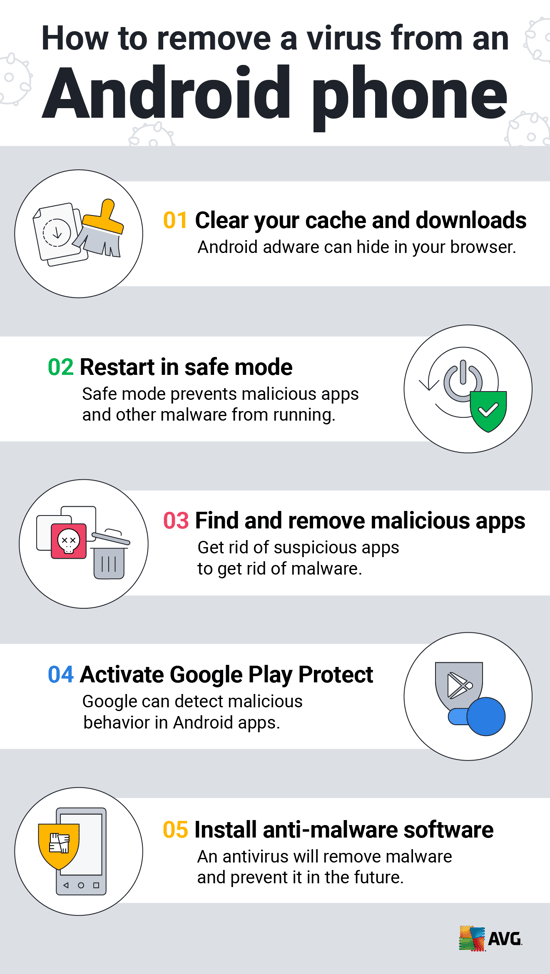
The best way to remove viruses from an Android phone is to boot the phone in safe mode. Safe mode only loads the necessary drivers, so potential viruses will not load in this mode. To scan for viruses, restart the phone and select the safe mode option.
To remove malware from Safe Mode in Windows 10, follow these steps: switch the PC to Safe mode, delete temporary files, uninstall suspicious applications, remove system restore points, reset web browser settings, and install and scan with an anti-malware program.
In safe mode on Android, you can remove malware files or apps by turning off third-party applications and files. This can be done by rebooting the device and entering safe mode.
Manually removing a virus from a PC involves downloading and installing a virus scanner, disconnecting from the internet, rebooting the computer into safe mode, deleting temporary files, running a virus scan, and deleting or quarantining the virus.
To perform a virus scan in safe mode, download the latest virus definition updates and select the option with networking enabled to ensure the scanner has the most up-to-date information.
If your phone exhibits changes in behavior, such as slow performance or suspicious app behavior, it might be infected with a virus. These signs indicate the presence of a virus on your phone.
To check for malware in safe mode, press F5 to boot into safe mode with networking and download the latest virus definition updates.
To manually remove malware from an Android phone, ensure Google Play Protect is turned on, check for device and security updates, remove untrusted apps, and perform a security checkup.
To check for malware on Android in safe mode, open the Play Store, tap on your profile, select Play Protect, tap Scan, and remove any detected malware.
To remove a virus from a computer without software, open the task manager by pressing Ctrl + Alt + Delete, go to “Processes,” check for unfamiliar programs running, confirm if it is a virus by searching online, and end the process to stop it.
To perform a virus scan on an Android phone, download an antivirus app from the Play Store, open the app, and follow the instructions to scan your phone for viruses.
Questions and Answers
- Can you remove a virus in safe mode?
- How do I remove malware from Safe Mode?
- Can malware run in safe mode on Android?
- How do I manually remove a virus?
- How do I do a virus scan in safe mode?
- How do you know if you have a virus on your phone?
- How do I check for malware in safe mode?
- How do I manually remove malware from my Android phone?
- How do I check for malware on Android in safe mode?
- How to remove a virus without software?
- How to do a virus scan on Android?
The best way to scan a computer for viruses is to boot the computer in safe mode. Safe mode only loads the drivers needed to operate Windows, so any potential viruses will not load in this mode. After your PC restarts, you’ll see a list of options. Select 4 or F4 to start your PC in Safe Mode.
How to Remove Malware from Windows 10 Step 1: Switch over the PC to Safe mode. Step 2: Delete Temporary Files. Step 3: Uninstall Suspicious Applications. Step 4: Remove System Restore Points. Step 5: Reset Web Browser Settings. Step 6: Install and Scan with an Anti-Malware.
Step 1: Reboot Your Android Device in Safe Mode. The safe mode allows you to remove malware files or apps from your device by turning off third-party applications and files. Users who utilize custom launch will see different launches when in safe mode. Cached
If your PC has a virus, following these ten simple steps will help you to get rid of it: Step 1: Download and install a virus scanner. Step 2: Disconnect from internet. Step 3: Reboot your computer into safe mode. Step 4: Delete any temporary files. Step 5: Run a virus scan. Step 6: Delete or quarantine the virus.
We may need to download the latest buy bot updates. So we must select the option with networking enabled. Enter your login details in the login screen to begin working in safe mode.
If your phone does have a virus, you’ll notice some changes in its behavior. A typical sign is the sudden existence of poor performance issues. Your phone might slow down when you try to open its browser or another app. Other times, you’ll notice some apps behaving suspiciously.
Options press f5 to build into safe mode with networking. We may need to download the latest buy bot updates. So we must select the option with networking enabled. Enter.
Step 1: Make sure Google Play Protect is turned on. Open the Google Play Store app. Step 2: Check for Android device & security updates. Get the latest Android updates available for you. Step 3: Remove untrusted apps. Step 4: Do a Security Checkup.
Check for Android malware using Play Protect Open the Play Store on the Android device you want to scan. Tap on your profile in the upper-right corner. Tap on Play Protect. Tap Scan. Tap on the option to remove any detected malware.
To do that, press Ctrl + Alt + Delete and open the task manager. Then, go to ‘Processes’ and check for any unfamiliar programs running. To confirm if it is a virus, search online. Once confirmed, highlight it and press ‘End Process’ to stop it.
5 steps to scan your Android phone for viruses Download an antivirus app from the Play Store. Open the app and follow the instructions to scan your phone for viruses.
Can you remove virus in safe mode
The best way to scan a computer for viruses is to boot the computer in safe mode. Safe mode only loads the drivers needed to operate windows, so any potential viruses will not load in this mode. After your PC restarts, you'll see a list of options. Select 4 or F4 to start your PC in Safe Mode.
How do I remove malware from Safe Mode
How to Remove Malware from Windows 10Step 1: Switch over the PC to Safe mode.Step 2: Delete Temporary Files.Step 3: Uninstall Suspicious Applications.Step 4: Remove System Restore Points.Step 5: Reset Web Browser Settings.Step 6: Install and Scan with an Anti-Malware.
Can malware run in safe mode Android
Step 1: Reboot Your Android Device in Safe Mode
The safe mode allows you to remove malware files or apps from your device by turning off third-party applications and files. Users who utilize custom launch will see different launches when in safe mode.
Cached
How do I manually remove a virus
If your PC has a virus, following these ten simple steps will help you to get rid of it:Step 1: Download and install a virus scanner.Step 2: Disconnect from internet.Step 3: Reboot your computer into safe mode.Step 4: Delete any temporary files.Step 5: Run a virus scan.Step 6: Delete or quarantine the virus.
How to do virus scan in safe mode
We may need to download the latest buy bot updates. So we must select the option with networking enabled. Enter. Your login details in the login screen to begin working in safe mode.
How do you know if you have a virus on your phone
If your phone does have a virus, you'll notice some changes in its behavior. A typical sign is the sudden existence of poor performance issues. Your phone might slow down when you try to open its browser or another app. Other times, you'll notice some apps behaving suspiciously.
How do I check for malware in safe mode
Options press f5 to build into safe mode with networking. We may need to download the latest buy bot updates. So we must select the option with networking enabled. Enter.
How do I manually remove malware from my Android phone
Step 1: Make sure Google Play Protect is turned on. Open the Google Play Store app .Step 2: Check for Android device & security updates. Get the latest Android updates available for you.Step 3: Remove untrusted apps.Step 4: Do a Security Checkup.
How do I check for malware on Android safe mode
Check for Android malware using Play ProtectOpen the Play Store on the Android device you want to scan.Tap on your profile in the upper-right corner.Tap on Play Protect.Tap Scan.Tap on the option to remove any detected malware.
How to remove virus without software
To do that, press Ctrl + Alt + Delete and open the task manager. Then, go to 'Processes' and check for any unfamiliar programs running. To confirm if it is a virus, search online. Once confirmed, highlight it and press 'End Process' to stop it.
How to do a Virus scan on Android
5 steps to scan your Android phone for virusesDownload and install an antivirus program. Download and install an antivirus program from the Google Play store.Set up the antivirus software.Make sure the antivirus app is up to date.Start the virus scan.Remove any viruses found.
How do I run a Virus scan on my phone
The best way to check for malware on your phone is to use a mobile security app like free AVG Antivirus for Android. Run a scan. After installing AVG Antivirus, open the app and run an antivirus scan to find malware hidden in your device's system.
Do phone viruses go away on their own
Do iPhone viruses go away If your iPhone is infected with malware, it won't go away on its own. Act quickly to remove the virus or malware from your iOS device and restore your privacy and security.
How do I know if my Android phone has a virus
What are the signs my phone has a virusYour phone is operating slower.Apps are taking longer to load.The battery drains faster than expected.You're experiencing a lot of pop-up ads.Your phone has apps you don't remember downloading.Unexplained increase in data usage.Higher than expected phone bills.
How do I check for malware on Android Safe Mode
Check for Android malware using Play ProtectOpen the Play Store on the Android device you want to scan.Tap on your profile in the upper-right corner.Tap on Play Protect.Tap Scan.Tap on the option to remove any detected malware.
What are three signs of malware
Follow this guide to learn more about the signs of malware and how you can diagnose and treat a malware infection.Slow performance.Unexpected freezing or crashing.Diminished storage space.Homepage randomly changes.Browser redirects.New browser toolbars.Annoying pop-ups.Unusual error messages.
How do I remove malware from my phone manually
How Do I Completely Remove Malware from AndroidStep 1: Immediately Turn Your Phone Off Before Performing Some Research.Step 2: Turn the Phone On in Safe Mode or Emergency Mode.Step 3: Go to Device Settings to Locate the Malicious App.Step 4: Uninstall the Infected Application.Step 5: Opt For A Factory Reset.
How do I find hidden malware on my Android phone
Check for Android malware using Play ProtectOpen the Play Store on the Android device you want to scan.Tap on your profile in the upper-right corner.Tap on Play Protect.Tap Scan.Tap on the option to remove any detected malware.
How do you know if your Android phone has a virus
What are the signs my phone has a virusYour phone is operating slower.Apps are taking longer to load.The battery drains faster than expected.You're experiencing a lot of pop-up ads.Your phone has apps you don't remember downloading.Unexplained increase in data usage.Higher than expected phone bills.
How do I remove a virus from my Android phone without formatting
How to remove viruses and other malware from your Android devicePower off the phone and reboot in safe mode. Press the power button to access the Power Off options.Uninstall the suspicious app.Look for other apps you think may be infected.Install a robust mobile security app on your phone.
Is it possible to remove virus without antivirus
w to remove virus from laptop without antivirus
Open Control Panel > click Windows Defender Firewall > Turn Windows Defender Firewall on. Step 2: Use the 'Virus & Threat Protection' feature to remove the virus. It is an in-built Windows feature that will easily enable you to remove viruses.
How do I scan for viruses in safe mode
This is why it can be useful to run a scan in safe mode. So that malware can be removed without issue to enter Safe Mode in Windows 10 click on the Windows Start menu icon then press the power button
How do I detect and remove a virus from my Android
How to check for malware on AndroidGo to the Google Play Store app.Open the menu button. You can do this by tapping on the three-line icon found in the top-left corner of your screen.Select Play Protect.Tap Scan.If your device uncovers harmful apps, it will provide an option for removal.
How do you tell if you have a virus on your phone
If your phone does have a virus, you'll notice some changes in its behavior. A typical sign is the sudden existence of poor performance issues. Your phone might slow down when you try to open its browser or another app. Other times, you'll notice some apps behaving suspiciously.
How do you tell if there is a virus on your phone
7 signs your phone has a virusYour device feels physically hot. Your phone isn't built to support malware.Random messages are sent to your contacts.The device responds slowly.You find fraudulent charges on your accounts.The phone uses excess data.


0 Comments